
Entity Framework Code-First(5):Code First Conventions
Code First Conventions:
We have seen how EF Code-First creates DB tables from domain classes in the previous section. Here, we will learn about default Code-First conventions.
What is Convention?
Convention is a set of default rules to automatically configure a conceptual model based on domain class definitions when working with Code-First. Code-First conventions are defined inSystem.Data.Entity.ModelConfiguration.Conventions namespace.
Let's see an overview of the various Code-First conventions.
Type Discovery:
In the previous section, we created a context class with DbSet properties for the classes that we want to be part of the model. Code-First will create tables for classes included as DbSet properties, as we have seen the previous section. Code-First also includes any referenced types included in these classes, even if the referenced types are defined in a different assembly.
For example, the following Student entity class includes reference of Teacher class. However, context class does not include Teacher as DbSet property.
public class Student

{

    public Student()

    {

    }

    public int StudentID { get; set; }

    public string StudentName { get; set; }

    public DateTime DateOfBirth { get; set; }

    public byte[]  Photo { get; set; }

    public decimal Height { get; set; }

    public float Weight { get; set; }

    public Teacher Teacher { get; set; }

    public Standard Standard { get; set; }

}

public class Teacher

{

    public Teacher()

    {

    }

    public int TeacherId { get; set; }

    public string TeacherName { get; set; }

}
The following is a context class which does not include Teacher as a DbSet property (entity set)
namespace EF_Code_First_Tutorials

{

    public class SchoolContext: DbContext

    {

        public SchoolContext(): base()

        {

        }

        public DbSet<Student> Students { get; set; }

        public DbSet<Standard> Standards { get; set; }

    }

}
So, even if Teacher is not included as an entity set in the context class, Code-First will include it in conceptual model and create a DB table for it, as shown below.
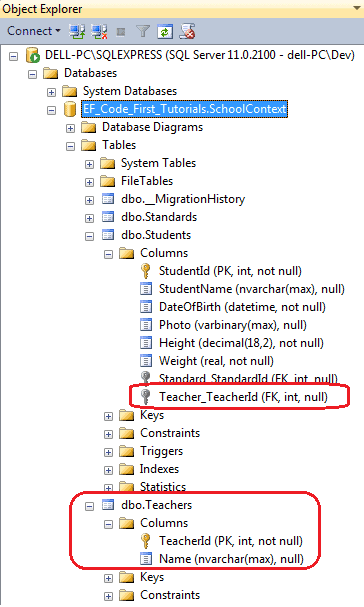
Code-First also includes derived classes even if the context class only includes base class as a DbSet property.
The conventions for the type discovery are:
- Code-First includes types defined as a DbSet property in context class.
- Code-First includes reference types included in entity types even if they are defined in different assembly.
- Code-First includes derived classes even if only the base class is defined as DbSet property.
Primary Key Convention:
In the previous section, we have seen that Code-First automatically creates a Primary Key in each table. The default convention for primary key is that Code-First would create a primary key for a property if the property name is Id or <class name>Id (NOT case sensitive). The data type of a primary key property can be anything, but if the type of the primary key property is numeric or GUID, it will be configured as an identity column.
If you have defined key property other than Id or <ClassName>Id then ModelValidationException will be thrown. For example, consider the following Standard class:
public class Standard

{

    public Standard()

    {

    }

    public int StdId { get; set; }

    public string StandardName { get; set; }

    public IList<Student> Students { get; set; }

 }
As you can see in the above code, Standard class is defined with StdId key property. Entity Framework will throw the following exception for this.
'System.Data.Entity.ModelConfiguration.ModelValidationException' occurred in EntityFramework.dll
EntityType 'Standard' has no key defined. Define the key for this EntityType.
If you want to define StdId as primary key then you have to use DataAnnotations or Fluent API to configure it as primary key. We will see how to do it later in these tutorials.
Relationship Convention:
Code First infer the relationship between the two entities using navigation property. This navigation property can be simple reference type or collection type. For example, we defined Standard navigation property in Student class and ICollection<Student> navigation property in Standard class. So, Code First automatically created one-to-many relationship between Standards and Students DB table by inserting Standard_StandardId foreign key column in the Students table.
public class Student

{

    public Student()

    {

    }

    public int StudentID { get; set; }

    public string StudentName { get; set; }

    public DateTime DateOfBirth { get; set; }

    public byte[]  Photo { get; set; }

    public decimal Height { get; set; }

    public float Weight { get; set; }

    //Navigation property

    public Standard Standard { get; set; }

}

public class Standard

{

    public Standard()

    {

    }

    public int StandardId { get; set; }

    public string StandardName { get; set; }

    //Collection navigation property

    public IList<Student> Students { get; set; }

}
The above entities created the following relationship using Standard_StandardId foreign key.
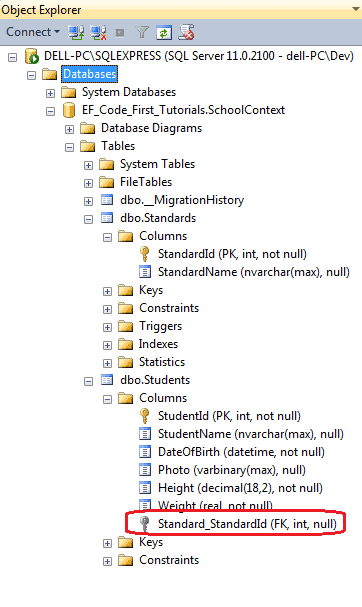
Thus, the default code first convention for relationship automatically inserted a foreign key with<navigation property Name>_<primary key property name of navigation property type> e.g. Standard_StandardId.
Foreign key Convention:
We have seen above that Code First automatically inserts a foreign key when it encounters a navigation property. It is recommended to include a foreign key property on the dependent end of a relationship. Consider the following example:
public class Student

{

    public Student()

    {

    }

    public int StudentID { get; set; }

    public string StudentName { get; set; }

    public DateTime DateOfBirth { get; set; }

    public byte[]  Photo { get; set; }

    public decimal Height { get; set; }

    public float Weight { get; set; }

    //Foreign key for Standard

    public int StandardId { get; set; }

    public Standard Standard { get; set; }

}

public class Standard

{

    public Standard()

    {

    }

    public int StandardId { get; set; }

    public string StandardName { get; set; }

    public IList<Student> Students { get; set; }

}
As you can see in the above code, Student class includes foreign key StandardId, which is the key property in Standard class. Now, Code First will create StandardId column in Students class instead of Standard_StandardId column, as shown below.
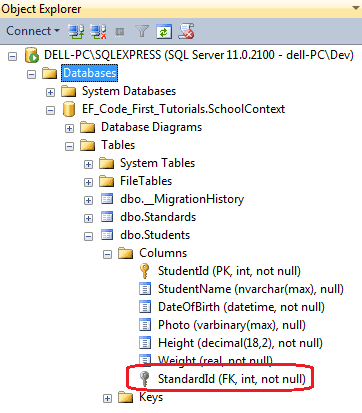
Notice that StandardId foreign key is not null in the above figure. This is because int data type is not nullable.
Code First infers the multiplicity of the relationship based on the nullability of the foreign key. If the property is nullable then the relationship is registered as null. Otherwise, the relationship is registered as NOT NULL. Modify data type of StandardId property from int to Nullable<int> in the Student class above to create a nullable foreign key column in the Students table.
Complex type Convention:
Code First creates complex type for the class which does not include key property and also primary key is not registered using DataAnnotation or Fluent API.
Default Code-First Conventions:
The following table lists default code first conventions:
| Default Convention For | Description |
|---|---|
| Table Name | <Entity Class Name> + 's' EF will create DB table with entity class name suffixed by 's' |
| Primary key Name | 1) Id 2) <Entity Class Name> + "Id" (case insensitive) EF will create primary key column for the property named Id or <Entity Class Name> + "Id" (case insensitive) |
| Foreign key property Name | By default EF will look for foreign key property with the same name as principal entity primary key name. If foreign key property does not exists then EF will create FK column in Db table with <Dependent Navigation Property Name> + "_" + <Principal Entity Primary Key Property Name> e.g. EF will create Standard_StandardId foreign key column into Students table if Student entity does not contain foreignkey property for Standard where Standard contains StandardId |
| Null column | EF creates null column for all reference type properties and nullable primitive properties. |
| Not Null Column | EF creates NotNull columns for PrimaryKey properties and non-nullable value type properties. |
| DB Columns order | EF will create DB columns same as order of properties in an entity class. However, primary key columns would be moved first. |
| Properties mapping to DB | By default all properties will map to database. Use [NotMapped] attribute to exclude property or class from DB mapping. |
| Cascade delete | Enabled By default for all types of relationships. |
The following table list C# datatype mapped with SQL datatype and primary key column datatype and lengt
| C# DataType | Related DB Column DataType | PK Column DataType & Length |
|---|---|---|
| int | int | int, Identity column increment by 1 |
| string | nvarchar(Max) | nvarchar(128) |
| decimal | decimal(18,2) | decimal(18,2) |
| float | real | real |
| byte[] | varbinary(Max) | varbinary(128) |
| datetime | datetime | datetime |
| bool | bit | bit |
| byte | tinyint | tinyint |
| short | smallint | smallint |
| long | bigint | bigint |
| double | float | float |
| char | No mapping | No mapping |
| sbyte | No mapping (throws exception) |
No mapping |
| object | No mapping | No mapping |
This was an overview of code first conventions. These conventions can be overriden using DataAnnotation or Fluent API. Also, you can define custom conventions for your application using Entity Framework 6.0, onwards.
Entity Framework Code-First(5):Code First Conventions的更多相关文章
- Entity Framework Tutorial Basics(11):Code First
Code First development with Entity Framework: Entity Framework supports three different development ...
- Entity Framework Tutorial Basics(37):Lazy Loading
Lazy Loading: One of the important functions of Entity Framework is lazy loading. Lazy loading means ...
- Entity Framework Tutorial Basics(36):Eager Loading
Eager Loading: Eager loading is the process whereby a query for one type of entity also loads relate ...
- Entity Framework Tutorial Basics(32):Enum Support
Enum in Entity Framework: You can now have an Enum in Entity Framework 5.0 onwards. EF 5 should targ ...
- Entity Framework Tutorial Basics(29):Stored Procedure in Entity Framework
Stored Procedure in Entity Framework: Entity Framework has the ability to automatically build native ...
- Entity Framework Tutorial Basics(28):Concurrency
Concurrency in Entity Framework: Entity Framework supports Optimistic Concurrency by default. In the ...
- Entity Framework Tutorial Basics(27):Update Entity Graph
Update Entity Graph using DbContext: Updating an entity graph in disconnected scenario is a complex ...
- Entity Framework Tutorial Basics(22):Disconnected Entities
Disconnected Entities: Before we see how to perform CRUD operation on disconnected entity graph, let ...
- Entity Framework Tutorial Basics(19):Change Tracking
Change Tracking in Entity Framework: Here, you will learn how entity framework tracks changes on ent ...
- Entity Framework Tutorial Basics(15):Querying with EDM
Querying with EDM: We have created EDM, DbContext, and entity classes in the previous sections. Here ...
随机推荐
- 大话设计模式--组合模式 Composite -- C++实现实例
1. 组合模式: 将对象组合成树形结构以表示"部分--整体"的层次结构,组合模式使用户对单个对象和组合对象的使用具有一致性. 需求中是体现部分与整体层次的结构时,希望用户可以忽略组 ...
- Codeforces 459E Pashmak and Graph:dp + 贪心
题目链接:http://codeforces.com/problemset/problem/459/E 题意: 给你一个有向图,每条边有边权. 让你找出一条路径,使得这条路径上的边权严格递增. 问你这 ...
- 分享知识-快乐自己:遍历Map集合
import java.util.HashMap; import java.util.Iterator; import java.util.Map; public class TestMap { pu ...
- python 链接MS SQL
cnxn = pyodbc.connect(driver='{SQL Server}', host=server, database=db1, trusted_connection=tcon, use ...
- Mysql异常_01_ 誓死登进mysql_Can't connect to MySQL server on 'localhost' (10061)
现象:打开cmd,输入命令:mysql -uroot -p 回车之后,输入密码,结果进不去mysql,并且抛出异常 异常:Can't connect to MySQL server on 'local ...
- stl_multimap.h
stl_multimap.h // Filename: stl_multimap.h // Comment By: 凝霜 // E-mail: mdl2009@vip.qq.com // Blog: ...
- FJOI2016 神秘数
题目大意 给定长为$N$一个序列,每次询问一个区间,求最小的不能表示为由区间内若干个(可以是$0$个)数的和的非负整数. 考虑一个可重集合$S$,设抽取$S$中若干个数相加无法得到的最小非负整数为$A ...
- CH6802 車的放置 和 CH6B24 Place the Robots
6802 車的放置 0x60「图论」例题 描述 给定一个N行M列的棋盘,已知某些格子禁止放置.问棋盘上最多能放多少个不能互相攻击的車.車放在格子里,攻击范围与中国象棋的"車"一致. ...
- ACM学习历程—HDU 3092 Least common multiple(数论 && 动态规划 && 大数)
Description Partychen like to do mathematical problems. One day, when he was doing on a least common ...
- Popular Cows
传送门(poj):http://poj.org/problem?id=2186 (bzoj):http://www.lydsy.com/JudgeOnline/problem.php?id=1051 ...