
吴裕雄 python深度学习与实践(12)
import tensorflow as tf

q = tf.FIFOQueue(,"float32")

counter = tf.Variable(0.0)

add_op = tf.assign_add(counter, tf.constant(1.0))

enqueueData_op = q.enqueue(counter)

sess = tf.Session()

qr = tf.train.QueueRunner(q, enqueue_ops=[add_op, enqueueData_op] * )

sess.run(tf.initialize_all_variables())

enqueue_threads = qr.create_threads(sess, start=True)

coord = tf.train.Coordinator()

enqueue_threads = qr.create_threads(sess, coord = coord,start=True)

for i in range(, ):

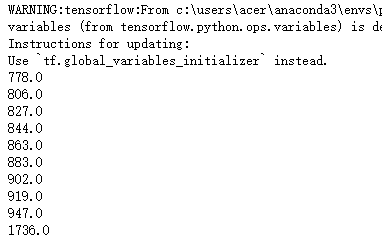
    print(sess.run(q.dequeue()))

coord.request_stop()

coord.join(enqueue_threads)
import os

path = 'F:\\lj\\aa\\VOCdevkit\\VOC2012\\JPEGImages\\'

filenames=os.listdir(path)

strText = ""

with open("E:\\train_list.csv", "w") as fid:

    for a in range(len(filenames)):

        strText = path+filenames[a]  + "," + filenames[a].split('_')[]  + "\n"

        fid.write(strText)

fid.close()
import cv2

import tensorflow as tf

image_add_list = []

image_label_list = []

with open("E:\\train_list.csv") as fid:

    for image in fid.readlines():

        image_add_list.append(image.strip().split(",")[0])

        image_label_list.append(image.strip().split(",")[1])

img=tf.image.convert_image_dtype(tf.image.decode_jpeg(tf.read_file('F:\\lj\\aa\\VOCdevkit\\VOC2012\\JPEGImages\\2007_000250.jpg'),channels=1),dtype=tf.float32)

print(img)

import cv2

import tensorflow as tf

image_add_list = []

image_label_list = []

with open("E:\\train_list.csv") as fid:

    for image in fid.readlines():

        image_add_list.append(image.strip().split(",")[0])

        image_label_list.append(image.strip().split(",")[1])

def get_image(image_path):

    return tf.image.convert_image_dtype(tf.image.decode_jpeg(tf.read_file(image_path), channels=1),dtype=tf.uint8)

img = tf.image.convert_image_dtype(tf.image.decode_jpeg(tf.read_file('F:\\lj\\aa\\VOCdevkit\\VOC2012\\JPEGImages\\2007_000250.jpg'), channels=1),dtype=tf.float32)

with tf.Session() as sess:

    cv2Img = sess.run(img)

    img2 = cv2.resize(cv2Img, (200,200))

    cv2.imshow('image', img2)

    cv2.waitKey(0)
import numpy as np

import tensorflow as tf

a_data = 0.834

b_data =  [17]

c_data = np.array([[0,1,2],[3,4,5]])

c = c_data.astype(np.uint8)

c_raw = c.tostring()  #转化成字符串

example = tf.train.Example(

        features=tf.train.Features(

            feature={

                'a': tf.train.Feature(float_list=tf.train.FloatList(value=[a_data])),

                'b': tf.train.Feature(int64_list=tf.train.Int64List(value=b_data)),

                'c': tf.train.Feature(bytes_list=tf.train.BytesList(value=[c_raw]))

            }

        )

)
import numpy as np

import tensorflow as tf

writer = tf.python_io.TFRecordWriter("E:\\trainArray.tfrecords")

for _ in range(100):

    randomArray = np.random.random((1,3))

    array_raw = randomArray.tobytes()

    example = tf.train.Example(features=tf.train.Features(feature={

        "label": tf.train.Feature(int64_list=tf.train.Int64List(value=[0])),

        'img_raw': tf.train.Feature(bytes_list=tf.train.BytesList(value=[array_raw]))

    }))

    writer.write(example.SerializeToString())

writer.close()
import os

import tensorflow as tf

from PIL import Image

path = "E:\\tupian"

filenames=os.listdir(path)

writer = tf.python_io.TFRecordWriter("E:\\train.tfrecords")

for name in filenames:

    class_path = path + os.sep + name

    for img_name in os.listdir(class_path):

        img_path = class_path+os.sep+img_name

        img = Image.open(img_path)

        img = img.resize((500,500))

        img_raw = img.tobytes()

        example = tf.train.Example(features=tf.train.Features(feature={

            "label": tf.train.Feature(int64_list=tf.train.Int64List(value=[int(name.split("_")[0])])),

            'image': tf.train.Feature(bytes_list=tf.train.BytesList(value=[img_raw]))

        }))

        writer.write(example.SerializeToString())
import cv2

import tensorflow as tf

filename = "E:\\train.tfrecords"

filename_queue = tf.train.string_input_producer([filename])

reader = tf.TFRecordReader()

_, serialized_example = reader.read(filename_queue)   #返回文件名和文件

features = tf.parse_single_example(serialized_example,

    features={

        'label': tf.FixedLenFeature([], tf.int64),

        'image' : tf.FixedLenFeature([], tf.string),

    })

img = tf.decode_raw(features['image'], tf.uint8)

img = tf.reshape(img, [300, 300,3])

img = tf.cast(img, tf.float32) * (1. / 128) - 0.5

label = tf.cast(features['label'], tf.int32)
import cv2

import tensorflow as tf

filename = "E:\\train.tfrecords"

filename_queue = tf.train.string_input_producer([filename])

reader = tf.TFRecordReader()

_, serialized_example = reader.read(filename_queue)   #返回文件名和文件

features = tf.parse_single_example(serialized_example,

    features={

        'label': tf.FixedLenFeature([], tf.int64),

        'image' : tf.FixedLenFeature([], tf.string),

    })

img = tf.decode_raw(features['image'], tf.uint8)

img = tf.reshape(img, [300, 300,3])

sess = tf.Session()

init = tf.initialize_all_variables()

sess.run(init)

threads = tf.train.start_queue_runners(sess=sess)

img = tf.cast(img, tf.float32) * (1. / 128) - 0.5

label = tf.cast(features['label'], tf.int32)

print(img)

# imgcv2 = sess.run(img)

# cv2.imshow("cool",imgcv2)

# cv2.waitKey(0)
import cv2

import tensorflow as tf

filename = "E:\\train.tfrecords"

def read_and_decode(filename):

    filename_queue = tf.train.string_input_producer([filename])

    reader = tf.TFRecordReader()

    _, serialized_example = reader.read(filename_queue)   #返回文件名和文件

    features = tf.parse_single_example(serialized_example,

        features={

            'label': tf.FixedLenFeature([], tf.int64),

            'image' : tf.FixedLenFeature([], tf.string),

        })

    img = tf.decode_raw(features['image'], tf.uint8)

    img = tf.reshape(img, [300, 300,3])

    img = tf.cast(img, tf.float32) * (1. / 128) - 0.5

    label = tf.cast(features['label'], tf.int32)

    return img,label

img,label = read_and_decode(filename)

img_batch,label_batch = tf.train.shuffle_batch([img,label],batch_size=1,capacity=10,min_after_dequeue=1)

init = tf.initialize_all_variables()

sess = tf.Session()

sess.run(init)

threads = tf.train.start_queue_runners(sess=sess)

for _ in range(10):

    val = sess.run(img_batch)

    label = sess.run(label_batch)

    val.resize((300,300,3))

    cv2.imshow("cool",val)

    cv2.waitKey()

    print(label)
吴裕雄 python深度学习与实践(12)的更多相关文章
- 吴裕雄 python深度学习与实践(13)
import numpy as np import matplotlib.pyplot as plt x_data = np.random.randn(10) print(x_data) y_data ...
- 吴裕雄 python深度学习与实践(6)
from pylab import * import pandas as pd import matplotlib.pyplot as plot import numpy as np filePath ...
- 吴裕雄 python深度学习与实践(18)
# coding: utf-8 import time import numpy as np import tensorflow as tf import _pickle as pickle impo ...
- 吴裕雄 python深度学习与实践(17)
import tensorflow as tf from tensorflow.examples.tutorials.mnist import input_data import time # 声明输 ...
- 吴裕雄 python深度学习与实践(16)
import struct import numpy as np import matplotlib.pyplot as plt dateMat = np.ones((7,7)) kernel = n ...
- 吴裕雄 python深度学习与实践(15)
import tensorflow as tf import tensorflow.examples.tutorials.mnist.input_data as input_data mnist = ...
- 吴裕雄 python深度学习与实践(14)
import numpy as np import tensorflow as tf import matplotlib.pyplot as plt threshold = 1.0e-2 x1_dat ...
- 吴裕雄 python深度学习与实践(11)
import numpy as np from matplotlib import pyplot as plt A = np.array([[5],[4]]) C = np.array([[4],[6 ...
- 吴裕雄 python深度学习与实践(10)
import tensorflow as tf input1 = tf.constant(1) print(input1) input2 = tf.Variable(2,tf.int32) print ...
随机推荐
- Js/对数组的认识。
1.是对数组的声明: var auditTaskIds = []; 我一般的写法. var auditTaskIds1 = []; 2.向数组中添加元素: auditTaskIds.pu ...
- APP打包提交审核的步骤
- net core 解除上传大附件的限制
1.对于使用自带服务器kernal的情况下,只需要在对应的action上添加属性 DisableRequestSizeLimit [HttpPost] [DisableRequestSizeLimit ...
- [LeetCode&Python] Problem 844. Backspace String Compare
Given two strings S and T, return if they are equal when both are typed into empty text editors. # m ...
- 2.python发展历程
创始人:吉多·范罗苏姆于1989年圣诞节在阿姆斯特丹编写 python分为: python 2.X python 3.X 使用python的公司: 豆瓣.BT.Dropbox.YouTube.Quor ...
- Logistic Loss的简单讨论
首先应该知道Logistic Loss和Crossing Entropy Loss本质上是一回事. 所以所谓的SoftMaxLoss就是一般二分类LogisitcLoss的推广.之所以在网络中采取这种 ...
- Nginx中文url出现404问题
Nginx中文url出现404问题 前提条件检查,如我的系统centos,需要检查系统字符集是不是支持utf-8, 怎么配置可以参考这个帖子 https://www.vpser.net/manage/ ...
- windows与linux换行规则
在计算机还没有出现之前,有一种叫做电传打字机(Teletype Model 33)的玩意,每秒钟可以打10个字符.但是它有一个问题,就是打完一行换行的时候,要用去0.2秒,正好可以打两个字符.要是在这 ...
- Delphi操作Ini文件
Delphi提供了一个TInifile类,使我们可以非常灵活的处理INI文件 一.INI文件的结构[小节名]ini文件 关键字1=值1 关键子2=值2INI文件允许有多个小节, ...
- 格式化输出=========》format 和 %
str.format() 实现格式化输出的功能 s1 = "i am {0},gae{1}".format("alex",18) 普通版,直接输入元祖 ...