
吴裕雄 python深度学习与实践(10)
import tensorflow as tf

input1 = tf.constant(1)

print(input1)

input2 = tf.Variable(2,tf.int32)

print(input2)

input2 = input1

sess = tf.Session()

print(sess.run(input2))

import tensorflow as tf

input1 = tf.placeholder(tf.int32)

input2 = tf.placeholder(tf.int32)

output = tf.add(input1, input2)

sess = tf.Session()

print(sess.run(output, feed_dict={input1:[1], input2:[2]}))

import numpy as np

import tensorflow as tf

"""

这里是一个非常好的大数据验证结果,随着数据量的上升,集合的结果也越来越接近真实值,

这也是反馈神经网络的一个比较好的应用

这里不是很需要各种激励函数

而对于dropout,这里可以看到加上dropout,loss的值更快。

随着数据量的上升,结果就更加接近于真实值。

"""

inputX = np.random.rand(3000,1)

noise = np.random.normal(0, 0.05, inputX.shape)

outputY = inputX * 4 + 1 + noise

#这里是第一层

weight1 = tf.Variable(np.random.rand(inputX.shape[1],4))

bias1 = tf.Variable(np.random.rand(inputX.shape[1],4))

x1 = tf.placeholder(tf.float64, [None, 1])

y1_ = tf.matmul(x1, weight1) + bias1

y = tf.placeholder(tf.float64, [None, 1])

loss = tf.reduce_mean(tf.reduce_sum(tf.square((y1_ - y)), reduction_indices=[1]))

train = tf.train.GradientDescentOptimizer(0.25).minimize(loss)  # 选择梯度下降法

init = tf.initialize_all_variables()

sess = tf.Session()

sess.run(init)

for i in range(1000):

    sess.run(train, feed_dict={x1: inputX, y: outputY})

print(weight1.eval(sess))

print("---------------------")

print(bias1.eval(sess))

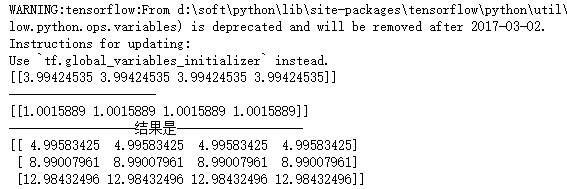
print("------------------结果是------------------")

x_data = np.matrix([[1.],[2.],[3.]])

print(sess.run(y1_,feed_dict={x1: x_data}))
import numpy as np

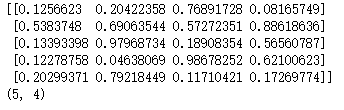
aa = np.random.rand(5,4)

print(aa)

print(np.shape(aa))
import tensorflow as tf

import numpy as np

"""

这里是一个非常好的大数据验证结果,随着数据量的上升,集合的结果也越来越接近真实值,

这也是反馈神经网络的一个比较好的应用

这里不是很需要各种激励函数

而对于dropout,这里可以看到加上dropout,loss的值更快。

随着数据量的上升,结果就更加接近于真实值。

"""

inputX = np.random.rand(3000,1)

noise = np.random.normal(0, 0.05, inputX.shape)

outputY = inputX * 4 + 1 + noise

#这里是第一层

weight1 = tf.Variable(np.random.rand(inputX.shape[1],4))

bias1 = tf.Variable(np.random.rand(inputX.shape[1],4))

x1 = tf.placeholder(tf.float64, [None, 1])

y1_ = tf.matmul(x1, weight1) + bias1

#这里是第二层

weight2 = tf.Variable(np.random.rand(4,1))

bias2 = tf.Variable(np.random.rand(inputX.shape[1],1))

y2_ = tf.matmul(y1_, weight2) + bias2

y = tf.placeholder(tf.float64, [None, 1])

loss = tf.reduce_mean(tf.reduce_sum(tf.square((y2_ - y)), reduction_indices=[1]))

train = tf.train.GradientDescentOptimizer(0.25).minimize(loss)  # 选择梯度下降法

init = tf.initialize_all_variables()

sess = tf.Session()

sess.run(init)

for i in range(1000):

    sess.run(train, feed_dict={x1: inputX, y: outputY})

print(weight1.eval(sess))

print("---------------------")

print(weight2.eval(sess))

print("---------------------")

print(bias1.eval(sess))

print("---------------------")

print(bias2.eval(sess))

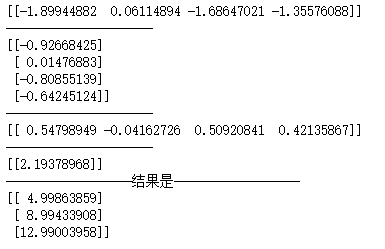
print("------------------结果是------------------")

x_data = np.matrix([[1.],[2.],[3.]])

print(sess.run(y2_,feed_dict={x1: x_data}))
吴裕雄 python深度学习与实践(10)的更多相关文章
- 吴裕雄 python深度学习与实践(18)
# coding: utf-8 import time import numpy as np import tensorflow as tf import _pickle as pickle impo ...
- 吴裕雄 python深度学习与实践(17)
import tensorflow as tf from tensorflow.examples.tutorials.mnist import input_data import time # 声明输 ...
- 吴裕雄 python深度学习与实践(16)
import struct import numpy as np import matplotlib.pyplot as plt dateMat = np.ones((7,7)) kernel = n ...
- 吴裕雄 python深度学习与实践(15)
import tensorflow as tf import tensorflow.examples.tutorials.mnist.input_data as input_data mnist = ...
- 吴裕雄 python深度学习与实践(14)
import numpy as np import tensorflow as tf import matplotlib.pyplot as plt threshold = 1.0e-2 x1_dat ...
- 吴裕雄 python深度学习与实践(13)
import numpy as np import matplotlib.pyplot as plt x_data = np.random.randn(10) print(x_data) y_data ...
- 吴裕雄 python深度学习与实践(12)
import tensorflow as tf q = tf.FIFOQueue(,"float32") counter = tf.Variable(0.0) add_op = t ...
- 吴裕雄 python深度学习与实践(11)
import numpy as np from matplotlib import pyplot as plt A = np.array([[5],[4]]) C = np.array([[4],[6 ...
- 吴裕雄 python深度学习与实践(7)
import cv2 import numpy as np img = np.mat(np.zeros((,))) cv2.imshow("test",img) cv2.waitK ...
随机推荐
- Greenplum(4.3.73)集群安装手册
1. 概述 本文档仅限于指导Greenplum 4.3.7.3(对应安装包greenplum-db-4.3.7.3-build-2-RHEL5-x86_64.bin)版本在CentOS6.5 系统进行 ...
- 列表:remove/del删除方法中的逻辑“误区”
结果: list_1=["A","B","C","D","E","F",&quo ...
- 同一个windows server 部署多个tomcat
只需要修改tomcat目录下conf下的server.xml文件即可,修改地方有三个,把下面这几个端口修改了为不同的端口即可,例如我把这几个端口统一减1了 <Server port=" ...
- java 实现excel 导出功能
实现功能:java导出excel表 1.jsp代码 <form id="zhanwForm" action="<%=path%>/conferences ...
- lsof一些使用
查看某进程和哪些文件相关 [root@linux-node2 ~]# netstat -lntp Active Internet connections (only servers) Proto Re ...
- apache开启验证登录
对某个目录开启验证登录 <Directory /var/www/html/admin > AllowOverride All Order allow,deny Allow from all ...
- Java方法的静态绑定与动态绑定讲解(向上转型的运行机制详解)
转载请注明原文地址:http://www.cnblogs.com/ygj0930/p/6554103.html 一:绑定 把一个方法与其所在的类/对象 关联起来叫做方法的绑定.绑定分为静态绑定(前期绑 ...
- DokuWiki 命名空间管理
为了更好的组织结构,Dokuwiki提供了命名空间这个功能,那怎么管理命名空间的,其实可以安装插件去管理 Add New Page Plugin:新建界面 https://www.dokuwiki.o ...
- VS在.NETFramework升级时遇到类库冲突如何解决
相信大家在开发环境中随着程序的不断升级,很多时间需要升级. NETFramework版本.今天项目中遇到的问题是从. NETFramework4.0升级到4.5时提示 Entityframework. ...
- Java构造器练习题
仔细阅读下面的程序 public class Car { String name = "汽车"; public Car(String name) { this.name = nam ...