
[iOS微博项目 - 3.5] - 封装业务
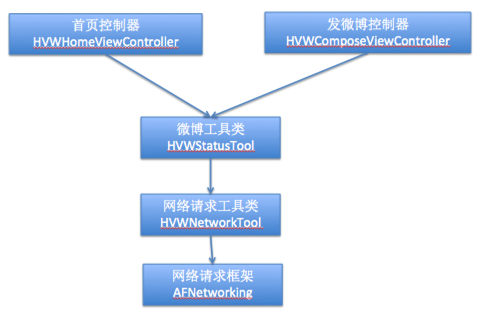
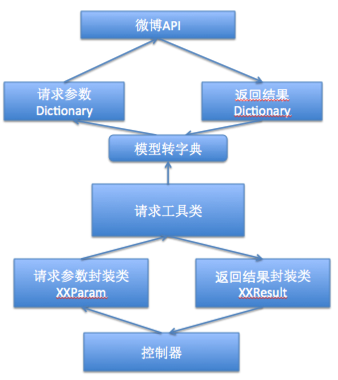
 //

 //  HVWBaseParam.h

 //  HVWWeibo

 //

 //  Created by hellovoidworld on 15/2/9.

 //  Copyright (c) 2015年 hellovoidworld. All rights reserved.

 //

 #import <Foundation/Foundation.h>

 @interface HVWBaseParam : NSObject

 /** 访问令牌 */

 @property(nonatomic, copy) NSString *access_token;

 @end
 //

 //  HVWBaseParam.m

 //  HVWWeibo

 //

 //  Created by hellovoidworld on 15/2/9.

 //  Copyright (c) 2015年 hellovoidworld. All rights reserved.

 //

 #import "HVWBaseParam.h"

 #import "HVWAccountInfo.h"

 #import "HVWAccountInfoTool.h"

 @implementation HVWBaseParam

 - (NSString *)access_token {

     if (nil == _access_token) {

         _access_token = [HVWAccountInfoTool accountInfo].access_token;

     }

     return _access_token;

 }

 @end
 //

 //  HVWHomeStatusParam.h

 //  HVWWeibo

 //

 //  Created by hellovoidworld on 15/2/9.

 //  Copyright (c) 2015年 hellovoidworld. All rights reserved.

 //

 #import "HVWBaseParam.h"

 @interface HVWHomeStatusParam : HVWBaseParam

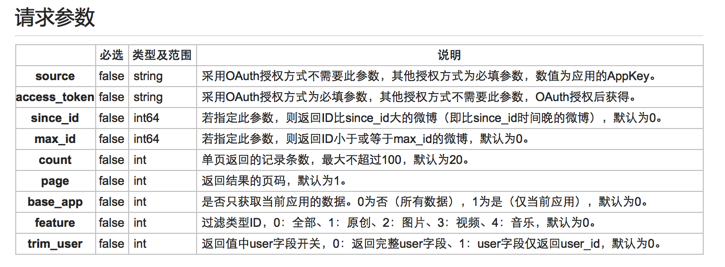
 /** false string 采用OAuth授权方式不需要此参数,其他授权方式为必填参数,数值为应用的AppKey。 */

 @property(nonatomic, copy) NSString *source;

 /** false int64 若指定此参数,则返回ID比since_id大的微博(即比since_id时间晚的微博),默认为0。 */

 @property(nonatomic, strong) NSNumber *since_id;

 /** false   int64 若指定此参数,则返回ID小于或等于max_id的微博,默认为0。 */

 @property(nonatomic, strong) NSNumber *max_id;

 /** false int 单页返回的记录条数,最大不超过100,默认为20。 */

 @property(nonatomic, strong) NSNumber *count;

 /** false int 返回结果的页码,默认为1。 */

 @property(nonatomic, strong) NSNumber *page;

 /** false int 是否只获取当前应用的数据。0为否(所有数据),1为是(仅当前应用),默认为0。 */

 @property(nonatomic, strong) NSNumber *base_app;

 /** false int 过滤类型ID,0:全部、1:原创、2:图片、3:视频、4:音乐,默认为0。 */

 @property(nonatomic, strong) NSNumber *feature;

 /** false int 返回值中user字段开关,0:返回完整user字段、1:user字段仅返回user_id,默认为0。 */

 @property(nonatomic, strong) NSNumber *trim_user;

 @end
 //

 //  HVWHomeStatusResult.h

 //  HVWWeibo

 //

 //  Created by hellovoidworld on 15/2/9.

 //  Copyright (c) 2015年 hellovoidworld. All rights reserved.

 //

 #import <Foundation/Foundation.h>

 #import "HVWStatus.h"

 @interface HVWHomeStatusResult : NSObject

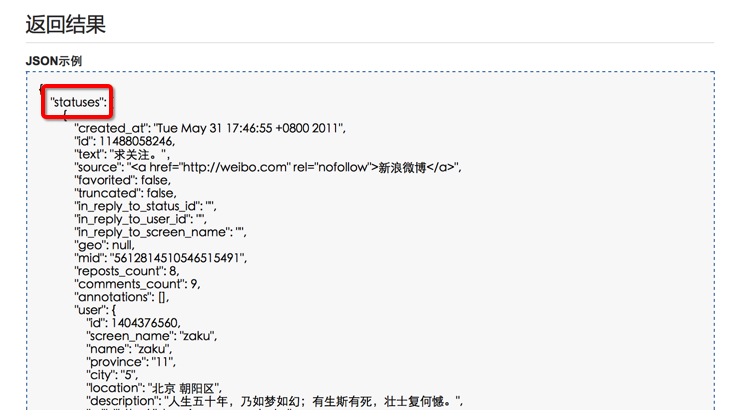
 /** 微博数组,里面装的HVWStatus模型 */

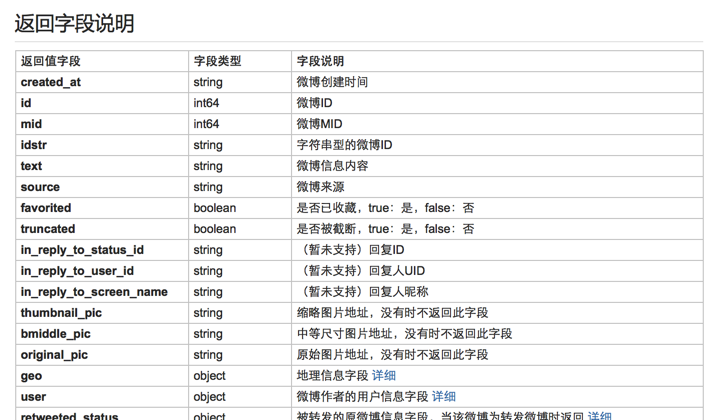
 @property(nonatomic, strong) NSArray *statuses;

 /** 近期微博总数 */

 @property(nonatomic, assign) int total_number;

 @end
 //

 //  HVWHomeStatusResult.m

 //  HVWWeibo

 //

 //  Created by hellovoidworld on 15/2/9.

 //  Copyright (c) 2015年 hellovoidworld. All rights reserved.

 //

 #import "HVWHomeStatusResult.h"

 #import "MJExtension.h"

 @implementation HVWHomeStatusResult

 /** 指明将json数组元素转为什么模型类 */

 - (NSDictionary *)objectClassInArray {

     return @{@"statuses":[HVWStatus class]};

 }

 @end
 //

 //  HVWBaseTool.h

 //  HVWWeibo

 //

 //  Created by hellovoidworld on 15/2/10.

 //  Copyright (c) 2015年 hellovoidworld. All rights reserved.

 //

 #import <Foundation/Foundation.h>

 @interface HVWBaseTool : NSObject

 /** GET请求 */

 + (void) getWithUrl:(NSString *)url parameters:(id)parameters resultClass:(Class)resultClass success:(void (^)(id))success failure:(void (^)(NSError *))failure;

 /** POST请求(不带文件参数) */

 + (void) postWithUrl:(NSString *)url parameters:(id)parameters resultClass:(Class)resultClass success:(void (^)(id))success failure:(void (^)(NSError *))failure;

 /** POST请求(带文件参数) */

 + (void) postWithUrl:(NSString *)url parameters:(id)parameters filesData:(NSArray *)filesData resultClass:(Class)resultClass success:(void (^)(id))success failure:(void (^)(NSError *))failure;

 @end
 //

 //  HVWBaseTool.m

 //  HVWWeibo

 //

 //  Created by hellovoidworld on 15/2/10.

 //  Copyright (c) 2015年 hellovoidworld. All rights reserved.

 //

 #import "HVWBaseTool.h"

 #import "HVWNetworkTool.h"

 #import "MJExtension.h"

 @implementation HVWBaseTool

 /** GET请求 */

 + (void) getWithUrl:(NSString *)url parameters:(id)parameters resultClass:(Class)resultClass success:(void (^)(id))success failure:(void (^)(NSError *))failure {

     // 解析出参数

     NSDictionary *param = [parameters keyValues];

     [HVWNetworkTool get:url parameters:param success:^(id responseObject) {

         if (success) {

             id result = [resultClass objectWithKeyValues:responseObject];

             success(result);

         }

     } failure:^(NSError *error) {

         if (failure) {

             if (failure) {

                 failure(error);

             }

         }

     }];

 }

 /** POST请求(不带文件参数) */

 + (void) postWithUrl:(NSString *)url parameters:(id)parameters resultClass:(Class)resultClass success:(void (^)(id))success failure:(void (^)(NSError *))failure {

     // 解析出参数

     NSDictionary *param = [parameters keyValues];

     [HVWNetworkTool post:url parameters:param success:^(id responseObject) {

         if (success) {

             id result = [resultClass objectWithKeyValues:responseObject];

             success(result);

         }

     } failure:^(NSError *error) {

         if (failure) {

             if (failure) {

                 failure(error);

             }

         }

     }];

 }

 /** POST请求(带文件参数) */

 + (void) postWithUrl:(NSString *)url parameters:(id)parameters filesData:(NSArray *)filesData resultClass:(Class)resultClass success:(void (^)(id))success failure:(void (^)(NSError *))failure {

     // 解析出参数

     NSDictionary *param = [parameters keyValues];

     [HVWNetworkTool post:url parameters:param filesData:filesData success:^(id responseObject) {

         if (success) {

             id result = [resultClass objectWithKeyValues:responseObject];

             success(result);

         }

     } failure:^(NSError *error) {

         if (failure) {

             if (failure) {

                 failure(error);

             }

         }

     }];

 }

 @end
 //

 //  HVWStatusTool.h

 //  HVWWeibo

 //

 //  Created by hellovoidworld on 15/2/9.

 //  Copyright (c) 2015年 hellovoidworld. All rights reserved.

 //

 #import <Foundation/Foundation.h>

 #import "HVWBaseTool.h"

 #import "HVWHomeStatusParam.h"

 #import "HVWHomeStatusResult.h"

 @interface HVWStatusTool : HVWBaseTool

 /** 获取首页微博数据 */

 + (void) statusWithParameters:(HVWHomeStatusParam *)parameters success:(void (^)(HVWHomeStatusResult *statusResult))success failure:(void (^)(NSError *error))failure;

 @end
 //

 //  HVWStatusTool.m

 //  HVWWeibo

 //

 //  Created by hellovoidworld on 15/2/9.

 //  Copyright (c) 2015年 hellovoidworld. All rights reserved.

 //

 #import "HVWStatusTool.h"

 #import "MJExtension.h"

 @implementation HVWStatusTool

 /** 获取首页微博数据 */

 + (void) statusWithParameters:(HVWHomeStatusParam *)parameters success:(void (^)(HVWHomeStatusResult *statusResult))success failure:(void (^)(NSError *error))failure {

     // 发送请求

     [self getWithUrl:@"https://api.weibo.com/2/statuses/home_timeline.json" parameters:parameters resultClass:[HVWHomeStatusResult class] success:success failure:failure];

 }

 @end
[iOS微博项目 - 3.5] - 封装业务的更多相关文章
- [iOS微博项目 - 2.5] - 封装授权和用户信息读写业务
github: https://github.com/hellovoidworld/HVWWeibo A.封装授权业务 1.把app的授权信息移动到HVWWeibo-Prefix.pch中作为公共 ...
- [iOS微博项目 - 3.3] - 封装网络请求
github: https://github.com/hellovoidworld/HVWWeibo A.封装网络请求 1.需求 为了避免代码冗余和对于AFN框架的多处使用导致耦合性太强,所以把网 ...
- [iOS微博项目 - 1.6] - 自定义TabBar
A.自定义TabBar 1.需求 控制TabBar内的item的文本颜色(普通状态.被选中状态要和图标一致).背景(普通状态.被选中状态均为透明) 重新设置TabBar内的item位置,为下一步在Ta ...
- [iOS微博项目 - 3.4] - 获取用户信息
github: https://github.com/hellovoidworld/HVWWeibo A.获取用户信息 1.需求 获取用户信息并储存 把用户昵称显示在“首页”界面导航栏的标题上 ...
- [iOS微博项目 - 3.1] - 发微博界面
github: https://github.com/hellovoidworld/HVWWeibo A.发微博界面:自定义UITextView 1.需求 用UITextView做一个编写微博的输 ...
- [iOS微博项目 - 2.6] - 获取微博数据
github: https://github.com/hellovoidworld/HVWWeibo A.新浪获取微博API 1.读取微博API 2.“statuses/home_time ...
- [iOS微博项目 - 1.0] - 搭建基本框架
A.搭建基本环境 github: https://github.com/hellovoidworld/HVWWeibo 项目结构: 1.使用代码构建UI,不使用storyboard ...
- [iOS微博项目 - 4.6] - 微博配图
github: https://github.com/hellovoidworld/HVWWeibo A.微博配图 1.需求 显示原创微博.转发微博的缩略图 4张图使用2x2布局,其他使用3x3布局, ...
- [iOS微博项目 - 4.0] - 自定义微博cell
github: https://github.com/hellovoidworld/HVWWeibo A.自定义微博cell基本结构 1.需求 创建自定义cell的雏形 cell包含:内容.工具条 内 ...
随机推荐
- OGNL表达式的基本语法和用法
首先我们一起来看一下OGNL中的#.%和$符号. 关于OGNL各种用法总结参看:http://blog.163.com/seara520@126/blog/static/720693042010320 ...
- 17. Subsets【medium】
Given a set of distinct integers, return all possible subsets. Notice Elements in a subset must be i ...
- 利用eclipse的search功能搜索当前项目的源文件
当你项目的源文件太多,文件组织结构太复杂的的时候,有时候希望google来帮你一把?给个关键字就把相关的搜索结果给出来? eclipse的search功能基本上就可以完成这个任务,文件搜索,甚至JAV ...
- Dubbo源代码实现三:注册中心Registry
我们知道,对于服务治理框架来说,服务通信(RPC)和服务管理两部分必不可少,而服务管理又分为服务注册.服务发现和服务人工介入,我们来看看Dubbo框架的结构图(来源网络): 图中可以看出,服务提供者P ...
- python操作word【简单封装】
#!/usr/bin/env python # -*- coding: utf-8 -*- import win32com.client import os #-------------------- ...
- msf提权命令/meterpreter下的几个命令
废话: 今天本来日学校内网.以为是台08.结果稀里糊涂居然日了宿舍哥们儿的PC机.按道理都该装杀毒的才对,我舍友都不装的.裸装上阵说的就是我舍友了.劝各位大佬.把杀毒装好.补丁打好. 通过这次我也学到 ...
- 解决Access denied for user ''@'localhost' to database 'mysql'问题
在改动mysql的root用户password后,再登陆,提示如标题的错误,找了一番答案之后,最终解决,过程例如以下: 1.停掉mysql: service mysqld stop 2.使用 ...
- (壹)、java面向对象详解
面向对象的概述: 1.用java语言对现实生活中的事物进行描述.通过类的形式来体现的. 2.怎么描述呢? 对于事物描述通常只关注两方面. 一个是属性,一个是行为. 3.成员变量和局部变量的区别: ①成 ...
- 扩展-Easyui Datagrid相同连续列合并扩展(一)
一.autoMergeCellAndCells实现效果 调用方法: function onLoadSuccess(data){ $(this).datagrid("autoMerge ...
- Linux中安装配置spark集群
一. Spark简介 Spark是一个通用的并行计算框架,由UCBerkeley的AMP实验室开发.Spark基于map reduce 算法模式实现的分布式计算,拥有Hadoop MapReduce所 ...