
spring-cloud config配置中心
这里那些概念不说,主要是记录下spring cloud config配置中心的服务端和客户端的一个demo。
服务端即提供统一配置文件
客户端即从服务端读取配置
1.新建一个spring boot项目config-server(config服务端)
主要依赖:
<dependency>

    <groupId>org.springframework.cloud</groupId>

    <artifactId>spring-cloud-config-server</artifactId>

</dependency>
pom.xml文件如下:
<?xml version="1.0" encoding="UTF-8"?>

<project xmlns="http://maven.apache.org/POM/4.0.0" xmlns:xsi="http://www.w3.org/2001/XMLSchema-instance"

         xsi:schemaLocation="http://maven.apache.org/POM/4.0.0 http://maven.apache.org/xsd/maven-4.0.0.xsd">

    <modelVersion>4.0.0</modelVersion>

    <parent>

        <groupId>org.springframework.boot</groupId>

        <artifactId>spring-boot-starter-parent</artifactId>

        <version>2.1.1.RELEASE</version>

        <relativePath/> <!-- lookup parent from repository -->

    </parent>

    <groupId>com.example</groupId>

    <artifactId>config-server</artifactId>

    <version>0.0.1-SNAPSHOT</version>

    <name>config-server</name>

    <description>Demo project for Spring Boot</description>

    <properties>

        <java.version>1.8</java.version>

        <spring-cloud.version>Greenwich.RC1</spring-cloud.version>

    </properties>

    <dependencies>

        <dependency>

            <groupId>org.springframework.cloud</groupId>

            <artifactId>spring-cloud-config-server</artifactId>

        </dependency>

        <dependency>

            <groupId>org.springframework.boot</groupId>

            <artifactId>spring-boot-starter-test</artifactId>

            <scope>test</scope>

        </dependency>

        <dependency>

            <groupId>org.springframework.boot</groupId>

            <artifactId>spring-boot-starter-security</artifactId>

        </dependency>

    </dependencies>

    <dependencyManagement>

        <dependencies>

            <dependency>

                <groupId>org.springframework.cloud</groupId>

                <artifactId>spring-cloud-dependencies</artifactId>

                <version>${spring-cloud.version}</version>

                <type>pom</type>

                <scope>import</scope>

            </dependency>

        </dependencies>

    </dependencyManagement>

    <build>

        <plugins>

            <plugin>

                <groupId>org.springframework.boot</groupId>

                <artifactId>spring-boot-maven-plugin</artifactId>

            </plugin>

        </plugins>

    </build>

    <repositories>

        <repository>

            <id>spring-milestones</id>

            <name>Spring Milestones</name>

            <url>https://repo.spring.io/milestone</url>

        </repository>

    </repositories>

</project>
通过注解启用配置中心: @EnableConfigServer
package com.example.configserver;

import org.springframework.boot.SpringApplication;

import org.springframework.boot.autoconfigure.SpringBootApplication;

import org.springframework.cloud.config.server.EnableConfigServer;

@EnableConfigServer

@SpringBootApplication

public class ConfigServerApplication {

    public static void main(String[] args) {

        SpringApplication.run(ConfigServerApplication.class, args);

    }

}
修改配置文件: application.yml
server:

  port: 1201

spring:

  application:

    name: config-server

  cloud:

    config:

      server:

        git:

          # Git 仓库位置

          uri: https://github.com/gexiaoshan518/spring-cloud.git

          # 访问 Git 仓库的用户名

          username:

          # 访问 Git 仓库的密码

          password:

#          default-label: ${spring.profiles.active}

          # 仓库路径下相对搜索位置,可配置多个

          search-paths: 'config-server/src/main/resources/{application}'

          #force-pull: true

  #加密,配置用户名密码

  security:

    user:

      name: admin

      password: 123456
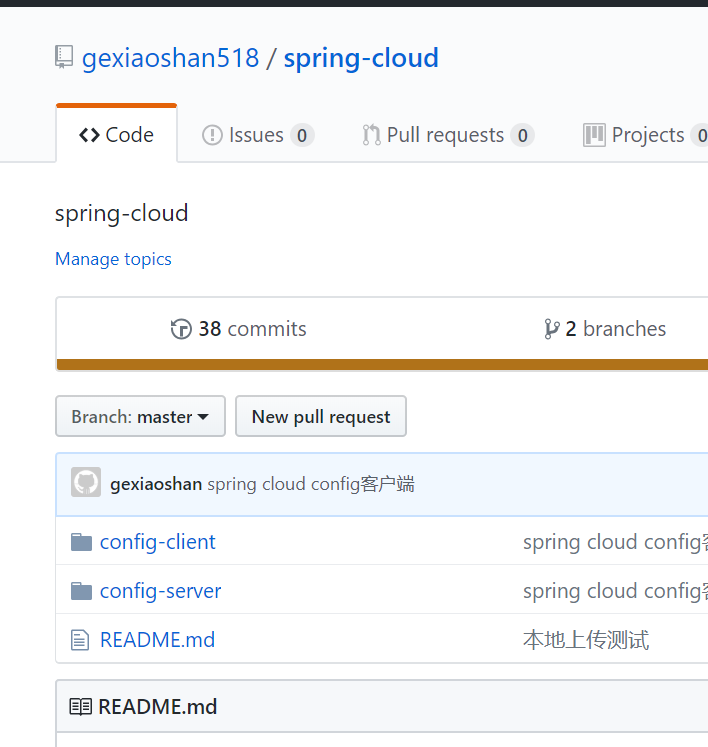
配置文件存放在gitHub上
上面配的git地址(https://github.com/gexiaoshan518/spring-cloud.git),界面如下:
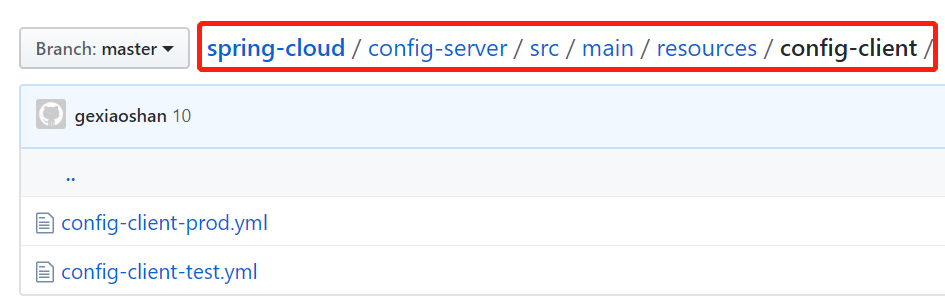
文件具体位置,在search-paths: 'config-server/src/main/resources/{application}' 路径下:
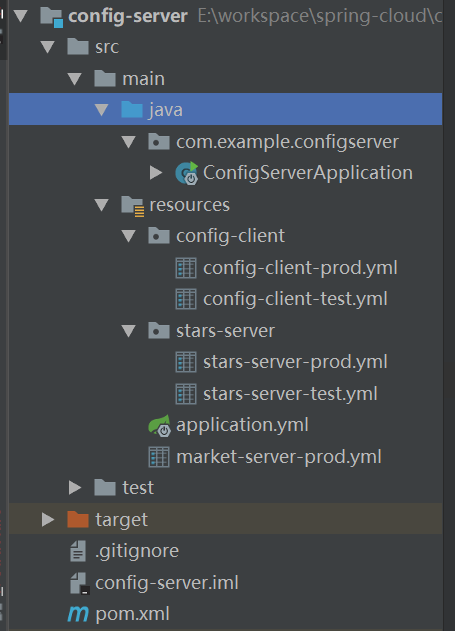
config-server结构如下:
项目推送到gitHub,启动
可按照以下规则访问配置信息:
/{application}/{profile}[/{label}]
/{application}-{profile}.yml
/{label}/{application}-{profile}.yml
/{application}-{profile}.properties
/{label}/{application}-{profile}.properties
各个占位符所代表的含义
- application: 表示微服务名称,即配置的spring.application.name
- profile: 表示当前的环境,local、feature、dev、test、prod
- label: 表示git仓库分支,feature、develop、test、master,当然默认的话是master
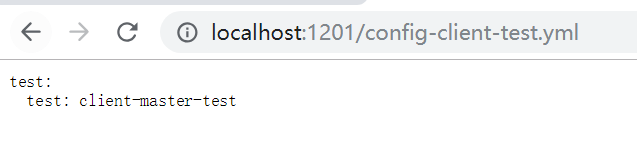
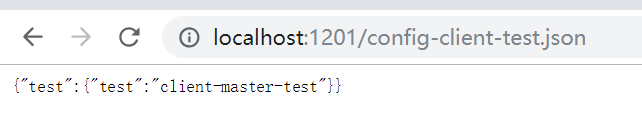
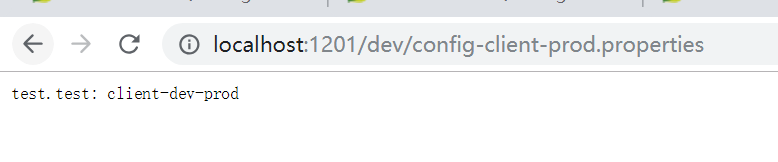
启动后,访问效果如下:


2.新建一个spring boot项目config-client(config客户端)
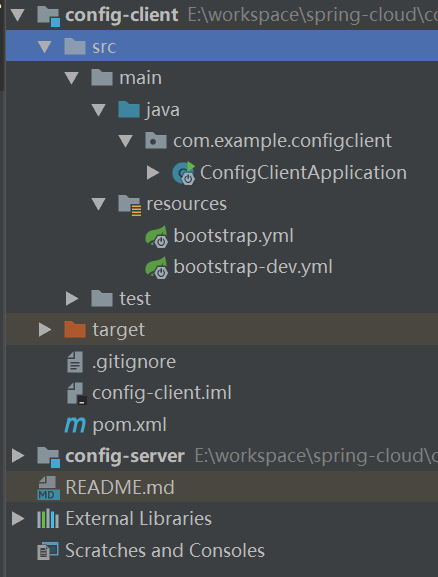
结构如下:
pom.xml配置如下:
<?xml version="1.0" encoding="UTF-8"?>

<project xmlns="http://maven.apache.org/POM/4.0.0" xmlns:xsi="http://www.w3.org/2001/XMLSchema-instance"

         xsi:schemaLocation="http://maven.apache.org/POM/4.0.0 http://maven.apache.org/xsd/maven-4.0.0.xsd">

    <modelVersion>4.0.0</modelVersion>

    <parent>

        <groupId>org.springframework.boot</groupId>

        <artifactId>spring-boot-starter-parent</artifactId>

        <version>2.1.1.RELEASE</version>

        <relativePath/> <!-- lookup parent from repository -->

    </parent>

    <groupId>com.example</groupId>

    <artifactId>config-client</artifactId>

    <version>0.0.1-SNAPSHOT</version>

    <name>config-client</name>

    <description>Demo project for Spring Boot</description>

    <properties>

        <java.version>1.8</java.version>

        <spring-cloud.version>Greenwich.RC1</spring-cloud.version>

    </properties>

    <dependencies>

        <dependency>

            <groupId>org.springframework.cloud</groupId>

            <artifactId>spring-cloud-starter-config</artifactId>

        </dependency>

        <dependency>

            <groupId>org.springframework.boot</groupId>

            <artifactId>spring-boot-starter-web</artifactId>

        </dependency>

        <dependency>

            <groupId>org.springframework.boot</groupId>

            <artifactId>spring-boot-starter-actuator</artifactId>

        </dependency>

        <dependency>

            <groupId>org.springframework.boot</groupId>

            <artifactId>spring-boot-starter-test</artifactId>

            <scope>test</scope>

        </dependency>

    </dependencies>

    <dependencyManagement>

        <dependencies>

            <dependency>

                <groupId>org.springframework.cloud</groupId>

                <artifactId>spring-cloud-dependencies</artifactId>

                <version>${spring-cloud.version}</version>

                <type>pom</type>

                <scope>import</scope>

            </dependency>

        </dependencies>

    </dependencyManagement>

    <build>

        <plugins>

            <plugin>

                <groupId>org.springframework.boot</groupId>

                <artifactId>spring-boot-maven-plugin</artifactId>

            </plugin>

        </plugins>

    </build>

    <repositories>

        <repository>

            <id>spring-milestones</id>

            <name>Spring Milestones</name>

            <url>https://repo.spring.io/milestone</url>

        </repository>

    </repositories>

</project>
配置bootstrap.yml 如下:
server:

  port: 8088

spring:

  application:

    name: config-client

  profiles:

    active: prod

  cloud:

    config:

      profile: ${spring.profiles.active}

      label: master

      uri: http://localhost:1201

      username: admin

      password: 123456
ConfigClientApplication代码如下:
package com.example.configclient;

import org.springframework.beans.factory.annotation.Value;

import org.springframework.boot.SpringApplication;

import org.springframework.boot.autoconfigure.SpringBootApplication;

import org.springframework.web.bind.annotation.RequestMapping;

import org.springframework.web.bind.annotation.RestController;

@SpringBootApplication

@RestController

public class ConfigClientApplication {

    public static void main(String[] args) {

        SpringApplication.run(ConfigClientApplication.class, args);

    }

    @Value("${test.test}")

    private String test;

    @RequestMapping("/test")

    public String getTest(){

        return test;

    }

}
启动,访问http://localhost:8088/test,如下:

因配置中心中只配置了config-client的test和prod环境的配置文件,若客户端配置spring.profiles.active:dev
则会读取本项目下的bootstrap-dev.yml 配置文件中的配置
当仓库中的配置修改后,如何在不启动客户端服务的情况下,更新配置,下面介绍下refresh 手动刷新的方法。
在客户端添加依赖:
<dependency>

            <groupId>org.springframework.boot</groupId>

            <artifactId>spring-boot-starter-actuator</artifactId>

</dependency>
在需要加载变量的类上面加载@RefreshScope,在客户端执行/actuator/refresh的时候就会更新此类下面的变量值。
@RestController

@RefreshScope

public class TestController {

    @Value("${test.test}")

    private String test;

    @RequestMapping("/test")

    public String getTest(){

        return test;

    }

}
修改配置bootstrap.yml,添加如下配置:
management:

  endpoints:

    web:

      exposure:

        include: refresh
说明下我这里使用的springboot2.1
测试:
调用
curl -X POST http://localhost:8088/actuator/refresh
后,在调用接口,配置更新demo代码gitHub地址:https://github.com/gexiaoshan518/spring-cloud
欢迎扫码交流:

spring-cloud config配置中心的更多相关文章
- 跟我学SpringCloud | 第七篇:Spring Cloud Config 配置中心高可用和refresh
SpringCloud系列教程 | 第七篇:Spring Cloud Config 配置中心高可用和refresh Springboot: 2.1.6.RELEASE SpringCloud: Gre ...
- 微服务SpringCloud之Spring Cloud Config配置中心Git
微服务以单个接口为颗粒度,一个接口可能就是一个项目,如果每个项目都包含一个配置文件,一个系统可能有几十或上百个小项目组成,那配置文件也会有好多,对后续修改维护也是比较麻烦,就和前面的服务注册一样,服务 ...
- 微服务SpringCloud之Spring Cloud Config配置中心服务化
在前面两篇Spring Cloud Config配置中心的博客中都是需要指定配置服务的地址url:spring.cloud.config.uri,客户端都是直接调用配置中心的server端来获取配置文 ...
- spring cloud --- config 配置中心 [本地、git获取配置文件]
spring boot 1.5.9.RELEASE spring cloud Dalston.SR1 1.前言 spring cloud config 配置中心是什么? 为了统一管理配 ...
- Spring Cloud Config 配置中心高可用
详细参见 <Spring Cloud 与 Docker微服务架构实战> p163-9.10 Spring Cloud Config 与 Eureka 配合使用 p163-9.12 Conf ...
- Spring Cloud Config 配置中心
请将远程配置文件的格式写对: 比如使用 *.yml 或者 *.properties yml: testconfig: testvalue properties: testconfig=testvalu ...
- 微服务SpringCloud之Spring Cloud Config配置中心SVN
在回来的路上看到一个个的都抱着花,吃了一路的狗粮,原本想着去旁边的工业园里跑跑步呢,想想还是算了,人家过七夕,俺们过巴西.上一博客学习了Spring Cloud Config使用git作为配置中心,本 ...
- SpringCloud学习笔记(7):使用Spring Cloud Config配置中心
简介 Spring Cloud Config为分布式系统中的外部化配置提供了服务器端和客户端支持,服务器端统一管理所有配置文件,客户端在启动时从服务端获取配置信息.服务器端有多种配置方式,如将配置文件 ...
- Spring Cloud Config 配置中心实践过程中,你需要了解这些细节!
本文导读: Spring Cloud Config 基本概念 Spring Cloud Config 客户端加载流程 Spring Cloud Config 基于消息总线配置 Spring Cloud ...
- Spring Cloud Config 配置中心 自动加解密功能 jasypt方式
使用此种方式会存在一种问题:如果我配置了自动配置刷新,则刷新过后,加密过后的密文无法被解密.具体原因分析,看 SpringCloud 详解配置刷新的原理 使用 jasypt-spring-boot- ...
随机推荐
- MySQL 查询语句--------------进阶5:分组查询
#进阶5:分组查询 /* select 分组函数,列(要求出现在group by的后面) from 表 [where 筛选条件] group by 分组的列表 [order by 子句] 注意: 查询 ...
- debian7下安装eclipse
apt-get install build-essential 完成后从eclipse官网上下载C++专用的版本,直接解压缩即可
- Chrome打开标签页预览
类似于Microsoft Edge浏览器上的标签页缩略图预览非常方便,其实现在谷歌浏览器正在测试相关的功能,如果想提前体验,就在地址栏输入"chrome://flags"并按下回车 ...
- idea 激活步骤
如果你的idea是已经激活过,但是到期了,点击help-register 删除之前的license server(不是通过注册服务激活的,就不用管) 激活步骤如下: 1.修改hosts文件,把 0.0 ...
- Excelvba从另一个工作簿取值
Private Sub getValue_Click() Dim MyWorkbook As Workbook Set MyWorkbook = Application.Workbooks.Open( ...
- npm安装教程[转载的,版权归原作者]
详情在里面:https://www.cnblogs.com/lgx5/p/10732016.html 详情二:https://www.cnblogs.com/lolDragon/p/6268345.h ...
- 给定中序和后序遍历,求前序序列(C++递归方式实现)
问题: 输入后序和中序,求中序遍历. 算法: void f2(string &pre,string in, string post) { ) //序列为空结束 return; ; //根节点 ...
- Android作业list
作业1. 请在自己的电脑上完成Android的安装与配置,并完成Hello Android项目.上交自己与项目的合照,将照片传至QQ群中. ------------------------------ ...
- Codeforces Round #392 (Div. 2) - B
题目链接:http://codeforces.com/contest/758/problem/B 题意:给定n个点灯的情况,灯只有四种颜色RBGY,然后如果某个灯坏了则用'!'表示,现在要求将坏的灯( ...
- ThreadLocal的原理
ThreadLocal是一个支持泛型的java类,抛开里面的静态内部类ThreadLocalMap不说,其实它没几行代码,不信,您自己去看看.它用来干啥?类上注释说的很明白: 它能让线程拥有了自己内部 ...