
《DSP using MATLAB》Problem 8.25


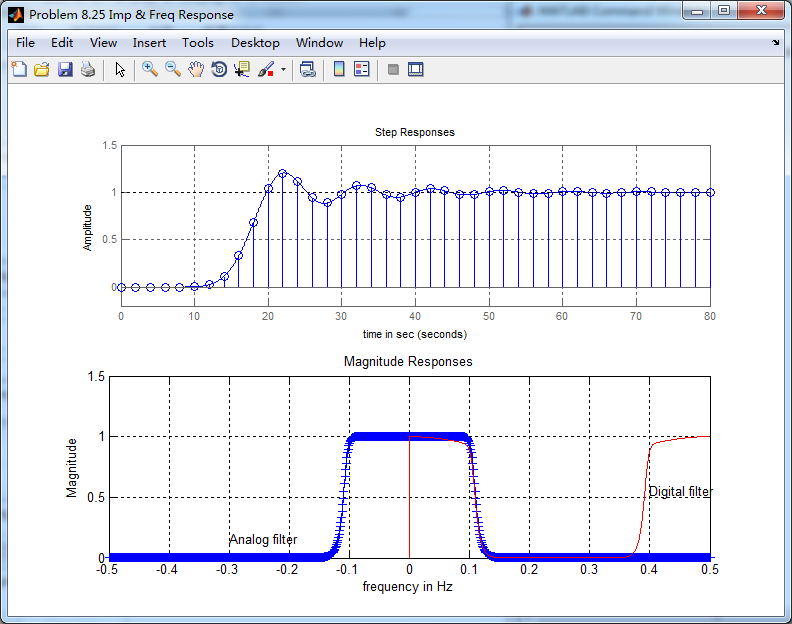
用match-z方法,将模拟低通转换为数字低通
代码:
%% ------------------------------------------------------------------------

%%            Output Info about this m-file

fprintf('\n***********************************************************\n');

fprintf('        <DSP using MATLAB> Problem 8.25 \n\n');

banner();

%% ------------------------------------------------------------------------

% -------------------------------

%       ω = ΩT = 2πF/fs

% Digital Filter Specifications:

% -------------------------------

wp = 0.4*pi;                     % digital passband freq in rad/sec

ws = 0.6*pi;                     % digital stopband freq in rad/sec

Rp = 0.5;                        % passband ripple in dB

As = 50;                         % stopband attenuation in dB

Ripple = 10 ^ (-Rp/20)           % passband ripple in absolute

Attn = 10 ^ (-As/20)             % stopband attenuation in absolute

% Analog prototype specifications: Inverse Mapping for frequencies

T = 2;                       % set T = 1

Fs = 1/T;

OmegaP = wp/T;               % prototype passband freq

OmegaS = ws/T;               % prototype stopband freq

% Analog Butterworth Prototype Filter Calculation:

[cs, ds] = afd_butt(OmegaP, OmegaS, Rp, As);

% Calculation of second-order sections:

fprintf('\n***** Cascade-form in s-plane: START *****\n');

[CS, BS, AS] = sdir2cas(cs, ds)

fprintf('\n***** Cascade-form in s-plane: END *****\n');

% Calculation of Frequency Response:

[db_s, mag_s, pha_s, ww_s] = freqs_m(cs, ds, 0.5*pi);

% Calculation of Impulse Response:

%[ha, x, t] = impulse(cs, ds);

% Impulse Invariance Transformation:

%[b, a] = imp_invr(cs, ds, T);

% Calculation of Step Response:

[ha, x, t] = step(cs, ds);

% Step Invariance Transformation:

[b, a] = stp_invr(cs, ds, T); [C, B, A] = dir2par(b, a)

% Calculation of Frequency Response:

[db, mag, pha, grd, ww] = freqz_m(b, a);

%% -----------------------------------------------------------------

%%                             Plot

%% -----------------------------------------------------------------

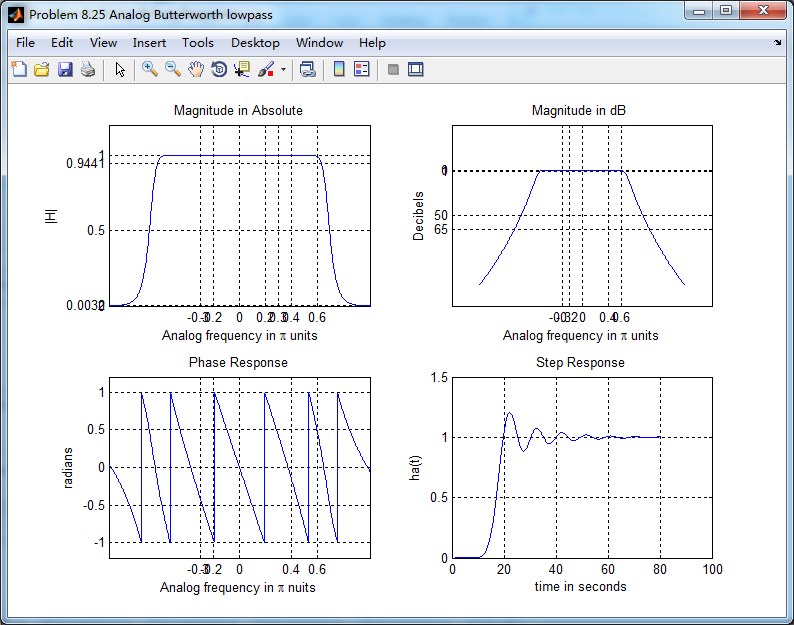
figure('NumberTitle', 'off', 'Name', 'Problem 8.25 Analog Butterworth lowpass')

set(gcf,'Color','white');

M = 1;                          % Omega max

subplot(2,2,1); plot(ww_s, mag_s);  grid on; axis([-M, M, 0, 1.2]);

xlabel(' Analog frequency in \pi units'); ylabel('|H|'); title('Magnitude in Absolute');

set(gca, 'XTickMode', 'manual', 'XTick', [-0.3, -0.2, 0, 0.2, 0.3, 0.4, 0.6]);

set(gca, 'YTickMode', 'manual', 'YTick', [0, 0.0032, 0.5, 0.9441, 1]);

subplot(2,2,2); plot(ww_s, db_s);  grid on; %axis([0, M, -50, 10]);

xlabel('Analog frequency in \pi units'); ylabel('Decibels'); title('Magnitude in dB ');

set(gca, 'XTickMode', 'manual', 'XTick', [-0.3, -0.2, 0, 0.4, 0.6]);

set(gca, 'YTickMode', 'manual', 'YTick', [-65, -50, -1, 0]);

set(gca,'YTickLabelMode','manual','YTickLabel',['65';'50';' 1';' 0']);

subplot(2,2,3); plot(ww_s, pha_s/pi);  grid on; axis([-M, M, -1.2, 1.2]);

xlabel('Analog frequency in \pi nuits'); ylabel('radians'); title('Phase Response');

set(gca, 'XTickMode', 'manual', 'XTick', [-0.3, -0.2, 0, 0.4, 0.6]);

set(gca, 'YTickMode', 'manual', 'YTick', [-1:0.5:1]);

subplot(2,2,4); plot(t, ha); grid on; %axis([0, 30, -0.05, 0.25]);

xlabel('time in seconds'); ylabel('ha(t)'); title('Step Response');

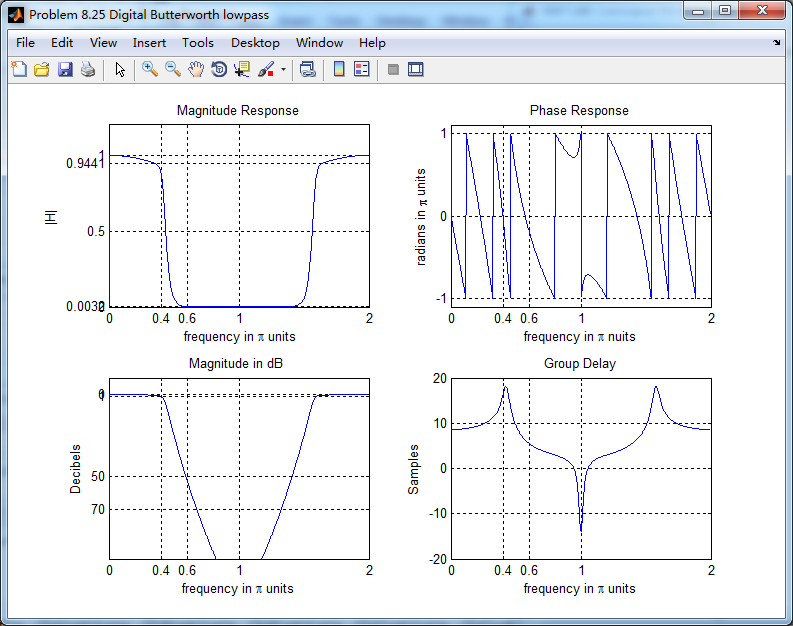
figure('NumberTitle', 'off', 'Name', 'Problem 8.25 Digital Butterworth lowpass')

set(gcf,'Color','white');

M = 2;                          % Omega max

subplot(2,2,1); plot(ww/pi, mag); axis([0, M, 0, 1.2]); grid on;

xlabel(' frequency in \pi units'); ylabel('|H|'); title('Magnitude Response');

set(gca, 'XTickMode', 'manual', 'XTick', [0, 0.4, 0.6, 1.0, M]);

set(gca, 'YTickMode', 'manual', 'YTick', [0, 0.0032, 0.5, 0.9441, 1]);

subplot(2,2,2); plot(ww/pi, pha/pi); axis([0, M, -1.1, 1.1]); grid on;

xlabel('frequency in \pi nuits'); ylabel('radians in \pi units'); title('Phase Response');

set(gca, 'XTickMode', 'manual', 'XTick', [0, 0.4, 0.6, 1.0, M]);

set(gca, 'YTickMode', 'manual', 'YTick', [-1:1:1]);

subplot(2,2,3); plot(ww/pi, db); axis([0, M, -100, 10]); grid on;

xlabel('frequency in \pi units'); ylabel('Decibels'); title('Magnitude in dB ');

set(gca, 'XTickMode', 'manual', 'XTick', [0, 0.4, 0.6, 1.0, M]);

set(gca, 'YTickMode', 'manual', 'YTick', [-70, -50, -1, 0]);

set(gca,'YTickLabelMode','manual','YTickLabel',['70';'50';' 1';' 0']);

subplot(2,2,4); plot(ww/pi, grd); grid on; %axis([0, M, 0, 35]);

xlabel('frequency in \pi units'); ylabel('Samples'); title('Group Delay');

set(gca, 'XTickMode', 'manual', 'XTick', [0, 0.4, 0.6, 1.0, M]);

%set(gca, 'YTickMode', 'manual', 'YTick', [0:5:35]);

figure('NumberTitle', 'off', 'Name', 'Problem 8.25 Pole-Zero Plot')

set(gcf,'Color','white');

zplane(b,a);

title(sprintf('Pole-Zero Plot'));

%pzplotz(b,a);

% ----------------------------------------------

%       Calculation of Impulse Response

% ----------------------------------------------

figure('NumberTitle', 'off', 'Name', 'Problem 8.25 Imp & Freq Response')

set(gcf,'Color','white');

t = [0:0.01:80]; subplot(2,1,1); step(cs,ds,t); grid on;      % Step response of the analog filter

axis([0,80,-0.2,1.5]);hold on

n = [0:1:80/T]; hn = filter(b,a,stepseq(0,0,80/T));           % Step response of the digital filter

stem(n*T,hn); xlabel('time in sec'); title ('Step Responses');

hold off

% Calculation of Frequency Response:

[dbs, mags, phas, wws] = freqs_m(cs, ds, 2*pi/T);             % Analog frequency   s-domain

[dbz, magz, phaz, grdz, wwz] = freqz_m(b, a);                 % Digital  z-domain

%% -----------------------------------------------------------------

%%                             Plot

%% -----------------------------------------------------------------

subplot(2,1,2); plot(wws/(2*pi),mags,'b+', wwz/(2*pi)*Fs,magz,'r'); grid on;

xlabel('frequency in Hz'); title('Magnitude Responses'); ylabel('Magnitude');

text(-0.3,0.15,'Analog filter'); text(0.4,0.55,'Digital filter');
运行结果:
通带、阻带绝对指标

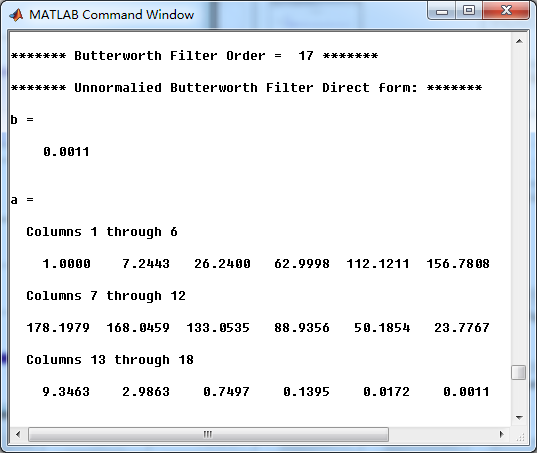
模拟原型Butterworth低通滤波器,直接形式系数
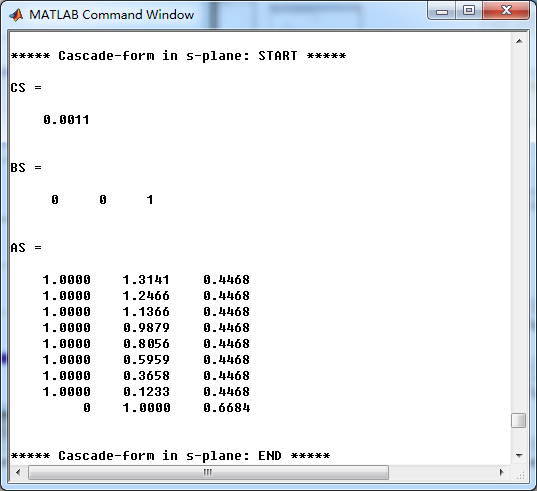
模拟原型Butterworth低通滤波器,串联形式系数
转换成数字低通后,并联形式系数

《DSP using MATLAB》Problem 8.25的更多相关文章
- 《DSP using MATLAB》Problem 7.25
代码: %% ++++++++++++++++++++++++++++++++++++++++++++++++++++++++++++++++++++++++++++++++ %% Output In ...
- 《DSP using MATLAB》示例Example7.25
今天清明放假的第二天,早晨出去吃饭时天气有些阴,十点多开始“清明时节雨纷纷”了. 母亲远在他乡看孙子,挺劳累的.父亲照顾生病的爷爷…… 我打算今天把<DSP using MATLAB>第7 ...
- 《DSP using MATLAB》Problem 7.27
代码: %% ++++++++++++++++++++++++++++++++++++++++++++++++++++++++++++++++++++++++++++++++ %% Output In ...
- 《DSP using MATLAB》Problem 7.14
代码: %% ++++++++++++++++++++++++++++++++++++++++++++++++++++++++++++++++++++++++++++++++ %% Output In ...
- 《DSP using MATLAB》Problem 7.13
代码: %% ++++++++++++++++++++++++++++++++++++++++++++++++++++++++++++++++++++++++++++++++ %% Output In ...
- 《DSP using MATLAB》Problem 6.23
代码: %% ++++++++++++++++++++++++++++++++++++++++++++++++++++++++++++++++++++++++++++++++ %% Output In ...
- 《DSP using MATLAB》Problem 5.24-5.25-5.26
代码: function y = circonvt(x1,x2,N) %% N-point Circular convolution between x1 and x2: (time domain) ...
- 《DSP using MATLAB》Problem 4.21
快到龙抬头,居然下雪了,天空飘起了雪花,温度下降了近20°. 代码: %% -------------------------------------------------------------- ...
- 《DSP using MATLAB》Problem 4.15
只会做前两个, 代码: %% ---------------------------------------------------------------------------- %% Outpu ...
随机推荐
- libevent的使用 32位 64位
前段时间一个项目需要用到高并发的服务,想着自己应该可以写一个,windwos 上使用完成端口实现,写完之后,测试感觉没什么问题,可是一上线各种各样的问题,初步怀疑是底层网路库的问题,于是决定更换网络库 ...
- 2018-2-13-win10-uwp-上传Nuget-让别人用我们的库
title author date CreateTime categories win10 uwp 上传Nuget 让别人用我们的库 lindexi 2018-2-13 17:23:3 +0800 2 ...
- JS事件 失焦事件(onblur)onblur事件与onfocus是相对事件,当光标离开当前获得聚焦对象的时候,触发onblur事件,同时执行被调用的程序。
失焦事件(onblur) onblur事件与onfocus是相对事件,当光标离开当前获得聚焦对象的时候,触发onblur事件,同时执行被调用的程序. 如下代码, 网页中有用户和密码两个文本框.当前光标 ...
- 人脸识别--Open set和Close set的区别
训练和测试人脸识别分类器时,总会提到Open-set和Close-set.这俩词到底是什么概念呢?有什么区别呢? 所谓close-set,就是所有的测试集都在训练集中出现过.所以每次的预测直接得出测试 ...
- Dubbo的服务请求失败怎么处理
dubbo启动时默认有重试机制和超时机制. 超时机制的规则是如果在一定的时间内,provider没有返回,则认为本次调用失败, 重试机制在出现调用失败时,会再次调用.如果在配置的调用次数内都失败,则认 ...
- Tomcat - 基本知识
基本概念 Tomcat是接收和解析http请求,并将结果返回客户端的应用程序 轻量级的web应用服务器 适用于并发性不是很高的系统中 开发和调试jsp的首选 类似的应用程序:Jetty, JBoss/ ...
- 配置文件一applicationContext.xml
p命名空间注入 需要引入xmlns:p="http://www.springframework.org/schema/p" p命名空间注入的特点是使用属性而不是子元素的形式配置Be ...
- java在使用equals的时候一种习惯帮忙隔离大部分空指针
相同的一段代码: 所以,在平时编码的时候,尽量把需要比对的不为空的放在equal前面,比如判断 i 是否等于 1,那么使用 1.equals(i) 更为合适,在equals源码中 传入的是object ...
- css3技巧——产品列表之鼠标滑过效果translateY(三)
<div class="main"> <div class="view view-tenth"> <figure> < ...
- kubernetes忘记token或者token过期怎么加入k8s集群
1.先查看token是否还可用 [root@hadoop01 ~]# kubeadm token list 1.1) 还在则获取ca证书sha256编码hash值,不在则进行2操作 openssl x ...