
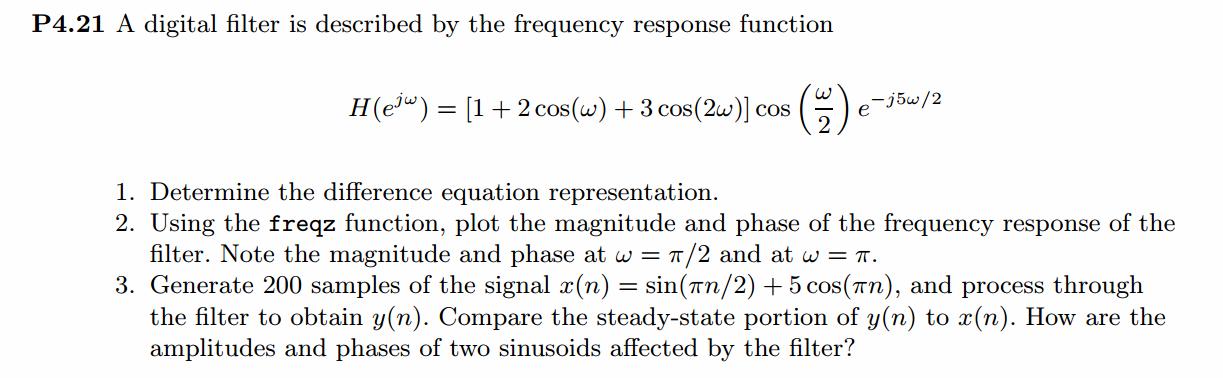
《DSP using MATLAB》Problem 4.21
快到龙抬头,居然下雪了,天空飘起了雪花,温度下降了近20°。


代码:
%% ------------------------------------------------------------------------

%%            Output Info about this m-file

fprintf('\n***********************************************************\n');

fprintf('        <DSP using MATLAB> Problem 4.21 \n\n');

banner();

%% ------------------------------------------------------------------------

% ----------------------------------------------------

%               1        H1(z)

% ----------------------------------------------------

b = [3/4, 5/4, 1, 1, 5/4, 3/4]; a = [1];                             %

[R, p, C] = residuez(b,a)

Mp = (abs(p))'

Ap = (angle(p))'/pi

%% ------------------------------------------------------

%%   START a    determine H(z) and sketch

%% ------------------------------------------------------

figure('NumberTitle', 'off', 'Name', 'P4.21 H(z) its pole-zero plot')

set(gcf,'Color','white');

zplane(b,a);

title('pole-zero plot'); grid on;

%% ----------------------------------------------

%%    END

%% ----------------------------------------------

% ------------------------------------

%                  h(n)

% ------------------------------------

[delta, n] = impseq(0, 0, 19);

h_check = filter(b, a, delta);                                             % check sequence

%% --------------------------------------------------------------

%%    START    b   |H|   <H

%%    3rd form of freqz

%% --------------------------------------------------------------

w = [-500:1:500]*2*pi/500;     H = freqz(b,a,w);

%[H,w] = freqz(b,a,200,'whole');                 % 3rd form of freqz

magH  = abs(H);  angH  = angle(H);  realH  = real(H);  imagH  = imag(H);

%% ================================================

%%              START H's  mag ang real imag

%% ================================================

figure('NumberTitle', 'off', 'Name', 'P4.21  DTFT and Real Imaginary Part ');

set(gcf,'Color','white');

subplot(2,2,1); plot(w/pi,magH); grid on;  %axis([0,1,0,1.5]);

title('Magnitude Response');

xlabel('frequency in \pi units'); ylabel('Magnitude  |H|');

subplot(2,2,3); plot(w/pi, angH/pi); grid on; % axis([-1,1,-1,1]);

title('Phase Response');

xlabel('frequency in \pi units'); ylabel('Radians/\pi');

subplot('2,2,2'); plot(w/pi, realH); grid on;

title('Real Part');

xlabel('frequency in \pi units'); ylabel('Real');

subplot('2,2,4'); plot(w/pi, imagH); grid on;

title('Imaginary Part');

xlabel('frequency in \pi units'); ylabel('Imaginary');

%% ==================================================

%%             END H's  mag ang real imag

%% ==================================================

% --------------------------------------------------------------

%        x(n) through the filter, we get output y(n)

% --------------------------------------------------------------

N = 200;

nx = [0:1:N-1];

 x = sin(pi*nx/2) + 5 * cos(pi*nx);

[y, ny] = conv_m(h_check, n, x, nx);

figure('NumberTitle', 'off', 'Name', 'P4.21  Input & h(n) Sequence');

set(gcf,'Color','white');

subplot(3,1,1); stem(nx, x); grid on;  %axis([0,1,0,1.5]);

title('x(n)');

xlabel('n'); ylabel('x');

subplot(3,1,2); stem(n, h_check); grid on;  %axis([0,1,0,1.5]);

title('h(n)');

xlabel('n'); ylabel('h');

subplot(3,1,3); stem(ny, y); grid on;  %axis([0,1,0,1.5]);

title('y(n)');

xlabel('n'); ylabel('y');

figure('NumberTitle', 'off', 'Name', 'P4.21  Output Sequence');

set(gcf,'Color','white');

subplot(1,1,1); stem(ny, y); grid on;  %axis([0,1,0,1.5]);

title('y(n)');

xlabel('n'); ylabel('y');

% ----------------------------------------

%                yss Response

% ----------------------------------------

ax = conv([1,0,1], [1,2,1])

bx = conv([0,1], [1,2,1]) + conv([5,5], [1,0,1])

by = conv(bx, b)

ay = ax

zeros = roots(by)

[R, p, C] = residuez(by, ay)

Mp_Y = (abs(p))'

Ap_Y = (angle(p))'/pi

%% ------------------------------------------------------

%%   START a    determine Y(z) and sketch

%% ------------------------------------------------------

figure('NumberTitle', 'off', 'Name', 'P4.21 Y(z) its pole-zero plot')

set(gcf,'Color','white');

zplane(by, ay);

title('pole-zero plot'); grid on;

% ------------------------------------

%                  y(n)

% ------------------------------------

LENGH = 100;

[delta, n] = impseq(0, 0, LENGH-1);

y_check = filter(by, ay, delta);                                             % check sequence

y_answer0 = 4.75*delta;

[delta_1, n1] = sigshift(delta, n, 1);

y_answer1 = 2.25*delta_1;

[delta_2, n2] = sigshift(delta, n, 2);

y_answer2 = 2.75*delta_2;

[delta_3, n3] = sigshift(delta, n, 3);

y_answer3 = 3.75*delta_3;

[delta_4, n4] = sigshift(delta, n, 4);

y_answer4 = 4.50*delta_4;

y_answer5 = (2*(-0.5)*cos(pi*n/2) + 2*0.5*sin(pi*n/2) ).*stepseq(0,0,LENGH-1);

[y01, n01] = sigadd(y_answer0, n,  y_answer1, n1);

[y02, n02] = sigadd(y_answer2, n2, y_answer3, n3);

[y03, n03] = sigadd(y01, n01, y02, n02);

[y04, n04] = sigadd(y03, n03, y_answer4, n4);

[y_answer, n_answer] = sigadd(y04, n04, y_answer5, n);

figure('NumberTitle', 'off', 'Name', 'P4.21  Yss and Y ');

set(gcf,'Color','white');

subplot(2,1,1); stem(n, y_answer5); grid on;  %axis([0,1,0,1.5]);

title('Steady-State Response');

xlabel('n'); ylabel('Yss');

subplot(2,1,2); stem(n, y_check); grid on; % axis([-1,1,-1,1]);

title('Total Response');

xlabel('n'); ylabel('Y');
运行结果:
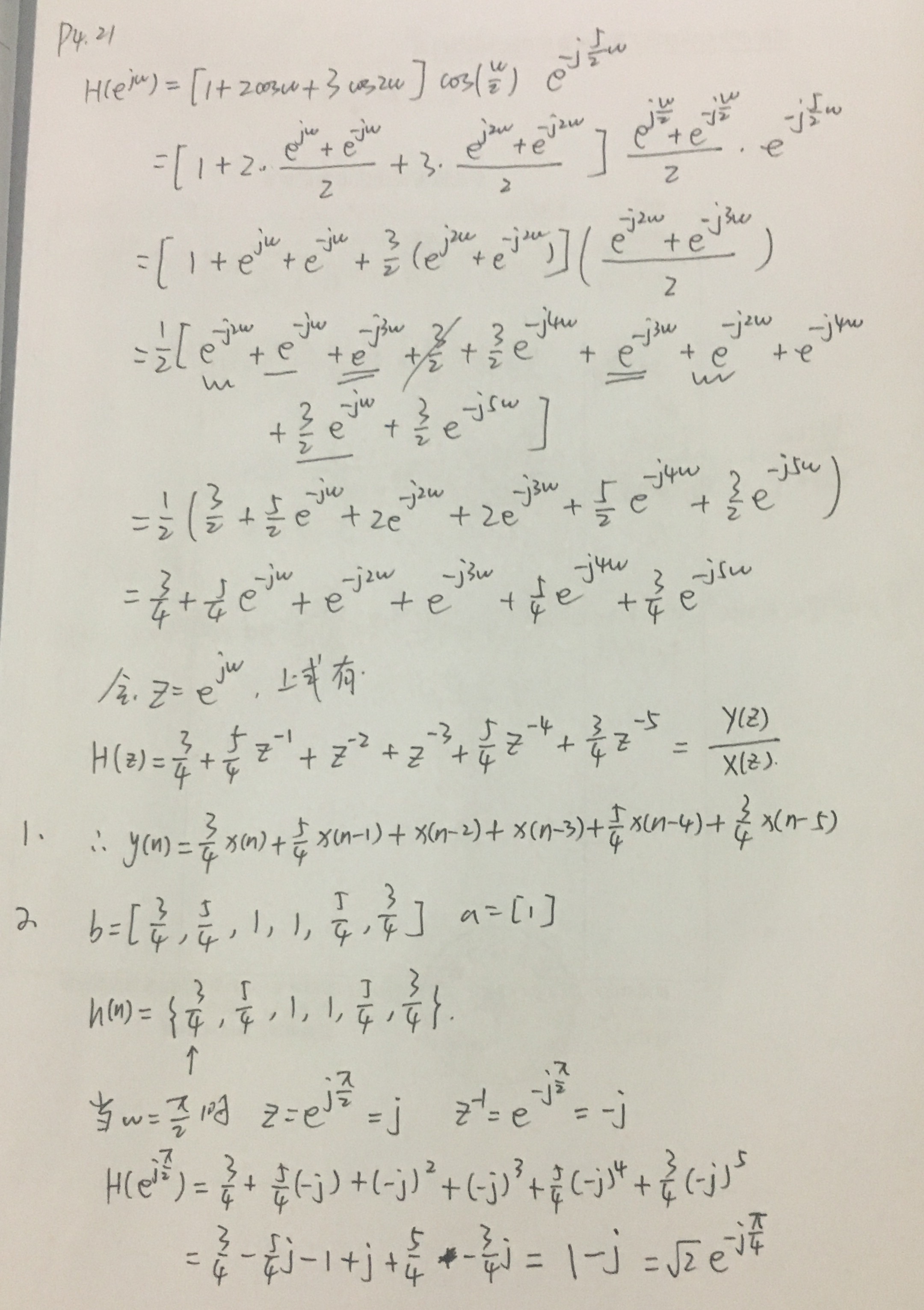
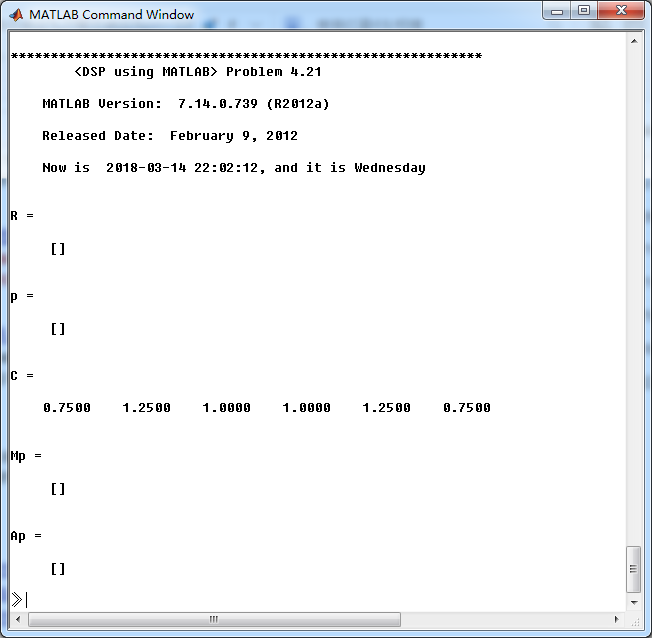
系统函数H(z)的系数:
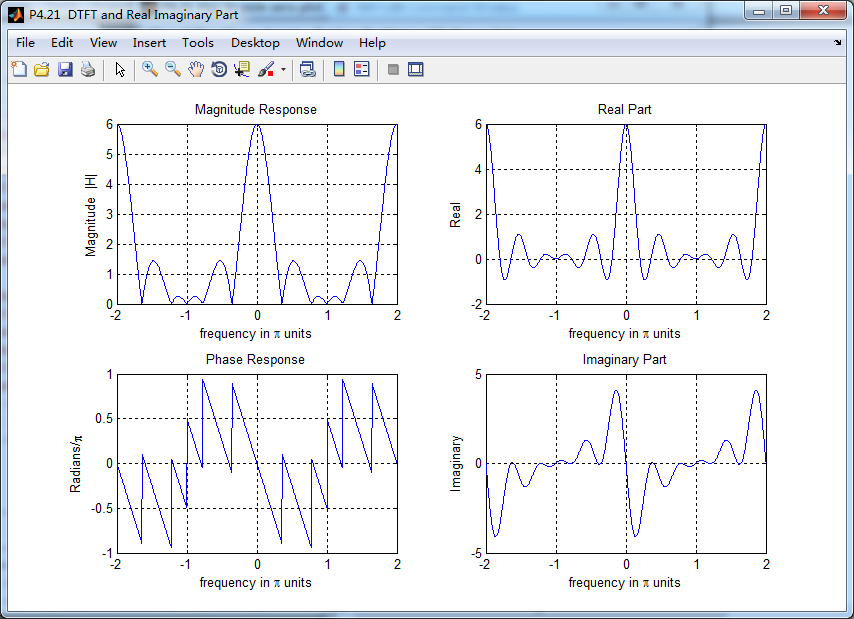
系统的DTFT,注意当ω=π/2和π时的振幅谱、相位谱的值。
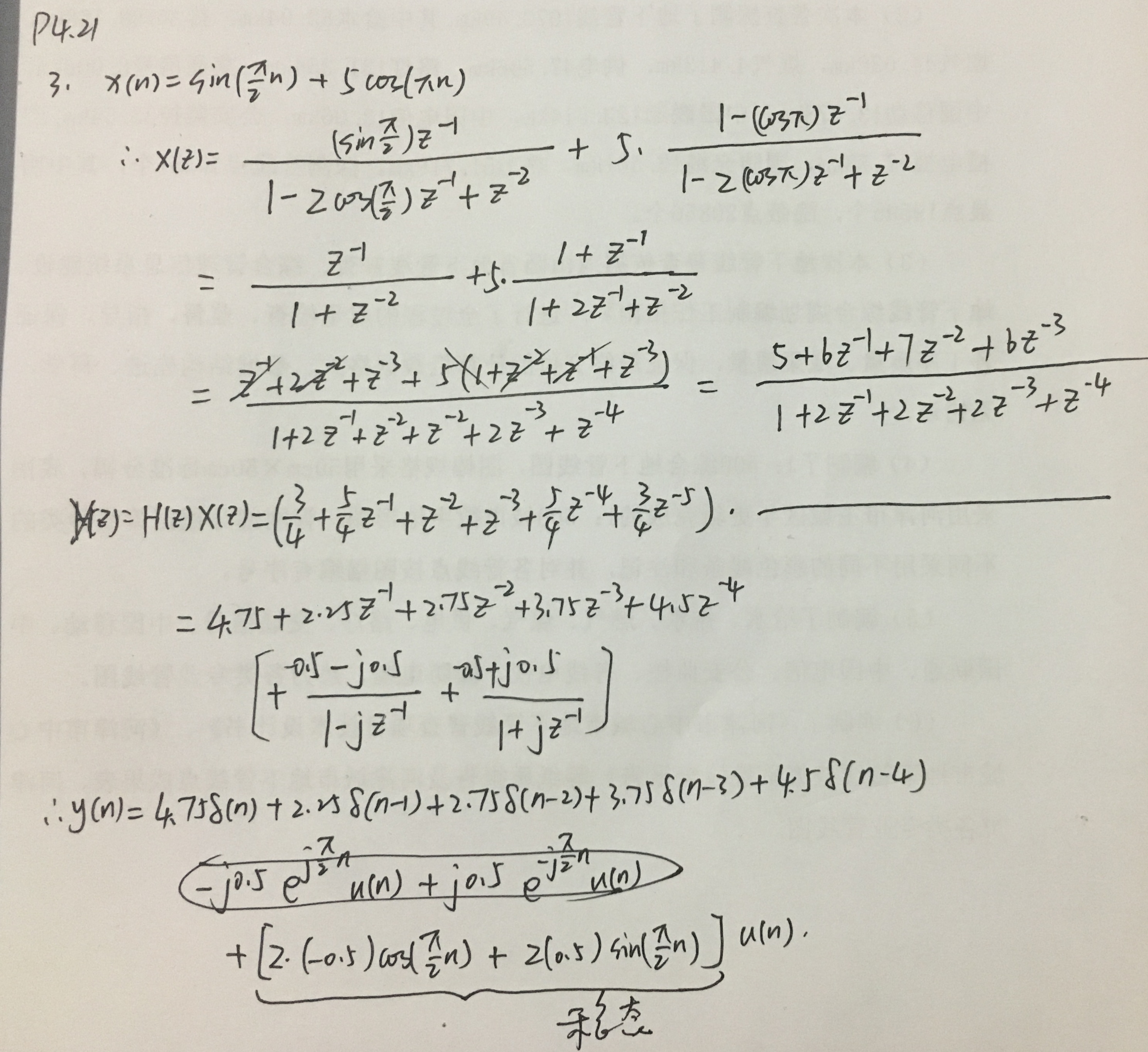
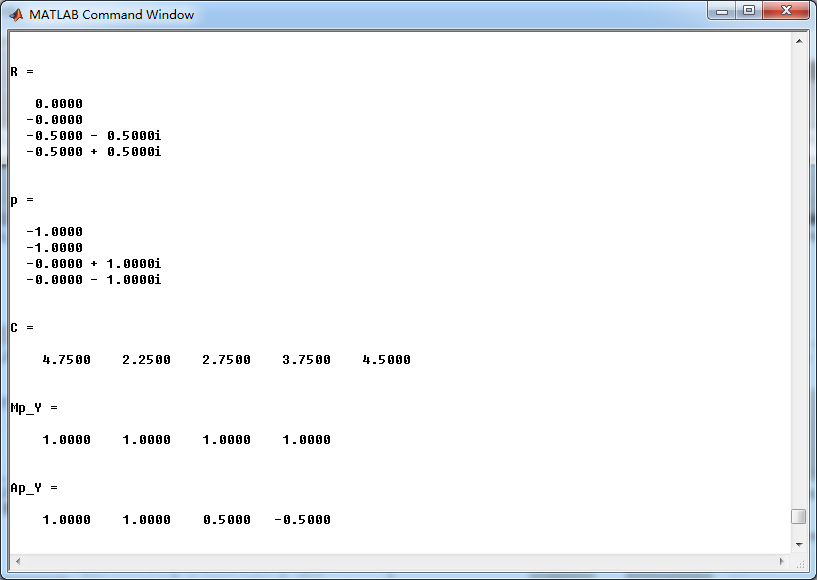
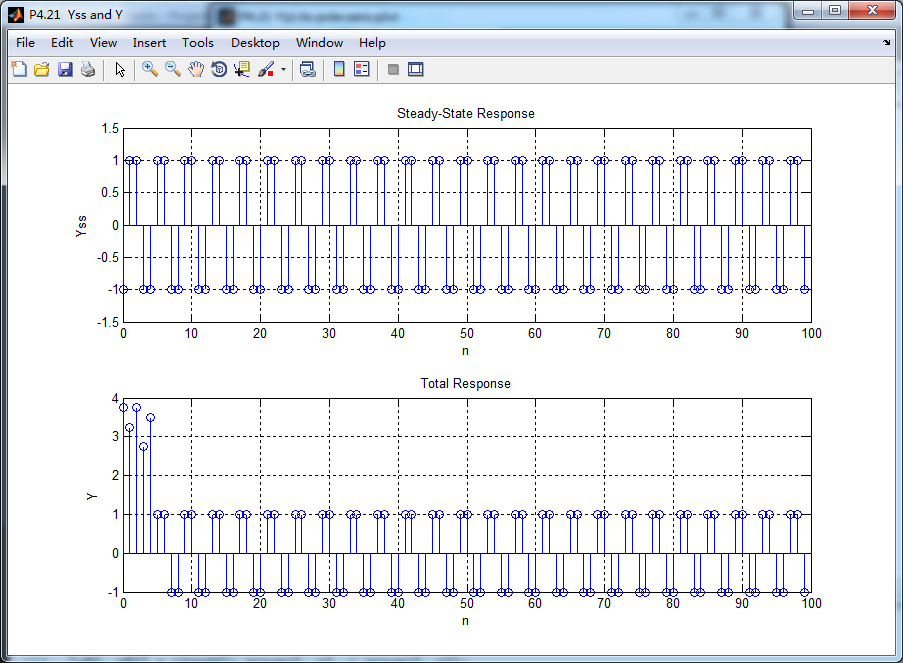
当有输入时,输出的Y(z)进行部分分式展开,留数及对应的极点如下:
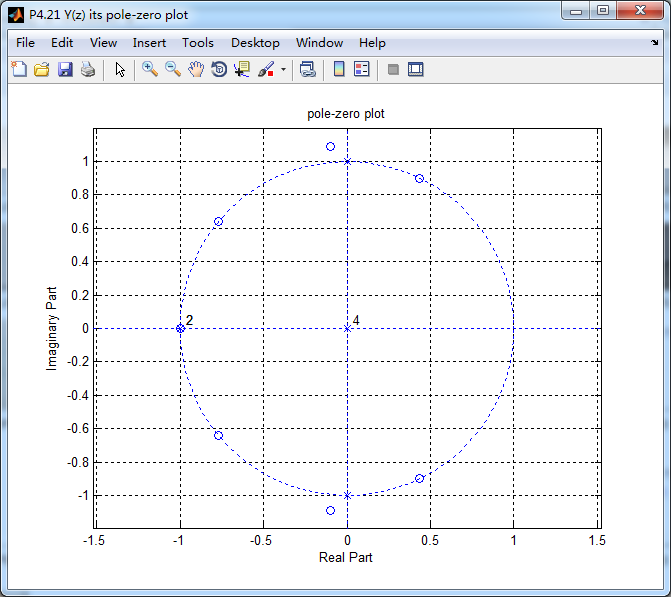
单位圆上z=-1处,极点和零点相互抵消,稳态响应只和正负j有关。
《DSP using MATLAB》Problem 4.21的更多相关文章
- 《DSP using MATLAB》Problem 6.21
代码: %% ++++++++++++++++++++++++++++++++++++++++++++++++++++++++++++++++++++++++++++++++ %% Output In ...
- 《DSP using MATLAB》Problem 5.21
证明: 代码: %% ++++++++++++++++++++++++++++++++++++++++++++++++++++++++++++++++++++++++++++++++++++++++ ...
- 《DSP using MATLAB》Problem 8.21
代码: %% ------------------------------------------------------------------------ %% Output Info about ...
- 《DSP using MATLAB》Problem 3.21
模拟信号经过不同的采样率进行采样后,得到不同的数字角频率,如下: 三种Fs,采样后的信号的谱 重建模拟信号,这里只显示由第1种Fs=0.01采样后序列进行重建,采用zoh.foh和spline三种方法 ...
- 《DSP using MATLAB》Problem 7.27
代码: %% ++++++++++++++++++++++++++++++++++++++++++++++++++++++++++++++++++++++++++++++++ %% Output In ...
- 《DSP using MATLAB》Problem 7.26
注意:高通的线性相位FIR滤波器,不能是第2类,所以其长度必须为奇数.这里取M=31,过渡带里采样值抄书上的. 代码: %% +++++++++++++++++++++++++++++++++++++ ...
- 《DSP using MATLAB》Problem 7.24
又到清明时节,…… 注意:带阻滤波器不能用第2类线性相位滤波器实现,我们采用第1类,长度为基数,选M=61 代码: %% +++++++++++++++++++++++++++++++++++++++ ...
- 《DSP using MATLAB》Problem 7.23
%% ++++++++++++++++++++++++++++++++++++++++++++++++++++++++++++++++++++++++++++++++ %% Output Info a ...
- 《DSP using MATLAB》Problem 7.16
使用一种固定窗函数法设计带通滤波器. 代码: %% ++++++++++++++++++++++++++++++++++++++++++++++++++++++++++++++++++++++++++ ...
随机推荐
- JDBC 与 Bean Shell的使用(一)获取值,并且传递
1.在使用Jmeter进行接口测试的时候,会使用到JDBC,连接数据库,操作数据库其得到的数据后续操作需要使用,这里我们使用了BeanShell的概念来获取JDBC的返回值 如下说明了联合使用的2种方 ...
- 为tomcat指定jdk
安装好jdk,不配置环境变量 windows平台 在catalina.bat文件和setclasspath.bat文件开头的空白处加上如下两句(指定JDK): \jre linux平台 在catali ...
- Dynamic Web Module 3.1 requires Java 1.7 or newer. 错误解决方案
在写代码的时候工程出现了这样奇怪的bug很是蛋疼啊,经过查询解决方法,终于解决了这些个问题. 下面是解决问题的方法,和大家分享一下 (1)确定你的java工程配置使用了java 7 右键单击你的工程p ...
- SecureCRT 7.2.0 Mac版密码无法保存的解决办法
参考:http://jingyan.baidu.com/article/915fc414fda5fb51394b20bd.html 我之前在网上找的解决办法都是SecureCRT 7.2.0 Mac ...
- Error: [ng:areq] Argument 'LoginCtrl' is not a function, got undefined
- 隔离级别 && SNAPSHOT
read uncommitted | 0 未提交读 将查询的隔离级别指定为 0. 可以读脏数据. 读脏数据:一事务对数据进行了增删改,但未提交,有可能回滚,另一事务却读取了未提交的数据. 例: 公 ...
- cookie -- 添加删除
前段时间学到了cookie,之前的公司用的jquery插件,现在终于学到了原生的js <!doctype html> <html> <head> <meta ...
- C++对象模型——默认构造函数的合成
最近在学习C++对象模型,看的书是侯捷老师的<深度探索C++对象模型>,发现自己以前对构造函数存在很多误解,作此笔记记录. 默认构造函数的误解 1.当程序猿定义了默认构造函数,编译器就会直 ...
- python--ConfigParser读写改配置文件
from configparser import ConfigParser fp = 'conf.ini' #定义配置文件名 conf = ConfigParser() #实例化 conf.read( ...
- php通过$_SERVER['HTTP_USER_AGENT']获取浏览器useAgent
php通过$_SERVER['HTTP_USER_AGENT']获取浏览器useAgent