
Spring Cloud Config配置中心的使用
一、概述
1. 为什么使用?
1> 配置文件太多,不方便维护
2> 配置文件一般都保存这各种明文显示的密码,无法保证配置内容的安全性,也无法做到按权限分配给个人
3> 更新配置项目需重启,试想想,在生产环境,那么多台机器。。。
2. config介绍
config分为Server端和Client端,实现原理如下图所示:
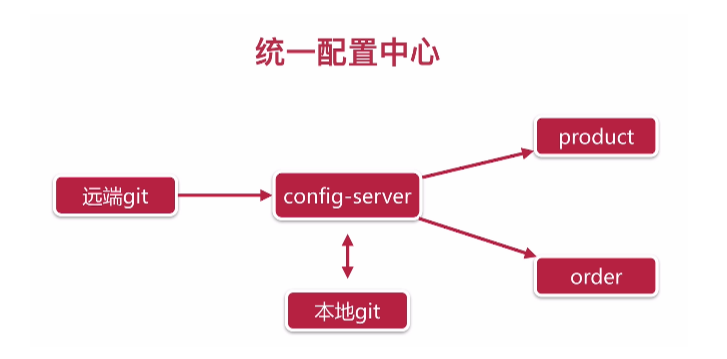
- Server端负责从远端git(码云、GitHub等)拉取配置,并缓存在本地;
- Client端(上图的product和order服务)在启动时,从Server端本地缓存中获取配置
二、Server端配置
1. 新建config Server模块,加载依赖
<dependency>

    <groupId>org.springframework.cloud</groupId>

    <artifactId>spring-cloud-config-server</artifactId>

</dependency>
2. 在启动类上@EnableConfigServer注解,开启configServer
@EnableConfigServer //开启configServer

@SpringBootApplication

@EnableDiscoveryClient //开启Eureka Client

public class TestConfigApplication {

    public static void main(String[] args) {

        SpringApplication.run(TestConfigApplication.class, args);

    }

}
3. 在远端git上新建项目(这里使用码云),并把配置上传上去,具体操作略
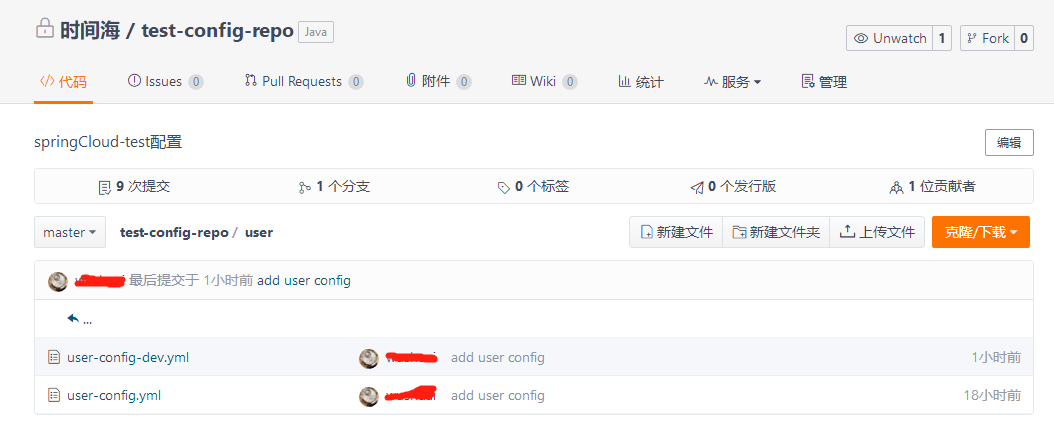
说明:config语法规定,xxx.yml为公共配置,在拉取配置时会和xxx.{}profiles}.yml合并
4. 修改配置文件
spring:

  application:

    name: test-config

  profiles:

    active: dev
#配置中心

  cloud:

    config:

      server:

        git:

          uri: https://gitee.com/wslook/test-config-repo.git

          search-paths: user  //配置文件目录,多个用逗号隔开

          username: xxx

          password: xxx

          default-label: master

          basedir: ./configRepo/  //本地缓存地址

          force-pull: true  //强制拉取配置,解决手动修改本地缓存配置后,无法拉取最新配置的问题
# 注册中心
eureka:
  instance:
    prefer-ip-address: true
  client:
    service-url:
      defaultZone: http://localhost:2181/eureka/
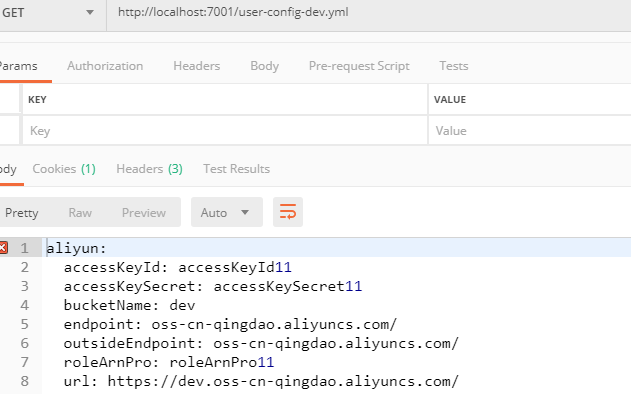
5. 测试
三、Client端配置
1. 加载依赖
<dependency>

    <groupId>org.springframework.cloud</groupId>

    <artifactId>spring-cloud-starter-config</artifactId>

</dependency>
2. 修改配置文件(把配置文件名改为bootstrap.yml)
spring:

# 配置中心

  cloud:

    config:

     name: user-config

     profile: dev

     label: master

     discovery:

        enabled: true

        serviceId: test-config

     fail-fast: true

# 注册中心

eureka:

  instance:

    prefer-ip-address: true

  client:

    service-url:

      defaultZone: http://localhost:2181/eureka/
3. 测试
编写测试代码:
@RequestMapping("/test")

@RestController

public class TestController {

    @Resource

    private OSSProperties ossProperties;

    @RequestMapping("/config")

    public String test(){

        return ossProperties.getUrl();

    }

}
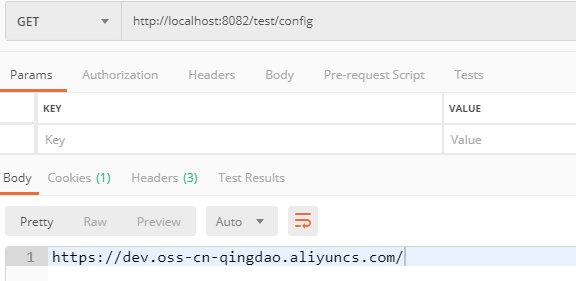
启动user服务,可以看到,已经把配置拉取下来了

使用postman验证
四、高可用
对于config集群,很简单,因为由注册中心(这里使用的eureka)统一管理服务,所以不需要额外的配置,只需多启动几台config Server服务即可
Spring Cloud Config配置中心的使用的更多相关文章
- 跟我学SpringCloud | 第七篇:Spring Cloud Config 配置中心高可用和refresh
SpringCloud系列教程 | 第七篇:Spring Cloud Config 配置中心高可用和refresh Springboot: 2.1.6.RELEASE SpringCloud: Gre ...
- 微服务SpringCloud之Spring Cloud Config配置中心Git
微服务以单个接口为颗粒度,一个接口可能就是一个项目,如果每个项目都包含一个配置文件,一个系统可能有几十或上百个小项目组成,那配置文件也会有好多,对后续修改维护也是比较麻烦,就和前面的服务注册一样,服务 ...
- 微服务SpringCloud之Spring Cloud Config配置中心服务化
在前面两篇Spring Cloud Config配置中心的博客中都是需要指定配置服务的地址url:spring.cloud.config.uri,客户端都是直接调用配置中心的server端来获取配置文 ...
- spring cloud --- config 配置中心 [本地、git获取配置文件]
spring boot 1.5.9.RELEASE spring cloud Dalston.SR1 1.前言 spring cloud config 配置中心是什么? 为了统一管理配 ...
- Spring Cloud Config 配置中心高可用
详细参见 <Spring Cloud 与 Docker微服务架构实战> p163-9.10 Spring Cloud Config 与 Eureka 配合使用 p163-9.12 Conf ...
- Spring Cloud Config 配置中心
请将远程配置文件的格式写对: 比如使用 *.yml 或者 *.properties yml: testconfig: testvalue properties: testconfig=testvalu ...
- 微服务SpringCloud之Spring Cloud Config配置中心SVN
在回来的路上看到一个个的都抱着花,吃了一路的狗粮,原本想着去旁边的工业园里跑跑步呢,想想还是算了,人家过七夕,俺们过巴西.上一博客学习了Spring Cloud Config使用git作为配置中心,本 ...
- SpringCloud学习笔记(7):使用Spring Cloud Config配置中心
简介 Spring Cloud Config为分布式系统中的外部化配置提供了服务器端和客户端支持,服务器端统一管理所有配置文件,客户端在启动时从服务端获取配置信息.服务器端有多种配置方式,如将配置文件 ...
- Spring Cloud Config 配置中心实践过程中,你需要了解这些细节!
本文导读: Spring Cloud Config 基本概念 Spring Cloud Config 客户端加载流程 Spring Cloud Config 基于消息总线配置 Spring Cloud ...
- Spring Cloud Config 配置中心 自动加解密功能 jasypt方式
使用此种方式会存在一种问题:如果我配置了自动配置刷新,则刷新过后,加密过后的密文无法被解密.具体原因分析,看 SpringCloud 详解配置刷新的原理 使用 jasypt-spring-boot- ...
随机推荐
- [Luogu4899][IOI2018] werewolf 狼人
luogu sol \(\mbox{IOI2018}\)的出题人有没有看过\(\mbox{NOI2018}\)的题目呀... \(\mbox{Kruskal}\)重构树+二维数点. 题目相当于是问你从 ...
- javascript reg 不加入分组
from :https://stackoverflow.com/questions/3512471/what-is-a-non-capturing-group-what-does-a-question ...
- udev学习笔记汇总
1.什么是udev udev--就是动态设备管理 udev 能够处理设备事件.管理设备文件的权限.在/dev目录中创建额外的符号链接.重命名网络接口,等等. 内核通常仅根据设备被发现的先后顺序给设备文 ...
- NET简单的一个画图程序
using System; using System.Drawing; //HttpUtility.UrlEncode /// <summary> ///Curve 的摘要说明 /// & ...
- List of LTE networks
https://en.wikipedia.org/wiki/List_of_LTE_networks
- python 简明教程
第一个源程序 #!/usr/bin/python# Filename : helloworld.pyprint 'Hello world' 执行: $ python helloworld.py 或者 ...
- cowboy添加验证码
参考的http://beebole.com/blog/erlang/how-to-implement-captcha-in-erlang-web-application/,移到cowboy,修改了下: ...
- 处理DateTime.Now不经过ToString()转换的格式(带有AM、PM)问题
问题是这样的: DateTime.Now不经过ToString()转换,网站部署到测试服务器(国内)得到的时间格式是:2018/8/17 16:26:09,而部署到国外服务器得到的时间格式是:17/8 ...
- laravel下载文件
public function jobDownload(){ $realPath = public_path('download/job/postForm.xls'); $filename = '应聘 ...
- Windows 上用IntelliJ Idea调试百度大数据分析框架Apache Doris FE
A. 环境准备 1. 安装jdk1.8+, Intelij IDEA 2. linux上编译好fe前端代码,主要目的是获取自动生成的代码,加入到前段工程里面去用于在idea中编译fe工程.具体编译请参 ...