
[Python爬虫] 之二十二:Selenium +phantomjs 利用 pyquery抓取界面网站数据
一、介绍
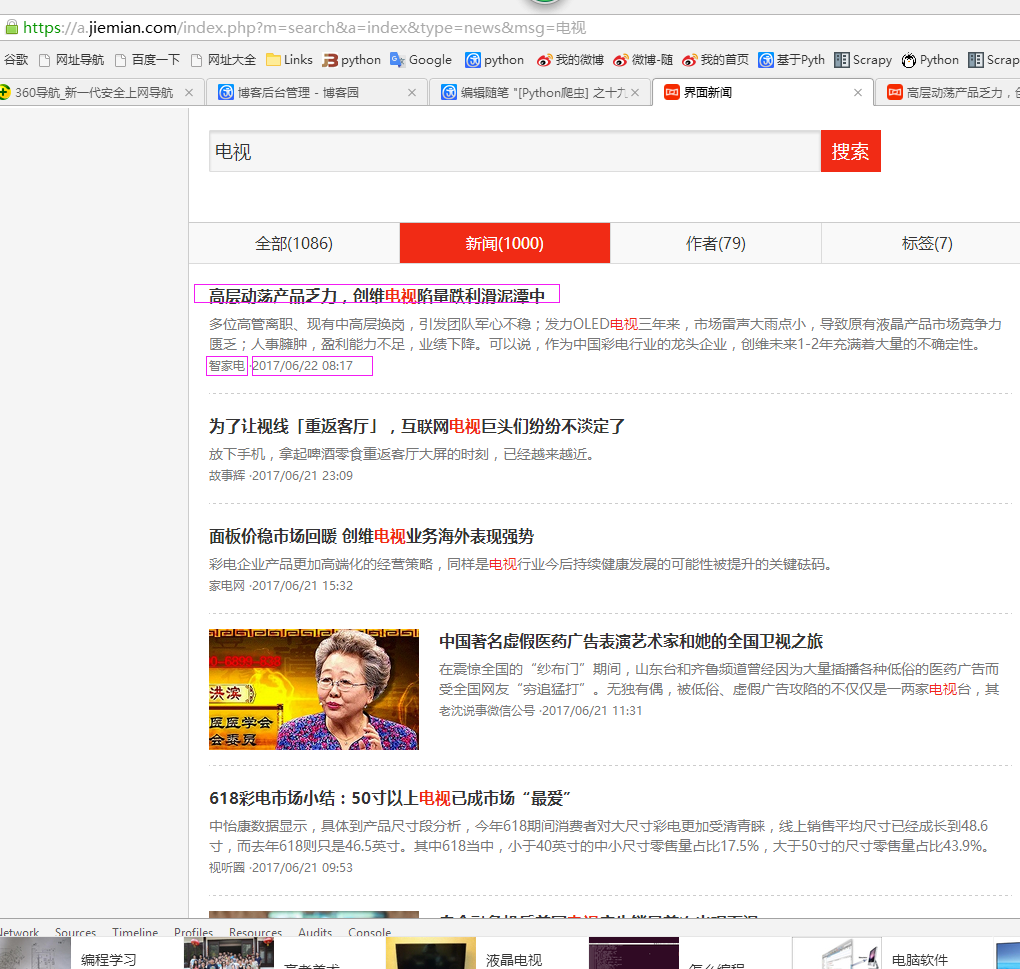
本例子用Selenium +phantomjs爬取界面(https://a.jiemian.com/index.php?m=search&a=index&type=news&msg=电视)的资讯信息,输入给定关键字抓取资讯信息。
给定关键字:数字;融合;电视
抓取信息内如下:
1、资讯标题
2、资讯链接
3、资讯时间
4、资讯来源
二、网站信息
三、数据抓取
针对上面的网站信息,来进行抓取
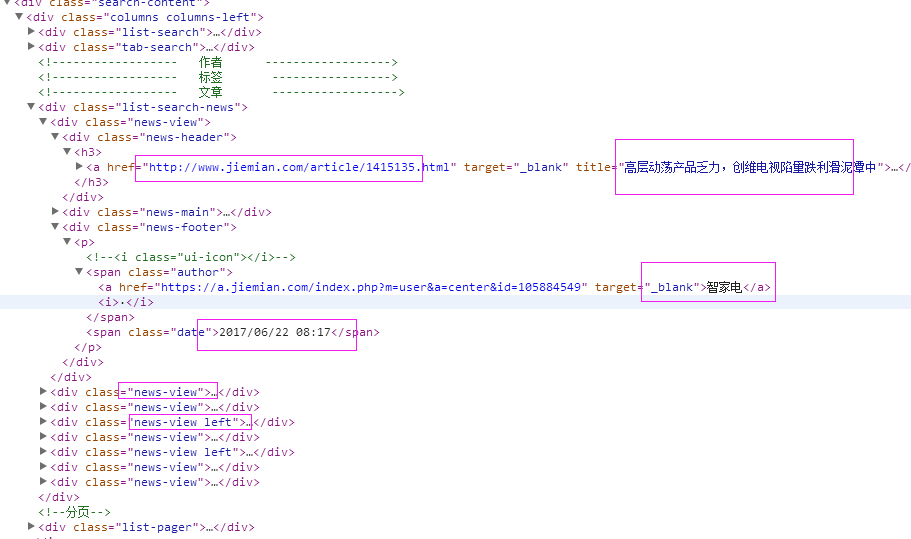
1、首先抓取信息列表
抓取代码:Elements = doc('div[class^="news-view"]')
2、抓取标题
抓取代码:title = element('div[class="news-header"]').find('h3').find('a').text().encode('utf8').replace(' ', '')
3、抓取链接
抓取代码:url = element('div[class="news-header"]').find('h3').find('a').attr('href')
4、抓取日期
抓取代码:strdate = element('div[class="news-footer"]').find('p').find('span').eq(1).text().encode('utf8')
5、抓取来源
抓取代码:source = element('div[class="news-footer"]').find('p').find('span').eq(0).find('a').text().encode('utf8').replace(' ', '')
四、完整代码
# coding=utf-8

import os

import re

from selenium import webdriver

import selenium.webdriver.support.ui as ui

import time

from datetime import datetime

import IniFile

# from threading import Thread

from pyquery import PyQuery as pq

import LogFile

import mongoDB

import urllib

class jiemianSpider(object):

    def __init__(self):

        logfile = os.path.join(os.path.dirname(os.getcwd()), time.strftime('%Y-%m-%d') + '.txt')

        self.log = LogFile.LogFile(logfile)

        configfile = os.path.join(os.path.dirname(os.getcwd()), 'setting.conf')

        cf = IniFile.ConfigFile(configfile)

        webSearchUrl_list = cf.GetValue("jiemian", "webSearchUrl")

        self.keyword_list = cf.GetValue("section", "information_keywords").split(';')

        self.db = mongoDB.mongoDbBase()

        self.start_urls = []

        for word in self.keyword_list:

            self.start_urls.append(webSearchUrl_list + urllib.quote(word))

        self.driver = webdriver.PhantomJS()

        self.wait = ui.WebDriverWait(self.driver, 2)

        self.driver.maximize_window()

    def scroll_foot(self):

        '''

                滚动条拉到底部

                :return:

                '''

        js = ""

        # 如何利用chrome驱动或phantomjs抓取

        if self.driver.name == "chrome" or self.driver.name == 'phantomjs':

            js = "var q=document.body.scrollTop=10000"

        # 如何利用IE驱动抓取

        elif self.driver.name == 'internet explorer':

            js = "var q=document.documentElement.scrollTop=10000"

        return self.driver.execute_script(js)

    def Comapre_to_days(self,leftdate, rightdate):

        '''

        比较连个字符串日期,左边日期大于右边日期多少天

        :param leftdate: 格式:2017-04-15

        :param rightdate: 格式:2017-04-15

        :return: 天数

        '''

        l_time = time.mktime(time.strptime(leftdate, '%Y-%m-%d'))

        r_time = time.mktime(time.strptime(rightdate, '%Y-%m-%d'))

        result = int(l_time - r_time) / 86400

        return result

    def date_isValid(self, strDateText):

        '''

        判断日期时间字符串是否合法:如果给定时间大于当前时间是合法,或者说当前时间给定的范围内

        :param strDateText: 四种格式 '慧聪网 7小时前'; '新浪游戏 29分钟前' ; '中国行业研究网 2017-6-13'

        :return: True:合法;False:不合法

        '''

        currentDate = time.strftime('%Y-%m-%d')

        datePattern = re.compile(r'\d{4}-\d{1,2}-\d{1,2}')

        dt = strDateText.replace('/', '-')

        strDate = re.findall(datePattern, dt)

        if len(strDate) == 1:

            if self.Comapre_to_days(currentDate, strDate[0]) == 0:

                return True, currentDate

        return False, ''

    def log_print(self, msg):

        '''

        #         日志函数

        #         :param msg: 日志信息

        #         :return:

        #         '''

        print '%s: %s' % (time.strftime('%Y-%m-%d %H-%M-%S'), msg)

    def scrapy_date(self):

        strsplit = '------------------------------------------------------------------------------------'

        for link in self.start_urls:

            self.driver.get(link)

            selenium_html = self.driver.execute_script("return document.documentElement.outerHTML")

            doc = pq(selenium_html)

            infoList = []

            self.log.WriteLog(strsplit)

            self.log_print(strsplit)

            Elements = doc('div[class^="news-view"]')

            for element in Elements.items():

                strdate = element('div[class="news-footer"]').find('p').find('span').eq(1).text().encode('utf8')

                flag, date = self.date_isValid(strdate)

                if flag:

                    title = element('div[class="news-header"]').find('h3').find('a').text().encode('utf8').replace(' ', '')

                    for keyword in self.keyword_list:

                        if title.find(keyword) > -1:

                            url = element('div[class="news-header"]').find('h3').find('a').attr('href')

                            source = element('div[class="news-footer"]').find('p').find('span').eq(0).find(

                                'a').text().encode('utf8').replace(' ', '')

                            dictM = {'title': title, 'date': date,

                             'url': url, 'keyword': keyword, 'introduction': title, 'source': source}

                            infoList.append(dictM)

                            # self.log.WriteLog('title:%s' % title)

                            # self.log.WriteLog('url:%s' % url)

                            # self.log.WriteLog('source:%s' % source)

                            # self.log.WriteLog('kword:%s' % keyword)

                            # self.log.WriteLog(strsplit)

                            self.log_print('title:%s' % dictM['title'])

                            self.log_print('url:%s' % dictM['url'])

                            self.log_print('date:%s' % dictM['date'])

                            self.log_print('source:%s' % dictM['source'])

                            self.log_print('kword:%s' % dictM['keyword'])

                            self.log_print(strsplit)

                            break

            if len(infoList)>0:

                self.db.SaveInformations(infoList)

        self.driver.close()

        self.driver.quit()

obj = jiemianSpider()

obj.scrapy_date()
[Python爬虫] 之二十二:Selenium +phantomjs 利用 pyquery抓取界面网站数据的更多相关文章
- [Python爬虫] 之二十三:Selenium +phantomjs 利用 pyquery抓取智能电视网数据
一.介绍 本例子用Selenium +phantomjs爬取智能电视网(http://news.znds.com/article/news/)的资讯信息,输入给定关键字抓取资讯信息. 给定关键字:数字 ...
- [Python爬虫] 之二十七:Selenium +phantomjs 利用 pyquery抓取今日头条视频
一.介绍 本例子用Selenium +phantomjs爬取今天头条视频(http://www.tvhome.com/news/)的信息,输入给定关键字抓取图片信息. 给定关键字:视频:融合:电视 二 ...
- [Python爬虫] 之二十一:Selenium +phantomjs 利用 pyquery抓取36氪网站数据
一.介绍 本例子用Selenium +phantomjs爬取36氪网站(http://36kr.com/search/articles/电视?page=1)的资讯信息,输入给定关键字抓取资讯信息. 给 ...
- [Python爬虫] 之三十:Selenium +phantomjs 利用 pyquery抓取栏目
一.介绍 本例子用Selenium +phantomjs爬取栏目(http://tv.cctv.com/lm/)的信息 二.网站信息 三.数据抓取 首先抓取所有要抓取网页链接,共39页,保存到数据库里 ...
- [Python爬虫] 之十六:Selenium +phantomjs 利用 pyquery抓取一点咨询数据
本篇主要是利用 pyquery来定位抓取数据,而不用xpath,通过和xpath比较,pyquery效率要高. 主要代码: # coding=utf-8 import os import re fro ...
- [Python爬虫] 之十七:Selenium +phantomjs 利用 pyquery抓取梅花网数据
一.介绍 本例子用Selenium +phantomjs爬取梅花网(http://www.meihua.info/a/list/today)的资讯信息,输入给定关键字抓取资讯信息. 给定关键字:数字: ...
- [Python爬虫] 之二十:Selenium +phantomjs 利用 pyquery通过搜狗搜索引擎数据
一.介绍 本例子用Selenium +phantomjs 利用 pyquery通过搜狗搜索引擎数据()的资讯信息,输入给定关键字抓取资讯信息. 给定关键字:数字:融合:电视 抓取信息内如下: 1.资讯 ...
- [Python爬虫] 之二十八:Selenium +phantomjs 利用 pyquery抓取网站排名信息
一.介绍 本例子用Selenium +phantomjs爬取中文网站总排名(http://top.chinaz.com/all/index.html,http://top.chinaz.com/han ...
- [Python爬虫] 之二十九:Selenium +phantomjs 利用 pyquery抓取节目信息信息
一.介绍 本例子用Selenium +phantomjs爬取节目(http://tv.cctv.com/epg/index.shtml?date=2018-03-25)的信息 二.网站信息 三.数据抓 ...
随机推荐
- shell脚本复制文件夹内容到另外的文件夹,如果存在则自动备份
有时我们需要将一个文件夹覆盖到我们的工作目录,但需要自动备份已经存在的文件,一个一个去备份太麻烦了,全部备份又没有必要.shell脚本可以很好滴完成这个任务.原文链接http://back.zhizh ...
- kuangbin带你飞 匹配问题 二分匹配 + 二分图多重匹配 + 二分图最大权匹配 + 一般图匹配带花树
二分匹配:二分图的一些性质 二分图又称作二部图,是图论中的一种特殊模型. 设G=(V,E)是一个无向图,如果顶点V可分割为两个互不相交的子集(A,B),并且图中的每条边(i,j)所关联的两个顶点i和j ...
- java 定时器的三种方式
原地址:http://blog.csdn.net/haorengoodman/article/details/23281343/ /** * 普通thread * 这是最常见的,创建一个thread, ...
- layer close 关闭层IE9-浏览器崩溃问题解决
针对ayer弹出层在IE上关闭导致浏览器崩溃的问题: 导致原因: 查看src源码,layer.close关闭总方法中有这么一行: layer.close = function(index){ ] + ...
- selenium+python在mac环境上的搭建【转载】
前言 mac自带了python2.7的环境,所以在mac上安装selenium环境是非常简单的,输入2个指令就能安装好 需要安装的软件: 1.pip 2.selenium2.53.6 3.Firefo ...
- Nodejs微信与Bot framework通过Direct Line连接
背景 最近开发了一个Bot Framework的小工具,能够通过Luis分析出用户输入的文本,对文本中的StyleNo/FabricNo/TrimNo提取出来,并传入另一个小系统进行查询出结果,包括文 ...
- 计蒜客 30996.Lpl and Energy-saving Lamps-线段树(区间满足条件最靠左的值) (ACM-ICPC 2018 南京赛区网络预赛 G)
G. Lpl and Energy-saving Lamps 42.07% 1000ms 65536K During tea-drinking, princess, amongst other t ...
- UVA 11636.Hello World!-水题
Hello World! Time limit: 1.000 seconds When you first made the computer to print the sentence “Hello ...
- POJ 1321 棋盘问题 (DFS + 回溯)
题目链接:http://poj.org/problem?id=1321 题意:中文题目,就不多说了...... 思路: 解题方法挺多,刚开始想的是先从N行中选择出来含有“#”的K行,再在这K行中放置K ...
- UVA 12594 Naming Babies
$dp$,斜率优化. 设$dp[j][i]$表示前$i$个位置分成$j$段的最小值,递推式很好写,预处理几个前缀和就可以了,然后斜率优化即可. #pragma comment(linker, &quo ...