
Python爬虫从入门到放弃(十九)之 Scrapy爬取所有知乎用户信息(下)
在上一篇文章中主要写了关于爬虫过程的分析,下面是代码的实现,完整代码在:
https://github.com/pythonsite/spider
items中的代码主要是我们要爬取的字段的定义
class UserItem(scrapy.Item):

    id = Field()

    name = Field()

    account_status = Field()

    allow_message= Field()

    answer_count = Field()

    articles_count = Field()

    avatar_hue = Field()

    avatar_url = Field()

    avatar_url_template = Field()

    badge = Field()

    business = Field()

    employments = Field()

    columns_count = Field()

    commercial_question_count = Field()

    cover_url = Field()

    description = Field()

    educations = Field()

    favorite_count = Field()

    favorited_count = Field()

    follower_count = Field()

    following_columns_count = Field()

    following_favlists_count = Field()

    following_question_count = Field()

    following_topic_count = Field()

    gender = Field()

    headline = Field()

    hosted_live_count = Field()

    is_active = Field()

    is_bind_sina = Field()

    is_blocked = Field()

    is_advertiser = Field()

    is_blocking = Field()

    is_followed = Field()

    is_following = Field()

    is_force_renamed = Field()

    is_privacy_protected = Field()

    locations = Field()

    is_org = Field()

    type = Field()

    url = Field()

    url_token = Field()

    user_type = Field()

    logs_count = Field()

    marked_answers_count = Field()

    marked_answers_text = Field()

    message_thread_token = Field()

    mutual_followees_count = Field()

    participated_live_count = Field()

    pins_count = Field()

    question_count = Field()

    show_sina_weibo = Field()

    thank_from_count = Field()

    thank_to_count = Field()

    thanked_count = Field()

    type = Field()

    vote_from_count = Field()

    vote_to_count = Field()

    voteup_count = Field()
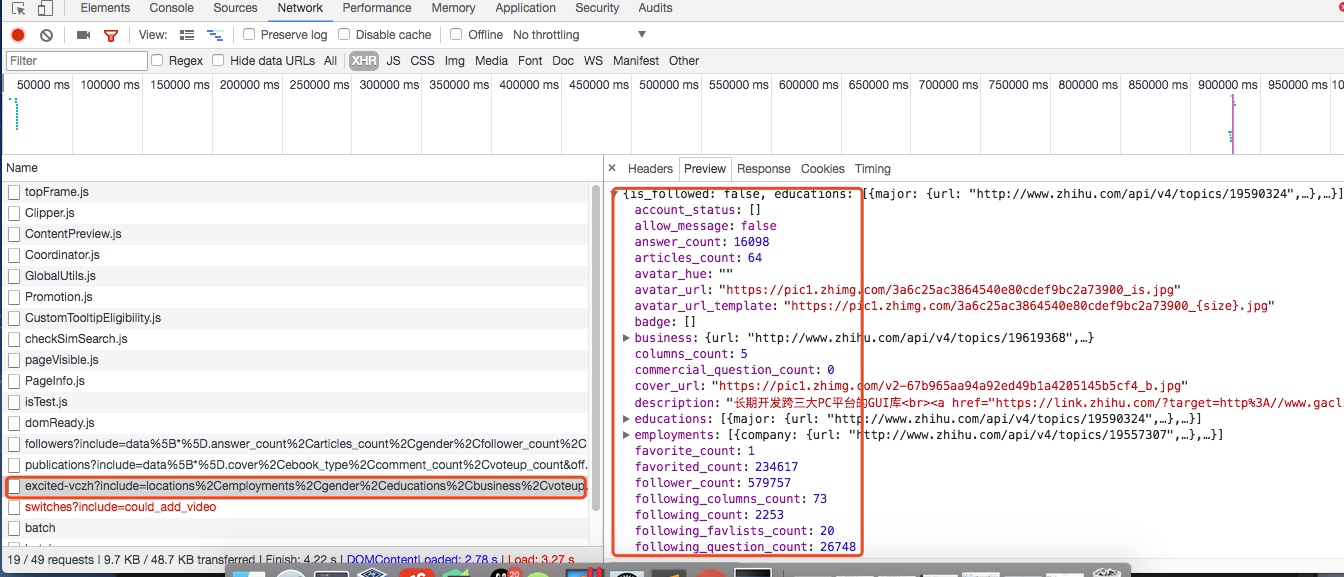
这些字段的是在用户详细信息里找到的,如下图所示,这里一共有58个字段,可以详细研究每个字段代表的意思:
关于spiders中爬虫文件zhihu.py中的主要代码
这段代码是非常重要的,主要的处理逻辑其实都是在这里
class ZhihuSpider(scrapy.Spider):

    name = "zhihu"

    allowed_domains = ["www.zhihu.com"]

    start_urls = ['http://www.zhihu.com/']

    #这里定义一个start_user存储我们找的大V账号

    start_user = "excited-vczh"

    #这里把查询的参数单独存储为user_query,user_url存储的为查询用户信息的url地址

    user_url = "https://www.zhihu.com/api/v4/members/{user}?include={include}"

    user_query = "locations,employments,gender,educations,business,voteup_count,thanked_Count,follower_count,following_count,cover_url,following_topic_count,following_question_count,following_favlists_count,following_columns_count,avatar_hue,answer_count,articles_count,pins_count,question_count,columns_count,commercial_question_count,favorite_count,favorited_count,logs_count,marked_answers_count,marked_answers_text,message_thread_token,account_status,is_active,is_bind_phone,is_force_renamed,is_bind_sina,is_privacy_protected,sina_weibo_url,sina_weibo_name,show_sina_weibo,is_blocking,is_blocked,is_following,is_followed,mutual_followees_count,vote_to_count,vote_from_count,thank_to_count,thank_from_count,thanked_count,description,hosted_live_count,participated_live_count,allow_message,industry_category,org_name,org_homepage,badge[?(type=best_answerer)].topics"

    #follows_url存储的为关注列表的url地址,fllows_query存储的为查询参数。这里涉及到offset和limit是关于翻页的参数,0,20表示第一页

    follows_url = "https://www.zhihu.com/api/v4/members/{user}/followees?include={include}&offset={offset}&limit={limit}"

    follows_query = "data%5B*%5D.answer_count%2Carticles_count%2Cgender%2Cfollower_count%2Cis_followed%2Cis_following%2Cbadge%5B%3F(type%3Dbest_answerer)%5D.topics"

    #followers_url是获取粉丝列表信息的url地址,followers_query存储的为查询参数。

    followers_url = "https://www.zhihu.com/api/v4/members/{user}/followers?include={include}&offset={offset}&limit={limit}"

    followers_query = "data%5B*%5D.answer_count%2Carticles_count%2Cgender%2Cfollower_count%2Cis_followed%2Cis_following%2Cbadge%5B%3F(type%3Dbest_answerer)%5D.topics"

    def start_requests(self):

        '''

        这里重写了start_requests方法,分别请求了用户查询的url和关注列表的查询以及粉丝列表信息查询

        :return:

        '''

        yield Request(self.user_url.format(user=self.start_user,include=self.user_query),callback=self.parse_user)

        yield Request(self.follows_url.format(user=self.start_user,include=self.follows_query,offset=0,limit=20),callback=self.parse_follows)

        yield Request(self.followers_url.format(user=self.start_user,include=self.followers_query,offset=0,limit=20),callback=self.parse_followers)

    def parse_user(self, response):

        '''

        因为返回的是json格式的数据,所以这里直接通过json.loads获取结果

        :param response:

        :return:

        '''

        result = json.loads(response.text)

        item = UserItem()

        #这里循环判断获取的字段是否在自己定义的字段中,然后进行赋值

        for field in item.fields:

            if field in result.keys():

                item[field] = result.get(field)

        #这里在返回item的同时返回Request请求,继续递归拿关注用户信息的用户获取他们的关注列表

        yield item

        yield Request(self.follows_url.format(user = result.get("url_token"),include=self.follows_query,offset=0,limit=20),callback=self.parse_follows)

        yield Request(self.followers_url.format(user = result.get("url_token"),include=self.followers_query,offset=0,limit=20),callback=self.parse_followers)

    def parse_follows(self, response):

        '''

        用户关注列表的解析,这里返回的也是json数据 这里有两个字段data和page,其中page是分页信息

        :param response:

        :return:

        '''

        results = json.loads(response.text)

        if 'data' in results.keys():

            for result in results.get('data'):

                yield Request(self.user_url.format(user = result.get("url_token"),include=self.user_query),callback=self.parse_user)

        #这里判断page是否存在并且判断page里的参数is_end判断是否为False,如果为False表示不是最后一页,否则则是最后一页

        if 'page' in results.keys() and results.get('is_end') == False:

            next_page = results.get('paging').get("next")

            #获取下一页的地址然后通过yield继续返回Request请求,继续请求自己再次获取下页中的信息

            yield Request(next_page,self.parse_follows)

    def parse_followers(self, response):

        '''

        这里其实和关乎列表的处理方法是一样的

        用户粉丝列表的解析,这里返回的也是json数据 这里有两个字段data和page,其中page是分页信息

        :param response:

        :return:

        '''

        results = json.loads(response.text)

        if 'data' in results.keys():

            for result in results.get('data'):

                yield Request(self.user_url.format(user = result.get("url_token"),include=self.user_query),callback=self.parse_user)

        #这里判断page是否存在并且判断page里的参数is_end判断是否为False,如果为False表示不是最后一页,否则则是最后一页

        if 'page' in results.keys() and results.get('is_end') == False:

            next_page = results.get('paging').get("next")

            #获取下一页的地址然后通过yield继续返回Request请求,继续请求自己再次获取下页中的信息

            yield Request(next_page,self.parse_followers)
上述的代码的主要逻辑用下图分析表示:
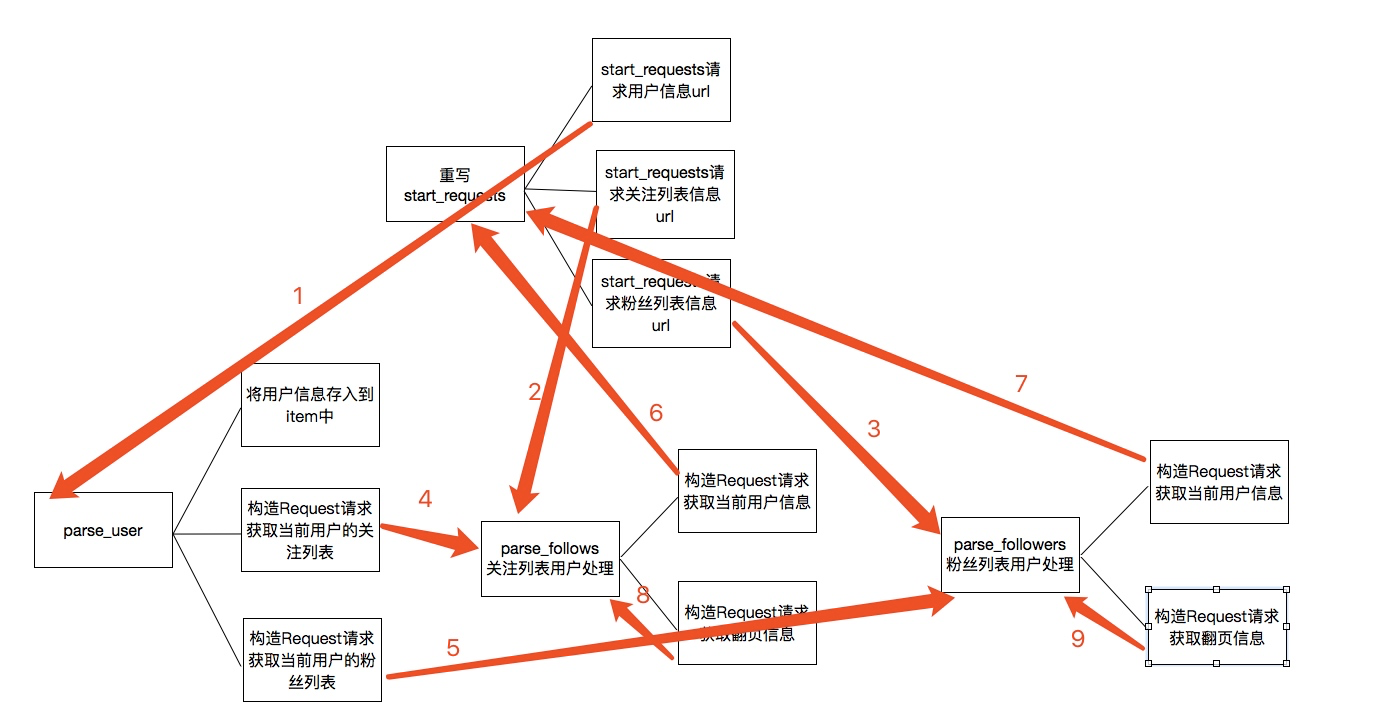
关于上图的一个简单描述:
1. 当重写start_requests,一会有三个yield,分别的回调函数调用了parse_user,parse_follows,parse_followers,这是第一次会分别获取我们所选取的大V的信息以及关注列表信息和粉丝列表信息
2. 而parse分别会再次回调parse_follows和parse_followers信息,分别递归获取每个用户的关注列表信息和分析列表信息
3. parse_follows获取关注列表里的每个用户的信息回调了parse_user,并进行翻页获取回调了自己parse_follows
4. parse_followers获取粉丝列表里的每个用户的信息回调了parse_user,并进行翻页获取回调了自己parse_followers
通过上面的步骤实现所有用户信息的爬取,最后是关于数据的存储
关于数据存储到mongodb
这里主要是item中的数据存储到mongodb数据库中,这里主要的一个用法是就是插入的时候进行了一个去重检测
class MongoPipeline(object):

    def __init__(self, mongo_uri, mongo_db):

        self.mongo_uri = mongo_uri

        self.mongo_db = mongo_db

    @classmethod

    def from_crawler(cls, crawler):

        return cls(

            mongo_uri=crawler.settings.get('MONGO_URI'),

            mongo_db=crawler.settings.get('MONGO_DATABASE', 'items')

        )

    def open_spider(self, spider):

        self.client = pymongo.MongoClient(self.mongo_uri)

        self.db = self.client[self.mongo_db]

    def close_spider(self, spider):

        self.client.close()

    def process_item(self, item, spider):

        #这里通过mongodb进行了一个去重的操作,每次更新插入数据之前都会进行查询,判断要插入的url_token是否已经存在,如果不存在再进行数据插入,否则放弃数据

        self.db['user'].update({'url_token':item["url_token"]},{'$set':item},True)

        return item
Python爬虫从入门到放弃(十九)之 Scrapy爬取所有知乎用户信息(下)的更多相关文章
- Python之爬虫(二十一) Scrapy爬取所有知乎用户信息(下)
在上一篇文章中主要写了关于爬虫过程的分析,下面是代码的实现,完整代码在:https://github.com/pythonsite/spider items中的代码主要是我们要爬取的字段的定义 cla ...
- Python爬虫从入门到放弃(十八)之 Scrapy爬取所有知乎用户信息(上)
爬取的思路 首先我们应该找到一个账号,这个账号被关注的人和关注的人都相对比较多的,就是下图中金字塔顶端的人,然后通过爬取这个账号的信息后,再爬取他关注的人和被关注的人的账号信息,然后爬取被关注人的账号 ...
- Python之爬虫(二十) Scrapy爬取所有知乎用户信息(上)
爬取的思路 首先我们应该找到一个账号,这个账号被关注的人和关注的人都相对比较多的,就是下图中金字塔顶端的人,然后通过爬取这个账号的信息后,再爬取他关注的人和被关注的人的账号信息,然后爬取被关注人的账号 ...
- python爬虫从入门到放弃(九)之 实例爬取上海高级人民法院网开庭公告数据
通过前面的文章已经学习了基本的爬虫知识,通过这个例子进行一下练习,毕竟前面文章的知识点只是一个 一个单独的散知识点,需要通过实际的例子进行融合 分析网站 其实爬虫最重要的是前面的分析网站,只有对要爬取 ...
- python爬虫从入门到放弃(九)之 Requests+正则表达式爬取猫眼电影TOP100
import requests from requests.exceptions import RequestException import re import json from multipro ...
- Python爬虫从入门到放弃(二十)之 Scrapy分布式原理
关于Scrapy工作流程回顾 Scrapy单机架构 上图的架构其实就是一种单机架构,只在本机维护一个爬取队列,Scheduler进行调度,而要实现多态服务器共同爬取数据关键就是共享爬取队列. 分布式架 ...
- Python爬虫从入门到放弃(二十二)之 爬虫与反爬虫大战
爬虫与发爬虫的厮杀,一方为了拿到数据,一方为了防止爬虫拿到数据,谁是最后的赢家? 重新理解爬虫中的一些概念 爬虫:自动获取网站数据的程序反爬虫:使用技术手段防止爬虫程序爬取数据误伤:反爬虫技术将普通用 ...
- python爬虫从入门到放弃(三)之 Urllib库的基本使用
官方文档地址:https://docs.python.org/3/library/urllib.html 什么是Urllib Urllib是python内置的HTTP请求库包括以下模块urllib.r ...
- Python爬虫从入门到放弃(十一)之 Scrapy框架整体的一个了解
这里是通过爬取伯乐在线的全部文章为例子,让自己先对scrapy进行一个整理的理解 该例子中的详细代码会放到我的github地址:https://github.com/pythonsite/spider ...
随机推荐
- Scrapy教程--豆瓣电影图片爬取
一.先上效果 二.安装Scrapy和使用 官方网址:https://scrapy.org/. 安装命令:pip install Scrapy 安装完成,使用默认模板新建一个项目,命令:scrapy s ...
- PHP漏洞之session会话劫持
本文主要介绍针对PHP网站Session劫持.session劫持是一种比较复杂的攻击方法.大部分互联网上的电脑多存在被攻击的危险.这是一种劫持tcp协议的方法,所以几乎所有的局域网,都存在被劫持可能. ...
- Here文档
Here文档为需要输入的程序,例如,mail.sort和cat等接收在线文本,直到遇到用户定义的结束符号为止.最常用的用户是在Shell脚本中和case命令一起创建菜单.自动登录等等. 1.建立菜单 ...
- IPhone开发“此证书是由未知颁发机构签名”解决办法
有一种情况是你删除了钥匙串中的系统文件,只要重新下载,并双击(会自动添加到钥匙串中)就ok了. 从浏览器中直接敲入下载地址:http://developer.apple.com/certificati ...
- 移动端APP CSS Reset及注意事项CSS重置
@charset "utf-8"; * { -webkit-box-sizing: border-box; box-sizing: border-box; } //禁止文本缩放 h ...
- 第14章 Linux开机详细流程
本文目录: 14.1 按下电源和bios阶段 14.2 MBR和各种bootloader阶段 14.2.1 boot loader 14.2.2 分区表 14.2.3 采用VBR/EBR方式引导操作系 ...
- 【Android Developers Training】 60. 在你的UI中显示位图
注:本文翻译自Google官方的Android Developers Training文档,译者技术一般,由于喜爱安卓而产生了翻译的念头,纯属个人兴趣爱好. 原文链接:http://developer ...
- python命令行神器Click
原文: http://www.lengirl.com/code/python-click.html Click 是用Python写的一个第三方模块,用于快速创建命令行.我们知道,Python内置了一个 ...
- 基于GCC的openMP学习与测试(2)
一.openMP简单测试 1.简单测试(1) #include<omp.h> #include<time.h> #include<iostream> using n ...
- angular自动化测试--protractor
前戏 面向模型编程: 测试驱动开发: 先保障交互逻辑,再调整细节.---by 雪狼. 为什么要自动化测试? 1,提高产出质量. 2,减少重构时的痛.反正我最近重构多了,痛苦经历多了. 3,便于新人接手 ...