
<scrapy爬虫>爬取腾讯社招信息
1.创建scrapy项目
dos窗口输入:
scrapy startproject tencent
cd tencent
2.编写item.py文件(相当于编写模板,需要爬取的数据在这里定义)
# -*- coding: utf-8 -*-

# Define here the models for your scraped items

#

# See documentation in:

# https://doc.scrapy.org/en/latest/topics/items.html

import scrapy

class TencentItem(scrapy.Item):

    # define the fields for your item here like:

    #职位名

    positionname = scrapy.Field()

    #链接

    positionlink = scrapy.Field()

    #类别

    positionType = scrapy.Field()

    #招聘人数

    positionNum = scrapy.Field()

    #工作地点

    positioncation = scrapy.Field()

    #职位名称

    positionTime = scrapy.Field()
3.创建爬虫文件
dos窗口输入:
scrapy genspider myspider tencent.com
4.编写myspider.py文件(接收响应,处理数据)
# -*- coding: utf-8 -*-

import scrapy

from tencent.items import TencentItem

class MyspiderSpider(scrapy.Spider):

    name = 'myspider'

    allowed_domains = ['tencent.com']

    url = 'https://hr.tencent.com/position.php?&start='

    offset = 0

    start_urls = [url+str(offset)]

    def parse(self, response):

        for each in response.xpath('//tr[@class="even"]|//tr[class="odd"]'):

            #初始化模型对象

            item = TencentItem()

            # 职位名

            item['positionname'] = each.xpath("./td[1]/a/text()").extract()[0]

            # 链接

            item['positionlink'] = 'http://hr.tencent.com/' + each.xpath("./td[1]/a/@href").extract()[0]

            # 类别

            item['positionType'] = each.xpath("./td[2]/text()").extract()[0]

            # 招聘人数

            item['positionNum'] = each.xpath("./td[3]/text()").extract()[0]

            # 工作地点

            item['positioncation'] = each.xpath("./td[4]/text()").extract()[0]

            # 职位名称

            item['positionTime'] = each.xpath("./td[5]/text()").extract()[0]

            yield item

        if self.offset < 2820:

            self.offset += 10

        else:

            raise ("程序结束")

        yield scrapy.Request(self.url+str(self.offset),callback=self.parse)
5.编写pipelines.py(存储数据)
# -*- coding: utf-8 -*-

# Define your item pipelines here

#

# Don't forget to add your pipeline to the ITEM_PIPELINES setting

# See: https://doc.scrapy.org/en/latest/topics/item-pipeline.html

import json

class TencentPipeline(object):

    def __init__(self):

        self.filename = open('tencent.json','wb')

    def process_item(self, item, spider):

        text =json.dumps(dict(item),ensure_ascii=False) + ',\n'

        self.filename.write(text.encode('utf-8'))

        return item

    def close_spider(self):

        self.filename.close()
6.编写settings.py(设置headers,pipelines等)
robox协议
# Obey robots.txt rules

ROBOTSTXT_OBEY = False
headers
DEFAULT_REQUEST_HEADERS = {

    'user-agent': 'Mozilla/5.0 (Windows NT 10.0; Win64; x64) AppleWebKit/537.36 (KHTML, like Gecko) Chrome/68.0.3440.106 Safari/537.36',

    'Accept': 'text/html,application/xhtml+xml,application/xml;q=0.9,*/*;q=0.8',

  # 'Accept-Language': 'en',

}
pipelines
ITEM_PIPELINES = {

    'tencent.pipelines.TencentPipeline': 300,

}
7.运行爬虫
dos窗口输入:
scrapy crawl myspider
运行结果:


查看debug:
2019-02-18 16:02:22 [scrapy.core.scraper] ERROR: Spider error processing <GET https://hr.tencent.com/position.php?&start=520> (referer: https://hr.tencent.com/position.php?&start=510)

Traceback (most recent call last):

  File "E:\software\ANACONDA\lib\site-packages\scrapy\utils\defer.py", line 102, in iter_errback

    yield next(it)

  File "E:\software\ANACONDA\lib\site-packages\scrapy\spidermiddlewares\offsite.py", line 30, in process_spider_output

    for x in result:

  File "E:\software\ANACONDA\lib\site-packages\scrapy\spidermiddlewares\referer.py", line 339, in <genexpr>

    return (_set_referer(r) for r in result or ())

  File "E:\software\ANACONDA\lib\site-packages\scrapy\spidermiddlewares\urllength.py", line 37, in <genexpr>

    return (r for r in result or () if _filter(r))

  File "E:\software\ANACONDA\lib\site-packages\scrapy\spidermiddlewares\depth.py", line 58, in <genexpr>

    return (r for r in result or () if _filter(r))

  File "C:\Users\123\tencent\tencent\spiders\myspider.py", line 22, in parse

    item['positionType'] = each.xpath("./td[2]/text()").extract()[0]
去网页查看:

这个职位少一个属性- -!!!(城市套路多啊!)
那就改一下myspider.py里面的一行:
item['positionType'] = each.xpath("./td[2]/text()").extract()[0]
加个判断,改为:
if len(each.xpath("./td[2]/text()").extract()) > 0:

  item['positionType'] = each.xpath("./td[2]/text()").extract()[0]

else:

  item['positionType'] = "None"
运行结果:

看网站上最后一页:
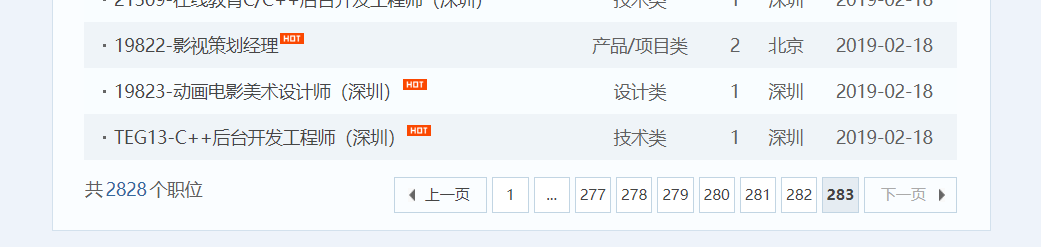
爬取成功!
<scrapy爬虫>爬取腾讯社招信息的更多相关文章
- <scrapy爬虫>爬取猫眼电影top100详细信息
1.创建scrapy项目 dos窗口输入: scrapy startproject maoyan cd maoyan 2.编写item.py文件(相当于编写模板,需要爬取的数据在这里定义) # -*- ...
- 利用scrapy爬取腾讯的招聘信息
利用scrapy框架抓取腾讯的招聘信息,爬取地址为:https://hr.tencent.com/position.php 抓取字段包括:招聘岗位,人数,工作地点,发布时间,及具体的工作要求和工作任务 ...
- 简单的scrapy实战:爬取腾讯招聘北京地区的相关招聘信息
简单的scrapy实战:爬取腾讯招聘北京地区的相关招聘信息 简单的scrapy实战:爬取腾讯招聘北京地区的相关招聘信息 系统环境:Fedora22(昨天已安装scrapy环境) 爬取的开始URL:ht ...
- 使用scrapy爬虫,爬取17k小说网的案例-方法一
无意间看到17小说网里面有一些小说小故事,于是决定用爬虫爬取下来自己看着玩,下图这个页面就是要爬取的来源. a 这个页面一共有125个标题,每个标题里面对应一个内容,如下图所示 下面直接看最核心spi ...
- 使用Scrapy框架爬取腾讯新闻
昨晚没事写的爬取腾讯新闻代码,在此贴出,可以参考完善. # -*- coding: utf-8 -*- import json from scrapy import Spider from scrap ...
- 使用scrapy爬虫,爬取今日头条搜索吉林疫苗新闻(scrapy+selenium+PhantomJS)
这一阵子吉林疫苗案,备受大家关注,索性使用爬虫来爬取今日头条搜索吉林疫苗的新闻 依然使用三件套(scrapy+selenium+PhantomJS)来爬取新闻 以下是搜索页面,得到吉林疫苗的搜索信息, ...
- 『Scrapy』爬取腾讯招聘网站
分析爬取对象 初始网址, http://hr.tencent.com/position.php?@start=0&start=0#a (可选)由于含有多页数据,我们可以查看一下这些网址有什么相 ...
- Python写网络爬虫爬取腾讯新闻内容
最近学了一段时间的Python,想写个爬虫,去网上找了找,然后参考了一下自己写了一个爬取给定页面的爬虫. Python的第三方库特别强大,提供了两个比较强大的库,一个requests, 另外一个Bea ...
- <scrapy爬虫>爬取360妹子图存入mysql(mongoDB还没学会,学会后加上去)
1.创建scrapy项目 dos窗口输入: scrapy startproject images360 cd images360 2.编写item.py文件(相当于编写模板,需要爬取的数据在这里定义) ...
随机推荐
- Nginx安装及分流多个web服务
Ngnix安装及常用配置 一.安装Nginx 1.检查依赖 yum install gcc-c++ yum install -y pcre pcre-devel yum install -y zlib ...
- C#学习笔记----反射基础
反射基础 反射用于在程序运行过程中,获取类里面的信息或发现程序集并运行的一个过程.通过反射可以获得.dll和.exe后缀的程序集里面的信息.使用反射可以看到一个程序集内部的类,接口,字段,属性,方法, ...
- excel 导数据
参考: ="insert tsilverinfo(ss_id,memo,ss_weight,ts_id,ss_type,ModelPosX,ss_stoneW,ss_stoneWU) val ...
- Java 几种队列区别的简单说明
前言 队列,字面意思就可以明白. 是一种线性的数据暂存与管理工具. 也可以让各种业务功能进行逐个的队列运行. 此篇博客只说明一下Java有几种队列 未阻塞和阻塞队列的区别 未阻塞: 1.未阻塞的队列在 ...
- c++ constructors not allowed a return type错误问题
出现这样的问题 constructors not allowed a return type,是因为类定义或者申明时,结束的地方忘了加个' ; ' 错误的举例如: class ClassName{ } ...
- [NOI2007]生成树计数环形版
NOI2007这道题人类进化更完全之后出现了新的做法 毕姥爷题解: 于是毕姥爷出了一道环形版的这题(test0814),让我们写这个做法 环形的情况下,k=5的时候是162阶递推. 求这个递推可以用B ...
- vuex的简单介绍
.vuex的定义 )Vuex 是一个专门为 Vue.js 应用程序开发的状态管理模式,使用插件的形式引进项目中 )集中存储和管理应用的所有组件的状态,并以相应的规则保证状态以一种可预测的方式发生变化 ...
- IK分词器插件
(1)源码 https://github.com/medcl/elasticsearch-analysis-ik (2)releases https://github.com/medcl/elast ...
- day 65 Django基础十一之认证系统
Django基础十一之认证系统 本节目录 一 auth模块 二 User对象 三 扩展默认的auth_user表 四 xxx 五 xxx 六 xxx 七 xxx 八 xxx 一 auth模块 我们 ...
- 深夜Python - 第2夜 - 爬行
深夜Python - 第2夜 - 爬行 我曾经幻想自己是一只蜗牛,有自己的一只小壳,不怕风,不怕雨,浪荡江湖,游历四方……夜猫兄一如既往地打断了我不切实际的幻想:“浪荡?游历?等你退休了都爬不出家门口 ...