
《DSP using MATLAB》Problem 8.44

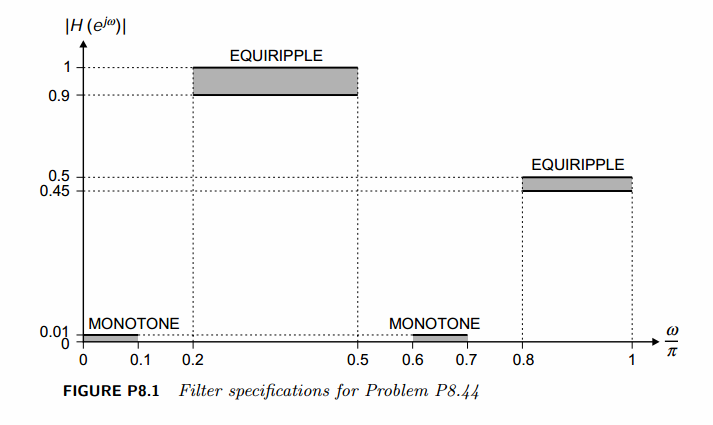
代码:
%% ------------------------------------------------------------------------

%%            Output Info about this m-file

fprintf('\n***********************************************************\n');

fprintf('        <DSP using MATLAB> Problem 8.44.4 \n\n');

banner();

%% ------------------------------------------------------------------------

%%

%%          Chebyshev-1 bandpass and highpass, parallel form,

%%          by MATLAB toolbox function

%%

%% ------------------------------------------------------------------------

%--------------------------------------------------------

%           PART1 bandpass

% Digital Filter Specifications:   Chebyshev-1 bandpass

% -------------------------------------------------------

wsbp = [0.10*pi 0.60*pi];             % digital stopband freq in rad

wpbp = [0.20*pi 0.50*pi];             % digital passband freq in rad

delta1 = 0.1;

delta2 = 0.01;

Ripple = 1-delta1;                     % passband ripple in absolute

Attn = delta2;                         % stopband attenuation in absolute

  Rp = -20*log10(Ripple);             % passband ripple in dB

  As = -20*log10(Attn);               % stopband attenuation in dB

% Calculation of Chebyshev-1 filter parameters:

[N, wn] = cheb1ord(wpbp/pi, wsbp/pi, Rp, As);

fprintf('\n  ********* Chebyshev-1 Digital Bandpass Filter Order is = %3.0f \n', 2*N)

% Digital Chebyshev-1 Bandpass Filter Design:

fprintf('\n*******Digital bandpass, Coefficients of DIRECT-form***********\n');

[bbp, abp] = cheby1(N, Rp, wn)

[C, B, A] = dir2cas(bbp, abp);

% Calculation of Frequency Response:

[dbbp, magbp, phabp, grdbp, wwbp] = freqz_m(bbp, abp);

% -----------------------------------------------------

%    PART2  highpass

% Digital Highpass Filter Specifications:

% -----------------------------------------------------

wphp = 0.8*pi;                 % digital passband freq in rad

wshp = 0.7*pi;                 % digital stopband freq in rad

delta1 = 0.05;

delta2 = 0.01;

Ripple = 0.5-delta1;           % passband ripple in absolute

Attn = delta2;                 % stopband attenuation in absolute

Rp = -20*log10(Ripple/0.5);    % passband ripple in dB

As = -20*log10(Attn/0.5);      % stopband attenuation in dB

% Calculation of Chebyshev-1 hp filter parameters:

[N, wn] = cheb1ord(wphp/pi, wshp/pi, Rp, As);

fprintf('\n********** Chebyshev-1 Digital Highpass Filter Order = %3.0f \n', N)

% Digital Chebyshev-1 Highpass Filter Design:

fprintf('\n*******Digital Highpass, Coefficients of DIRECT-form***********\n');

[bhp, ahp] = cheby1(N, Rp, wn, 'high')

[C, B, A] = dir2cas(bhp*0.5, ahp);

% Calculation of Frequency Response:

[dbhp, maghp, phahp, grdhp, wwhp] = freqz_m(bhp*0.5, ahp);

% ---------------------------------------------

%      PART3   parallel form of bp and hp

% ---------------------------------------------

abp;

bbp;

ahp;

bhp;

a = conv(2*abp, ahp)

b = conv(2*bbp, ahp) + conv(bhp, abp)

[C, B, A] = dir2cas(b, a)

% Calculation of Frequency Response:

[db, mag, pha, grd, ww] = freqz_m(b, a);

%% -----------------------------------------------------------------

%%                             Plot

%% -----------------------------------------------------------------

figure('NumberTitle', 'off', 'Name', 'Problem 8.44.4 combination of Chebyshev-1 bp and hp, by MATLAB cheby1 function')

set(gcf,'Color','white');

M = 1;                          % Omega max

subplot(2,2,1); plot(ww/pi, mag); axis([0, M, 0, 1.2]); grid on;

xlabel('Digital frequency in \pi units'); ylabel('|H|'); title('Magnitude Response');

set(gca, 'XTickMode', 'manual', 'XTick', [0, wsbp(1)/pi, wpbp/pi, wsbp(2)/pi, wshp/pi, wphp/pi, M]);

set(gca, 'YTickMode', 'manual', 'YTick', [0, 0.01, 0.45, 0.5, 0.9, 1]);

subplot(2,2,2); plot(ww/pi, db); axis([0, M, -100, 2]); grid on;

xlabel('Digital frequency in \pi units'); ylabel('Decibels'); title('Magnitude in dB');

set(gca, 'XTickMode', 'manual', 'XTick', [0, wsbp(1)/pi, wpbp/pi, wsbp(2)/pi, wshp/pi, wphp/pi, M]);

set(gca, 'YTickMode', 'manual', 'YTick', [-76, -46, -41, -1, 0]);

set(gca,'YTickLabelMode','manual','YTickLabel',['76'; '46'; '41';'1 ';' 0']);

subplot(2,2,3); plot(ww/pi, pha/pi); axis([0, M, -1.1, 1.1]); grid on;

xlabel('Digital frequency in \pi nuits'); ylabel('radians in \pi units'); title('Phase Response');

set(gca, 'XTickMode', 'manual', 'XTick', [0, wsbp(1)/pi, wpbp/pi, wsbp(2)/pi, wshp/pi, wphp/pi, M]);

set(gca, 'YTickMode', 'manual', 'YTick', [-1:0.5:1]);

subplot(2,2,4); plot(ww/pi, grd); axis([0, M, 0, 80]); grid on;

xlabel('Digital frequency in \pi units'); ylabel('Samples'); title('Group Delay');

set(gca, 'XTickMode', 'manual', 'XTick', [0, wsbp(1)/pi, wpbp/pi, wsbp(2)/pi, wshp/pi, wphp/pi, M]);

set(gca, 'YTickMode', 'manual', 'YTick', [0:20:80]);

figure('NumberTitle', 'off', 'Name', 'Problem 8.44.4 Pole-Zero Plot')

set(gcf,'Color','white');

zplane(b, a);

title(sprintf('Pole-Zero Plot'));

%pzplotz(b,a);

figure('NumberTitle', 'off', 'Name', 'Problem 8.44.4 combination of Chebyshev-1 bp and hp, by MATLAB cheby1 function')

set(gcf,'Color','white');

M = 1;                          % Omega max

%subplot(2,2,1);

plot(ww/pi, mag); axis([0, M, 0, 1.2]); grid on;

xlabel('Digital frequency in \pi units'); ylabel('|H|'); title('Magnitude Response');

set(gca, 'XTickMode', 'manual', 'XTick', [0, wsbp(1)/pi, wpbp/pi, wsbp(2)/pi, wshp/pi, wphp/pi, M]);

set(gca, 'YTickMode', 'manual', 'YTick', [0, 0.01, 0.45, 0.5, 0.9, 1]);
运行结果:
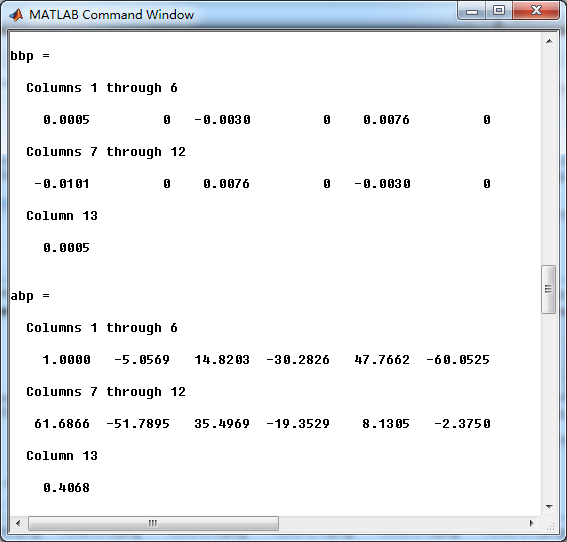
看设计要求,是Chebyshev-1型数字带通和高通滤波器的组合,首先计算带通。
系统函数直接形式系数如下:

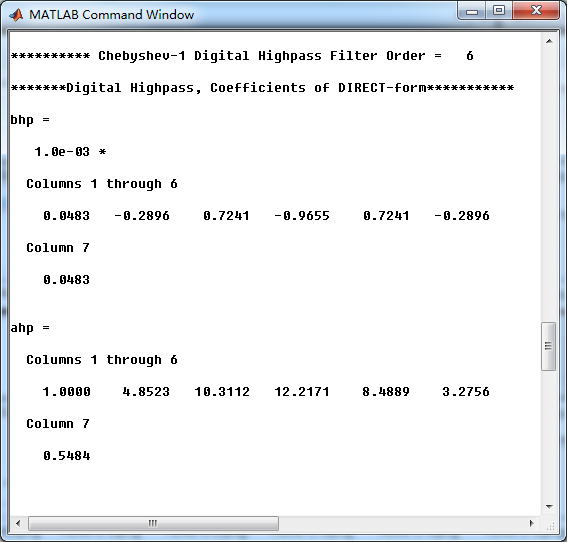
其次计算高通,系统函数直接形式系数如下:
再次,前面计算完高通和带通后,二者进行并联组合。等效滤波器的系统函数,直接形式系数如下:
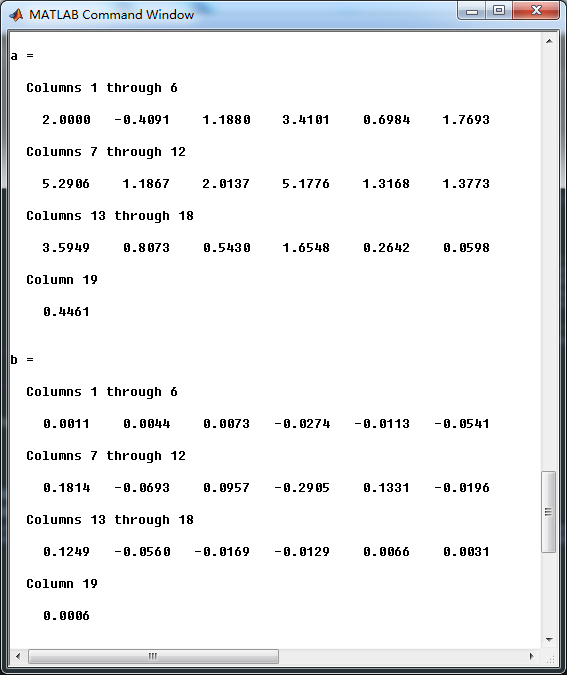
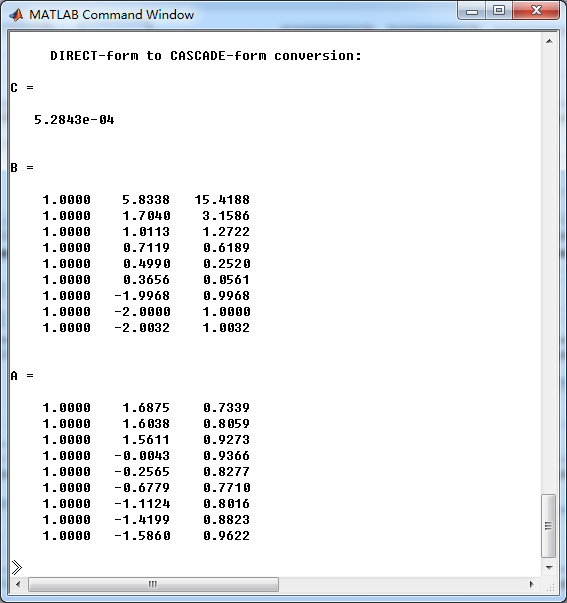
串联形式的系数如下:
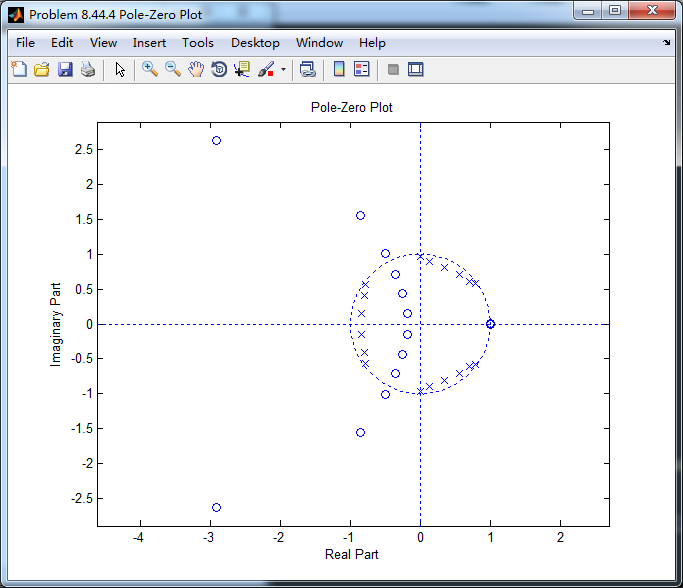
零极点图
等效滤波器的幅度谱,相关幅度值、频带边界频率画出直线,如下图

《DSP using MATLAB》Problem 8.44的更多相关文章
- 《DSP using MATLAB》Problem 8.42
代码: %% ------------------------------------------------------------------------ %% Output Info about ...
- 《DSP using MATLAB》Problem 8.40
代码: function [wpLP, wsLP, alpha] = bs2lpfre(wpbs, wsbs) % Band-edge frequency conversion from bandst ...
- 《DSP using MATLAB》Problem 8.30
10月1日,新中国70周岁生日,上午观看了盛大的庆祝仪式,整齐的方阵,先进的武器,尊敬的先辈英雄,欢乐的人们,愿我们的 国家越来越好,人民生活越来越好. 接着做题. 代码: %% ---------- ...
- 《DSP using MATLAB》Problem 7.33
代码: %% ++++++++++++++++++++++++++++++++++++++++++++++++++++++++++++++++++++++++++++++++ %% Output In ...
- 《DSP using MATLAB》Problem 7.27
代码: %% ++++++++++++++++++++++++++++++++++++++++++++++++++++++++++++++++++++++++++++++++ %% Output In ...
- 《DSP using MATLAB》Problem 7.26
注意:高通的线性相位FIR滤波器,不能是第2类,所以其长度必须为奇数.这里取M=31,过渡带里采样值抄书上的. 代码: %% +++++++++++++++++++++++++++++++++++++ ...
- 《DSP using MATLAB》Problem 7.25
代码: %% ++++++++++++++++++++++++++++++++++++++++++++++++++++++++++++++++++++++++++++++++ %% Output In ...
- 《DSP using MATLAB》Problem 7.24
又到清明时节,…… 注意:带阻滤波器不能用第2类线性相位滤波器实现,我们采用第1类,长度为基数,选M=61 代码: %% +++++++++++++++++++++++++++++++++++++++ ...
- 《DSP using MATLAB》Problem 7.23
%% ++++++++++++++++++++++++++++++++++++++++++++++++++++++++++++++++++++++++++++++++ %% Output Info a ...
随机推荐
- OS: 生产者消费者问题(二) ---- 系统V IPC通信-信号量和共享内存
在上一篇“OS: 生产者消费者问题(多进程+共享内存+信号量)”中提到的方法二: 如果进程之间并没有父子关系,但是协商好了共享存储的 KEY , 那么在每个进程中,就可以通过 KEY 以及 shmge ...
- angulajs 详解 directive 中 的 scope 概念
Directive 是 angularjs 中最重要的概念,我的理解就是自定义html tag, 这个自定的tag 浏览器不会解析,会有angularjs 来动态解析. 比如在html 中添加 < ...
- C语言变长参数实现
#include<stdio.h> #include<string.h> #include<stdarg.h> /***编写可变长参数列表的函数案例*/ /* vo ...
- 关于提BUG的一点思考以及工作中总结的规范
在测试的工作中,提BUG是日常工作. 以前自己为了省事,省时,仅仅是截图,在图片上注明一下问题,就放到BUG库中了. 现在发现这样会造成开发的时间的浪费,增加了沟通成本. 对于BUG,当发现了异常时, ...
- SpringBoot就这一篇全搞定
Spring Boot从初识到实战 文章收集在 GitHub JavaEgg 中,欢迎star+指导 JavaEgg--<"Java技术员"成长手册>,包含Java基础 ...
- 0620 ALT选择竖排 虚函数的优缺点 浅拷贝深拷贝 操作系统
1.word按住ALT可以选择整列文字 2.虚函数优点:http://blog.163.com/jianhuali0118@126/blog/static/3774997020083610434091 ...
- chrony实现局域网时间同步
chrony基于cs架构实现,配置一台服务主机与其他客户主机即可 服务端 #yum install chrony --RHEL7默认已安装chrony,而没有安装ntpd. #systemctl st ...
- Win10下安装erl和RabbitMQ踩坑【版本不兼容】
版本不兼容 erl:otp_win64_21.0.1.exe rabbitmq:rabbitmq-server-3.8.1.exe(2019.12.06时最新版) 根据官方文档的匹配表:https:/ ...
- 【HDUOJ】几道递推DP
就不写题解了.很基础的递推. HDU2084数塔 题目链接:http://acm.hdu.edu.cn/showproblem.php?pid=2084 代码: #include <iostre ...
- python之保留有限的历史记录(collections.deque)
1.deque(maxlen=N)创建一个固定长度的队列,当有新的记录加入而队列已经满时,会自动移除老的记录. from collections import deque q = deque(maxl ...