
《DSP using MATLAB》Problem 8.40
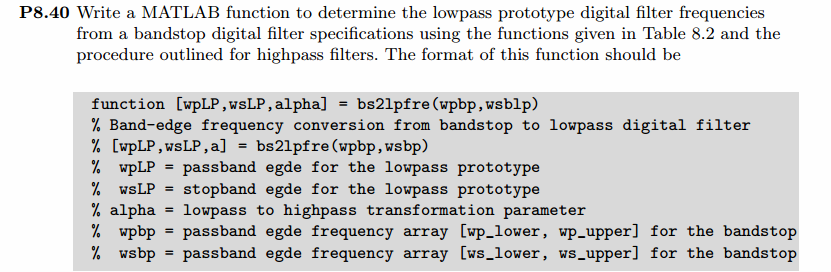
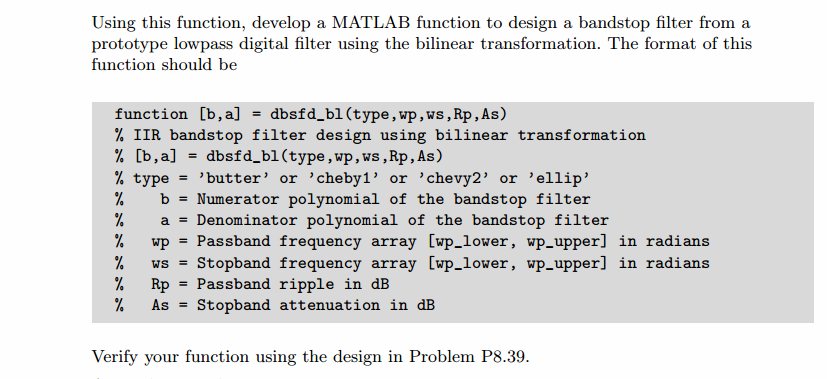
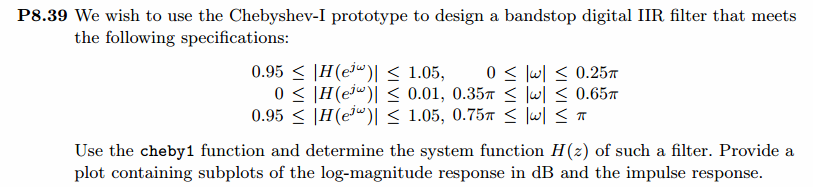
代码:
function [wpLP, wsLP, alpha] = bs2lpfre(wpbs, wsbs)

% Band-edge frequency conversion from bandstop to lowpass digital filter

% -------------------------------------------------------------------------

% [wpLP, wsLP, alpha] = bs2lpfre(wpbs, wsbs)

%   wpLP = passband edge for the lowpass digital prototype

%   wsLP = stopband edge for the lowpass digital prototype

%  alpha = lowpass to bandstop transformation parameter

%   wpbs = passband edge frequency array [wp_lower, wp_upper] for the bandstop

%   wsbs = stopband edge frequency array [ws_lower, ws_upper] for the bandstop

%

%

% Determine the digital lowpass cutoff frequencies:

wpLP = 0.2*pi;

     K = tan((wpbs(2)-wpbs(1))/2)*tan(wpLP/2);

  beta = cos((wpbs(2)+wpbs(1))/2)/cos((wpbs(2)-wpbs(1))/2);

alpha1 = -2*beta*K/(K+1);

alpha2 = (1-K)/(K+1);

alpha = [alpha1, alpha2];

wsLP = -angle((exp(-2*j*wsbs(1))+alpha1*exp(-j*wsbs(1))+alpha2)/(alpha2*exp(-2*j*wsbs(1))+alpha1*exp(-j*wsbs(1))+1))

wsLP = angle((exp(-2*j*wsbs(2))+alpha1*exp(-j*wsbs(2))+alpha2)/(alpha2*exp(-2*j*wsbs(2))+alpha1*exp(-j*wsbs(2))+1))
function [b, a] = cheb1bsf(wpbs, wsbs, Rp, As)

% IIR bandstop Filter Design using Chebyshev-1 Prototype

% -----------------------------------------------------------------------

% [b, a] = cheb1bsf(wp, ws, Rp, As);

%      b = numerator polynomial coefficients of bandstop filter, Direct form

%      a = denominator polynomial coefficients of bandstop filter, Direct form

%     wp = Passband edge frequency array [wp_lower, wp_upper] in radians;

%     ws = Stopband edge frequency array [ws_lower, ws_upper] in radians;

%     Rp = Passband ripple in +dB; Rp > 0

%     As = Stopband attenuation in +dB; As > 0

%

%

% Determine the digital lowpass cutoff frequencies:

wpLP = 0.2*pi;

     K = tan((wpbs(2)-wpbs(1))/2)*tan(wpLP/2);

  beta = cos((wpbs(2)+wpbs(1))/2)/cos((wpbs(2)-wpbs(1))/2);

alpha1 = -2*beta*K/(K+1);

alpha2 = (1-K)/(K+1);

alpha = [alpha1, alpha2];

wsLP = -angle((exp(-2*j*wsbs(1))+alpha1*exp(-j*wsbs(1))+alpha2)/(alpha2*exp(-2*j*wsbs(1))+alpha1*exp(-j*wsbs(1))+1))

wsLP = angle((exp(-2*j*wsbs(2))+alpha1*exp(-j*wsbs(2))+alpha2)/(alpha2*exp(-2*j*wsbs(2))+alpha1*exp(-j*wsbs(2))+1))

% Compute Analog Lowpass Prototype Specifications: Inverse Mapping for frequencies

T = 1; Fs = 1/T;                    % set T = 1

OmegaP = (2/T)*tan(wpLP/2);         % Prewarp(Cutoff) prototype passband freq

OmegaS = (2/T)*tan(wsLP/2);         % Prewarp(cutoff) prototype stopband freq

% Design Analog Chebyshev-1 Prototype Lowpass Filter:

[cs, ds] = afd_chb1(OmegaP, OmegaS, Rp, As);

% Bilinear transformation to obtain digital lowpass:

[blp, alp] = bilinear(cs, ds, Fs);

% Transform digital lowpass into bandstop filter

Nz = [alpha2, alpha1, 1]; Dz = [1, alpha1, alpha2];

[b, a] = zmapping(blp, alp, Nz, Dz);
%% ------------------------------------------------------------------------

%%            Output Info about this m-file

fprintf('\n***********************************************************\n');

fprintf('        <DSP using MATLAB> Problem 8.40.2 \n\n');

banner();

%% ------------------------------------------------------------------------

% Digital Filter Specifications:   Chebyshev-1 bandstop

wsbs = [0.35*pi 0.65*pi];             % digital stopband freq in rad

wpbs = [0.25*pi 0.75*pi];             % digital passband freq in rad

delta1 = 0.05;                      % passband tolerance, absolute specs

delta2 = 0.01;                      % stopband tolerance, absolute specs

Rp = -20 * log10( (1-delta1)/(1+delta1))    % passband ripple in dB

As = -20 * log10( delta2 / (1+delta1))      % stopband attenuation in dB

Ripple = 10 ^ (-Rp/20)           % passband ripple in absolute

Attn = 10 ^ (-As/20)             % stopband attenuation in absolute

% --------------------------------------------------------

%         method 1:  cheb1bsf function

% --------------------------------------------------------

fprintf('\n*******Digital bandstop, Coefficients of DIRECT-form***********\n');

[bbs, abs] = cheb1bsf(wpbs, wsbs, Rp, As)

[C, B, A] = dir2cas(bbs, abs)

% Calculation of Frequency Response:

[dbbs, magbs, phabs, grdbs, wwbs] = freqz_m(bbs, abs);

% ---------------------------------------------------------------

%    find Actual Passband Ripple and Min Stopband attenuation

% ---------------------------------------------------------------

delta_w = 2*pi/1000;

Rp_bs = -(min(dbbs( 1:1:ceil(wpbs(1)/delta_w+1) )));    % Actual Passband Ripple

fprintf('\nActual Passband Ripple is %.4f dB.\n', Rp_bs);

As_bs = -round(max(dbbs(ceil(wsbs(1)/delta_w)+1:1:ceil(wsbs(2)/delta_w)+1)));        % Min Stopband attenuation

fprintf('\nMin Stopband attenuation is %.4f dB.\n\n', As_bs);

%% -----------------------------------------------------------------

%%                             Plot

%% -----------------------------------------------------------------

figure('NumberTitle', 'off', 'Name', 'Problem 8.40.2 Chebyshev-1 bs by cheb1bsf function')

set(gcf,'Color','white');

M = 1;                          % Omega max

subplot(2,2,1); plot(wwbs/pi, magbs); axis([0, M, 0, 1.2]); grid on;

xlabel('Digital frequency in \pi units'); ylabel('|H|'); title('Magnitude Response');

set(gca, 'XTickMode', 'manual', 'XTick', [0, 0.25, 0.35, 0.65, 0.75, M]);

set(gca, 'YTickMode', 'manual', 'YTick', [0, 0.01, 0.9048, 1]);

subplot(2,2,2); plot(wwbs/pi, dbbs); axis([0, M, -100, 2]); grid on;

xlabel('Digital frequency in \pi units'); ylabel('Decibels'); title('Magnitude in dB');

set(gca, 'XTickMode', 'manual', 'XTick', [0, 0.25, 0.35, 0.65, 0.75, M]);

set(gca, 'YTickMode', 'manual', 'YTick', [-80, -44, -1, 0]);

set(gca,'YTickLabelMode','manual','YTickLabel',['80'; '44';'1 ';' 0']);

subplot(2,2,3); plot(wwbs/pi, phabs/pi); axis([0, M, -1.1, 1.1]); grid on;

xlabel('Digital frequency in \pi nuits'); ylabel('radians in \pi units'); title('Phase Response');

set(gca, 'XTickMode', 'manual', 'XTick', [0, 0.25, 0.35, 0.65, 0.75, M]);

set(gca, 'YTickMode', 'manual', 'YTick', [-1:0.5:1]);

subplot(2,2,4); plot(wwbs/pi, grdbs); axis([0, M, 0, 30]); grid on;

xlabel('Digital frequency in \pi units'); ylabel('Samples'); title('Group Delay');

set(gca, 'XTickMode', 'manual', 'XTick', [0, 0.25, 0.35, 0.65, 0.75, M]);

set(gca, 'YTickMode', 'manual', 'YTick', [0:10:30]);

figure('NumberTitle', 'off', 'Name', 'Problem 8.40.2 Pole-Zero Plot')

set(gcf,'Color','white');

zplane(bbs, abs);

title(sprintf('Pole-Zero Plot'));

%pzplotz(b,a);

% --------------------------------------------------------------------------------

%           cheby1 function

% --------------------------------------------------------------------------------

% Calculation of Chebyshev-1 filter parameters:

[N, wn] = cheb1ord(wpbs/pi, wsbs/pi, Rp, As);

fprintf('\n  ********* Chebyshev-1 Digital Bandstop Filter Order is = %3.0f \n', 2*N)

% Digital Chebyshev-1 bandstop Filter Design:

[bbs, abs] = cheby1(N, Rp, wn, 'stop');

[C, B, A] = dir2cas(bbs, abs)

% Calculation of Frequency Response:

[dbbs, magbs, phabs, grdbs, wwbs] = freqz_m(bbs, abs);

% ---------------------------------------------------------------

%    find Actual Passband Ripple and Min Stopband attenuation

% ---------------------------------------------------------------

delta_w = 2*pi/1000;

Rp_bs = -(min(dbbs(1:1:ceil(wpbs(1)/delta_w+1))));                             % Actual Passband Ripple

fprintf('\nActual Passband Ripple is %.4f dB.\n', Rp_bs);

As_bs = -round(max(dbbs(ceil(wsbs(1)/delta_w)+1:1:ceil(wsbs(2)/delta_w)+1)));   % Min Stopband attenuation

fprintf('\nMin Stopband attenuation is %.4f dB.\n\n', As_bs);

%% -----------------------------------------------------------------

%%                             Plot

%% -----------------------------------------------------------------

figure('NumberTitle', 'off', 'Name', 'Problem 8.40.2 Chebyshev-1 bs by cheby1 function')

set(gcf,'Color','white');

M = 1;                          % Omega max

subplot(2,2,1); plot(wwbs/pi, magbs); axis([0, M, 0, 1.2]); grid on;

xlabel('Digital frequency in \pi units'); ylabel('|H|'); title('Magnitude Response');

set(gca, 'XTickMode', 'manual', 'XTick', [0, 0.25, 0.35, 0.65, 0.75, M]);

set(gca, 'YTickMode', 'manual', 'YTick', [0, 0.01, 0.9048, 1]);

subplot(2,2,2); plot(wwbs/pi, dbbs); axis([0, M, -120, 2]); grid on;

xlabel('Digital frequency in \pi units'); ylabel('Decibels'); title('Magnitude in dB');

set(gca, 'XTickMode', 'manual', 'XTick', [0, 0.25, 0.35, 0.65, 0.75, M]);

set(gca, 'YTickMode', 'manual', 'YTick', [-80, -44, -1, 0]);

set(gca,'YTickLabelMode','manual','YTickLabel',['80'; '44';'1 ';' 0']);

subplot(2,2,3); plot(wwbs/pi, phabs/pi); axis([0, M, -1.1, 1.1]); grid on;

xlabel('Digital frequency in \pi nuits'); ylabel('radians in \pi units'); title('Phase Response');

set(gca, 'XTickMode', 'manual', 'XTick', [0, 0.25, 0.35, 0.65, 0.75, M]);

set(gca, 'YTickMode', 'manual', 'YTick', [-1:0.5:1]);

subplot(2,2,4); plot(wwbs/pi, grdbs); axis([0, M, 0, 30]); grid on;

xlabel('Digital frequency in \pi units'); ylabel('Samples'); title('Group Delay');

set(gca, 'XTickMode', 'manual', 'XTick', [0, 0.25, 0.35, 0.65, 0.75, M]);

set(gca, 'YTickMode', 'manual', 'YTick', [0:10:30]);
运行结果:
通带、阻带设计指标,dB单位和绝对值单位
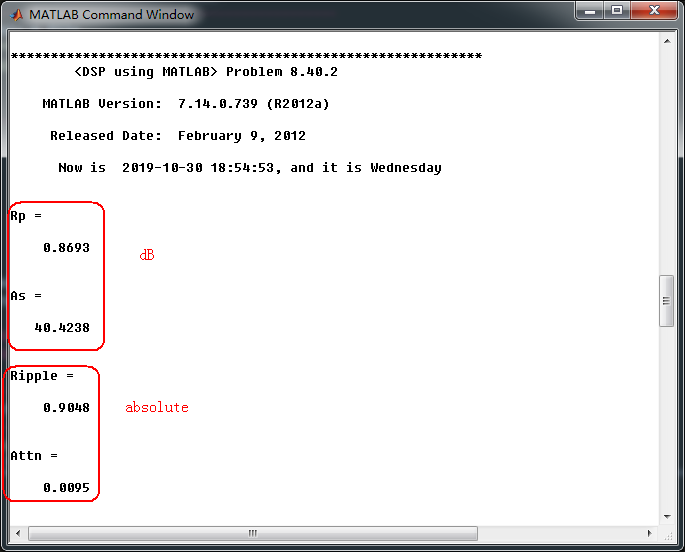
采用cheb1bsf函数,得到Chebyshev-1型数字带阻滤波器,系统函数直接形式的系数如下
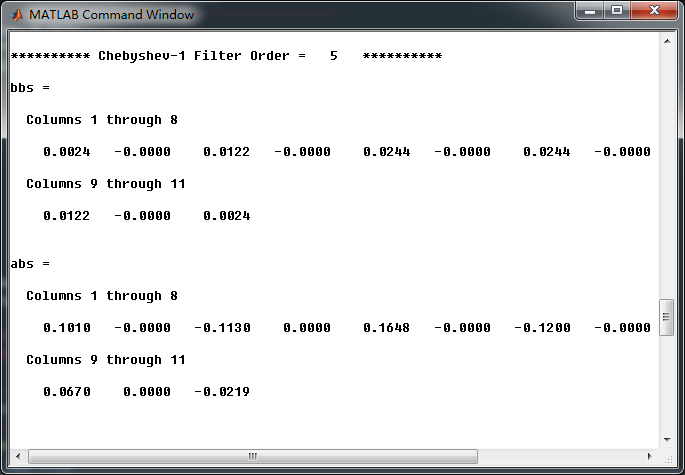
转换成串联形式,系数如下
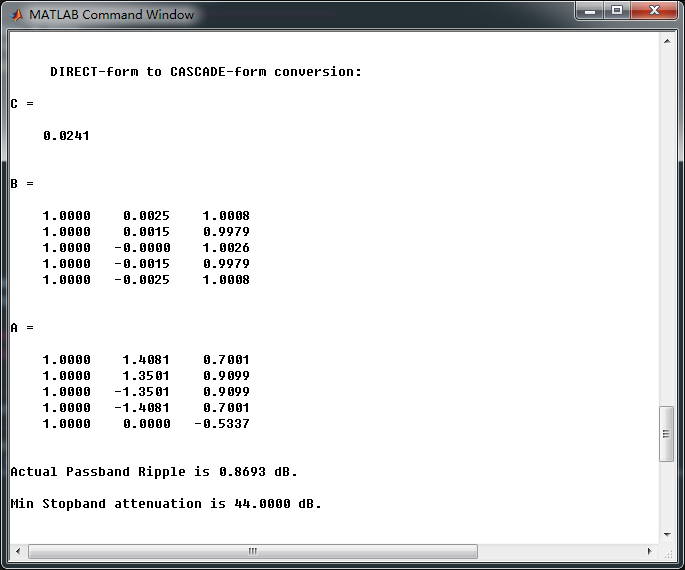
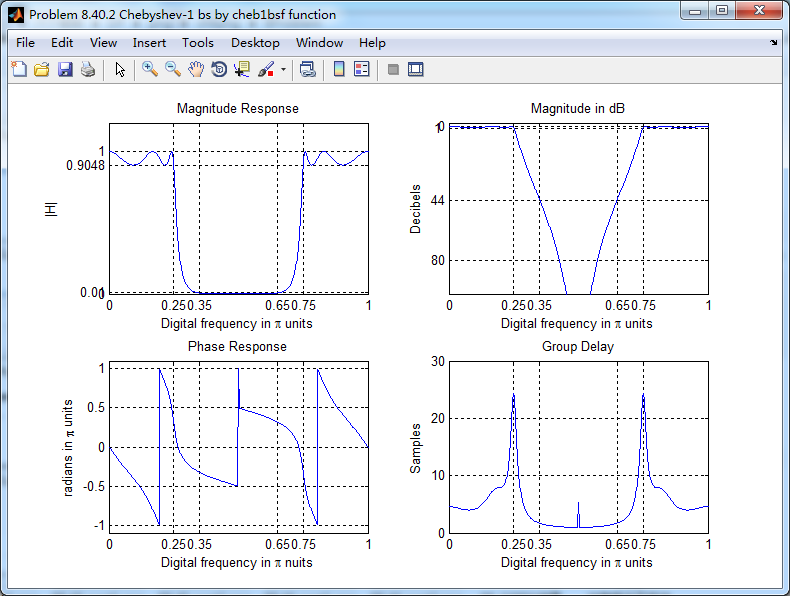
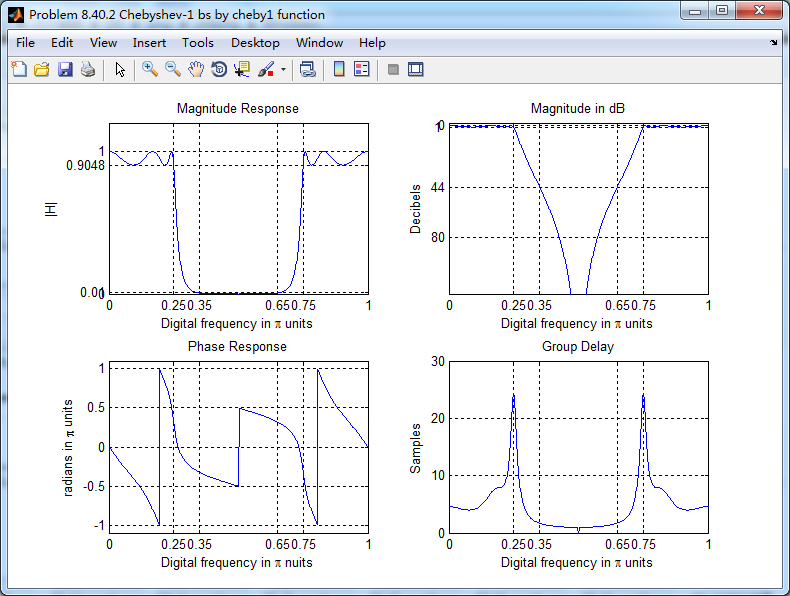
幅度谱、相位谱和群延迟响应
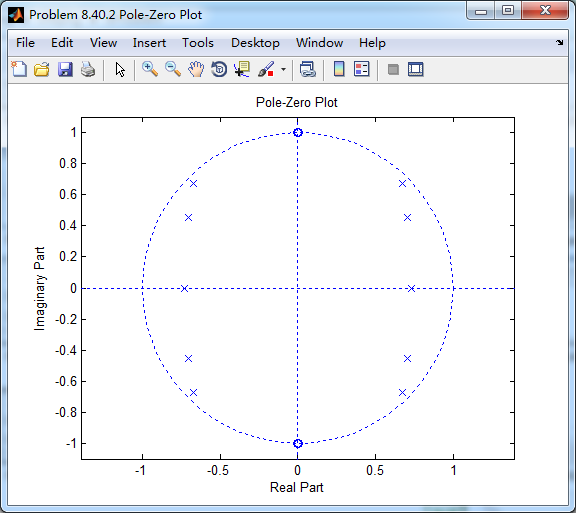
数字带阻滤波器零极点图
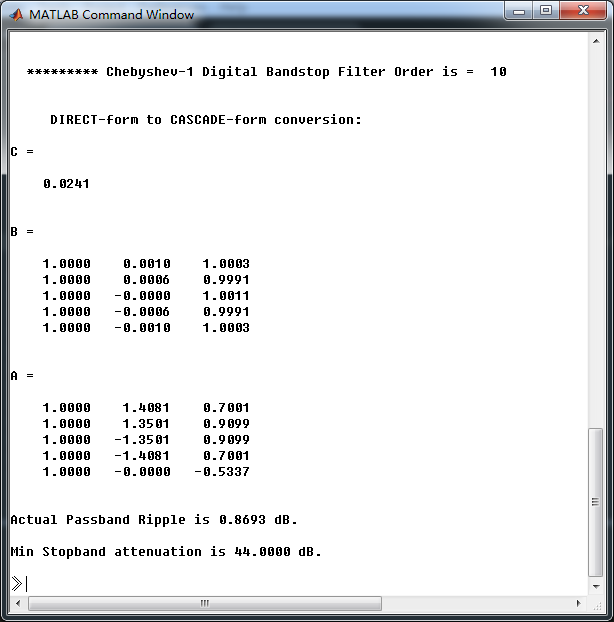
和P8.39进行对比,采用cheby1函数(MATLAB工具箱函数),计算得到数字带阻滤波器,系统函数直接形式的系数如下
《DSP using MATLAB》Problem 8.40的更多相关文章
- 《DSP using MATLAB》Problem 7.27
代码: %% ++++++++++++++++++++++++++++++++++++++++++++++++++++++++++++++++++++++++++++++++ %% Output In ...
- 《DSP using MATLAB》Problem 7.23
%% ++++++++++++++++++++++++++++++++++++++++++++++++++++++++++++++++++++++++++++++++ %% Output Info a ...
- 《DSP using MATLAB》Problem 7.16
使用一种固定窗函数法设计带通滤波器. 代码: %% ++++++++++++++++++++++++++++++++++++++++++++++++++++++++++++++++++++++++++ ...
- 《DSP using MATLAB》Problem 7.9
代码: %% ++++++++++++++++++++++++++++++++++++++++++++++++++++++++++++++++++++++++++++++++ %% Output In ...
- 《DSP using MATLAB》Problem 7.6
代码: 子函数ampl_res function [Hr,w,P,L] = ampl_res(h); % % function [Hr,w,P,L] = Ampl_res(h) % Computes ...
- 《DSP using MATLAB》Problem 5.38
代码: %% ++++++++++++++++++++++++++++++++++++++++++++++++++++++++++++++++++++++++++++++++ %% Output In ...
- 《DSP using MATLAB》Problem 5.19
代码: function [X1k, X2k] = real2dft(x1, x2, N) %% --------------------------------------------------- ...
- 《DSP using MATLAB》Problem 5.10
代码: 第1小题: %% ++++++++++++++++++++++++++++++++++++++++++++++++++++++++++++++++++++++++++++++++ %% Out ...
- 《DSP using MATLAB》Problem 5.5
代码: %% ++++++++++++++++++++++++++++++++++++++++++++++++++++++++++++++++++++++++++++++++ %% Output In ...
随机推荐
- Zookeeper_CAP原则
CAP原则 简单介绍CAP 想要进行分布式事务控制,CAP理论是我们必须要知道的: CAP原则:也叫CAP定理,指的是在一个分布式系统中,一致性.可用性.分区容错性三者不可兼得 一致性(Consist ...
- 干货满满!解密阿里云RPA (机器人流程自动化)的产品架构和商业化发展
阿里云RPA,作为阿里云自研8年的技术,在资本的热捧下,逐渐从幕后来到台前,成为企业服务市场的黑马.本文将从产品上全面剖析,阿里云RPA这款产品的现阶段情况,同时简单谈谈阿里云RPA的商业化进展. 阿 ...
- bcc-tools工具之profile
profile是用于追踪程序执行调用流程的工具,类似于perf中的-g指令 相比perf -g而言,profile功能化更加细分,可以根据需要选择追踪层面,例如-U(用户要调用流程) -K (内核态调 ...
- 17 win7 sp1 x64/VS2015下配置creo4.0二次开发环境——调用了众多开源库(ceres-solver,PCL1.8.0,office 2016COM接口,MySql数据库等)
0 引言 本次开发环境的配置是在综合考虑了开源库的版本.VS版本以及CREO4.0的版本,同时针对甲方需求选择了win7 sp1 x64系统. 配置的过程中遇到了形形色色的问题,但是一一解决了.通过这 ...
- post请求传文件
public static JSONObject doFormDataPost(File file, String sURL) throws IOException { HttpClient cont ...
- [JZOJ 5810] 简单的玄学
思路: 就是考虑一个结论 对于\(1<=x<=2^n\),那么\(x\)与\(2^n - x\)中的2的个数相等. 证明: 我们将\(x\)表示成\(2^k*b\),那么\(2^n - x ...
- ios 查看UIView的层次继承关系工具
http://stackoverflow.com/questions/5150186/how-do-i-inspect-the-view-hierarchy-in-ios https://github ...
- Centos6.5安装rar5.3
linux下使用最多的压缩工具是gzip,zip等,如果需要使用rar,就必须编译安装了,以下是编译安装rar教程: 一.安装支持库yum install -y gcc gcc-c++ autocon ...
- CodeForces 1166D Cute Sequences
题目链接:http://codeforces.com/problemset/problem/1166/D 题目大意 给定序列的第一个元素 a 和最后一个元素 b 还有一个限制 m,请构造一个序列,序列 ...
- python+tushare获取A股所有股票代码和名称列表
接口:stock_basic 描述:获取基础信息数据,包括股票代码.名称.上市日期.退市日期等 注:tushare模块下载和安装教程,请查阅我之前的文章 输入参数 名称 | 类型 ...