
pytest-allure-poco之allure全量详细用法
allure简介
Allure Framework是一个灵活的轻量级多语言测试报告工具。貌似是目前最漂亮的一个报告工具
python版本及必要库或工具
python 3.7
pytest 4.3.1
allure-pytest 2.6.1 (注意:这里不要使用pytest-allure-adaptor,踩过坑。使用pytest-allure-adaptor时因为一些兼容问题发现只有pytest3.7.0 才可以与alllure2.0匹配。但pytest3.7.0有不少bug)
command tool 工具 #用于生成美观报告
brew tap qatools/formulas
brew install allure-commandline
Features
1.title case标题
可以自定义用例标题,标题默认为函数名.
@allure.title
# -*- coding: utf-8 -*-

# @Time    : 2019/3/12 11:46

# @Author  : zzt

import allure

import pytest

@allure.title("用例标题0")

def test_0():

    pass

@allure.title("用例标题1")

def test_1():

    pass

def test_2():

    pass
执行效果:

2. 说明
可以添加测试的详细说明,以便根据需要为报告阅读器提供尽可能多的上下文。
两种方式:@allure.description 提供描述字符串的装饰器
@allure.description_html 提供一些HTML在测试用例的描述部分 (待研究)
# -*- coding: utf-8 -*-

# @Time    : 2019/3/12 11:46

# @Author  : zzt

import allure

import pytest

@allure.title("用例标题0")

@allure.description("这里是对test_0用例的一些详细说明")

def test_0():

    pass

@allure.title("用例标题1")

def test_1():

    pass

@allure.title("用例标题2")

def test_2():

    pass

3. 标签
这个标签非常好用
@allure.feature 分组第一层
@allure.story 分组第二层
@allure.severity 标记严重级别
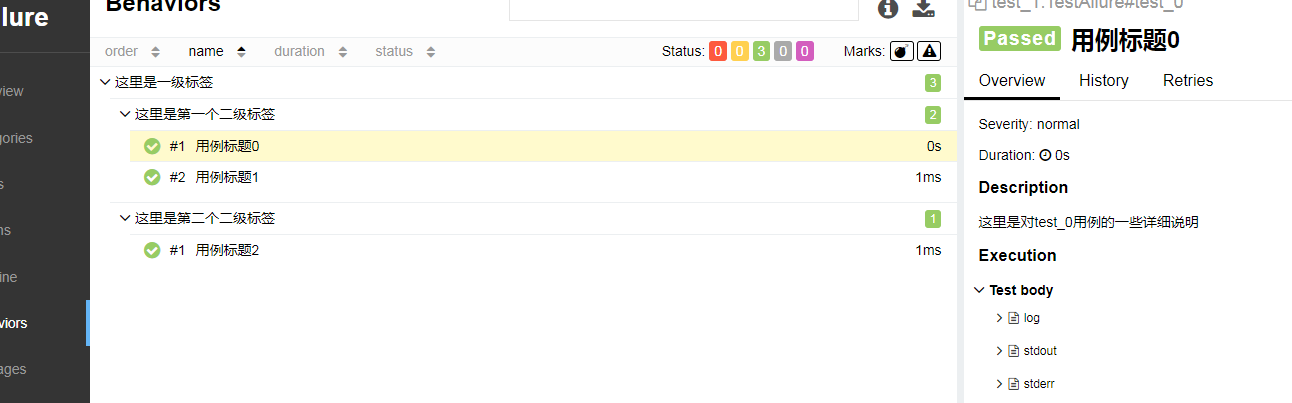
用法一:通过@allure.feature @allure.story来标记case 可以使得case在报告里显示更有层次感
# -*- coding: utf-8 -*-

# @Time    : 2019/3/12 11:46

# @Author  : zzt

import allure

import pytest

@allure.feature('这里是一级标签')

class TestAllure():

    @allure.title("用例标题0")

    @allure.description("这里是对test_0用例的一些详细说明")

    @allure.story("这里是第一个二级标签")

    def test_0(self):

        pass

    @allure.title("用例标题1")

    @allure.story("这里是第一个二级标签")

    def test_1(self):

        pass

    @allure.title("用例标题2")

    @allure.story("这里是第二个二级标签")

    def test_2(self):

        pass
运行结果如下:
用法二:@allure.story @allure.feature 还可以用来指定执行的case集合
1 --allure-features
2 --allure-stories
3 --allure-epics (待研究)
# -*- coding: utf-8 -*-

# @Time    : 2019/3/12 11:46

# @Author  : zzt

import allure

import pytest

@allure.feature('这里是一级标签')

class TestAllure():

    @allure.title("用例标题0")

    @allure.description("这里是对test_0用例的一些详细说明")

    @allure.story("这里是第一个二级标签")

    def test_0(self):

        pass

    @allure.title("用例标题1")

    @allure.story("这里是第二个二级标签")

    def test_1(self):

        pass

    @allure.title("用例标题2")

    @allure.story("这里是第三个二级标签")

    def test_2(self):

        pass
执行命令 pytest test_1.py --allure-stories "这里是第二个二级标签", "这里是第三个二级标签" #
执行结果如下: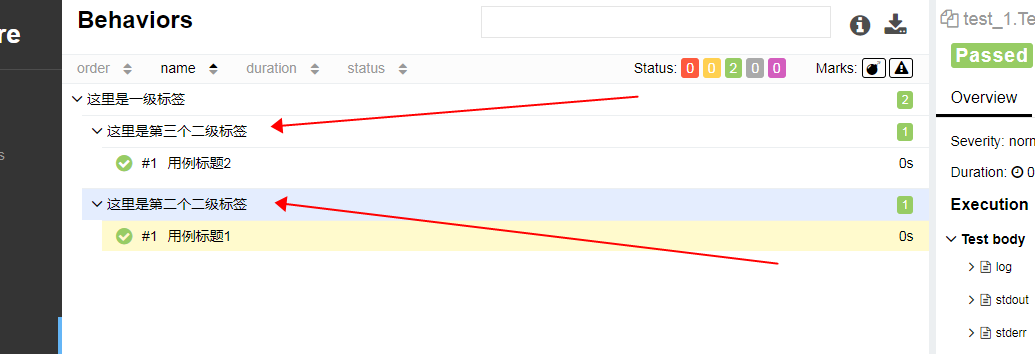
用法三:使用@allure.severity装饰器, 按严重性级别来标记case 这里等于给每个case定义一个严重级别 在Graphs页面查看分布情况。当然也可以指定执行的case集合 语法为 --allure.-severities XX,XX
- BLOCKER = 'blocker' 中断缺陷(客服端程序无响应,无法执行下一步骤)
- CRITICAL = 'critical' 临界缺陷(功能点缺失)
- NORMAL = 'normal' 普通缺陷(数据计算错误)
- MINOR = 'minor' 次要缺陷(界面错误与ui需求不符)
- TRIVIAL = 'trivial' 轻微缺陷(必须项无提示,或者提示不规范)
# -*- coding: utf-8 -*-

# @Time    : 2019/3/12 11:46

# @Author  : zzt

import allure

import pytest

@allure.feature('这里是一级标签')

class TestAllure():

    @allure.title("用例标题0")

    @allure.description("这里是对test_0用例的一些详细说明")

    @allure.story("这里是第一个二级标签")

    @allure.severity(allure.severity_level.CRITICAL)

    def test_0(self):

        pass

    @allure.title("用例标题1")

    @allure.story("这里是第二个二级标签")

    @allure.severity(allure.severity_level.BLOCKER)

    def test_1(self):

        pass

    @allure.title("用例标题2")

    @allure.story("这里是第三个二级标签")

    @allure.severity(allure.severity_level.NORMAL)

    def test_2(self):

        pass
执行结果如下:

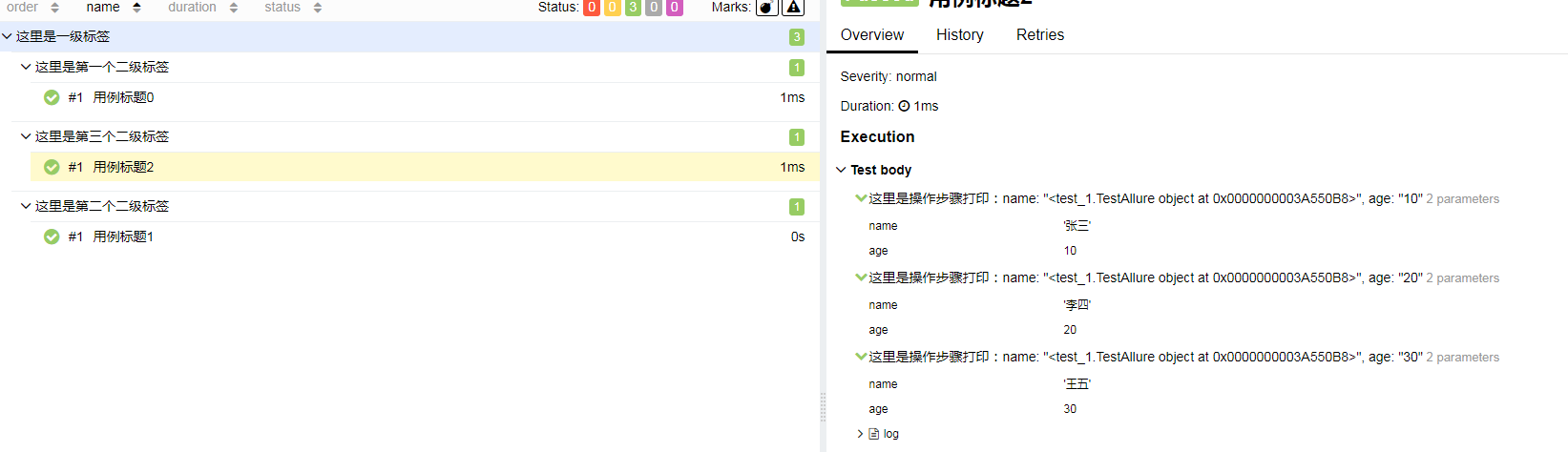
4. step 步骤 为报告中对应case添加一些的描述,以提供更详细的操作步骤
用法:@allure.step()
@allure.step(‘这里是操作步骤的描述: 获取参数一:“{0}”,获取参数二: “{1}” ’)
来装饰对应case
# -*- coding: utf-8 -*-

# @Time    : 2019/3/12 11:46

# @Author  : zzt

import allure

import pytest

@allure.feature('这里是一级标签')

class TestAllure():

    @allure.title("用例标题0")

    @allure.description("这里是对test_0用例的一些详细说明")

    @allure.story("这里是第一个二级标签")

    @allure.severity(allure.severity_level.CRITICAL)

    @allure.step("这里是步骤说明一")

    def test_0(self):

        pass

    @allure.title("用例标题1")

    @allure.story("这里是第二个二级标签")

    @allure.severity(allure.severity_level.BLOCKER)

    @allure.step("这里是步骤说明二")

    def test_1(self):

        pass

    @allure.step('这里是操作步骤打印:name: "{0}", age: "{age}"')

    def step_with_title(self, name, age=10):

        pass

    @allure.title("用例标题2")

    @allure.story("这里是第三个二级标签")

    @allure.severity(allure.severity_level.NORMAL)

    def test_2(self):

        self.step_with_title('张三')

        self.step_with_title('李四', 20)

        self.step_with_title('王五', age=30)
执行结果如下:
5. 参数化
可以将case所需参数展示在报告中,方便问题追踪
# -*- coding: utf-8 -*-

# @Time    : 2019/3/12 11:46

# @Author  : zzt

import allure

import pytest

@allure.feature('这里是一级标签')

class TestAllure():

    @allure.title("用例标题0")

    @allure.description("这里是对test_0用例的一些详细说明")

    @allure.story("这里是第一个二级标签")

    @allure.severity(allure.severity_level.CRITICAL)

    @allure.step("这里是步骤说明一")

    @pytest.mark.parametrize('param1, param2', [(1, 10), (2, 20)])

    def test_0(self, param1, param2):

        print(param1)

    @allure.title("用例标题1")

    @allure.story("这里是第二个二级标签")

    @allure.severity(allure.severity_level.BLOCKER)

    @allure.step("这里是步骤说明二")

    @pytest.mark.parametrize('param1', ['value 1', 'value 2'])

    @pytest.mark.parametrize('param2', [True], ids=["这是一个有意思的操作"])

    @pytest.mark.parametrize('param3', [1])

    def test_1(self, param1, param2, param3):

        pass

    @allure.step('这里是操作步骤打印:name: "{0}", age: "{age}"')

    def step_with_title(self, name, age=10):

        pass

    @allure.title("用例标题2")

    @allure.story("这里是第三个二级标签")

    @allure.severity(allure.severity_level.NORMAL)

    def test_2(self):

        self.step_with_title('张三')

        self.step_with_title('李四', 20)

        self.step_with_title('王五', age=30)
执行结果如下: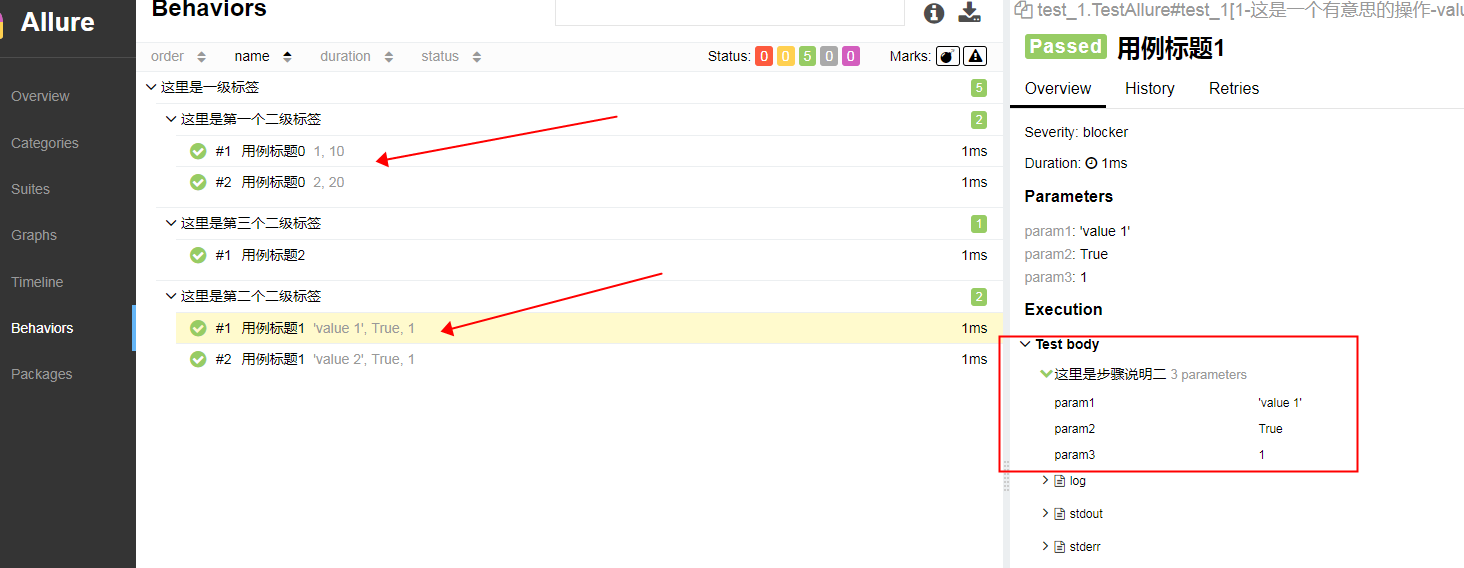
6 附件
报告可以展示许多不同类型的附件,用来补充测试,步骤等信息
allure.attach(body, name, attachment_type, extension)
body- 要写入文件的原始内容。name- 包含文件名的字符串attachment_type- 其中一个allure.attachment_type值extension- 提供的将用作创建文件的扩展名
或者 allure.attach.file(source, name, attachment_type, extension)
source - 包含文件路径的字符串。
# -*- coding: utf-8 -*-

# @Time    : 2019/3/12 11:46

# @Author  : zzt

import allure

import pytest

@allure.feature('这里是一级标签')

class TestAllure():

    @allure.title("用例标题0")

    @allure.story("这里是第一个二级标签")

    @pytest.mark.parametrize('param', ['青铜', '白银', '黄金'])

    def test_0(self, param):

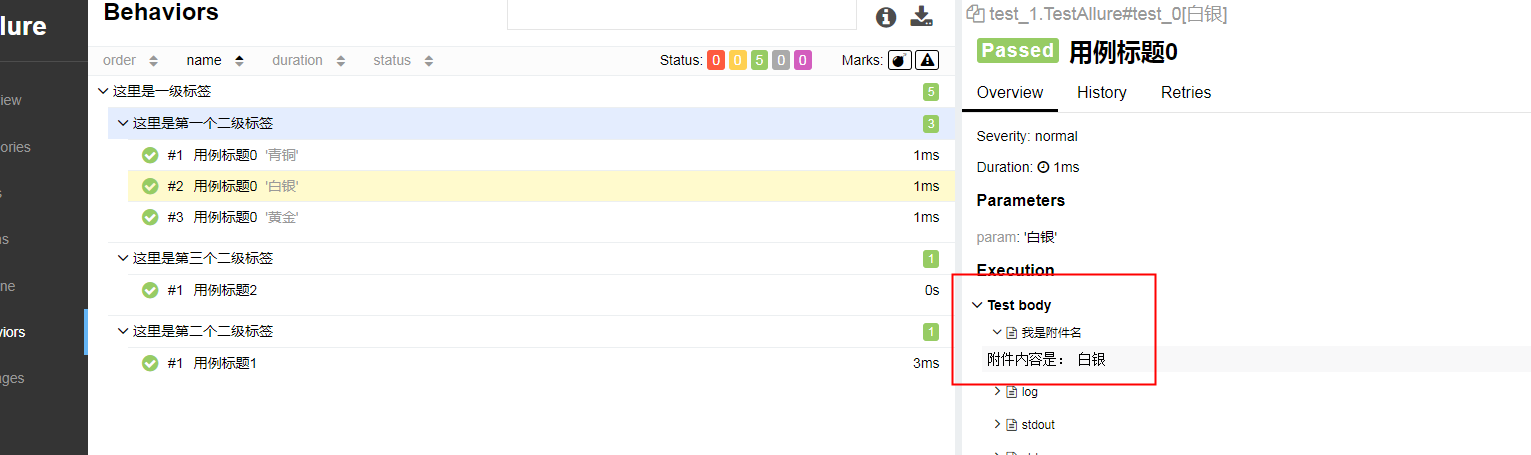
        allure.attach('附件内容是: '+param, '我是附件名', allure.attachment_type.TEXT)

    @allure.title("用例标题1")

    @allure.story("这里是第二个二级标签")

    def test_1(self):

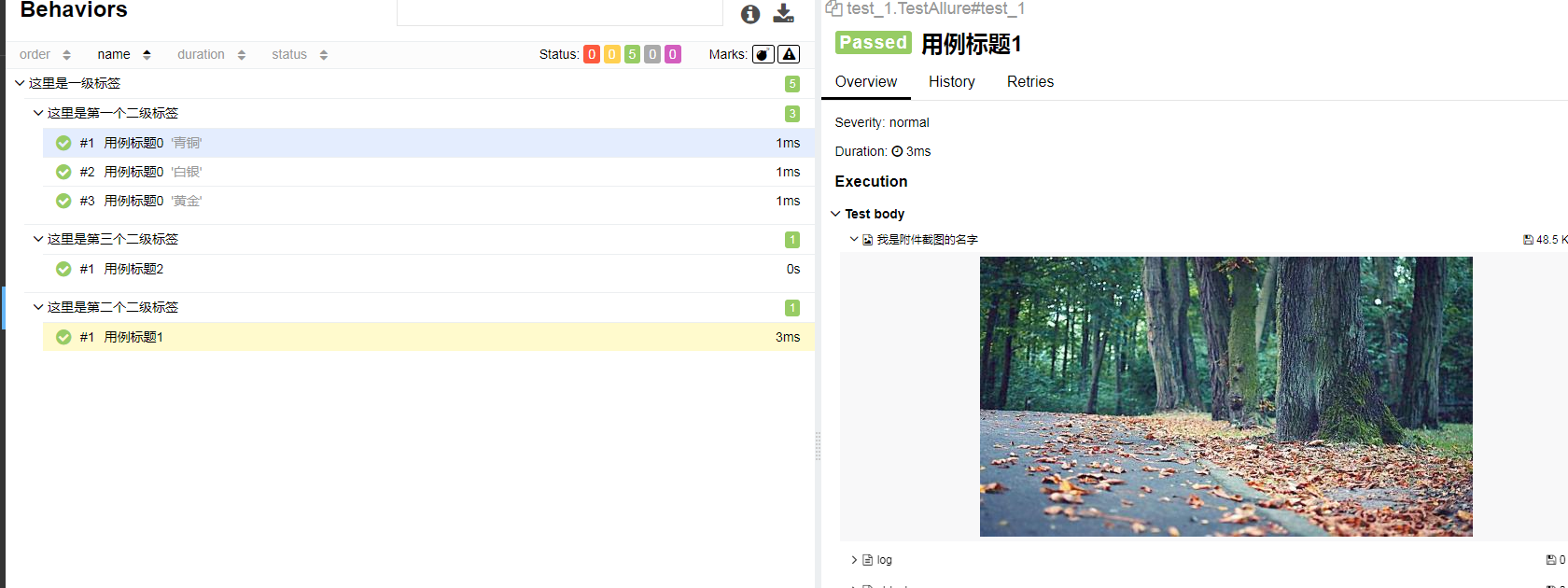
        allure.attach.file(r'E:\Myproject\pytest-allure\test\test_1.jpg', '我是附件截图的名字', attachment_type=allure.attachment_type.JPG)

    @allure.title("用例标题2")

    @allure.story("这里是第三个二级标签")

    @allure.severity(allure.severity_level.NORMAL)

    def test_2(self):

        pass
执行结果如下:
7. 链接
@allure.link @allure.issue @allure.testcase
# -*- coding: utf-8 -*-

# @Time    : 2019/3/12 11:46

# @Author  : zzt

import allure

import pytest

@allure.feature('这里是一级标签')

class TestAllure():

    @allure.title("用例标题0")

    @allure.story("这里是第一个二级标签")

    @pytest.mark.parametrize('param', ['青铜', '白银', '黄金'])

    def test_0(self, param):

        allure.attach('附件内容是: '+param, '我是附件名', allure.attachment_type.TEXT)

    @allure.title("用例标题1")

    @allure.story("这里是第二个二级标签")

    def test_1(self):

        allure.attach.file(r'E:\Myproject\pytest-allure\test\test_1.jpg', '我是附件截图的名字', attachment_type=allure.attachment_type.JPG)

    @allure.title("用例标题2")

    @allure.story("这里是第三个二级标签")

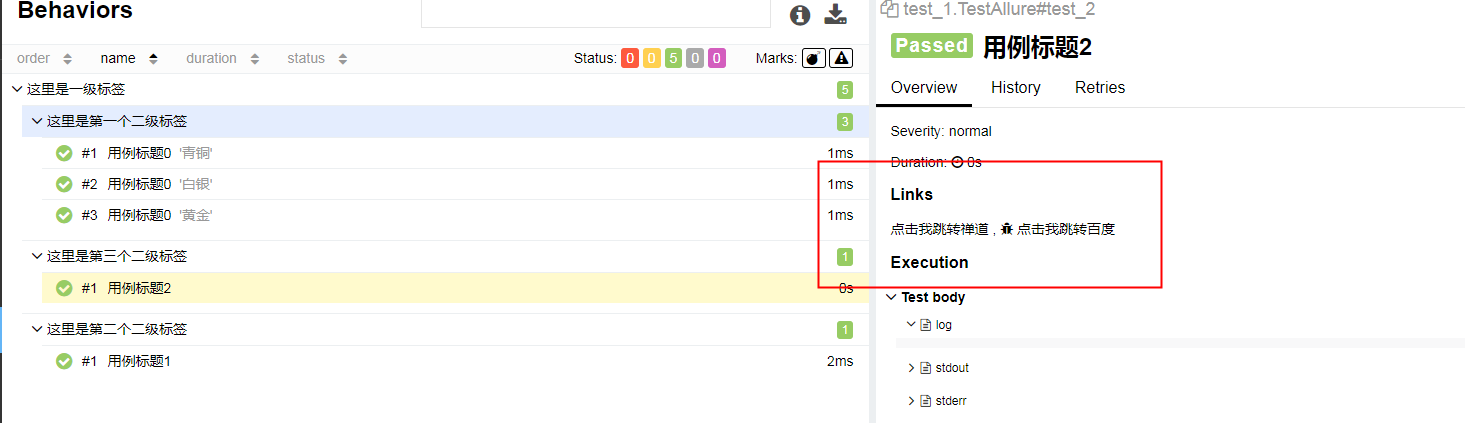
    @allure.issue('http://baidu.com', name='点击我跳转百度')

    @allure.testcase('http://bug.com/user-login-Lw==.html', name='点击我跳转禅道')

    def test_2(self):

        pass
执行结果如下:
8 重试
Allure允许您汇总有关在单次测试运行期间重新执行的测试的信息以及在一段时间内测试执行的历史记录。
重试需要引入插件: pip pytest-rerunfailures 或者手动下载 https://github.com/pytest-dev/pytest-rerunfailures
(未完待续)
pytest-allure-poco之allure全量详细用法的更多相关文章
- Pytest系列(20)- allure结合pytest,allure.step()、allure.attach的详细使用
如果你还想从头学起Pytest,可以看看这个系列的文章哦! https://www.cnblogs.com/poloyy/category/1690628.html 前言 allure除了支持pyte ...
- Pytest系列(21)- allure的特性,@allure.description()、@allure.title()的详细使用
如果你还想从头学起Pytest,可以看看这个系列的文章哦! https://www.cnblogs.com/poloyy/category/1690628.html 前言 前面介绍了两种allure的 ...
- Pytest系列(23)- allure打标记,@allure.feature()、@allure.story()、@allure.severity()的详细使用
如果你还想从头学起Pytest,可以看看这个系列的文章哦! https://www.cnblogs.com/poloyy/category/1690628.html 前言 前面几篇文章主要介绍了all ...
- Pytest系列(22)- allure的特性,@allure.link()、@allure.issue()、@allure.testcase()的详细使用
如果你还想从头学起Pytest,可以看看这个系列的文章哦! https://www.cnblogs.com/poloyy/category/1690628.html 前言 上一篇文章介绍了两种allu ...
- pytest(12)-Allure常用特性allure.attach、allure.step、fixture、environment、categories
上一篇文章pytest Allure生成测试报告我们学习了Allure中的一些特性,接下来继续学习其他常用的特性. allure.attach allure.attach用于在测试报告中添加附件,补充 ...
- module 'pytest' has no attribute 'allure'问题解决
安装allure后执行命令后报错module 'pytest' has no attribute 'allure' C:\Users\Desktop\xin>pytest -s -q --all ...
- Pytest自动化测试 - 完美结合Allure
简介 Allure Framework是一种灵活的.轻量级.多语言测试报告工具. 不仅可以以简洁的网络报告形式非常简洁地显示已测试的内容, 而且还允许参与开发过程的每个人从日常执行中提取最大程度的有用 ...
- Pytest(11)allure报告
前言 allure是一个report框架,支持java的Junit/testng等框架,当然也可以支持python的pytest框架,也可以集成到Jenkins上展示高大上的报告界面. mac环境: ...
- pytest文档32-allure描述用例详细讲解
前言 pytest+allure是最完美的结合了,关于allure的使用,本篇做一个总结. allure报告可以很多详细的信息描述测试用例,包括epic.feature.story.title.iss ...
随机推荐
- 分析DuxCms之AdminController
/** * 后台模板显示 调用内置的模板引擎显示方法, * @access protected * @param string $templateFile 指定要调用的模板文件 * @return v ...
- 判断NaN in JavaScript
[NaN 作用是用来表示一个值不是数字] NaN在JavaScript中行为很怪异,是因为那NaN和任何值都不相等(包括它自己). NaN === NaN; // false因为 ...
- __new__()方法的使用和实例化
Python中__new__()方法的使用和实例化 1 2 new()是在新式类中新出现的方法,它作用在构造方法init()建造实例之前,可以这么理解,在Python 中存在于类里面的构造方法init ...
- oracle的事务级别
ooracle的事务级别是不提交的,如果在sql语句中插入数据,如果不提交(commit).在程序里面试读不出来数据的.长时间不用oracle竟然忘了这些东西,特此记下.方便以后查看
- ndarray数据类型
dtype(数据类型)是一个特殊的对象,它含有ndarray将一块内存解释为特定数据类型所需的信息 In [18]: sim1 = np.array([1,2,3],dtype=np.float64) ...
- Javassist字节码增强示例
概述 Javassist是一款字节码编辑工具,可以直接编辑和生成Java生成的字节码,以达到对.class文件进行动态修改的效果.熟练使用这套工具,可以让Java编程更接近与动态语言编程. 下面一个方 ...
- Java NIO Channel to Channel Transfers通道传输接口
原文链接:http://tutorials.jenkov.com/java-nio/channel-to-channel-transfers.html 在Java NIO中如果一个channel是Fi ...
- windows下Redis的安装配置以及注意事项
一.下载windows版本的Redis 去官网找了很久,发现原来在官网上可以下载的windows版本的,现在官网以及没有下载地址,只能在github上下载,官网只提供linux版本的下载 官网下载地址 ...
- Unity文档阅读 第三章 依赖注入与Unity
Introduction 简介In previous chapters, you saw some of the reasons to use dependency injection and lea ...
- C3垂直居中均分
<!DOCTYPE html><html lang="en"><head> <meta charset="UTF-8" ...