
Android物联网应用程序开发(智慧园区)—— 登录界面开发
效果:
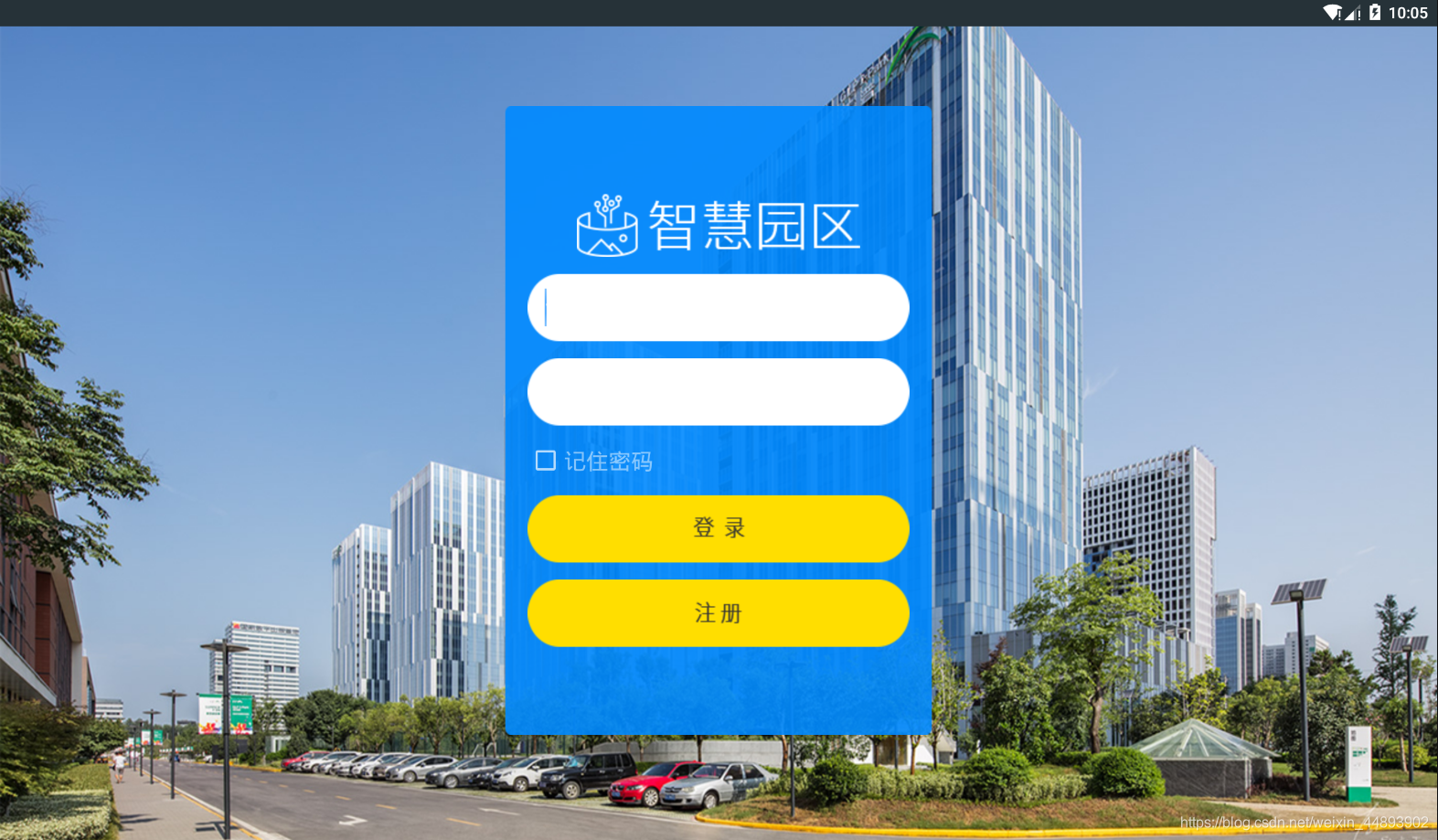
布局代码:
<?xml version="1.0" encoding="utf-8"?>

<LinearLayout xmlns:android="http://schemas.android.com/apk/res/android"

    android:layout_width="match_parent"

    android:layout_height="match_parent"

    android:background="@drawable/bg_out"

    android:gravity="center"

    android:orientation="vertical">

    <LinearLayout

        android:layout_width="380dp"

        android:layout_height="560dp"

        android:background="@drawable/bg_login"

        android:gravity="center"

        android:orientation="vertical"

        android:padding="20dp">

        <ImageView

            android:layout_width="wrap_content"

            android:layout_height="wrap_content"

            android:src="@drawable/icon_smart_park" />

        <EditText

            android:layout_width="match_parent"

            android:layout_height="wrap_content"

            android:layout_marginTop="15dp"

            android:background="@drawable/input_normal"

            android:hint="请输入账号"

            android:paddingLeft="15dp"

            android:textSize="25sp" />

        <EditText

            android:layout_width="match_parent"

            android:layout_height="wrap_content"

            android:layout_marginTop="15dp"

            android:background="@drawable/input_normal"

            android:hint="请输入密码"

            android:inputType="textPassword"

            android:paddingLeft="15dp"

            android:textSize="25sp" />

        <CheckBox

            android:layout_width="match_parent"

            android:layout_height="wrap_content"

            android:layout_marginLeft="15dp"

            android:layout_marginTop="15dp"

            android:text="记住密码"

            android:textColor="#ffffff"

            android:textSize="20sp" />

        <Button

            android:layout_width="match_parent"

            android:layout_height="wrap_content"

            android:layout_marginTop="15dp"

            android:background="@drawable/btn_login_normal" />

        <Button

            android:layout_width="match_parent"

            android:layout_height="wrap_content"

            android:layout_marginTop="15dp"

            android:background="@drawable/btn_register_normal" />

    </LinearLayout>

</LinearLayout>
Android物联网应用程序开发(智慧园区)—— 登录界面开发的更多相关文章
- Android studio 开发一个用户登录界面
Android studio 开发一个用户登录界面 activity_main.xml <?xml version="1.0" encoding="utf-8&qu ...
- [转]Android:布局实例之模仿QQ登录界面
Android:布局实例之模仿QQ登录界面 预览图: 准备: 1.找到模仿对象 QQ登陆界面UI下载>>>>> 2.导入工程 3.查看布局结构和使用控件 其对应效果图分布 ...
- Android:布局实例之模仿QQ登录界面
预览图: 准备: 1.找到模仿对象 QQ登陆界面UI下载>>>>> 2.导入工程 3.查看布局结构和使用控件 其对应效果图分布为 4.分析样式选择器 下拉箭头2种样式:点 ...
- Android:布局实例之模仿京东登录界面
预览图及布局结构参考: 布局: <?xml version="1.0" encoding="utf-8"?> <RelativeLayout ...
- Android物联网应用程序开发(智慧园区)—— 图片预览界面
效果图: 实现步骤: 1.首先在 build.gradle 文件中引入 RecycleView implementation 'com.android.support:recyclerview-v7: ...
- Android物联网应用程序开发(智慧园区)—— 设置传感器阈值对话框界面
效果图: 自定义对话框布局: <?xml version="1.0" encoding="utf-8"?> <LinearLayout xml ...
- Android物联网应用程序开发(智慧园区)—— 园区监控系统界面
效果图: 布局代码: <?xml version="1.0" encoding="utf-8"?> <LinearLayout xmlns:a ...
- Android物联网应用程序开发(智慧城市)—— 查询购物信息界面开发
效果: 布局代码: <RelativeLayout xmlns:android="http://schemas.android.com/apk/res/android" xm ...
- Android物联网应用程序开发(智慧城市)—— 用户注册界面开发
效果: 布局代码: <?xml version="1.0" encoding="utf-8"?> <RelativeLayout xmlns: ...
随机推荐
- Angular @ViewChild,Angular 中的 dom 操作
Angular 中的 dom 操作(原生 js) ngAfterViewInit(){ var boxDom:any=document.getElementById('box'); boxDom.st ...
- LeetCode33题——搜索旋转排序数组
1.题目描述 假设按照升序排序的数组在预先未知的某个点上进行了旋转. ( 例如,数组 [0,1,2,4,5,6,7] 可能变为 [4,5,6,7,0,1,2] ). 搜索一个给定的目标值,如果数组中存 ...
- zabbix之监控Nginx连接数
#;下载Nginx (编译的时候必须加上此选项 --with-http_stub_status_module) 官网地址:http://nginx.org/en/docs/http/ngx_http_ ...
- Spring Batch Event Listeners
Learn to create and configure Spring batch's JobExecutionListener (before and after job), StepExecut ...
- 莫烦python教程学习笔记——线性回归模型的属性
#调用查看线性回归的几个属性 # Youtube video tutorial: https://www.youtube.com/channel/UCdyjiB5H8Pu7aDTNVXTTpcg # ...
- 程序员Meme 第02期
- java基础---局部变量和全局变量
1.成员变量的概念: 成员变量就是属于类的变量,在类中,方法体外定义的变量 1)成员变量又分为两种: 类变量(又称静态变量) 实例变量(又称非静态变量) 类变量(静态变量) :是被static所修 ...
- CPU的中断
目录 一.简介 二.具体 方式 硬中断 软中断 中断切换 网卡中断 三.中断查看 一.简介 中断其实就是由硬件或软件所发送的一种称为IRQ(中断请求)的信号.中断允许让设备,如键盘,串口卡,并口等设备 ...
- axb_2019_fmt32
一道格式字符串的题目,拿到题目例行检查一下 32位的程序开机了nx的保护,将程序放入ida中 发现没有system函数于是进入main主函数进行代码审计 可以看到printf存在明显的格式字符串漏洞 ...
- [BUUCTF]REVERSE——[GKCTF2020]Check_1n
[GKCTF2020]Check_1n 附件 步骤: 例行查壳儿,32位程序,无壳儿 32位ida载入,习惯性的检索程序里的字符串,看到了一个比较有意思的字符串,但是不懂是什么解密,先不管它了 在这些 ...