
Android物联网应用程序开发(智慧园区)—— 图片预览界面
效果图:
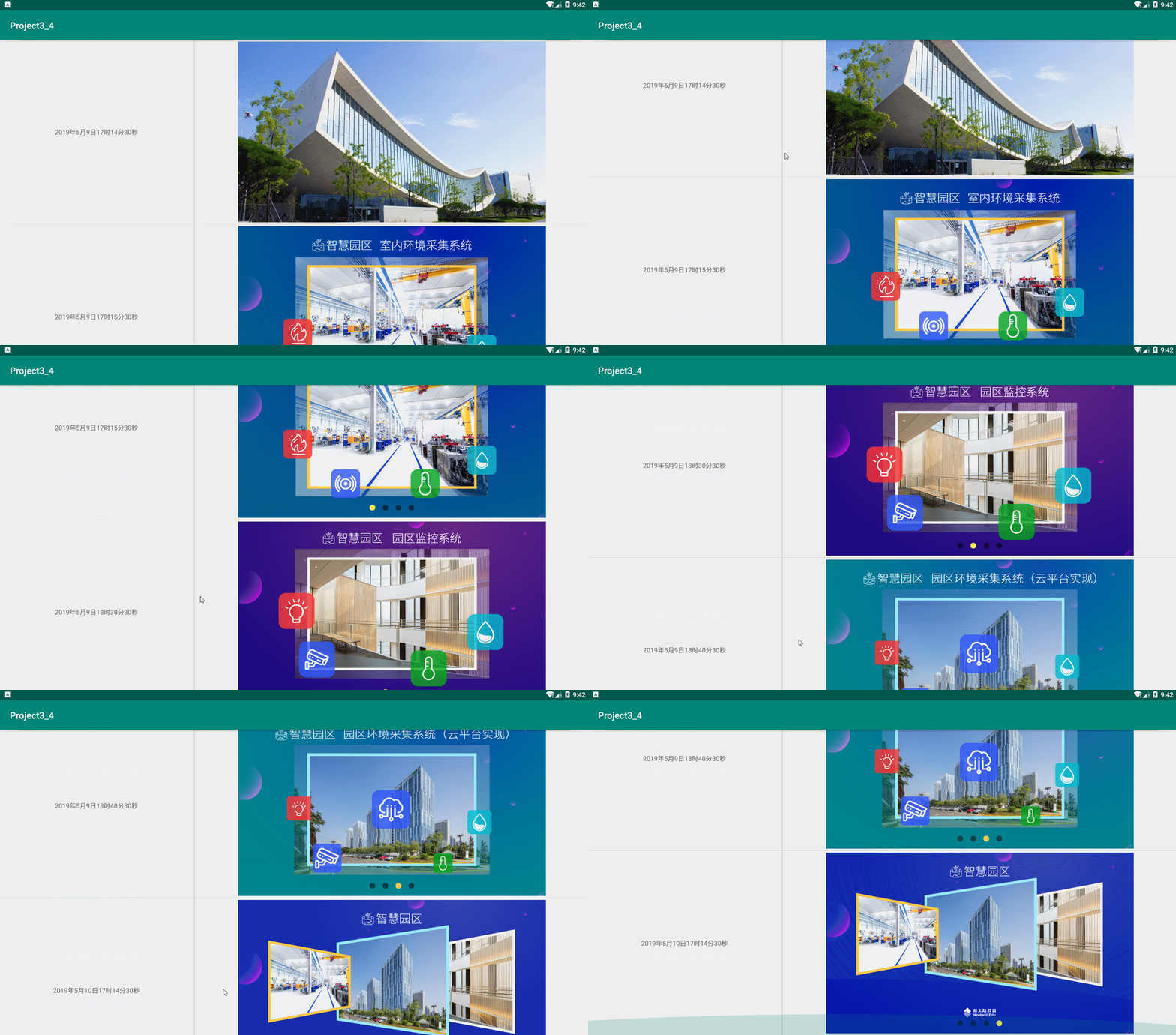
实现步骤:
1、首先在 build.gradle 文件中引入 RecycleView
implementation 'com.android.support:recyclerview-v7:28.0.0'
添加完成后,在右上角有一个同步Sync Now的提示,点击进行同步构建,接下来修改activity_main.xml的代码
2、在 activity_main.xml 布局文件中加入RecyclerView
<?xml version="1.0" encoding="utf-8"?>

<LinearLayout xmlns:android="http://schemas.android.com/apk/res/android"

    android:layout_width="match_parent"

    android:layout_height="match_parent"

    android:orientation="vertical">

    <android.support.v7.widget.RecyclerView

        android:id="@+id/recycler_view"

        android:layout_width="match_parent"

        android:layout_height="match_parent">

    </android.support.v7.widget.RecyclerView>

</LinearLayout>
接着创建RecyclerView的列表项布局

<?xml version="1.0" encoding="utf-8"?>

<LinearLayout xmlns:android="http://schemas.android.com/apk/res/android"

    android:layout_width="match_parent"

    android:layout_height="400dp"

    android:gravity="center">

    <TextView

        android:id="@+id/time"

        android:layout_width="0dp"

        android:layout_height="wrap_content"

        android:layout_weight="1"

        android:gravity="center" />

    <View

        android:layout_width="1dp"

        android:layout_height="fill_parent"

        android:background="#c0c0c0" />

    <ImageView

        android:id="@+id/image"

        android:layout_width="0dp"

        android:layout_height="match_parent"

        android:layout_margin="4dp"

        android:layout_weight="2"

        android:scaleType="fitCenter"

        android:src="@drawable/image1" />

</LinearLayout>
3、然后创建 RecyclerView 的数据适配器
package com.newland.project3_4;

import android.support.annotation.NonNull;

import android.support.v7.widget.RecyclerView;

import android.view.LayoutInflater;

import android.view.View;

import android.view.ViewGroup;

import android.widget.ImageView;

import android.widget.TextView;

public class MonitorAdapter extends RecyclerView.Adapter<MonitorAdapter.ViewHolder> {

    private String[] times = {"2019年5月9日17时14分30秒", "2019年5月9日17时15分30秒", "2019年5月9日18时30分30秒", "2019年5月9日18时40分30秒", "2019年5月10日17时14分30秒"};

    private int[] imageIds = {R.drawable.image1,R.drawable.image2,R.drawable.image3,R.drawable.image4,R.drawable.image5};

    @NonNull

    @Override

    public ViewHolder onCreateViewHolder(@NonNull ViewGroup parent, int viewType) {

        View view = LayoutInflater.from(parent.getContext()).inflate(R.layout.recyclerview_item, parent, false);

        ViewHolder holder = new ViewHolder(view);

        return holder;

    }

    @Override

    public void onBindViewHolder(@NonNull ViewHolder holder, int position) {

        holder.image.setImageResource(imageIds[position]);

        holder.time.setText(times[position]);

    }

    @Override

    public int getItemCount() {

        return times.length;

    }

    static class ViewHolder extends RecyclerView.ViewHolder {

        private ImageView image;//图片

        private TextView time;//时间

        public ViewHolder(View v) {

            super(v);

            image = v.findViewById(R.id.image);

            time = v.findViewById(R.id.time);

        }

    }

}
最后设置 RecyclerView 的适配器
package com.newland.project3_4;

import android.support.v7.app.AppCompatActivity;

import android.os.Bundle;

import android.support.v7.widget.DividerItemDecoration;

import android.support.v7.widget.LinearLayoutManager;

import android.support.v7.widget.RecyclerView;

public class MainActivity extends AppCompatActivity {

    private RecyclerView recyclerView;

    @Override

    protected void onCreate(Bundle savedInstanceState) {

        super.onCreate(savedInstanceState);

        setContentView(R.layout.activity_main);

        recyclerView = findViewById(R.id.recycler_view);

        //创建线性布局管理器,方向垂直

        LinearLayoutManager linearLayoutManager = new LinearLayoutManager(this, LinearLayoutManager.VERTICAL, false);

        //recyclerView设置布局管理器

        recyclerView.setLayoutManager(linearLayoutManager);

        MonitorAdapter adapter = new MonitorAdapter();

        //添加Android自带的分割线

        recyclerView.addItemDecoration(new DividerItemDecoration(this, DividerItemDecoration.VERTICAL));

        //设置适配器

        recyclerView.setAdapter(adapter);

    }

}
Android物联网应用程序开发(智慧园区)—— 图片预览界面的更多相关文章
- (干货)微信小程序之上传图片和图片预览
这几天一直负责做微信小程序这一块,也可以说是边做边学习吧,把自己做的微信小程序的一些功能分享出来,与大家探讨一下,相互学习相互进步. 先看下效果图 只写了一下效果样式的话希望大家不要太在意,下面马路杀 ...
- 微信小程序之上传图片和图片预览
这几天一直负责做微信小程序这一块,也可以说是边做边学习吧,把自己做的微信小程序的一些功能分享出来,与大家探讨一下,相互学习相互进步. 先看下效果图 只写了一下效果样式的话希望大家不要太在意,下面马路杀 ...
- 微信小程序开发之真机预览
1:真机预览时上传组件的坑: 当在真机里面使用上传组件,当进入选择相片或者拍照的时候,小程序会进入后台,调用APP onHide()方法,选择完返回小程序是会调用App Onshow()方法,然后调用 ...
- Android物联网应用程序开发(智慧园区)—— 设置传感器阈值对话框界面
效果图: 自定义对话框布局: <?xml version="1.0" encoding="utf-8"?> <LinearLayout xml ...
- Android物联网应用程序开发(智慧园区)—— 园区监控系统界面
效果图: 布局代码: <?xml version="1.0" encoding="utf-8"?> <LinearLayout xmlns:a ...
- Android物联网应用程序开发(智慧园区)—— 登录界面开发
效果: 布局代码: <?xml version="1.0" encoding="utf-8"?> <LinearLayout xmlns:an ...
- Android物联网应用程序开发(智慧城市)—— 摄像头监控界面开发
效果: 布局代码: <?xml version="1.0" encoding="utf-8"?> <RelativeLayout xmlns: ...
- Android物联网应用程序开发(智慧城市)—— 查询购物信息界面开发
效果: 布局代码: <RelativeLayout xmlns:android="http://schemas.android.com/apk/res/android" xm ...
- Android物联网应用程序开发(智慧城市)—— 用户注册界面开发
效果: 布局代码: <?xml version="1.0" encoding="utf-8"?> <RelativeLayout xmlns: ...
随机推荐
- css相关,position定位详解
CSS 有两个最重要的基本属性,前端开发必须掌握:display 和 position. display属性指定网页的布局.两个重要的布局,弹性布局flex和网格布局grid. 本文介绍非常有用的po ...
- 容器之分类与各种测试(三)——slist的用法
slist和forward_list的不同之处在于其所在的库 使用slist需要包含 #include<ext\list> 而使用forward_list则需要包含 #include< ...
- 如何使用table布局静态网页
<!DOCTYPE html><html lang="en"><head> <meta charset="UTF-8" ...
- ABP.VNext-模块
一.什么是ABP.Vnext? ABP.Vnext是一个基于Asp.Net Core Web应用程序框架.主要目的是用来快速开发Web应用, ABP.Vnext不仅提供完整Web应用程序开发模板,而且 ...
- docker容器使用loki收集日志
docker-compose安装loki套件(loki+promtail+grafana) loki进行日志聚合处理 类似elk中的es promtail是日志收集,类似elk中的logstash ...
- CF415A Mashmokh and Lights 题解
Content 有 \(n\) 个灯,一开始都是亮着的. 有 \(m\) 次操作,每次操作按下开关 \(x\),按下之后所有编号 \(\geqslant x\) 的灯全部熄灭.问你所有的灯第一次被熄灭 ...
- CF177A1/A2 Good Matrix Elements 题解
Content 给定一个 \(n\times n\) 的矩阵,每个元素都有一个值,求出处于两条对角线以及中间行和中间列的元素之和. 数据范围:\(1\leqslant n\leqslant 5(\te ...
- linux安装软件系列之npm安装
什么是rpm 百度说它是 Red-hat Package Manager (红帽包管理器) 其实它是:RPM Package Manager (RPM包管理器,来源于:https://rpm.org) ...
- java 编程基础:【注解】 提取注解信息,利用自定义注解编写测试类,注解绑定事件
提取注解信息 使用注解修饰了类.方法.成员变量等成员之后,这些注解不会自己生效,必须由开发者提供相应工具来提取并处理注解信息. Java使用java.lang.annotation.Annotat ...
- java 输入输出IO流:标准输入/输出System.in;System.out;System.err;【重定向输入System.setIn(FileinputStream);输出System.setOut(printStream);】
Java的标准输入输出分别通过System.in和System.out来代表的,在默认情况下它分别代表键盘和显示器,当程序通过System.in来获取输入时,实际上是从键盘读取输入 当程序试图通过 S ...