
【转】Setting up SDL Extension Libraries on Visual Studio 2019 Community
Setting up SDL Extension Libraries on Visual Studio 2019 Community
Last Updated 7/20/20
1)First thing you need to do is download SDL_image headers and binaries. You will find them on the SDL_image website, specifically on this page.
You'll want to download the Visual C++ development libraries.
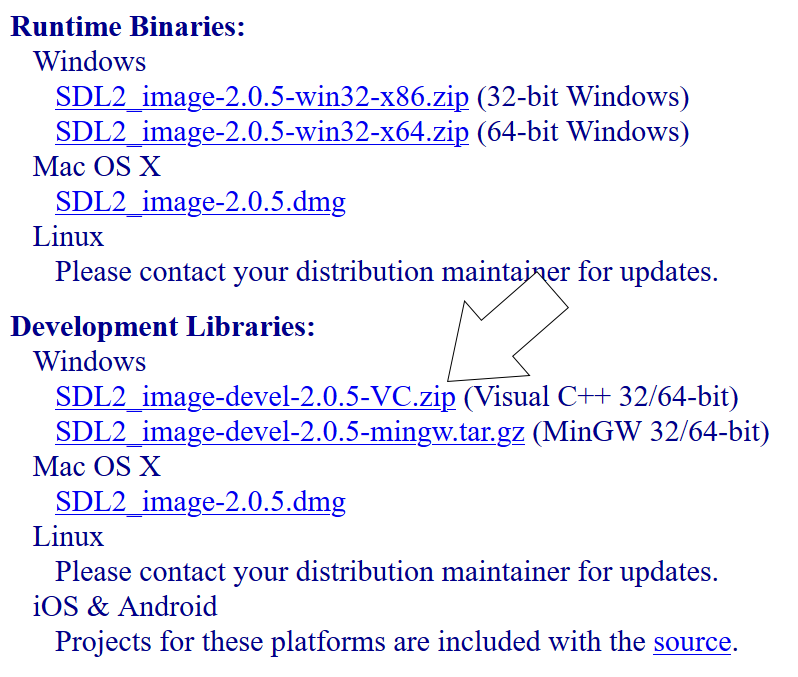
Extact the folder to where ever you'd like. I recommend keeping your development libraries in the same directory so for this tutorial we will be extacting it to C:\vclib
2)Now go download the source for lesson 06. Add the source file to your existing SDL2 project and hit build. You should get the following error:
Cannot open include file: 'SDL_image.h': No such file or directory
Like before, this mean Visual C++ can't find the SDL_image headers, so make sure to add the SDL_image headers to your path:
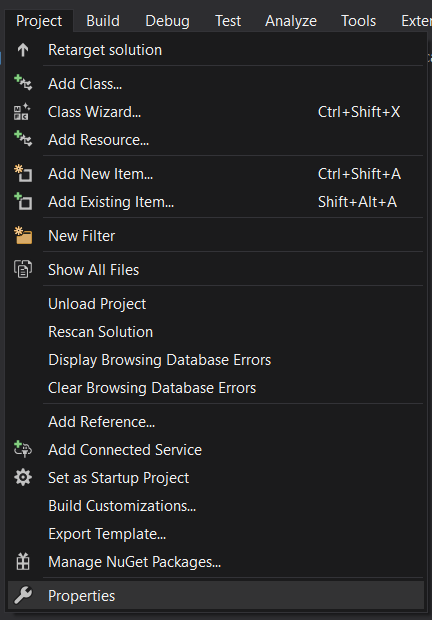


3) Try and build again. You'll probably get the following error:
unresolved external symbol IMG_Init referenced in function "bool __cdecl init(void)" (?init@@YA_NXZ)
Again, this means Visual Studio does not know it needs to use the SDL_image library, so go add it to your dependencies:
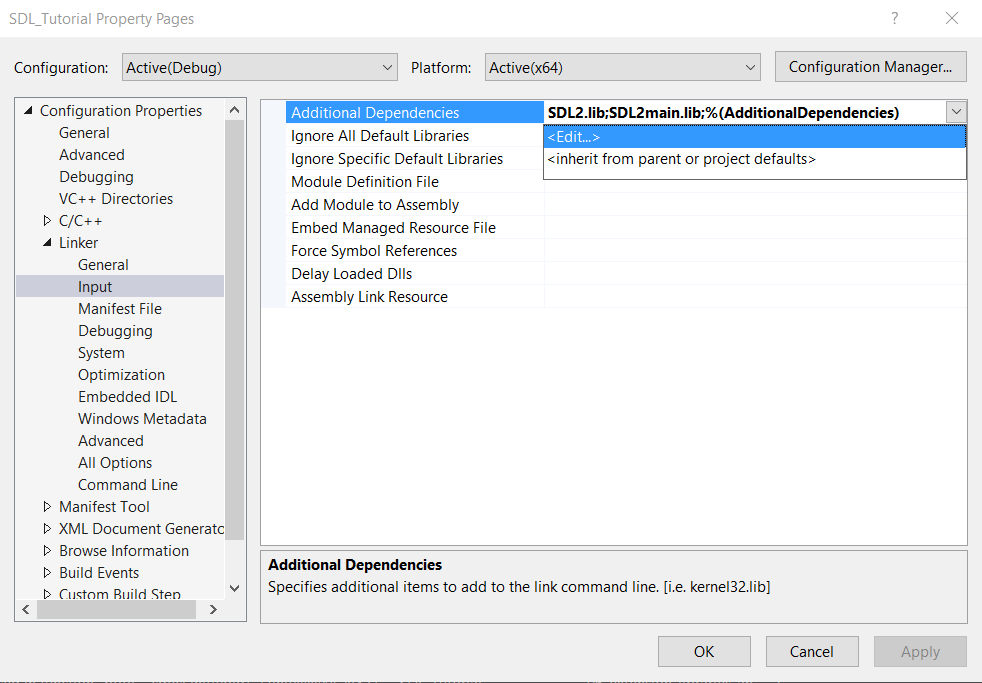
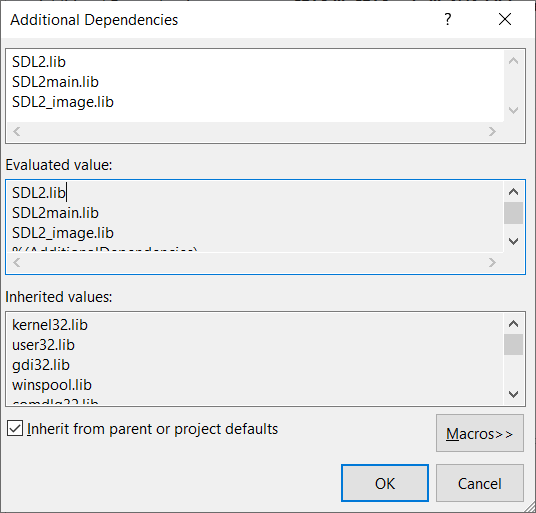
4)Build again and you'll get this error:
cannot open file 'SDL2_image.lib'
This is Visual C++ complaining that it can't find the SDL_image library file, so let's add it to library directories. Again, make sure you pick the library that matches your build configuration (for this tutorial we are using the Debug x64 configuration):

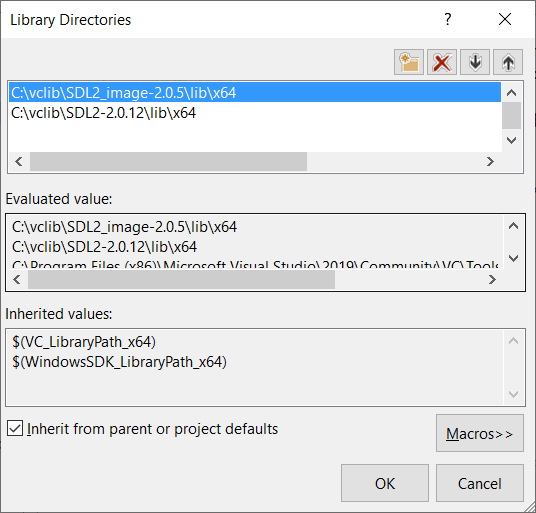
5)Build one more time and it should compile, but if you try to run you'll get this error:
The code execution cannot proceed because SDL2_image.dll was not found.
This is Windows complaining that it can't find SDL2_image.dll along with the other SDL2_image dlls. Let's add it to the path environment variable like we did for SDL
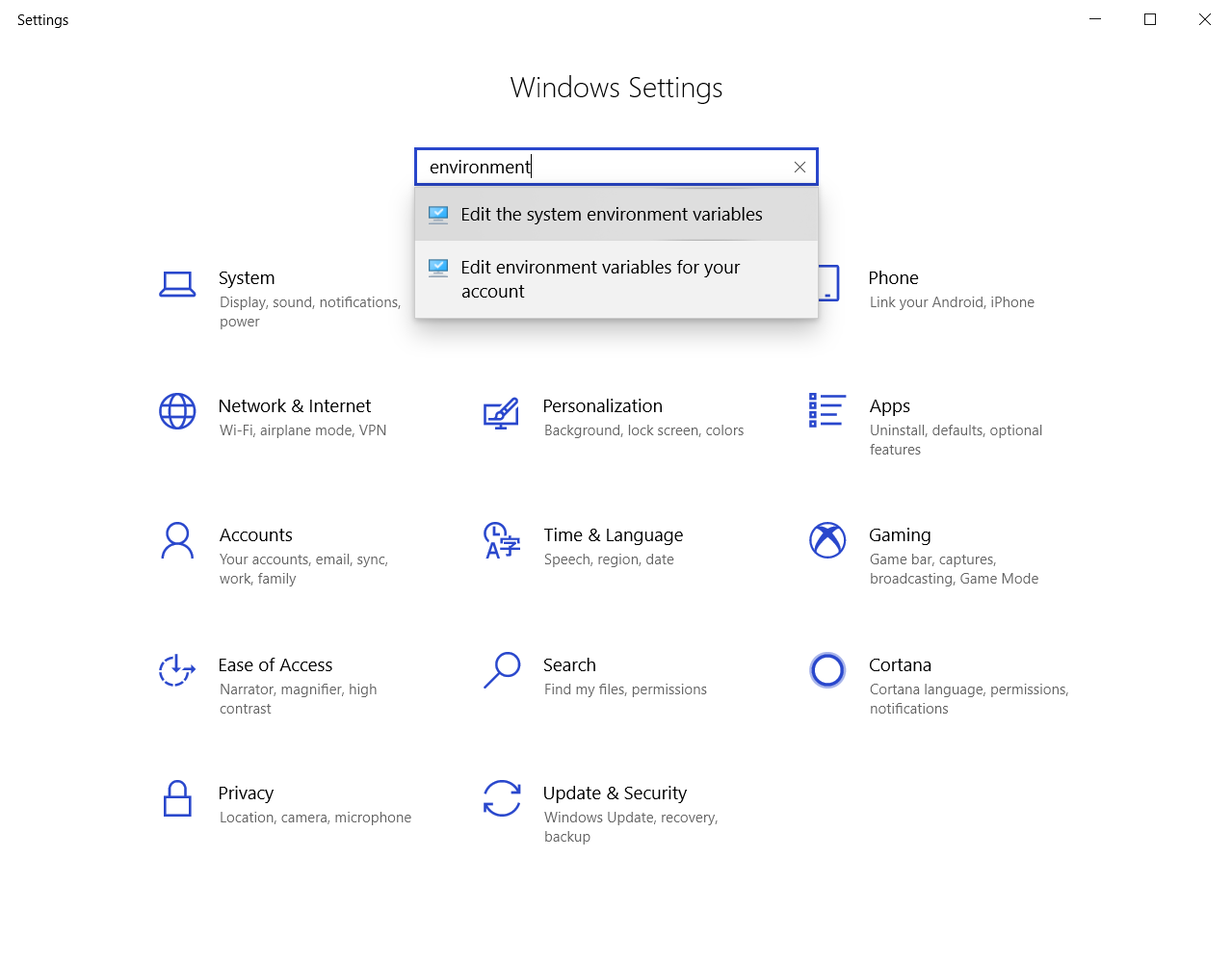
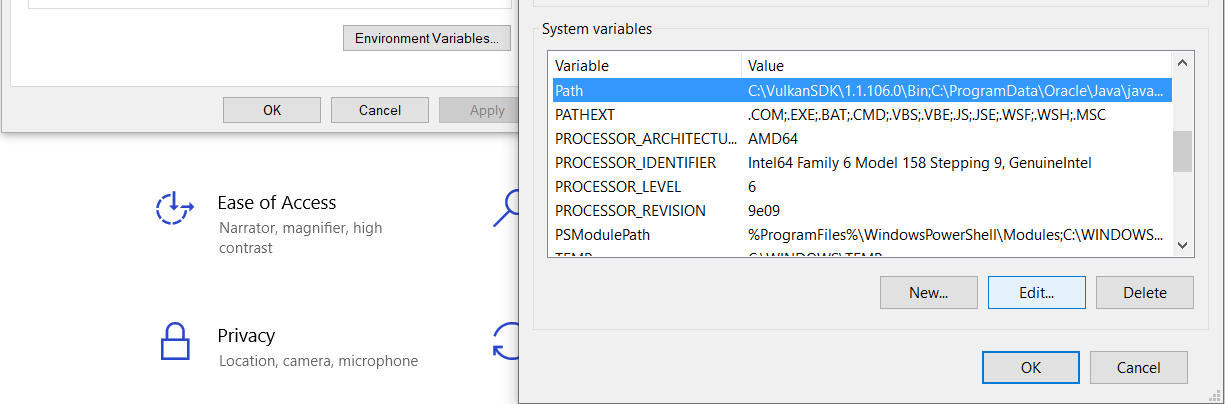
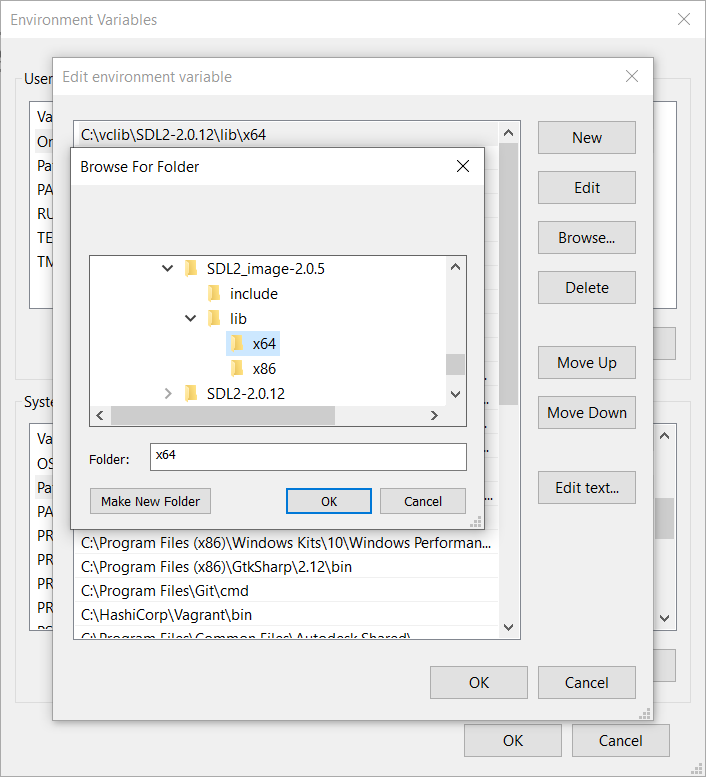
6)Restart Visual C++ so it can get the updated path variable, and the application should run.
Now that you have the extension library compiling, it's time to go onto part 2 of the tutorial.
Extension Libraries and Loading Other Image Formats Part 2: Loading PNGs with SDL_image
【转】Setting up SDL Extension Libraries on Visual Studio 2019 Community的更多相关文章
- 【转】Setting up SDL Extension Libraries on Visual Studio 2010 Ultimate
FROM:http://lazyfoo.net/tutorials/SDL/06_extension_libraries_and_loading_other_image_formats/windows ...
- 【转】Setting up SDL Extension Libraries on Windows
FROM: http://lazyfoo.net/tutorials/SDL/06_extension_libraries_and_loading_other_image_formats/window ...
- 【转】Setting up SDL Extension Libraries on MinGW
FROM:http://lazyfoo.net/tutorials/SDL/06_extension_libraries_and_loading_other_image_formats/windows ...
- 【转】Setting up SDL Extension Libraries on Code::Blocks 12.11
FROM: http://lazyfoo.net/tutorials/SDL/06_extension_libraries_and_loading_other_image_formats/window ...
- 【转】Setting up SDL 2 on Visual Studio 2019 Community
FROM: http://lazyfoo.net/tutorials/SDL/01_hello_SDL/windows/msvc2019/index.php Setting up SDL 2 on V ...
- Making every developer more productive with Visual Studio 2019
Today, in the Microsoft Connect(); 2018 keynote, Scott Guthrie announced the availability of Visual ...
- Visual Studio 2019 for Mac 离线更新方法
当你打开Visual Studio 2019 for Mac检查更新时,如果下载更新包很慢,可以尝试如下操作: 打开Finder(访达),找到~/Library/Caches/VisualStudio ...
- Visual Studio 2019 发布活动 - 2019 年 4 月 2 日
Visual Studio 2019 发布活动 2019 年 4 月 2 日,星期二 | 上午 9:00 (PT) 围观: https://visualstudio.microsoft.com/zh- ...
- Visual Studio 2019 正式发布,重磅更新,支持live share
如约而至,微软已于今天推出 Visual Studio 2019 正式版,一同发布的还有 Visual Studio 2019 for Mac. Visual Studio 2019 下载地址:htt ...
随机推荐
- RabbitMQ与Kafka选型对比
背景 本公司是.Net项目,在.Net可选的MQ比较少,主要Kafka和RabbitMQ,RabbitMQ我也是使用多年了,最近的Kafka广告与流行度打得使我也是无法无视,因此也是花了点时间收集了资 ...
- 微服务实战系列(五)-注册中心Eureka与nacos区别
1. 场景描述 nacos最近用的比较多,介绍下nacos及部署吧,刚看了下以前写过类似的,不过没写如何部署及与eureka区别,只展示了效果,补补吧. 2.解决方案 2.1 nacos与eureka ...
- APP自动化-环境安装
环境安装: 需要安装以下工具: 1.appium server-desktop 官方网站下载地址:http://appium.io// 2.安卓ADT(Android Develop Tools) 下 ...
- 利用new Object方式创建对象
var obj = new Object(); //创建了一个空的对象obj.uname = 'zhangsanfeng';obj.name = 18; //字面量方式创建对象不 ...
- Centos-归档文件或目录-tar
tar 对文件或者目录进行打包归档成一个文件,不是压缩 相关选项 -c 新建文件 -r 将目标文件追加都档案文件末尾 -t 列出归档文件中已经归档文件列表 -x 从归档文件中还原文件 -u 新文件更新 ...
- 共享内存Distributed Memory 与分布式内存Distributed Memory
我们经常说到的多核处理器,是指一个处理器(CPU)上有多个处理核心(CORE),共享内存多核系统我们可以将CPU想象为一个密封的包,在这个包内有多个互相连接的CORES,每个CORE共享一个主存,所有 ...
- JS寄快递地址智能解析
JS寄快递地址智能解析--2020年7月15日 去年做了些前端内容,最近在整理一些稍微有点用的内容,比如智能解析地址,用户只要输入:张三1351111111江苏省扬州市广陵区XX小区X楼xxx室,就能 ...
- 手把手教你AspNetCore WebApi:增删改查
前言 小明已经创建与运行了WebApi项目,了解项目结构有哪些组成,并学会了怎么发布到IIS.基础已经建好,从现在开始要真正实现待办事项的功能了. 新建表 CREATE TABLE [dbo].[To ...
- 使用EasyX和C++写一个消砖块游戏
第一次玩EasyX,写一个比较简单的消砖块游戏. 主函数包括Game的类的开始,运行和结束. 1 #include "BrickElimination.h" 2 3 int mai ...
- 《To C产品经理进阶》
我所说的,都是错的. To C产品设计和To B产品设计对一个优秀的产品经理的洞察能力.架构能力有共通的要求. 实际产品设计过程中,To C产品往往是从商业思维思考,侧重用户研究,思考用户心智,由产品 ...