
【转】Setting up SDL Extension Libraries on MinGW
FROM:http://lazyfoo.net/tutorials/SDL/06_extension_libraries_and_loading_other_image_formats/windows/mingw/index.php
Setting up SDL Extension Libraries on MinGW
Last Updated 6/21/14
1)First thing you need to do is download SDL_image headers and binaries. You will find them on the SDL_image website, specifically on this page.
You'll want to download the MinGW development libraries.
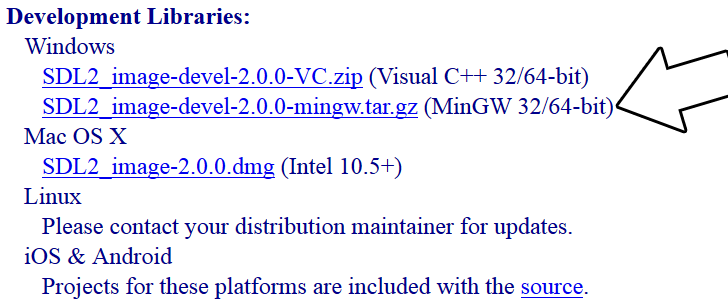
Open the gzip archive and there should be a tar archive. Open up the tar archive and the should be a folder called SDL2_image-2.something.something. In side of that folder there should be a bunch of folders and files, most importantly i686-w64-mingw32 which contains the 32bit library and x86_64-w64-mingw32 which contains the 64bit library.
2)This is important: most compilers still compile 32bit binaries by default to maximize compatibility. We will be using the 32bit binaries for this tutorial set. It doesn't matter if you have a 64bit operating system, since we are compiling 32bit binaries we will be using the 32bit library.
Inside of i686-w64-mingw32 are the include, lib, and bin folders which contain everything we need compile and run SDL applications. Copy the contents of i686-w64-mingw32 to any directory you want. I recommend putting it in a folder that you dedicate to holding all your development libraries for MinGW. For these tutorials I'm putting it in a directory I created C:\mingw_dev_lib
3)Now go download the source for lesson 06. Extract the source somewhere and compile by entering this big old command (This command assumed you have SDL_image extracted at C:\mingw_dev_lib):
g++ 06_extension_libraries_and_loading_other_image_formats.cpp -IC:\mingw_dev_lib\include\SDL2 -LC:\mingw_dev_lib\lib -w -Wl,-subsystem,windows -lmingw32 -lSDL2main -lSDL2 -lSDL2_image -o 06_extension_libraries_and_loading_other_image_formats
If you're using a makefile, you can just change the values of some of the macros:
From Makefile
#OBJS specifies which files to compile as part of the project

OBJS = 06_extension_libraries_and_loading_other_image_formats.cpp

#CC specifies which compiler we're using

CC = g++

#INCLUDE_PATHS specifies the additional include paths we'll need

INCLUDE_PATHS = -IC:\mingw_dev_lib\include\SDL2

#LIBRARY_PATHS specifies the additional library paths we'll need

LIBRARY_PATHS = -LC:\mingw_dev_lib\lib

#COMPILER_FLAGS specifies the additional compilation options we're using

# -w suppresses all warnings

# -Wl,-subsystem,windows gets rid of the console window

COMPILER_FLAGS = -w -Wl,-subsystem,windows

#LINKER_FLAGS specifies the libraries we're linking against

LINKER_FLAGS = -lmingw32 -lSDL2main -lSDL2 -lSDL2_image

#OBJ_NAME specifies the name of our exectuable

OBJ_NAME = 06_extension_libraries_and_loading_other_image_formats

#This is the target that compiles our executable

all : $(OBJS)

	$(CC) $(OBJS) $(INCLUDE_PATHS) $(LIBRARY_PATHS) $(COMPILER_FLAGS) $(LINKER_FLAGS) -o $(OBJ_NAME)
As you can see it was as easy as changing the file name of the source and executable and adding
-lSDL2_image
to the linker. If we were linking SDL_ttf, we'd add
-lSDL2_ttf
and for SDL_mixer we'd put:
-lSDL2_mixer
Now that you have the extension library compiling, it's time to go onto part 2 of the tutorial.
【转】Setting up SDL Extension Libraries on MinGW的更多相关文章
- 【转】Setting up SDL Extension Libraries on Code::Blocks 12.11
FROM: http://lazyfoo.net/tutorials/SDL/06_extension_libraries_and_loading_other_image_formats/window ...
- 【转】Setting up SDL Extension Libraries on Windows
FROM: http://lazyfoo.net/tutorials/SDL/06_extension_libraries_and_loading_other_image_formats/window ...
- 【转】Setting up SDL Extension Libraries on Visual Studio 2010 Ultimate
FROM:http://lazyfoo.net/tutorials/SDL/06_extension_libraries_and_loading_other_image_formats/windows ...
- 【转】Setting up SDL Extension Libraries on Visual Studio 2019 Community
FROM:http://lazyfoo.net/tutorials/SDL/06_extension_libraries_and_loading_other_image_formats/windows ...
- 【转】Extension Libraries and Loading Other Image Formats
FROM: http://lazyfoo.net/tutorials/SDL/06_extension_libraries_and_loading_other_image_formats/index. ...
- 【转】Setting up SDL 2 on MinGW
FROM: http://lazyfoo.net/tutorials/SDL/01_hello_SDL/windows/mingw/index.php Setting up SDL 2 on MinG ...
- 【转】Setting up SDL 2 on Code::Blocks 12.11
FROM: http://lazyfoo.net/tutorials/SDL/01_hello_SDL/windows/codeblocks/index.php Setting up SDL 2 on ...
- 【转】Setting up SDL 2 on Visual Studio 2010 Ultimate
from: Lazy Foo'Productions - Setting up SDL 2 on Visual Studio 2010 Ultimate 1)First thing you need ...
- 【转】Setting up SDL 2 on Visual Studio 2019 Community
FROM: http://lazyfoo.net/tutorials/SDL/01_hello_SDL/windows/msvc2019/index.php Setting up SDL 2 on V ...
随机推荐
- 原创-公司项目部署交付环境预检查shell脚本
大型项目环境预检查脚本,根据自己实际情况修改脚本中变量,给大家一个思路~ #!/usr/bin/env bash root=$( cd $(dirname $0) pwd ) source " ...
- dbdeployer MySQL沙盒部署详解
一.工具介绍 前几日用mysql-sandbox来搭建MySQL8.0新版本时发现用不了,提示需要使用dbdeployer才行,瞬间觉得mysql-sandbox不香了,只好咬咬牙来熟悉dbdeplo ...
- node中的cookie
为什么需要cookie 我们知道http是无状态的协议,无状态是什么意思呢?我来举一个小例子来说明:比如小明在网上购物,他浏览了多个页面,购买了一些物品,这些请求在多次连接中完成,如果不借助额外的手段 ...
- Kafka处理请求的全流程分析
大家好,我是 yes. 这是我的第三篇Kafka源码分析文章,前两篇讲了日志段的读写和二分算法在kafka索引上的应用 今天来讲讲 Kafka Broker端处理请求的全流程,剖析下底层的网络通信是如 ...
- js简单数据类型和复杂数据类型
var timer = null; //简单数据类型null 返回的是一个空的对象 object console.log(typeof timer); 1.简单数据类型 在内存中存放在栈中,在里面开 ...
- 在C++中使用libuv时对回调的处理 (2)
前情简介 在完成了第一版的<在C++中使用libuv时对回调的处理>之后,在对项目进行开发的时候,还是感觉有一些难受. 因为在实际操作的时候,需要构建一个结构体,并且需要对这个结构体的内存 ...
- OpenCV图像加载与保存
OpenCV中的图像加载与保存 头文件是包含的库,在GitHub上下载的 imread("图片路径",图片加载方式) 图片加载方式: IMREAD_GRAYSCALE 灰度图像 I ...
- Flutter 开发从 0 到 1(三)布局与 ListView
上周日出去玩了,因此没时间写文章.我司加班到 11 点,第二天可以晚上班一个小时,加班到 12 点,可以晚上班两个小时,以此类推,为什么说这个,对的,加班第二天我没有多睡觉,而是起来抓紧时间写文章,好 ...
- JAVA学习线路:day01面向对象(继承、抽象类)
所有的文档和源代码都开源在GitHub: https://github.com/kun213/DailyCode上了.希望我们可以一起加油,一起学习,一起交流. day01面向对象[继承.抽象类] 今 ...
- XML节点自动生成简单实例
有些时候我们在拼装XML的过程中,因为各种拼接会感到非常的麻烦(定义变量模型,自动生成,使用XElement再去组装),我的脑袋感觉都大了,能不能有个稍微比较快捷自动随变量自动生成XML格式的方式,看 ...