
Python豆瓣书籍信息爬虫
练习下BeautifulSoup,requests库,用python3.3 写了一个简易的豆瓣小爬虫,将爬取的信息在控制台输出并且写入文件中。
上源码:
 # coding = utf-8

 '''my words

     基于python3 需要的库 requests BeautifulSoup

     这个爬虫很基本,没有采用任何的爬虫框架,用requests,BeautifulSoup,re等库。

     这个爬虫的基本功能是爬取豆瓣各个类型的书籍的信息:作者,出版社,豆瓣评分,评分人数,出版时间等信息。

     不能保证爬取到的信息都是正确的,可能有误。

     也可以把爬取到的书籍信息存放在数据库中,这里只是输出到控制台。

     爬取到的信息存储在文本txt中。

 '''

 import requests

 from bs4 import BeautifulSoup

 import re

 #爬取豆瓣所有的标签分类页面,并且提供每一个标签页面的URL

 def provide_url():

     # 以http的get方式请求豆瓣页面(豆瓣的分类标签页面)

     responds = requests.get("https://book.douban.com/tag/?icn=index-nav")

     # html为获得响应的页面内容

     html = responds.text

     # 解析页面

     soup = BeautifulSoup(html, "lxml")

     # 选取页面中的需要的a标签,从而提取出其中的所有链接

     book_table = soup.select("#content > div > .article > div > div > .tagCol > tbody > tr > td > a")

     # 新建一个列表来存放爬取到的所有链接

     book_url_list = []

     for book in book_table:

         book_url_list.append('https://book.douban.com/tag/' + str(book.string))

     return book_url_list

 #获得评分人数的函数

 def get_person(person):

     person = person.get_text().split()[0]

     person = re.findall(r'[0-9]+',person)

     return person

 #当detail分为四段时候的获得价格函数

 def get_rmb_price1(detail):

     price = detail.get_text().split('/',4)[-1].split()

     if re.match("USD", price[0]):

         price = float(price[1]) * 6

     elif re.match("CNY", price[0]):

         price = price[1]

     elif re.match("\A$", price[0]):

         price = float(price[1:len(price)]) * 6

     else:

         price = price[0]

     return price

 #当detail分为三段时候的获得价格函数

 def get_rmb_price2(detail):

     price = detail.get_text().split('/',3)[-1].split()

     if re.match("USD", price[0]):

         price = float(price[1]) * 6

     elif re.match("CNY", price[0]):

         price = price[1]

     elif re.match("\A$", price[0]):

         price = float(price[1:len(price)]) * 6

     else:

         price = price[0]

     return price

 #测试输出函数

 def test_print(name,author,intepretor,publish,time,price,score,person):

     print('name: ',name)

     print('author:', author)

     print('intepretor: ',intepretor)

     print('publish: ',publish)

     print('time: ',time)

     print('price: ',price)

     print('score: ',score)

     print('person: ',person)

 #解析每个页面获得其中需要信息的函数

 def get_url_content(url):

     res = requests.get(url)

     html = res.text

     soup = BeautifulSoup(html.encode('utf-8'),"lxml")

     tag = url.split("?")[0].split("/")[-1]  #页面标签,就是页面链接中'tag/'后面的字符串

     titles = soup.select(".subject-list > .subject-item > .info > h2 > a") #包含书名的a标签

     details = soup.select(".subject-list > .subject-item > .info > .pub") #包含书的作者,出版社等信息的div标签

     scores = soup.select(".subject-list > .subject-item > .info > div > .rating_nums") #包含评分的span标签

     persons = soup.select(".subject-list > .subject-item > .info > div > .pl")  #包含评价人数的span标签

     print("*******************这是 %s 类的书籍**********************" %tag)

     #打开文件,将信息写入文件

     file = open("C:/Users/lenovo/Desktop/book_info.txt",'a') #可以更改为你自己的文件地址

     file.write("*******************这是 %s 类的书籍**********************" % tag)

     #用zip函数将相应的信息以元祖的形式组织在一起,以供后面遍历

     for title,detail,score,person in zip(titles,details,scores,persons):

         try:#detail可以分成四段

             name = title.get_text().split()[0] #书名

             author = detail.get_text().split('/',4)[0].split()[0] #作者

             intepretor = detail.get_text().split('/',4)[1] #译者

             publish = detail.get_text().split('/',4)[2]  #出版社

             time = detail.get_text().split('/',4)[3].split()[0].split('-')[0] #出版年份,只输出年

             price = get_rmb_price1(detail)   #获取价格

             score = score.get_text() if True else ""   #如果没有评分就置空

             person = get_person(person)  #获得评分人数

             #在控制台测试打印

             test_print(name,author,intepretor,publish,time,price,score,person)

             #将书籍信息写入txt文件

             try:

                 file.write('name: %s ' % name)

                 file.write('author: %s ' % author)

                 file.write('intepretor: %s ' % intepretor)

                 file.write('publish: %s ' % publish)

                 file.write('time: %s ' % time)

                 file.write('price: %s ' % price)

                 file.write('score: %s ' % score)

                 file.write('person: %s ' % person)

                 file.write('\n')

             except (IndentationError,UnicodeEncodeError):

                 continue

         except IndexError:

             try:#detail可以分成三段

                 name = title.get_text().split()[0]  # 书名

                 author = detail.get_text().split('/', 3)[0].split()[0]  # 作者

                 intepretor = "" # 译者

                 publish = detail.get_text().split('/', 3)[1]  # 出版社

                 time = detail.get_text().split('/', 3)[2].split()[0].split('-')[0]  # 出版年份,只输出年

                 price = get_rmb_price2(detail)  # 获取价格

                 score = score.get_text() if True else ""  # 如果没有评分就置空

                 person = get_person(person)  # 获得评分人数

                 #在控制台测试打印

                 test_print(name, author, intepretor, publish, time, price, score, person)

                 #将书籍信息写入txt文件

                 try:

                     file.write('name: %s ' % name)

                     file.write('author: %s ' % author)

                     file.write('intepretor: %s ' % intepretor)

                     file.write('publish: %s ' % publish)

                     file.write('time: %s ' % time)

                     file.write('price: %s ' % price)

                     file.write('score: %s ' % score)

                     file.write('person: %s ' % person)

                     file.write('\n')

                 except (IndentationError, UnicodeEncodeError):

                     continue

             except (IndexError,TypeError):

                 continue

         except TypeError:

             continue

     file

     file.write('\n')

     file.close()  #关闭文件

 #程序执行入口

 if __name__ == '__main__':

     #url = "https://book.douban.com/tag/程序"

     book_url_list = provide_url() #存放豆瓣所有分类标签页URL的列表

     for url in book_url_list:

         get_url_content(url)  #解析每一个URL的内容
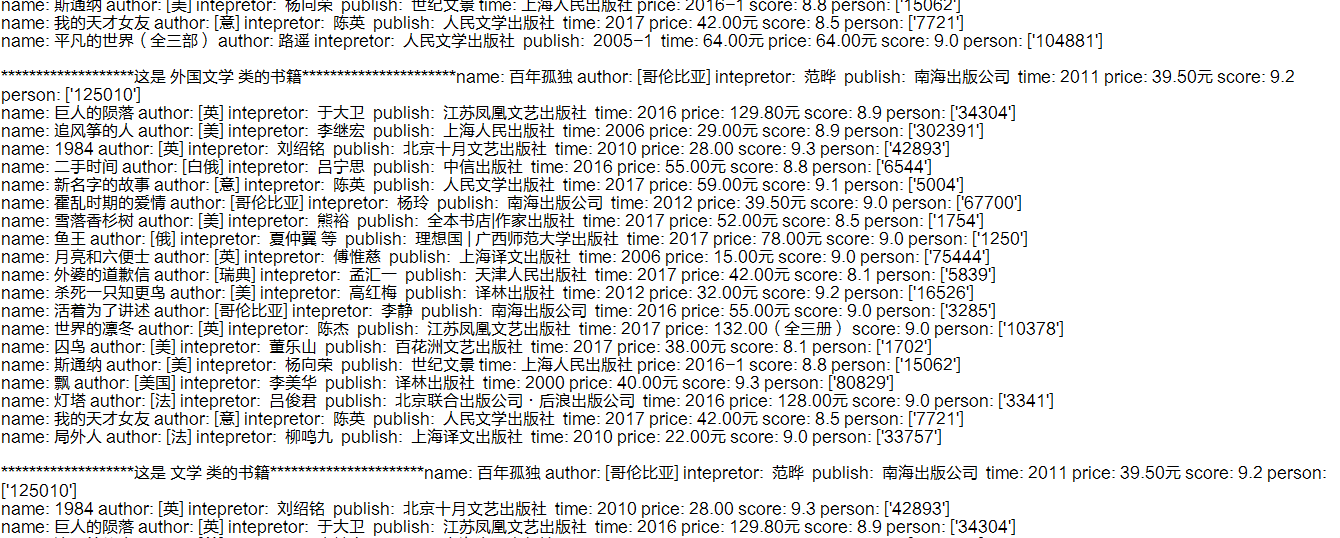
下面是效果图:
Python豆瓣书籍信息爬虫的更多相关文章
- python 爬取豆瓣书籍信息
继爬取 猫眼电影TOP100榜单 之后,再来爬一下豆瓣的书籍信息(主要是书的信息,评分及占比,评论并未爬取).原创,转载请联系我. 需求:爬取豆瓣某类型标签下的所有书籍的详细信息及评分 语言:pyth ...
- [Python] 豆瓣电影top250爬虫
1.分析 <li><div class="item">电影信息</div></li> 每个电影信息都是同样的格式,毕竟在服务器端是用 ...
- 豆瓣电影TOP250和书籍TOP250爬虫
豆瓣电影 TOP250 和书籍 TOP250 爬虫 最近开始玩 Python , 学习爬虫相关知识的时候,心血来潮,爬取了豆瓣电影TOP250 和书籍TOP250, 这里记录一下自己玩的过程. 电影 ...
- 网络爬虫: 从allitebooks.com抓取书籍信息并从amazon.com抓取价格(3): 抓取amazon.com价格
通过上一篇随笔的处理,我们已经拿到了书的书名和ISBN码.(网络爬虫: 从allitebooks.com抓取书籍信息并从amazon.com抓取价格(2): 抓取allitebooks.com书籍信息 ...
- 网络爬虫: 从allitebooks.com抓取书籍信息并从amazon.com抓取价格(2): 抓取allitebooks.com书籍信息及ISBN码
这一篇首先从allitebooks.com里抓取书籍列表的书籍信息和每本书对应的ISBN码. 一.分析需求和网站结构 allitebooks.com这个网站的结构很简单,分页+书籍列表+书籍详情页. ...
- 网络爬虫: 从allitebooks.com抓取书籍信息并从amazon.com抓取价格(1): 基础知识Beautiful Soup
开始学习网络数据挖掘方面的知识,首先从Beautiful Soup入手(Beautiful Soup是一个Python库,功能是从HTML和XML中解析数据),打算以三篇博文纪录学习Beautiful ...
- python爬取当当网的书籍信息并保存到csv文件
python爬取当当网的书籍信息并保存到csv文件 依赖的库: requests #用来获取页面内容 BeautifulSoup #opython3不能安装BeautifulSoup,但可以安装Bea ...
- 【Python3爬虫】网络小说更好看?十四万条书籍信息告诉你
一.前言简述 因为最近微信读书出了网页版,加上自己也在闲暇的时候看了两本书,不禁好奇什么样的书更受欢迎,哪位作者又更受读者喜欢呢?话不多说,爬一下就能有个了解了. 二.页面分析 首先打开微信读书:ht ...
- Python爬取十四万条书籍信息告诉你哪本网络小说更好看
前言 本文的文字及图片来源于网络,仅供学习.交流使用,不具有任何商业用途,版权归原作者所有,如有问题请及时联系我们以作处理. 作者: TM0831 PS:如有需要Python学习资料的小伙伴可以加点击 ...
随机推荐
- hdu 2822 ~!!!!!!坑死我
首先 在此哀悼... 为我逝去的时间哀悼... 每一步都确定再去写下一步吧...日狗 不过还是有点收获的.. 对优先队列的使用 有了进一步的理解 先上代码 #include<iostrea ...
- Linux入职基础-1.1_国内开源的主要镜像站
Linux入职基础-1.1_国内开源的主要镜像站 东北地区: 东北大学 http://mirror.neu.edu.cn 大连理工大学 http://mirror.dlut.edu.cn 大连东软 ...
- DotNet 使用阿里云媒体转码服务
公司项目中一部分文件放到了阿里云 OSS 上,其中有些音频文件是 amr 类型的,在后期使用的时候比较麻烦,所以需要转换成 mp3 的文件,方便以后使用.本来想使用 ffmpeg 处理,但由于文件都存 ...
- JS的DOM和BOM
* JavaScript分三个部分: ECMAScript标准:JS的基本的语法 DOM:Document Object Model --->文档对象模型----操作页面的元素 BOM:Brow ...
- 节日营销!这样搞-App运营日常
节日送礼需求日益增长,当儿女们有了购买需求的时候,商家如何突出重围,成为孝子们的首选?如何做好节日营销?几个经验分享一下: 1.抓住节日特色 结合节日风格特色,营造节日气氛,如母亲节这种节日,主要体现 ...
- canvas 绘制动态圆环进度条
由于使用的是vue开发,所以就展示一下绘制函数好了,上图是效果图 drawMain(drawing_elem, percent, forecolor, bgcolor) { /* @drawing_e ...
- kubernetes 资源清单定义入门
k8s中的资源 什么叫资源? k8s中所有的内容都抽象为资源, 资源实例化之后,叫做对象 在k8s中有哪些资源? 工作负载型资源(workload): Pod ReplicaSet Deploymen ...
- MVC-区域(Area)
1.启用路由前的准备工作 1.Global.asax.cs中注册路由 public class MvcApplication : System.Web.HttpApplication { protec ...
- 第十三篇:socket网络编程
本篇主要介绍网络编程的基础,以及UDP/TCP网络的socket编程,关于UDP套接字聊天器的实现.以及基于TCP套接字的服务器/客户端的实现上传下载功能. 一.网络通信 关于网络通信即通过网络(介质 ...
- c# 处理串行化对象的版本变化