
scrapy实例:爬取中国天气网
1.创建项目
在你存放项目的目录下,按shift+鼠标右键打开命令行,输入命令创建项目:
PS F:\ScrapyProject> scrapy startproject weather # weather是项目名称

回车即创建成功
这个命令其实创建了一个文件夹而已,里面包含了框架规定的文件和子文件夹.
我们要做的就是编辑其中的一部分文件即可.
其实scrapy构建爬虫就像填空.这么一想就很简单了
cmd执行命令:
PS F:\ScrapyProject> cd weather   #进入刚刚创建的项目目录

PS F:\ScrapyProject\weather>
进入项目根目录.
你已经创建好了一个scrapy项目.
我想,有必要了解一下scrapy构建的爬虫的爬取过程:
scrapy crawl spidername开始运行,程序自动使用start_urls构造Request并发送请求,然后调用parse函数对其进行解析,在这个解析过程中使用rules中的规则从html(或xml)文本中提取匹配的链接,通过这个链接再次生成Request,如此不断循环,直到返回的文本中再也没有匹配的链接,或调度器中的Request对象用尽,程序才停止。
2.确定爬取目标:
这里选择中国天气网做爬取素材,
所谓工欲善其事必先利其器,爬取网页之前一定要先分析网页,要获取那些信息,怎么获取更加 方便.
篇幅有限,网页源代码这里只展示部分:
<div class="ctop clearfix">

            <div class="crumbs fl">

                <a href="http://js.weather.com.cn" target="_blank">江苏</a>

                <span>></span>

                <a href="http://www.weather.com.cn/weather/101190801.shtml" target="_blank">徐州</a><span>></span>  <span>鼓楼</span>

            </div>

            <div class="time fr"></div>

        </div>
可以看到这部分包含城市信息,这是我们需要的信息之一.
接下来继续在页面里找其他需要的信息,例如天气,温度等.
3.填写Items.py
Items.py只用于存放你要获取的字段:
给自己要获取的信息取个名字:
# -*- coding: utf-8 -*-

# Define here the models for your scraped items

#

# See documentation in:

# https://doc.scrapy.org/en/latest/topics/items.html

import scrapy

class WeatherItem(scrapy.Item):

    # define the fields for your item here like:

    # name = scrapy.Field()

    city = scrapy.Field()

    city_addition = scrapy.Field()

    city_addition2 = scrapy.Field()

    weather = scrapy.Field()

    data = scrapy.Field()

    temperatureMax = scrapy.Field()

    temperatureMin = scrapy.Field()

    pass
4.填写spider.py
spider.py顾名思义就是爬虫文件.
在填写spider.py之前,我们先看看如何获取需要的信息
刚才的命令行应该没有关吧,关了也没关系
win+R在打开cmd,键入:
C:\Users\admin>scrapy shell http://www.weather.com.cn/weather1d/101020100.shtml#search #网址是你要爬取的url
这是scrapy的shell命令,可以在不启动爬虫的情况下,对网站的响应response进行处理调试等
运行结果:
[s] Available Scrapy objects:

[s]   scrapy     scrapy module (contains scrapy.Request, scrapy.Selector, etc)

[s]   crawler    <scrapy.crawler.Crawler object at 0x04C42C10>

[s]   item       {}

[s]   request    <GET http://www.weather.com.cn/weather1d/101020100.shtml#search>

[s]   response   <200 http://www.weather.com.cn/weather1d/101020100.shtml>

[s]   settings   <scrapy.settings.Settings object at 0x04C42B10>

[s]   spider     <DefaultSpider 'default' at 0x4e37d90>

[s] Useful shortcuts:

[s]   fetch(url[, redirect=True]) Fetch URL and update local objects (by default, redirects are followed)

[s]   fetch(req)                  Fetch a scrapy.Request and update local objects

[s]   shelp()           Shell help (print this help)

[s]   view(response)    View response in a browser

In [1]:
还有很长一大串日志信息,但不用管,只要你看到Available Scrapy objects(可用的scrapy对象)有response就够了.
response就是scrapy帮你发送request请求到目标网站后接收的返回信息.
下面做些测试:
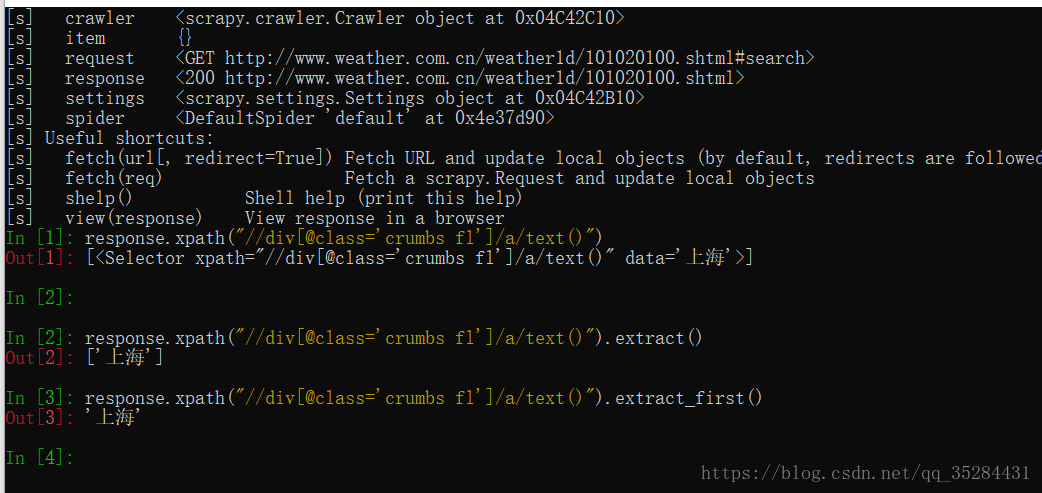
定位元素使用的是xpath,如果此前没接触过xpath,不要紧,百度一下
在此我解释下In[3]的xpath: 获取class="crumbs f1"的div下的a标签的text文本
至于extract()是用来提取文本
经过测试,In[3]里输入的语句可以获得我们想要的信息
那就把它写进spider里:
import scrapy

from weather.items import WeatherItem

from scrapy.spiders import Rule, CrawlSpider

from scrapy.linkextractors import LinkExtractor

class Spider(CrawlSpider):

    name = 'weatherSpider'  #定义爬虫的名字

    start_urls = [          #爬虫开始爬取数据的url

        "http://www.weather.com.cn/weather1d/101020100.shtml#search"

    ]

         #执行爬虫的方法

    def parse_item(self, response):

        item = WeatherItem()

                #这里的item['city']就是你定义的items.py里的字段

        item['city'] = response.xpath("//div[@class='crumbs fl']/a/text()").extract_first()

        yield item
爬虫到这里已经可以初步实现了.修改下items.py里只留下city,
执行爬虫:(注意要在项目路径下)
PS F:\ScrapyProject\weather> scrapy crawl weatherSpider # weatherSpider是自己定义的爬虫名称
到这里还只能获取一个"city"字段,还需要在html里获取剩余的字段.
你可以尝试自己写xpath路径.
完整的spider.pyimport scrapy
from weather.items import WeatherItem

from scrapy.spiders import Rule, CrawlSpider

from scrapy.linkextractors import LinkExtractor

class Spider(CrawlSpider):

    name = 'weatherSpider'   #spider的名称

    #allowed_domains = "www.weather.com.cn"      #允许的域名

    start_urls = [                               #爬取开始的url

        "http://www.weather.com.cn/weather1d/101020100.shtml#search"

    ]

    #定义规则,过滤掉不需要爬取的url

    rules = (

        Rule(LinkExtractor(allow=('http://www.weather.com.cn/weather1d/101\d{6}.shtml#around2')), follow=False, callback='parse_item'),

    )#声明了callback属性时,follow默认为False,没有声明callback时,follow默认为True

    #回调函数,在这里抓取数据,
   #注意多页面爬取时需要自定义方法名称,不能用parse

    def parse_item(self, response):

        item = WeatherItem()

        item['city'] = response.xpath("//div[@class='crumbs fl']/a/text()").extract_first()

        city_addition = response.xpath("//div[@class='crumbs fl']/span[2]/text()").extract_first()

        if city_addition == '>':

            item['city_addition'] = response.xpath("//div[@class='crumbs fl']/a[2]/text()").extract_first()

        else:

            item['city_addition'] = response.xpath("//div[@class='crumbs fl']/span[2]/text()").extract_first()

        item['city_addition2'] = response.xpath("//div[@class='crumbs fl']/span[3]/text()").extract_first()

        weatherData = response.xpath("//div[@class='today clearfix']/input[1]/@value").extract_first()

        item['data'] = weatherData[0:6]

        item['weather'] = response.xpath("//p[@class='wea']/text()").extract_first()

        item['temperatureMax'] = response.xpath("//ul[@class='clearfix']/li[1]/p[@class='tem']/span[1]/text()").extract_first()

        item['temperatureMin'] = response.xpath("//ul[@class='clearfix']/li[2]/p[@class='tem']/span[1]/text()").extract_first()

        yield item
多了不少东西,这里简单说明一下:
allowed_domains:顾名思义,允许的域名,爬虫只会爬取该域名下的url
rule:定义爬取规则,爬虫只会爬取符合规则的url
rule有allow属性,使用正则表达式书写匹配规则.正则表达式不熟悉的话可以写好后在网上在线校验,尝试几次后,简单的正则还是比较容易的,我们要用的也不复杂.
rule有callback属性可以指定回调函数,爬虫在发现符合规则的url后就会调用该函数,注意要和默认的回调函数parse作区分.
(爬取的数据在命令行里都可以看到)
rule有follow属性.为True时会爬取网页里所有符合规则的url,反之不会. 我这里设置为了False,因为True的话要爬很久.大约两千多条天气信息.
但要保存爬取的数据的话,还需写下pipeline.py:
5.填写pipeline.py
这里有三种保存方法,你可以选择其中一种测试
# -*- coding: utf-8 -*-

# Define your item pipelines here

#

# Don't forget to add your pipeline to the ITEM_PIPELINES setting

# See: https://doc.scrapy.org/en/latest/topics/item-pipeline.html

import os

import codecs

import json

import csv

from scrapy.exporters import JsonItemExporter

from openpyxl import Workbook

#保存为json文件

class JsonPipeline(object):

    # 使用FeedJsonItenExporter保存数据

    def __init__(self):

        self.file = open('weather1.json','wb')

        self.exporter = JsonItemExporter(self.file,ensure_ascii =False)

        self.exporter.start_exporting()

    def process_item(self,item,spider):

        print('Write')

        self.exporter.export_item(item)

        return item

    def close_spider(self,spider):

        print('Close')

        self.exporter.finish_exporting()

        self.file.close()

#保存为TXT文件

class TxtPipeline(object):

    def process_item(self, item, spider):

        #获取当前工作目录

        base_dir = os.getcwd()

        filename = base_dir + 'weather.txt'

        print('创建Txt')

        #从内存以追加方式打开文件,并写入对应的数据

        with open(filename, 'a') as f:

            f.write('城市:' + item['city'] + ' ')

            f.write(item['city_addition'] + ' ')

            f.write(item['city_addition2'] + '\n')

            f.write('天气:' + item['weather'] + '\n')

            f.write('温度:' + item['temperatureMin'] + '~' + item['temperatureMax'] + '℃\n')

#保存为Excel文件

class ExcelPipeline(object):

    #创建EXCEL,填写表头

    def __init__(self):

        self.wb = Workbook()

        self.ws = self.wb.active

        #设置表头

        self.ws.append(['省', '市', '县(乡)', '日期', '天气', '最高温', '最低温'])

    def process_item(self, item, spider):

        line = [item['city'], item['city_addition'], item['city_addition2'], item['data'], item['weather'], item['temperatureMax'], item['temperatureMin']]

        self.ws.append(line) #将数据以行的形式添加仅xlsx中

        self.wb.save('weather.xlsx')

        return item
这里写了管道文件,还要在settings.py设置文件里启用这个pipeline:
6.填写settings.py
改下DOWNLOAD_DELAY"下载延迟",避免访问过快被网站屏蔽
把注释符号去掉就行
# Configure a delay for requests for the same website (default: 0)

# See https://doc.scrapy.org/en/latest/topics/settings.html#download-delay

# See also autothrottle settings and docs

DOWNLOAD_DELAY = 1
改下ITEM_PIPELINES:
去掉注释就行,数字的意思是数值小先执行,
# Configure item pipelines

# See https://doc.scrapy.org/en/latest/topics/item-pipeline.html

ITEM_PIPELINES = {

    #'weather.pipelines.TxtPipeline': 600,

        #'weather.pipelines.JsonPipeline': 6,

    'weather.pipelines.ExcelPipeline': 300,

}
完成.
进入项目根目录执行爬虫:
PS F:\ScrapyProject\weather> scrapy crawl weatherSpider
运行部分结果:
2018-10-17 15:16:19 [scrapy.core.engine] INFO: Spider opened

2018-10-17 15:16:19 [scrapy.extensions.logstats] INFO: Crawled 0 pages (at 0 pages/min), scraped 0 items (at 0 items/min)

2018-10-17 15:16:19 [scrapy.extensions.telnet] DEBUG: Telnet console listening on 127.0.0.1:6024

2018-10-17 15:16:20 [scrapy.core.engine] DEBUG: Crawled (200) <GET http://www.weather.com.cn/robots.txt> (referer: None)

2018-10-17 15:16:21 [scrapy.core.engine] DEBUG: Crawled (200) <GET http://www.weather.com.cn/weather1d/101020100.shtml#search> (referer: None)

2018-10-17 15:16:22 [scrapy.core.engine] DEBUG: Crawled (200) <GET http://www.weather.com.cn/weather1d/101191101.shtml#around2> (referer: http://www.weather.com.cn/weather1d/101020100.shtml)

2018-10-17 15:16:22 [scrapy.core.scraper] DEBUG: Scraped from <200 http://www.weather.com.cn/weather1d/101191101.shtml>

{'city': '江苏',

 'city_addition': '常州',

 'city_addition2': '城区',

 'data': '10月17日',

 'temperatureMax': '23',

 'temperatureMin': '13',

 'weather': '多云'}

2018-10-17 15:16:23 [scrapy.core.engine] DEBUG: Crawled (200) <GET http://www.weather.com.cn/weather1d/101190803.shtml#around2> (referer: http://www.weather.com.cn/weather1d/101020100.shtml)

2018-10-17 15:16:24 [scrapy.core.scraper] DEBUG: Scraped from <200 http://www.weather.com.cn/weather1d/101190803.shtml>

{'city': '江苏',

 'city_addition': '徐州',

 'city_addition2': '丰县',

 'data': '10月17日',

 'temperatureMax': '20',

 'temperatureMin': '7',

 'weather': '阴'}
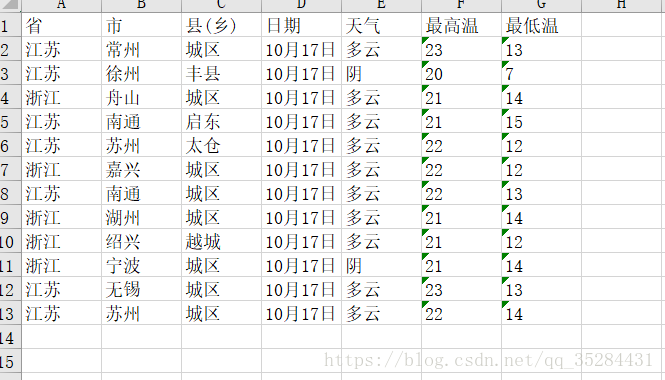
根目录下的excel文件:

写入excel的内容
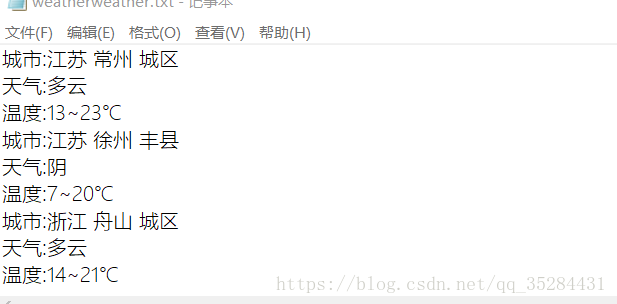
写入txt文件的内容:
欢迎留言交流!
完整项目代码:https://github.com/sanqiansang/weatherSpider.git
scrapy实例:爬取中国天气网的更多相关文章
- Python爬取中国天气网
Python爬取中国天气网 基于requests库制作的爬虫. 使用方法:打开终端输入 “python3 weather.py 北京(或你所在的城市)" 程序正常运行需要在同文件夹下加入一个 ...
- 初识python 之 爬虫:爬取中国天气网数据
用到模块: 获取网页并解析:import requests,html5lib from bs4 import BeautifulSoup 使用pyecharts的Bar可视化工具"绘制图表& ...
- scrapy实例:爬取天气、气温等
1.创建项目 scrapy startproject weather # weather是项目名称 scrapy crawl spidername开始运行,程序自动使用start_urls构造Requ ...
- python3抓取中国天气网不同城市7天、15天实时数据
思路:1.根据city.txt文档来获取不同城市code2.获取中国天气网7d和15d不同城市url3.利用requests库请求url获取html内容4.利用beautifulsoup获取7d和15 ...
- Python的scrapy之爬取顶点小说网的所有小说
闲来无事用Python的scrapy框架练练手,爬取顶点小说网的所有小说的详细信息. 看一下网页的构造: tr标签里面的 td 使我们所要爬取的信息 下面是我们要爬取的二级页面 小说的简介信息: 下面 ...
- 使用scrapy爬虫,爬取起点小说网的案例
爬取的页面为https://book.qidian.com/info/1010734492#Catalog 爬取的小说为凡人修仙之仙界篇,这边小说很不错. 正文的章节如下图所示 其中下面的章节为加密部 ...
- 使用scrapy爬虫,爬取17k小说网的案例-方法二
楼主准备爬取此页面的小说,此页面一共有125章 我们点击进去第一章和第一百二十五章发现了一个规律 我们看到此链接的 http://www.17k.com/chapter/271047/6336386 ...
- 使用scrapy爬虫,爬取17k小说网的案例-方法一
无意间看到17小说网里面有一些小说小故事,于是决定用爬虫爬取下来自己看着玩,下图这个页面就是要爬取的来源. a 这个页面一共有125个标题,每个标题里面对应一个内容,如下图所示 下面直接看最核心spi ...
- Python爬取中国票房网所有电影片名和演员名字,爬取齐鲁网大陆所有电视剧名称
爬取CBO中国票房网所有电影片名和演员名字 # -*- coding: utf-8 -*- # 爬取CBO中国票房网所有电影片名 import json import requests import ...
随机推荐
- MFC应用技术之CTreeControl的使用
MFC应用技术之CTreeControl的使用 一丶MFC添加树控件.添加父节点跟子节点. MFC上面放一个树控件.并未这个树控件绑定变量.然后添加一个按钮.按钮的作用就是添加父节点跟子节点. PS: ...
- MySQL SQL语句执行顺序
MySQL的语句一共分为11步,如下图所标注的那样,最先执行的总是FROM操作,最后执行的是LIMIT操作.其中每一个操作都会产生一张虚拟的表,这个虚拟的表作为一个处理的输入,只是这些虚拟的表对用户来 ...
- k8s之external-etcd集群管理
一.概述 kubernetes使用etcd作为数据中心,使用kubeadm部署kubernetes的时候默认会自己部署一个etcd,当然也可以将kubeadm部署的单点的etcd做成集群,但是比较麻烦 ...
- webservice的两种调用方式
如下 using ConsoleApplication1.TestWebService; using System; using System.Collections; using System.Co ...
- springmvc和structs2的区别
1.从安全性角度分析spring mvc和struts2的区别: spring mvc:controller 1.spring mvc 默认controller是单实例(通过注解@Scope(“pro ...
- popupWindow设置后完美解决返回键响应无效的方案以及popupWindow背景透明方案
// 点击其他地方消失 viewPuwAddNew.setOnTouchListener(new OnTouchListener() { @Override public boolean onTouc ...
- tomcat开启自启动
linux方式 #!/bin/bash #chkconfig: #description: Starts and Stops the Tomcat daemon. #by benjamin ##### ...
- Spring Data REST API集成Springfox、Swagger
原文: Documenting a Spring Data REST API with Springfox and Swagger 使用Spring Date REST,你可以迅速为Spring Da ...
- hihocoder编程练习赛75
题目1 : 工作城市分配 时间限制:10000ms 单点时限:1000ms 内存限制:256MB 描述 H公司在北京和上海两个城市各有一间办公室.该公司最近新招募了2N名员工,小Hi负责把这2N名员工 ...
- idea中查看方法参数;查看类、方法、属性注释
Ctrl+P:查看方法参数Ctrl+Q:查看类.方法.属性注释