
吴裕雄--天生自然 PYTHON数据分析:糖尿病视网膜病变数据分析(完整版)

# This Python 3 environment comes with many helpful analytics libraries installed

# It is defined by the kaggle/python docker image: https://github.com/kaggle/docker-python

# For example, here's several helpful packages to load in

import numpy as np # linear algebra

import pandas as pd # data processing, CSV file I/O (e.g. pd.read_csv)

# Input data files are available in the "../input/" directory.

# For example, running this (by clicking run or pressing Shift+Enter) will list the files in the input directory
import os, sys

import numpy as np

import pandas as pd

import matplotlib.pyplot as plt

import skimage.io

from skimage.transform import resize

#from imgaug import augmenters as iaa

from tqdm import tqdm

import PIL

from PIL import Image, ImageOps

import cv2

from sklearn.utils import class_weight, shuffle

from keras.losses import binary_crossentropy

from keras.applications.resnet50 import preprocess_input

import keras.backend as K

import tensorflow as tf

from sklearn.metrics import f1_score, fbeta_score

from keras.utils import Sequence

from keras.utils import to_categorical

from sklearn.model_selection import train_test_split

WORKERS = 2

CHANNEL = 3

import warnings

warnings.filterwarnings("ignore")

IMG_SIZE = 512

NUM_CLASSES = 5

SEED = 77

TRAIN_NUM = 1000 # use 1000 when you just want to explore new idea, use -1 for full train
df_train = pd.read_csv('F:\\kaggleDataSet\\diabeticRetinopathy\\trainLabels19.csv')

df_test = pd.read_csv('F:\\kaggleDataSet\\diabeticRetinopathy\\testImages19.csv')

x = df_train['id_code']

y = df_train['diagnosis']

x, y = shuffle(x, y, random_state=SEED)
train_x, valid_x, train_y, valid_y = train_test_split(x, y, test_size=0.15,stratify=y, random_state=SEED)

print(train_x.shape, train_y.shape, valid_x.shape, valid_y.shape)

train_y.hist()

valid_y.hist()

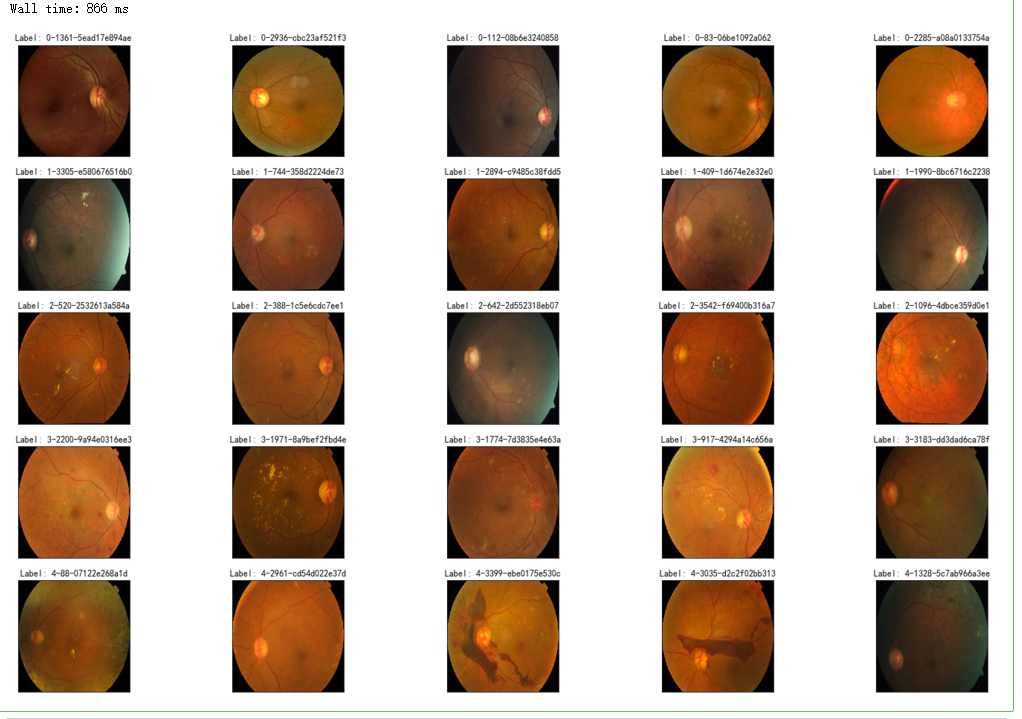
%%time

fig = plt.figure(figsize=(25, 16))

# display 10 images from each class

for class_id in sorted(train_y.unique()):

    for i, (idx, row) in enumerate(df_train.loc[df_train['diagnosis'] == class_id].sample(5, random_state=SEED).iterrows()):

        ax = fig.add_subplot(5, 5, class_id * 5 + i + 1, xticks=[], yticks=[])

        path="F:\\kaggleDataSet\\diabeticRetinopathy\\resized train 19\\"+str(row['id_code'])+".jpg"

        image = cv2.imread(path)

        image = cv2.cvtColor(image, cv2.COLOR_BGR2RGB)

        image = cv2.resize(image, (IMG_SIZE, IMG_SIZE))

        plt.imshow(image)

        ax.set_title('Label: %d-%d-%s' % (class_id, idx, row['id_code']) )
%%time

fig = plt.figure(figsize=(25, 16))

for class_id in sorted(train_y.unique()):

    for i, (idx, row) in enumerate(df_train.loc[df_train['diagnosis'] == class_id].sample(5, random_state=SEED).iterrows()):

        ax = fig.add_subplot(5, 5, class_id * 5 + i + 1, xticks=[], yticks=[])

        path="F:\\kaggleDataSet\\diabeticRetinopathy\\resized train 19\\"+str(row['id_code'])+".jpg"

        image = cv2.imread(path)

        image = cv2.cvtColor(image, cv2.COLOR_BGR2GRAY)

#         image=cv2.addWeighted ( image, 0 , cv2.GaussianBlur( image , (0 ,0 ) , 10) ,-4 ,128)

        image = cv2.resize(image, (IMG_SIZE, IMG_SIZE))

        plt.imshow(image, cmap='gray')

        ax.set_title('Label: %d-%d-%s' % (class_id, idx, row['id_code']) )

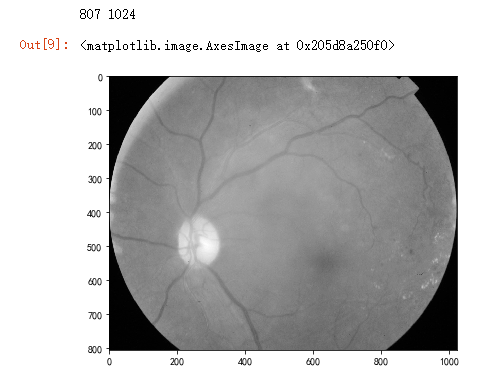
dpi = 80 #inch

# path=f"../input/aptos2019-blindness-detection/train_images/5c7ab966a3ee.png" # notice upper part

path="F:\\kaggleDataSet\\diabeticRetinopathy\\resized train 19\\cd54d022e37d.jpg" # lower-right, this still looks not so severe, can be class3

image = cv2.imread(path)

image = cv2.cvtColor(image, cv2.COLOR_BGR2GRAY)

height, width = image.shape

print(height, width)

SCALE=2

figsize = (width / float(dpi))/SCALE, (height / float(dpi))/SCALE

fig = plt.figure(figsize=figsize)

plt.imshow(image, cmap='gray')
%%time

fig = plt.figure(figsize=(25, 16))

for class_id in sorted(train_y.unique()):

    for i, (idx, row) in enumerate(df_train.loc[df_train['diagnosis'] == class_id].sample(5, random_state=SEED).iterrows()):

        ax = fig.add_subplot(5, 5, class_id * 5 + i + 1, xticks=[], yticks=[])

        path="F:\\kaggleDataSet\\diabeticRetinopathy\\resized train 19\\"+str(row['id_code'])+".jpg"

        image = cv2.imread(path)

        image = cv2.cvtColor(image, cv2.COLOR_BGR2GRAY)

#         image = cv2.cvtColor(image, cv2.COLOR_BGR2RGB)

        image = cv2.resize(image, (IMG_SIZE, IMG_SIZE))

        image=cv2.addWeighted ( image,4, cv2.GaussianBlur( image , (0,0) , IMG_SIZE/10) ,-4 ,128) # the trick is to add this line

        plt.imshow(image, cmap='gray')

        ax.set_title('Label: %d-%d-%s' % (class_id, idx, row['id_code']) )

def crop_image1(img,tol=7):

    # img is image data

    # tol  is tolerance

    mask = img>tol

    return img[np.ix_(mask.any(1),mask.any(0))]

def crop_image_from_gray(img,tol=7):

    if img.ndim ==2:

        mask = img>tol

        return img[np.ix_(mask.any(1),mask.any(0))]

    elif img.ndim==3:

        gray_img = cv2.cvtColor(img, cv2.COLOR_RGB2GRAY)

        mask = gray_img>tol

        check_shape = img[:,:,0][np.ix_(mask.any(1),mask.any(0))].shape[0]

        if (check_shape == 0): # image is too dark so that we crop out everything,

            return img # return original image

        else:

            img1=img[:,:,0][np.ix_(mask.any(1),mask.any(0))]

            img2=img[:,:,1][np.ix_(mask.any(1),mask.any(0))]

            img3=img[:,:,2][np.ix_(mask.any(1),mask.any(0))]

    #         print(img1.shape,img2.shape,img3.shape)

            img = np.stack([img1,img2,img3],axis=-1)

    #         print(img.shape)

        return img
def load_ben_color(path, sigmaX=10):

    image = cv2.imread(path)

    image = cv2.cvtColor(image, cv2.COLOR_BGR2RGB)

    image = crop_image_from_gray(image)

    image = cv2.resize(image, (IMG_SIZE, IMG_SIZE))

    image=cv2.addWeighted ( image,4, cv2.GaussianBlur( image , (0,0) , sigmaX) ,-4 ,128)

    return image
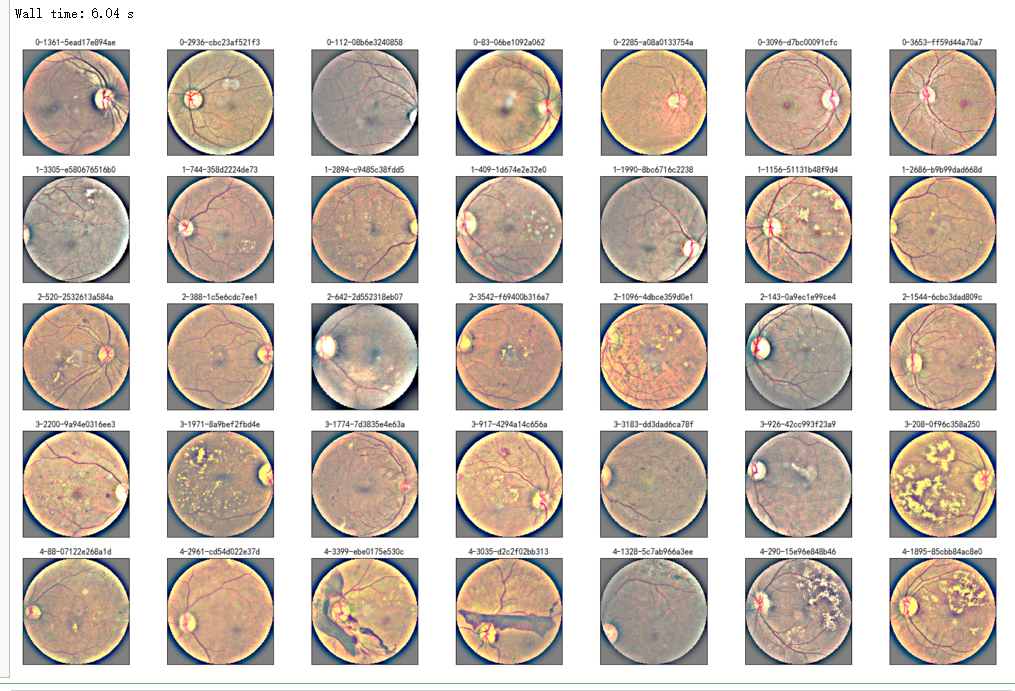
%%time

NUM_SAMP=7

fig = plt.figure(figsize=(25, 16))

for class_id in sorted(train_y.unique()):

    for i, (idx, row) in enumerate(df_train.loc[df_train['diagnosis'] == class_id].sample(NUM_SAMP, random_state=SEED).iterrows()):

        ax = fig.add_subplot(5, NUM_SAMP, class_id * NUM_SAMP + i + 1, xticks=[], yticks=[])

        path="F:\\kaggleDataSet\\diabeticRetinopathy\\resized train 19\\"+str(row['id_code'])+".jpg"

        image = load_ben_color(path,sigmaX=30)

        plt.imshow(image)

        ax.set_title('%d-%d-%s' % (class_id, idx, row['id_code']) )

def circle_crop(img, sigmaX=10):

    """

    Create circular crop around image centre

    """

    img = cv2.imread(img)

    img = crop_image_from_gray(img)

    img = cv2.cvtColor(img, cv2.COLOR_BGR2RGB)

    height, width, depth = img.shape

    x = int(width/2)

    y = int(height/2)

    r = np.amin((x,y))

    circle_img = np.zeros((height, width), np.uint8)

    cv2.circle(circle_img, (x,y), int(r), 1, thickness=-1)

    img = cv2.bitwise_and(img, img, mask=circle_img)

    img = crop_image_from_gray(img)

    img=cv2.addWeighted ( img,4, cv2.GaussianBlur( img , (0,0) , sigmaX) ,-4 ,128)

    return img
%%time

## try circle crop

NUM_SAMP=7

fig = plt.figure(figsize=(25, 16))

for class_id in sorted(train_y.unique()):

    for i, (idx, row) in enumerate(df_train.loc[df_train['diagnosis'] == class_id].sample(NUM_SAMP, random_state=SEED).iterrows()):

        ax = fig.add_subplot(5, NUM_SAMP, class_id * NUM_SAMP + i + 1, xticks=[], yticks=[])

        path="F:\\kaggleDataSet\\diabeticRetinopathy\\resized train 19\\"+str(row['id_code'])+".jpg"

        image = circle_crop(path,sigmaX=30)

        plt.imshow(image)

        ax.set_title('%d-%d-%s' % (class_id, idx, row['id_code']) )
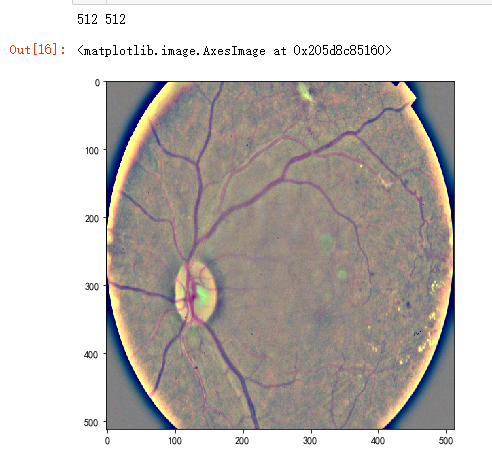
dpi = 80 #inch

path="F:\\kaggleDataSet\\diabeticRetinopathy\\resized train 19\\cd54d022e37d.jpg"

image = load_ben_color(path,sigmaX=10)

height, width = IMG_SIZE, IMG_SIZE

print(height, width)

SCALE=1

figsize = (width / float(dpi))/SCALE, (height / float(dpi))/SCALE

fig = plt.figure(figsize=figsize)

plt.imshow(image, cmap='gray')
%%time

NUM_SAMP=10

fig = plt.figure(figsize=(25, 16))

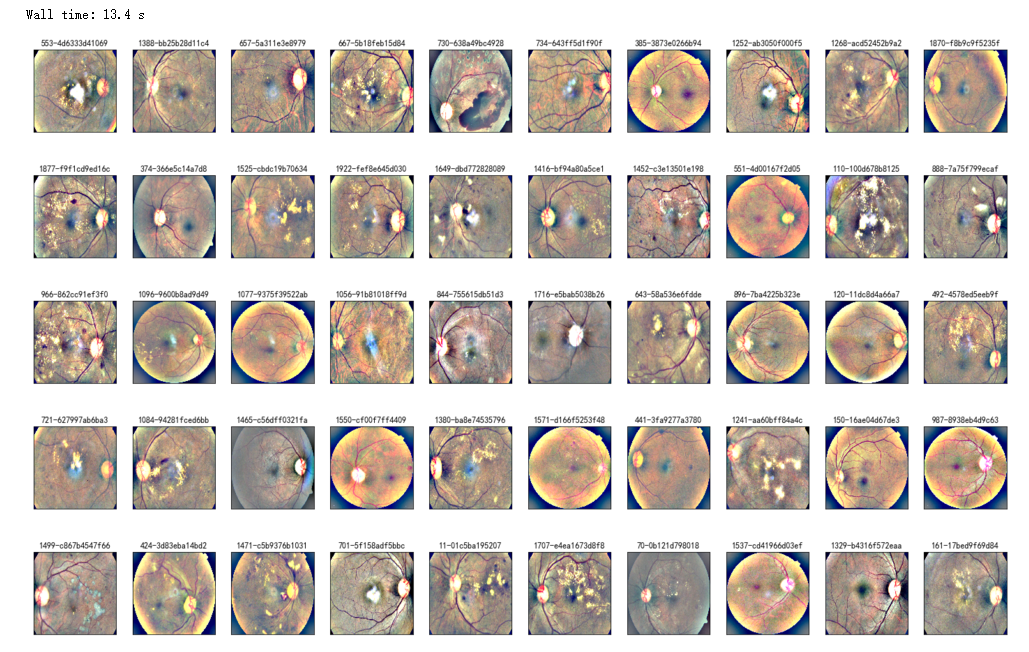
for jj in range(5):

    for i, (idx, row) in enumerate(df_test.sample(NUM_SAMP,random_state=SEED+jj).iterrows()):

        ax = fig.add_subplot(5, NUM_SAMP, jj * NUM_SAMP + i + 1, xticks=[], yticks=[])

        path="F:\\kaggleDataSet\\diabeticRetinopathy\\resized test 19\\"+str(row['id_code'])+".jpg"

        image = load_ben_color(path,sigmaX=30)

        plt.imshow(image)

        ax.set_title('%d-%s' % (idx, row['id_code']) )

%%time

NUM_SAMP=10

fig = plt.figure(figsize=(25, 16))

for jj in range(5):

    for i, (idx, row) in enumerate(df_test.sample(NUM_SAMP,random_state=SEED+jj).iterrows()):

        ax = fig.add_subplot(5, NUM_SAMP, jj * NUM_SAMP + i + 1, xticks=[], yticks=[])

        path="F:\\kaggleDataSet\\diabeticRetinopathy\\resized test 19\\"+str(row['id_code'])+".jpg"

        image = load_ben_color(path,sigmaX=50)

        plt.imshow(image, cmap='gray')

        ax.set_title('%d-%s' % (idx, row['id_code']) )
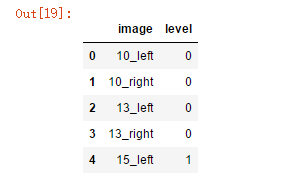
df_old = pd.read_csv('F:\\kaggleDataSet\\diabeticRetinopathy\\trainLabels.csv')

df_old.head()
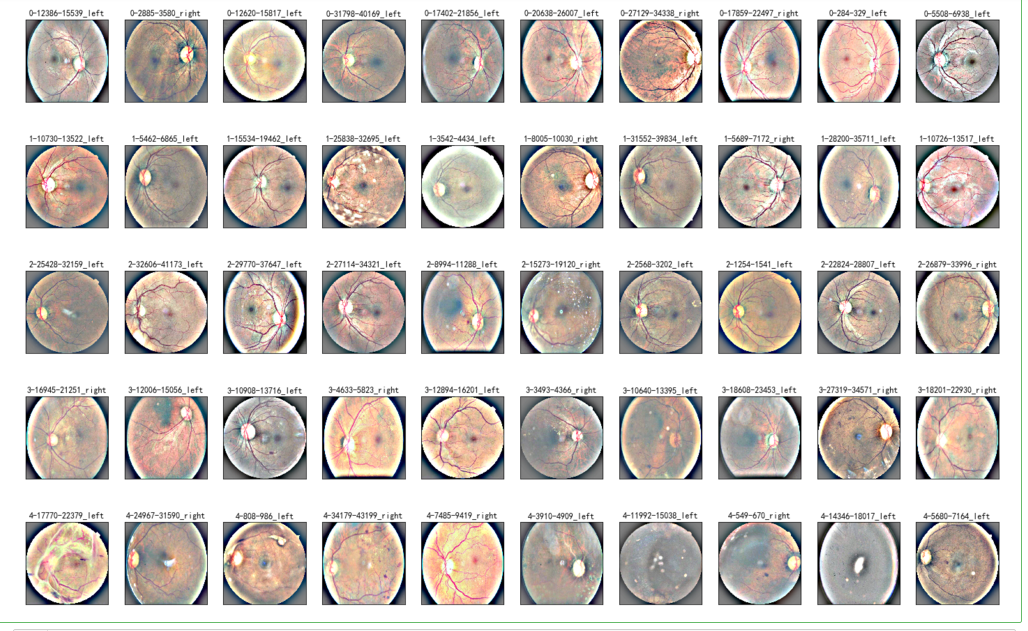
NUM_SAMP=10

fig = plt.figure(figsize=(25, 16))

for class_id in sorted(train_y.unique()):

    for i, (idx, row) in enumerate(df_old.loc[df_old['level'] == class_id].sample(NUM_SAMP, random_state=SEED).iterrows()):

        ax = fig.add_subplot(5, NUM_SAMP, class_id * NUM_SAMP + i + 1, xticks=[], yticks=[])

        path="F:\\kaggleDataSet\\diabeticRetinopathy\\resized_train\\"+row['image']+".jpeg"

        image = load_ben_color(path,sigmaX=30)

        plt.imshow(image)

        ax.set_title('%d-%d-%s' % (class_id, idx, row['image']) )
NUM_SAMP=10

fig = plt.figure(figsize=(25, 16))

for class_id in sorted(train_y.unique()):

    for i, (idx, row) in enumerate(df_old.loc[df_old['level'] == class_id].sample(NUM_SAMP, random_state=SEED).iterrows()):

        ax = fig.add_subplot(5, NUM_SAMP, class_id * NUM_SAMP + i + 1, xticks=[], yticks=[])

        path="F:\\kaggleDataSet\\diabeticRetinopathy\\resized_train\\"+row['image']+".jpeg"

        image = cv2.imread(path)

        image = cv2.cvtColor(image, cv2.COLOR_BGR2RGB)

        image = cv2.resize(image, (IMG_SIZE, IMG_SIZE))

        plt.imshow(image, cmap='gray')

        ax.set_title('%d-%d-%s' % (class_id, idx, row['image']) )

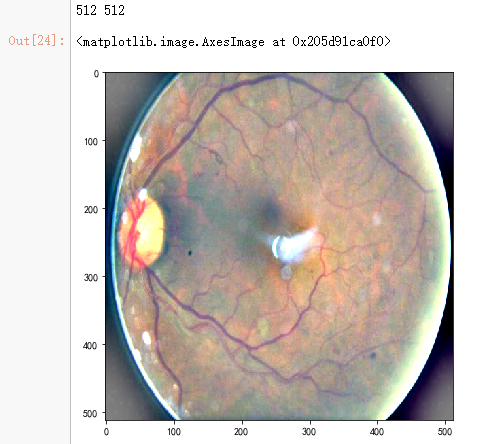
dpi = 80 #inch

path=f"F:\\kaggleDataSet\\diabeticRetinopathy\\resized_train\\31590_right.jpeg" # too many vessels?

image = load_ben_color(path,sigmaX=30)

# image = cv2.imread(path)

# image = cv2.cvtColor(image, cv2.COLOR_BGR2GRAY)

# image = crop_image1(image)

# image = cv2.resize(image, (IMG_SIZE, IMG_SIZE))

# image=cv2.addWeighted ( image,4, cv2.GaussianBlur( image , (0,0) , IMG_SIZE/10) ,-4 ,128)

height, width = IMG_SIZE, IMG_SIZE

print(height, width)

SCALE=1

figsize = (width / float(dpi))/SCALE, (height / float(dpi))/SCALE

fig = plt.figure(figsize=figsize)

plt.imshow(image, cmap='gray')
dpi = 80 #inch

path_jpg=f"F:\\kaggleDataSet\\diabeticRetinopathy\\resized_train_cropped\\18017_left.jpeg" # too many vessels?

path_png=f"F:\\kaggleDataSet\\diabeticRetinopathy\\rescaled_train_896\\18017_left.png" # details are lost

image = cv2.imread(path_png)

image = cv2.cvtColor(image, cv2.COLOR_BGR2RGB)

image = cv2.resize(image, (IMG_SIZE, IMG_SIZE))

image2 =  cv2.imread(path_jpg)

image2 = cv2.cvtColor(image2, cv2.COLOR_BGR2RGB)

image2 = cv2.resize(image2, (IMG_SIZE, IMG_SIZE))

height, width = IMG_SIZE, IMG_SIZE

print(height, width)

SCALE=1/4

figsize = (width / float(dpi))/SCALE, (height / float(dpi))/SCALE

fig = plt.figure(figsize=figsize)

ax = fig.add_subplot(2, 2, 1, xticks=[], yticks=[])

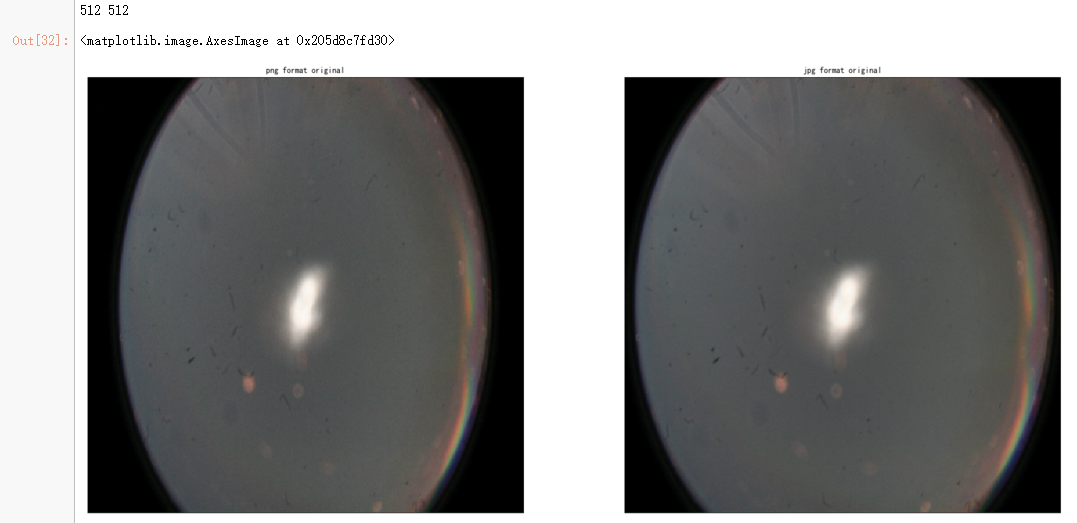
ax.set_title('png format original' )

plt.imshow(image, cmap='gray')

ax = fig.add_subplot(2, 2, 2, xticks=[], yticks=[])

ax.set_title('jpg format original' )

plt.imshow(image2, cmap='gray')

image = load_ben_color(path_png,sigmaX=30)

image2 = load_ben_color(path_jpg,sigmaX=30)

ax = fig.add_subplot(2, 2, 3, xticks=[], yticks=[])

ax.set_title('png format transformed' )

plt.imshow(image, cmap='gray')

ax = fig.add_subplot(2, 2, 4, xticks=[], yticks=[])

ax.set_title('jpg format transformed' )

plt.imshow(image2, cmap='gray')

import json

import math

import os

import cv2

from PIL import Image

import numpy as np

from keras import layers

from keras.applications import DenseNet121

from keras.callbacks import Callback, ModelCheckpoint

from keras.preprocessing.image import ImageDataGenerator

from keras.models import Sequential

from keras.optimizers import Adam

import matplotlib.pyplot as plt

import pandas as pd

from sklearn.model_selection import train_test_split

from sklearn.metrics import cohen_kappa_score, accuracy_score

import scipy

from tqdm import tqdm

%matplotlib inline
train_df = pd.read_csv('F:\\kaggleDataSet\\diabeticRetinopathy\\trainLabels19.csv')

test_df = pd.read_csv('F:\\kaggleDataSet\\diabeticRetinopathy\\testImages19.csv')

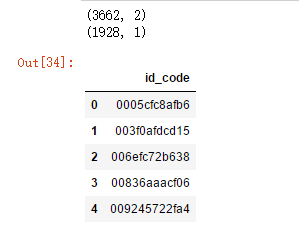
print(train_df.shape)

print(test_df.shape)

test_df.head()
def get_pad_width(im, new_shape, is_rgb=True):

    pad_diff = new_shape - im.shape[0], new_shape - im.shape[1]

    t, b = math.floor(pad_diff[0]/2), math.ceil(pad_diff[0]/2)

    l, r = math.floor(pad_diff[1]/2), math.ceil(pad_diff[1]/2)

    if is_rgb:

        pad_width = ((t,b), (l,r), (0, 0))

    else:

        pad_width = ((t,b), (l,r))

    return pad_width

def preprocess_image(image_path, desired_size=224):

    im = Image.open(image_path)

    im = im.resize((desired_size, )*2, resample=Image.LANCZOS)

    return im
N = test_df.shape[0]

x_test = np.empty((N, 224, 224, 3), dtype=np.uint8)

for i, image_id in enumerate(tqdm(test_df['id_code'])):

    x_test[i, :, :, :] = preprocess_image("F:\\kaggleDataSet\\diabeticRetinopathy\\resized test 19\\"+str(image_id)+".jpg")

# model.summary()

def load_image_ben_orig(path,resize=True,crop=False,norm255=True,keras=False):

    image = cv2.imread(path)

    image = cv2.cvtColor(image, cv2.COLOR_BGR2RGB)

    image=cv2.addWeighted( image,4, cv2.GaussianBlur( image , (0,0) ,  10) ,-4 ,128)

    if norm255:

        return image/255

    elif keras:

        #see https://github.com/keras-team/keras-applications/blob/master/keras_applications/imagenet_utils.py for mode

        #see https://github.com/keras-team/keras-applications/blob/master/keras_applications/xception.py for inception,xception mode

        #the use of tf based preprocessing (- and / by 127 respectively) will results in [-1,1] so it will not visualize correctly (directly)

        image = np.expand_dims(image, axis=0)

        return preprocess_input(image)[0]

    else:

        return image.astype(np.int16)

    return image

def transform_image_ben(img,resize=True,crop=False,norm255=True,keras=False):

    image=cv2.addWeighted( img,4, cv2.GaussianBlur( img , (0,0) ,  10) ,-4 ,128)

    if norm255:

        return image/255

    elif keras:

        image = np.expand_dims(image, axis=0)

        return preprocess_input(image)[0]

    else:

        return image.astype(np.int16)

    return image
def display_samples(df, columns=5, rows=2, Ben=True):

    fig=plt.figure(figsize=(5*columns, 4*rows))

    for i in range(columns*rows):

        image_path = df.loc[i,'id_code']

        path = f"F:\\kaggleDataSet\\diabeticRetinopathy\\resized test 19\\"+str(image_path)+".jpg"

        if Ben:

            img = load_image_ben_orig(path)

        else:

            img = cv2.imread(path)

            img = cv2.cvtColor(img, cv2.COLOR_BGR2RGB)

        fig.add_subplot(rows, columns, i+1)

        plt.imshow(img)

    plt.tight_layout()

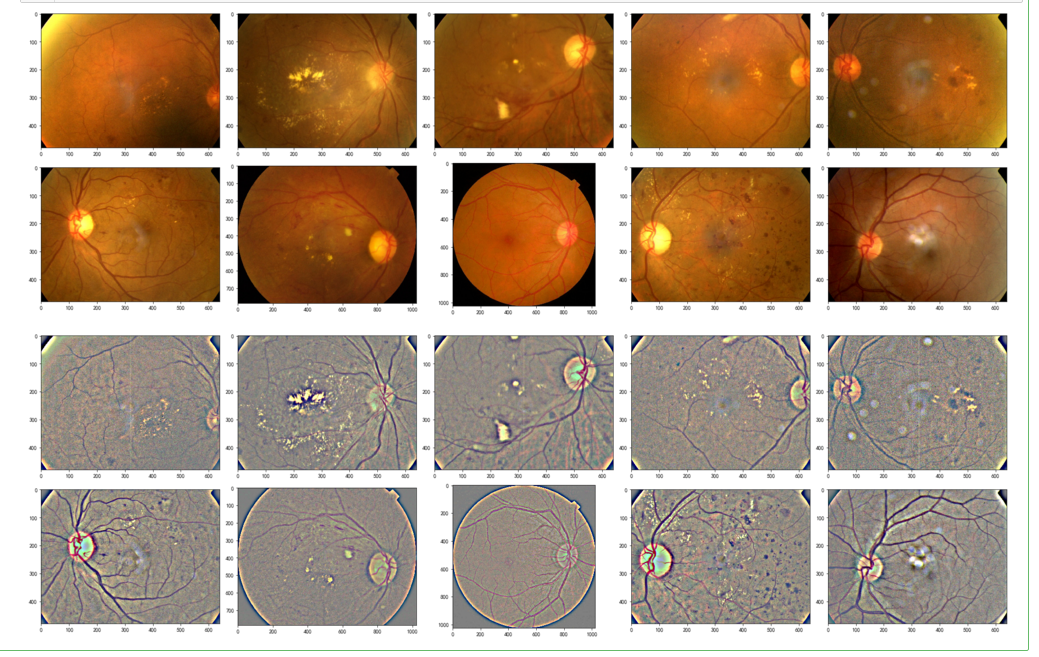
display_samples(test_df, Ben=False)

display_samples(test_df, Ben=True)
from keras import layers

from keras.models import Model

import keras.backend as K
K.clear_session()

densenet = DenseNet121(weights=None,include_top=False,input_shape=(None,None,3))
GAP_layer = layers.GlobalAveragePooling2D()

drop_layer = layers.Dropout(0.5)

dense_layer = layers.Dense(5, activation='sigmoid', name='final_output')
def build_model_sequential():

    model = Sequential()

    model.add(densenet)

    model.add(GAP_layer)

    model.add(drop_layer)

    model.add(dense_layer)

    return model
modelA = build_model_sequential()

modelA.load_weights('F:\\kaggleDataSet\\diabeticRetinopathy\\dense_xhlulu_731.h5')

modelA.summary()
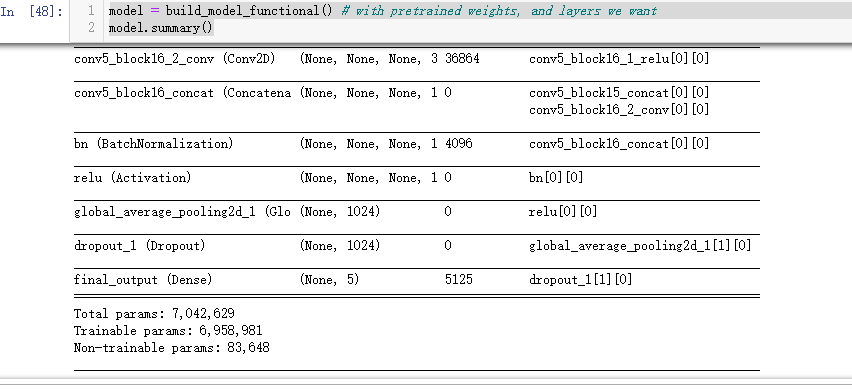
model = build_model_functional() # with pretrained weights, and layers we want

model.summary()
y_test = model.predict(x_test) > 0.5

y_test = y_test.astype(int).sum(axis=1) - 1
import seaborn as sns

import cv2

SIZE=224

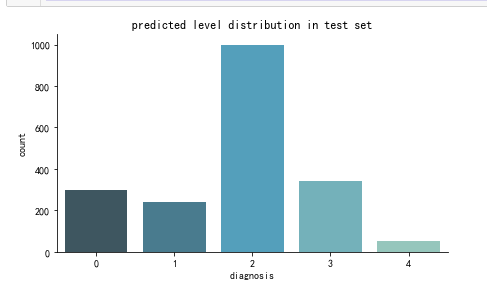
def create_pred_hist(pred_level_y,title='NoTitle'):

    results = pd.DataFrame({'diagnosis':pred_level_y})

    f, ax = plt.subplots(figsize=(7, 4))

    ax = sns.countplot(x="diagnosis", data=results, palette="GnBu_d")

    sns.despine()

    plt.title(title)

    plt.show()

create_pred_hist(y_test,title='predicted level distribution in test set')
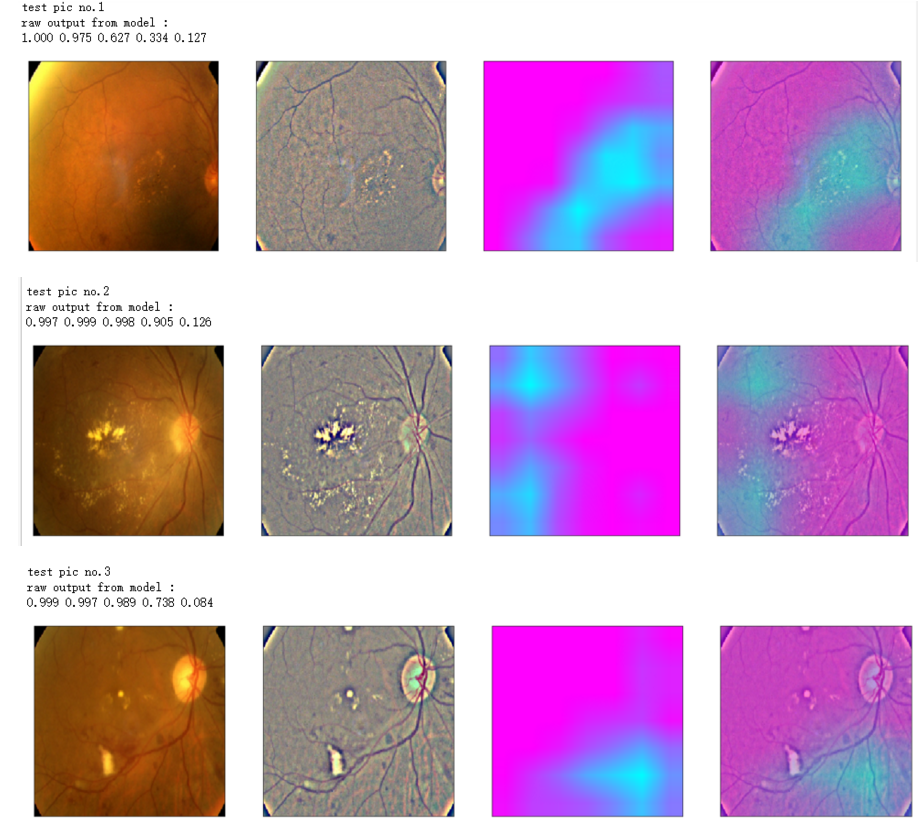
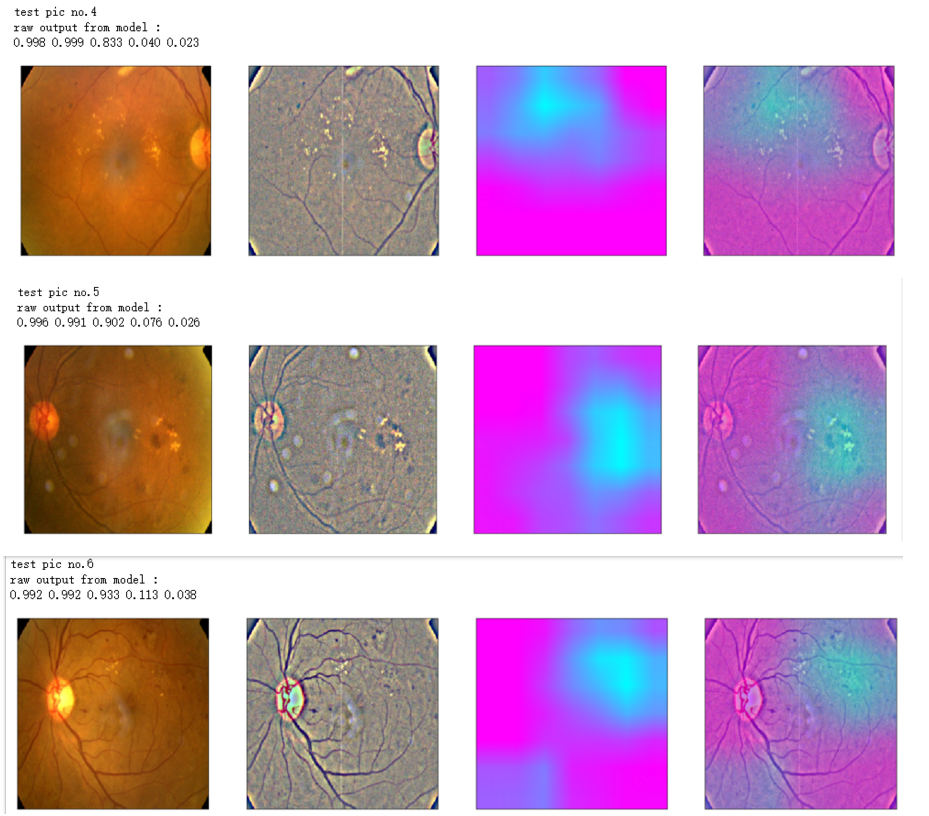
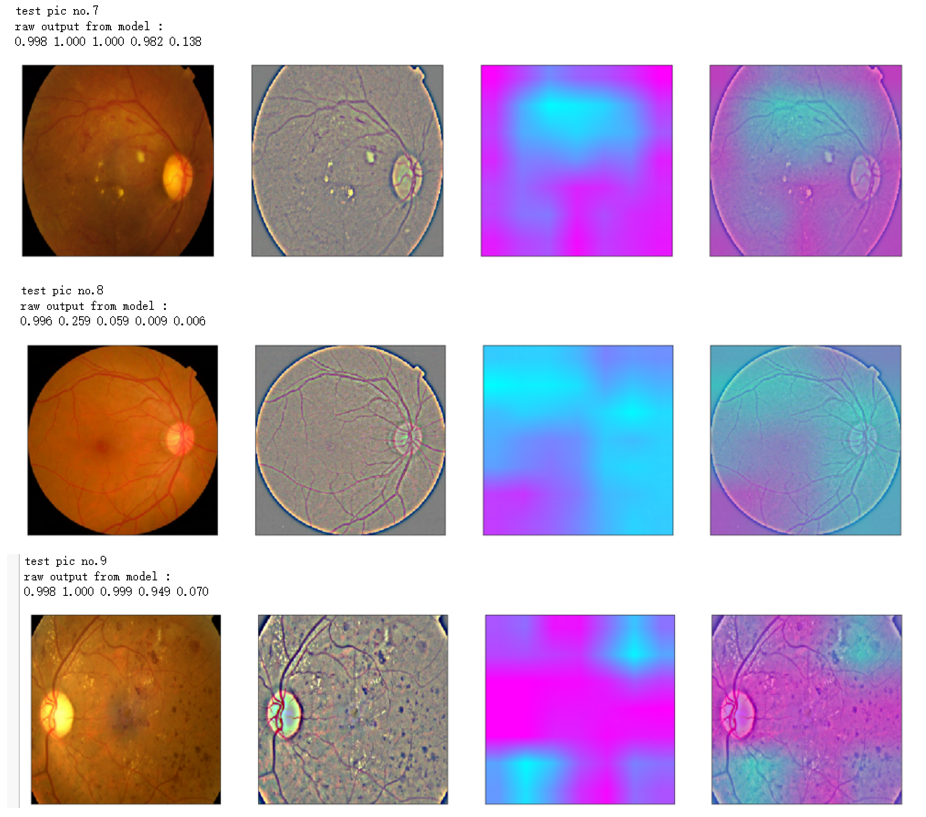
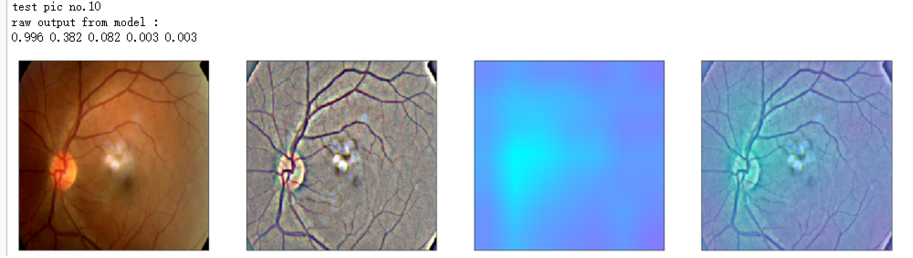
def gen_heatmap_img(img, model0, layer_name='last_conv_layer',viz_img=None,orig_img=None):

    preds_raw = model0.predict(img[np.newaxis])

    preds = preds_raw > 0.5 # use the same threshold as @xhlulu original kernel

    class_idx = (preds.astype(int).sum(axis=1) - 1)[0]

    class_output_tensor = model0.output[:, class_idx]

    viz_layer = model0.get_layer(layer_name)

    grads = K.gradients(class_output_tensor ,viz_layer.output)[0] # gradients of viz_layer wrt output_tensor of predicted class

    pooled_grads=K.mean(grads,axis=(0,1,2))

    iterate=K.function([model0.input],[pooled_grads, viz_layer.output[0]])

    pooled_grad_value, viz_layer_out_value = iterate([img[np.newaxis]])

    for i in range(pooled_grad_value.shape[0]):

        viz_layer_out_value[:,:,i] *= pooled_grad_value[i]

    heatmap = np.mean(viz_layer_out_value, axis=-1)

    heatmap = np.maximum(heatmap,0)

    heatmap /= np.max(heatmap)

    viz_img=cv2.resize(viz_img,(img.shape[1],img.shape[0]))

    heatmap=cv2.resize(heatmap,(viz_img.shape[1],viz_img.shape[0]))

    heatmap_color = cv2.applyColorMap(np.uint8(heatmap*255), cv2.COLORMAP_SPRING)/255

    heated_img = heatmap_color*0.5 + viz_img*0.5

    print('raw output from model : ')

    print_pred(preds_raw)

    if orig_img is None:

        show_Nimages([img,viz_img,heatmap_color,heated_img])

    else:

        show_Nimages([orig_img,img,viz_img,heatmap_color,heated_img])

    plt.show()

    return heated_img
def show_image(image,figsize=None,title=None):

    if figsize is not None:

        fig = plt.figure(figsize=figsize)

    if image.ndim == 2:

        plt.imshow(image,cmap='gray')

    else:

        plt.imshow(image)

    if title is not None:

        plt.title(title)

def show_Nimages(imgs,scale=1):

    N=len(imgs)

    fig = plt.figure(figsize=(25/scale, 16/scale))

    for i, img in enumerate(imgs):

        ax = fig.add_subplot(1, N, i + 1, xticks=[], yticks=[])

        show_image(img)

def print_pred(array_of_classes):

    xx = array_of_classes

    s1,s2 = xx.shape

    for i in range(s1):

        for j in range(s2):

            print('%.3f ' % xx[i,j],end='')

        print('')
NUM_SAMP=10

SEED=77

layer_name = 'relu' #'conv5_block16_concat'

for i, (idx, row) in enumerate(test_df[:NUM_SAMP].iterrows()):

    path=f"F:\\kaggleDataSet\\diabeticRetinopathy\\resized test 19\\"+str(row["id_code"])+".jpg"

    ben_img = load_image_ben_orig(path)

    input_img = np.empty((1,224, 224, 3), dtype=np.uint8)

    input_img[0,:,:,:] = preprocess_image(path)

    print('test pic no.%d' % (i+1))

    _ = gen_heatmap_img(input_img[0],model, layer_name=layer_name,viz_img=ben_img)
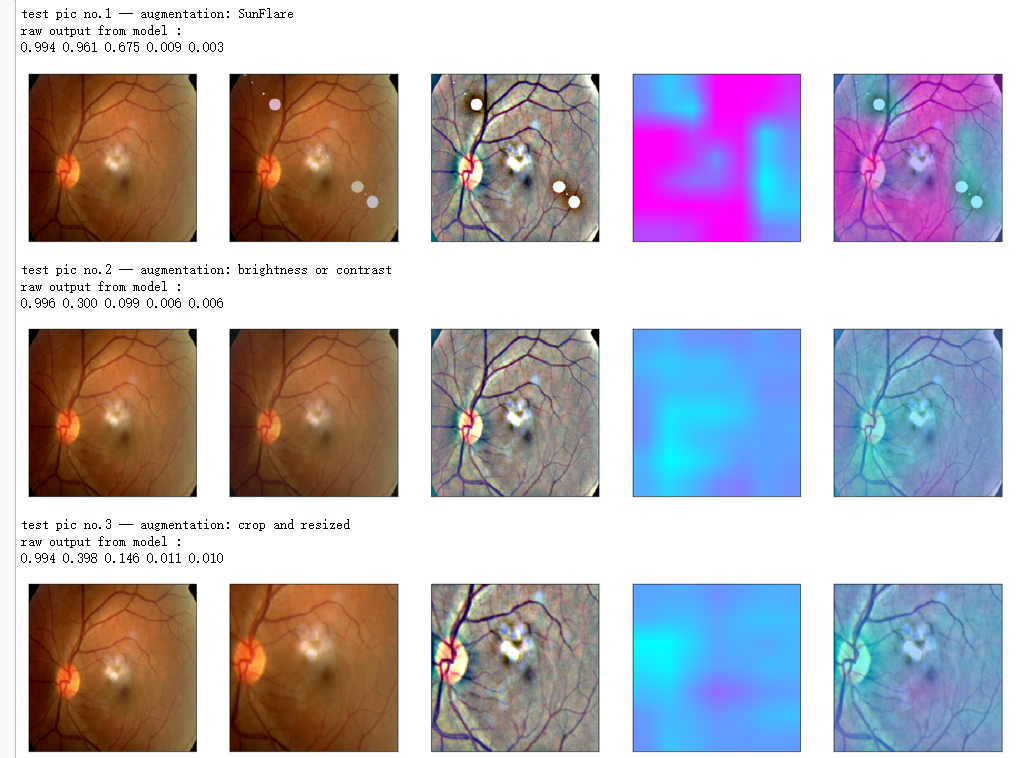
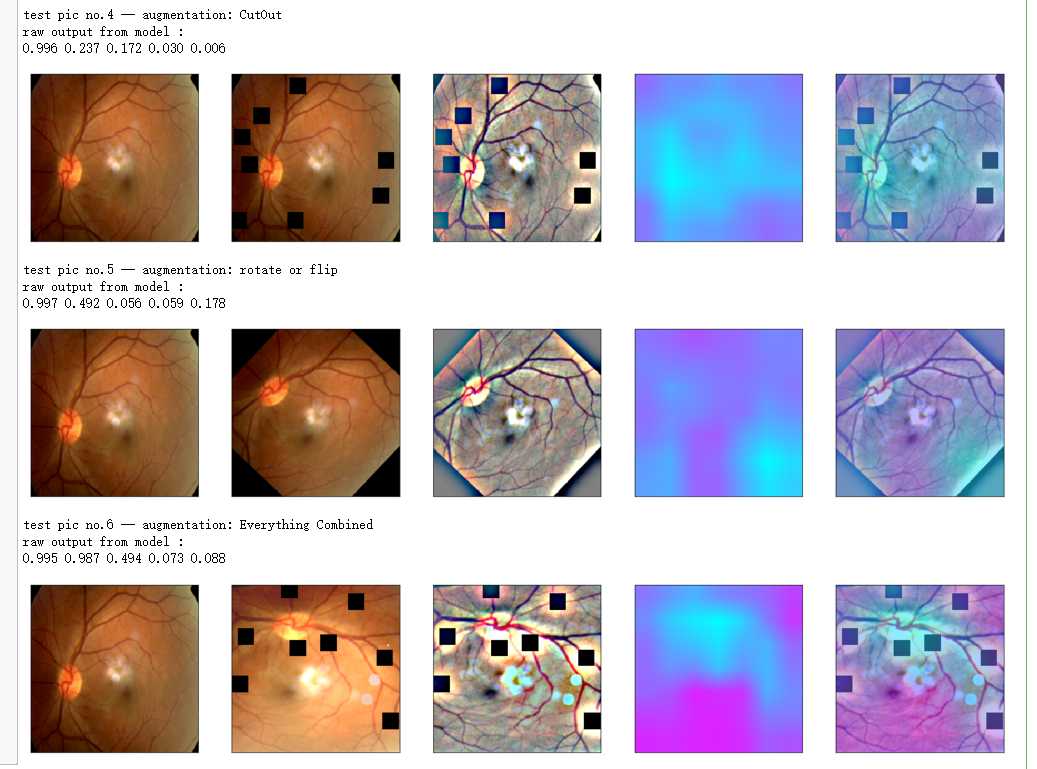
from albumentations import *

import time

IMG_SIZE = (224,224)

'''Use case from https://www.kaggle.com/alexanderliao/image-augmentation-demo-with-albumentation/'''

def albaugment(aug0, img):

    return aug0(image=img)['image']

idx=8

image1=x_test[idx]

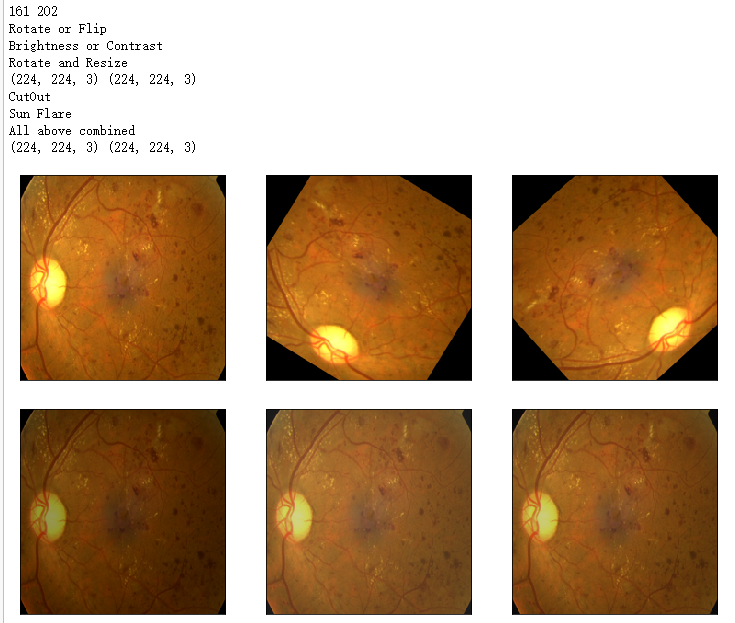
'''1. Rotate or Flip'''

aug1 = OneOf([Rotate(p=0.99, limit=160, border_mode=0,value=0), Flip(p=0.5)],p=1)

'''2. Adjust Brightness or Contrast'''

aug2 = RandomBrightnessContrast(brightness_limit=0.45, contrast_limit=0.45,p=1)

h_min=np.round(IMG_SIZE[1]*0.72).astype(int)

h_max= np.round(IMG_SIZE[1]*0.9).astype(int)

print(h_min,h_max)

'''3. Random Crop and then Resize'''

#w2h_ratio = aspect ratio of cropping

aug3 = RandomSizedCrop((h_min, h_max),IMG_SIZE[1],IMG_SIZE[0], w2h_ratio=IMG_SIZE[0]/IMG_SIZE[1],p=1)

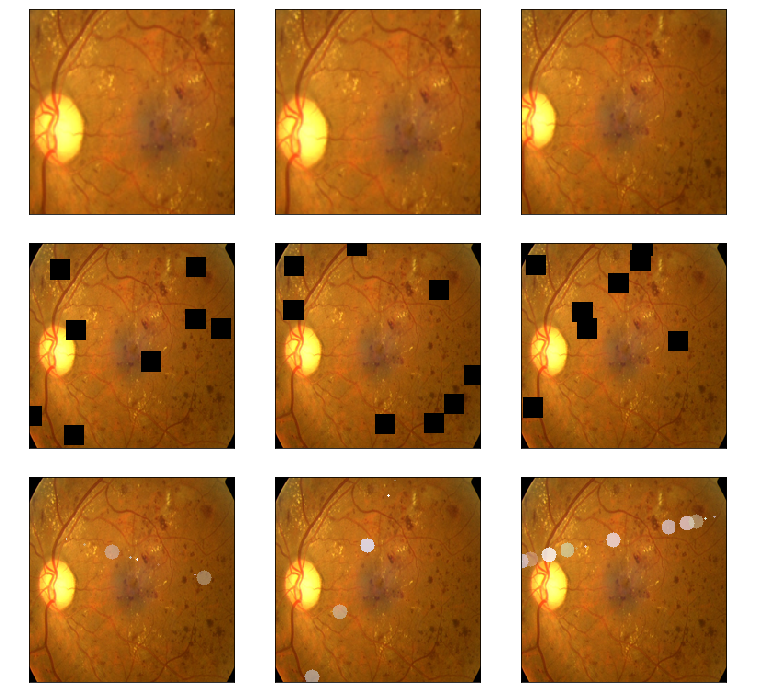
'''4. CutOut Augmentation'''

max_hole_size = int(IMG_SIZE[1]/10)

aug4 = Cutout(p=1,max_h_size=max_hole_size,max_w_size=max_hole_size,num_holes=8 )#default num_holes=8

'''5. SunFlare Augmentation'''

aug5 = RandomSunFlare(src_radius=max_hole_size,num_flare_circles_lower=10,num_flare_circles_upper=20,p=1)

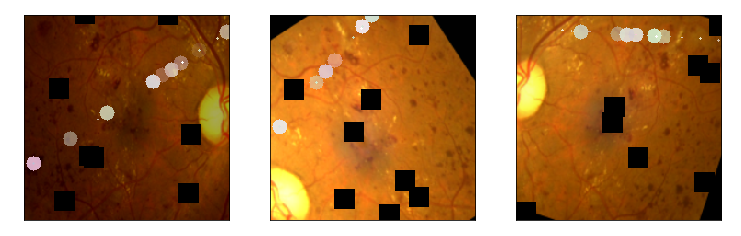
'''6. Ultimate Augmentation -- combine everything'''

final_aug = Compose([aug1,aug2,aug3,aug4,aug5],p=1)

img1 = albaugment(aug1,image1)

img2 = albaugment(aug1,image1)

print('Rotate or Flip')

show_Nimages([image1,img1,img2],scale=2)

# time.sleep(1)

img1 = albaugment(aug2,image1)

img2 = albaugment(aug2,image1)

img3 = albaugment(aug2,image1)

print('Brightness or Contrast')

show_Nimages([img3,img1,img2],scale=2)

# time.sleep(1)

img1 = albaugment(aug3,image1)

img2 = albaugment(aug3,image1)

img3 = albaugment(aug3,image1)

print('Rotate and Resize')

show_Nimages([img3,img1,img2],scale=2)

print(img1.shape,img2.shape)

# time.sleep(1)

img1 = albaugment(aug4,image1)

img2 = albaugment(aug4,image1)

img3 = albaugment(aug4,image1)

print('CutOut')

show_Nimages([img3,img1,img2],scale=2)

# time.sleep(1)

img1 = albaugment(aug5,image1)

img2 = albaugment(aug5,image1)

img3 = albaugment(aug5,image1)

print('Sun Flare')

show_Nimages([img3,img1,img2],scale=2)

# time.sleep(1)

img1 = albaugment(final_aug,image1)

img2 = albaugment(final_aug,image1)

img3 = albaugment(final_aug,image1)

print('All above combined')

show_Nimages([img3,img1,img2],scale=2)

print(img1.shape,img2.shape)
aug_list = [aug5, aug2, aug3, aug4, aug1, final_aug]

aug_name = ['SunFlare', 'brightness or contrast', 'crop and resized', 'CutOut', 'rotate or flip', 'Everything Combined']

idx=8

layer_name = 'relu'

for i in range(len(aug_list)):

    path=f"F:\\kaggleDataSet\\diabeticRetinopathy\\resized test 19\\"+str(row["id_code"])+".jpg"

    input_img = np.empty((1,224, 224, 3), dtype=np.uint8)

    input_img[0,:,:,:] = preprocess_image(path)

    aug_img = albaugment(aug_list[i],input_img[0,:,:,:])

    ben_img = transform_image_ben(aug_img)

    print('test pic no.%d -- augmentation: %s' % (i+1, aug_name[i]))

    _ = gen_heatmap_img(aug_img,model, layer_name=layer_name,viz_img=ben_img,orig_img=input_img[0])
吴裕雄--天生自然 PYTHON数据分析:糖尿病视网膜病变数据分析(完整版)的更多相关文章
- 吴裕雄--天生自然 PYTHON数据分析:所有美国股票和etf的历史日价格和成交量分析
# This Python 3 environment comes with many helpful analytics libraries installed # It is defined by ...
- 吴裕雄--天生自然 python数据分析:健康指标聚集分析(健康分析)
# This Python 3 environment comes with many helpful analytics libraries installed # It is defined by ...
- 吴裕雄--天生自然 python数据分析:葡萄酒分析
# import pandas import pandas as pd # creating a DataFrame pd.DataFrame({'Yes': [50, 31], 'No': [101 ...
- 吴裕雄--天生自然 PYTHON数据分析:人类发展报告——HDI, GDI,健康,全球人口数据数据分析
import pandas as pd # Data analysis import numpy as np #Data analysis import seaborn as sns # Data v ...
- 吴裕雄--天生自然 python数据分析:医疗费数据分析
import numpy as np import pandas as pd import os import matplotlib.pyplot as pl import seaborn as sn ...
- 吴裕雄--天生自然 PYTHON语言数据分析:ESA的火星快车操作数据集分析
import os import numpy as np import pandas as pd from datetime import datetime import matplotlib imp ...
- 吴裕雄--天生自然 python语言数据分析:开普勒系外行星搜索结果分析
import pandas as pd pd.DataFrame({'Yes': [50, 21], 'No': [131, 2]}) pd.DataFrame({'Bob': ['I liked i ...
- 吴裕雄--天生自然 PYTHON数据分析:基于Keras的CNN分析太空深处寻找系外行星数据
#We import libraries for linear algebra, graphs, and evaluation of results import numpy as np import ...
- 吴裕雄--天生自然 python数据分析:基于Keras使用CNN神经网络处理手写数据集
import pandas as pd import numpy as np import matplotlib.pyplot as plt import matplotlib.image as mp ...
随机推荐
- FFMPEG学习----解码视频
基础概念 我们平时看到的视频文件有许多格式,比如 avi, mkv, rmvb, mov, mp4等等,这些被称为容器(Container), 不同的容器格式规定了其中音视频数据的组织方式(也包括其他 ...
- [win]更改win终端编码
更改cmd的编码格式 chcp: 显示当前的编码格式 chcp 65001: 更改当前编码格式为UTF-8 字体选择`Lucida Console` 更改PowerShell编码格式(from zhi ...
- js变量和函数提升
写在前面: 变量提升是 声明提升,初始化不会提升,比如说 var a=1; console.log(a); 实际是这样执行(个人理解,仅供参考) var a; console.log(a); a=1; ...
- DRF框架的安装与使用
目录 DRF框架的安装与配置 基于restful接口规范的接口设计 DRF框架的安装与配置 """ 1)安装 >: pip install djangorestfr ...
- 深入理解ASP.NET Core依赖注入
概述 ASP.NET Core可以说是处处皆注入,本文从基础角度理解一下原生DI容器,及介绍下怎么使用并且如何替换官方提供的默认依赖注入容器. 什么是依赖注入 百度百科中对 ...
- Spark中的RDD和DataFrame
什么是DataFrame 在Spark中,DataFrame是一种以RDD为基础的分布式数据集,类似于传统数据库中的二维表格. RDD和DataFrame的区别 DataFrame与RDD的主要区别在 ...
- Jmeter之上传文件
前言 我们可以利用postman工具来测试上传文件的接口,那么假如要利用Jmeter工具来进行上传接口的测试,又该如何测试呢? 上传文件的接口地址:/pinter/file/api/upload:接口 ...
- 微信支付v3版本NET 图片上传API
最近在写特约服务商进件的由于微信官方没有DEMO,导致踩了很多坑,特把自己经验分享给大家. 注意几点: 1.上传图片签名不是把所有body内容都进行签名,只需签名计算的请求主体为meta的json串: ...
- MongoDB入门(介绍、安装)
一.什么是MongoDB? MongoDB is a document database with the scalability and flexibility that you want with ...
- [Python]执行Linux命令
使用subprocess模块 import subprocess # 防火墙服务存在关闭状态 child1 = subprocess.Popen(["systemctl status fir ...