
吴裕雄 python 神经网络——TensorFlow TFRecord样例程序
import numpy as np

import tensorflow as tf

from tensorflow.examples.tutorials.mnist import input_data

# 定义函数转化变量类型。

def _int64_feature(value):

    return tf.train.Feature(int64_list=tf.train.Int64List(value=[value]))

def _bytes_feature(value):

    return tf.train.Feature(bytes_list=tf.train.BytesList(value=[value]))

# 将数据转化为tf.train.Example格式。

def _make_example(pixels, label, image):

    image_raw = image.tostring()

    example = tf.train.Example(features=tf.train.Features(feature={

        'pixels': _int64_feature(pixels),

        'label': _int64_feature(np.argmax(label)),

        'image_raw': _bytes_feature(image_raw)

    }))

    return example

# 读取mnist训练数据。

mnist = input_data.read_data_sets("E:\\MNIST_data\\",dtype=tf.uint8, one_hot=True)

images = mnist.train.images

labels = mnist.train.labels

pixels = images.shape[1]

num_examples = mnist.train.num_examples

# 输出包含训练数据的TFRecord文件。

with tf.python_io.TFRecordWriter("E:\\MNIST_data\\output.tfrecords") as writer:

    for index in range(num_examples):

        example = _make_example(pixels, labels[index], images[index])

        writer.write(example.SerializeToString())

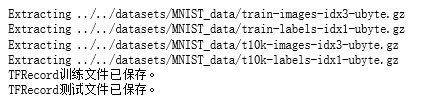
print("TFRecord训练文件已保存。")

# 读取mnist测试数据。

images_test = mnist.test.images

labels_test = mnist.test.labels

pixels_test = images_test.shape[1]

num_examples_test = mnist.test.num_examples

# 输出包含测试数据的TFRecord文件。

with tf.python_io.TFRecordWriter("E:\\MNIST_data\\output_test.tfrecords") as writer:

    for index in range(num_examples_test):

        example = _make_example(pixels_test, labels_test[index], images_test[index])

        writer.write(example.SerializeToString())

print("TFRecord测试文件已保存。")
# 读取文件。

reader = tf.TFRecordReader()

filename_queue = tf.train.string_input_producer(["E:\\MNIST_data\\output.tfrecords"])

_,serialized_example = reader.read(filename_queue)

# 解析读取的样例。

features = tf.parse_single_example(

    serialized_example,

    features={

        'image_raw':tf.FixedLenFeature([],tf.string),

        'pixels':tf.FixedLenFeature([],tf.int64),

        'label':tf.FixedLenFeature([],tf.int64)

    })

images = tf.decode_raw(features['image_raw'],tf.uint8)

labels = tf.cast(features['label'],tf.int32)

pixels = tf.cast(features['pixels'],tf.int32)

sess = tf.Session()

# 启动多线程处理输入数据。

coord = tf.train.Coordinator()

threads = tf.train.start_queue_runners(sess=sess,coord=coord)

for i in range(10):

    image, label, pixel = sess.run([images, labels, pixels])
吴裕雄 python 神经网络——TensorFlow TFRecord样例程序的更多相关文章
- 吴裕雄 python 神经网络TensorFlow实现LeNet模型处理手写数字识别MNIST数据集
import tensorflow as tf tf.reset_default_graph() # 配置神经网络的参数 INPUT_NODE = 784 OUTPUT_NODE = 10 IMAGE ...
- 吴裕雄 python 神经网络——TensorFlow 输入数据处理框架
import tensorflow as tf files = tf.train.match_filenames_once("E:\\MNIST_data\\output.tfrecords ...
- 吴裕雄 python 神经网络——TensorFlow 输入文件队列
import tensorflow as tf def _int64_feature(value): return tf.train.Feature(int64_list=tf.train.Int64 ...
- 吴裕雄 python 神经网络——TensorFlow 图像预处理完整样例
import numpy as np import tensorflow as tf import matplotlib.pyplot as plt def distort_color(image, ...
- 吴裕雄 python 神经网络——TensorFlow 完整神经网络样例程序
import tensorflow as tf from numpy.random import RandomState batch_size = 8 w1= tf.Variable(tf.rando ...
- 吴裕雄 python 神经网络——TensorFlow variables_to_restore函数的使用样例
import tensorflow as tf v = tf.Variable(0, dtype=tf.float32, name="v") ema = tf.train.Expo ...
- 吴裕雄 python 神经网络——TensorFlow训练神经网络:卷积层、池化层样例
import numpy as np import tensorflow as tf M = np.array([ [[1],[-1],[0]], [[-1],[2],[1]], [[0],[2],[ ...
- 吴裕雄 python 神经网络——TensorFlow 数据集高层操作
import tempfile import tensorflow as tf train_files = tf.train.match_filenames_once("E:\\output ...
- 吴裕雄 python 神经网络——TensorFlow 数据集基本使用方法
import tempfile import tensorflow as tf input_data = [1, 2, 3, 5, 8] dataset = tf.data.Dataset.from_ ...
随机推荐
- UOJ 34: 多项式乘法(FFT模板题)
关于FFT 这个博客的讲解超级棒 http://blog.miskcoo.com/2015/04/polynomial-multiplication-and-fast-fourier-transfor ...
- AC3 exponent coding
1.overview AC-3编码的audio信号中的频率系数由浮点型数据表示,并将其归一化到0~1之间. transform coefficient由exponent和mantissa组成. 设tr ...
- MinGW dll导入导出类
dll不仅可以导入导出函数,还可以导入导出类.这篇文章就来介绍如何将类导入dll中并导出. 首先我们建立一个名为dll.cpp的文件(又是这种破名字),里面写上: #include <iostr ...
- swagger2 常用注解的使用
一.@Api 效果: @Api注解放在类上面,这里的value是没用的,tags表示该controller的介绍. 二 .@ApiOperation 效果: @ApiOperation注解用于放在方法 ...
- android底部导航栏实现
第一种用radiobutton实现 https://wizardforcel.gitbooks.io/w3school-android/content/75.html 布局文件,使用radiogrou ...
- 【资源分享】Dll Injector(DLL注入器)
*----------------------------------------------[下载区]----------------------------------------------* ...
- centos 添加rpmfusion源,yum 安装 ffmpeg
rpmfusion提供了,在Fedora和 centos 源之外的其他yum 源 例如ffmpeg 在 centos 基础源和epel-release 里面都没有, 但是可以在rpmfusion中找到 ...
- Django报错 The serializer field might be named incorrectly and not match any Got AttributeError when attempting to get a value for field `author_for` on serializer `KnownledgeBaseListSerializer`
1.问题描述,在设置,model部分字段的serialier时,出现如下报错 字段如下: # 知识库List class KnownledgeBaseListSerializer(serializer ...
- Python - 运行流程图, call graph, 调用图
解决方案 pycallgraph(感觉直接用pycallgraph grahviz命令生成的图并不是我想要的) 如何去阅读并学习一些优秀的开源框架的源码? - mailto1587的回答 - 知乎 h ...
- ACM-ICPC实验室20.2.19测试-图论
B.Harborfan的新年拜访Ⅱ 就是一道tarjan缩点的裸题. 建图比较麻烦 以后遇到这种建图,先用循环把样例实现出来,再对着循环写建图公式 #include<bits/stdc++.h& ...