
iphone dev 入门实例7:How to Add Splash Screen in Your iOS App
http://www.appcoda.com/how-to-add-splash-screen-in-your-ios-app/
What’s Splash Screen?
For those who are new to programming and haven’t heard of the term “Splash Screen”, let me first give a brief explanation about it. Splash screen is commonly found in iOS apps, as well as, other desktop applications. This is the first screen you see when launching an application. Usually, splash screen is an image covering the entire screen and disappears after the main screen is loaded. Below figure shows you a few samples of splash screen:

Sample Splash Screens / Launch Images
The primary purpose of splash screen is to let user know your app is loading and give user an introductory screen showing your brand. Splash screen is especially important for apps that take longer time to launch. Perceptually, it gives a better user experience.
Adding Splash Screen in Your App
As mentioned earlier, it’s not required to write any code to display the splash screen. iOS comes with a built-in function called launch image. This image is automatically displayed when user opens the app and disappeared until the app is fully ready to use. You can simply specify your splash screen as launch image in Xcode and it will handle the rest for you.
Preparing Your Splash Screen
As you know, iPhone 4/4S supports a higher screen resolution (what so called Retina Display). In order to support both screen resolution of older iPhone models and latest models, you have to prepare two versions of splash screen images of these sizes:
- 320 x 480 (for iPhone 2G / 3G / 3GS)
- 640 x 960 (for iPhone 4 / 4S)
The splash screen image should be in PNG format. By default, you should name the image file for lower screen resolution as “Default.png”. For the image intended for Retina Display (i.e. 640 x 960 screen resolution), name the file as “Default@2x.png”. The “@2x” is a standard scale modifier used in iOS. All image files designated for displaying in Retina Display should name with the optional string “@2x”.
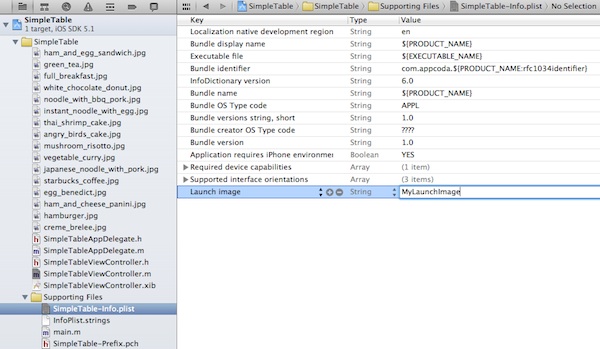
The change instructs iOS to pick “MyLaunchImage.png” and “MyLaunchImage@2x.png” as launch image.
You can design your own splash screen. For testing purpose, you may download the sample splash screens.

Splash Screen for Our Simple Table App
Add Your Launch Image in Xcode
After preparing the launch image, go back to Xcode and open your Xcode project. Here we’ll continue to use our Simple Table project. Right click the “SimpleTable” project and select “Add Files to SimpleTable”. Add both “Default.png” and “Default@2x.png” to your project.

Add File to Xcode Project
If you’ve done everything correctly, you’ll see both files in your project and Xcode automatically recognizes the files as launch images.

Launch Image added in Xcode
Test it Out!
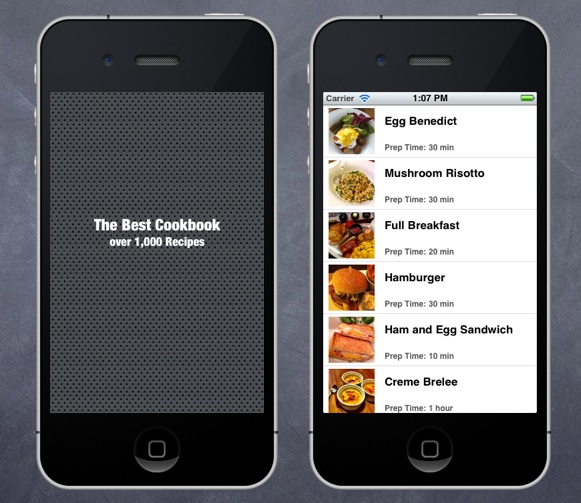
Simply run your app again. This time you’ll see a splash screen shown up instantly as it runs. For now, there is not much thing to load during application startup. (Note: the splash screen only shows up for a second and disappears.)
iphone dev 入门实例7:How to Add Splash Screen in Your iOS App的更多相关文章
- iphone dev 入门实例3:Delete a Row from UITableView
How To Delete a Row from UITableView I hope you have a better understanding about Model-View-Control ...
- iphone dev 入门实例6:How To Use UIScrollView to Scroll and Zoom and Page
http://www.raywenderlich.com/10518/how-to-use-uiscrollview-to-scroll-and-zoom-content Getting Starte ...
- iphone dev 入门实例5:Get the User Location & Address in iPhone App
Create the Project and Design the Interface First, create a new Xcode project using the Single View ...
- iphone dev 入门实例4:CoreData入门
The iPhone Core Data Example Application The application developed in this chapter will take the for ...
- iphone Dev 开发实例10:How To Add a Slide-out Sidebar Menu in Your Apps
Creating the Xcode Project With a basic idea about what we’ll build, let’s move on. You can create t ...
- iphone dev 入门实例2:Pass Data Between View Controllers using segue
Assigning View Controller Class In the first tutorial, we simply create a view controller that serve ...
- iphone dev 入门实例1:Use Storyboards to Build Table View
http://www.appcoda.com/use-storyboards-to-build-navigation-controller-and-table-view/ Creating Navig ...
- iphone Dev 开发实例9:Create Grid Layout Using UICollectionView in iOS 6
In this tutorial, we will build a simple app to display a collection of recipe photos in grid layout ...
- iphone Dev 开发实例8: Parsing an RSS Feed Using NSXMLParser
From : http://useyourloaf.com/blog/2010/10/16/parsing-an-rss-feed-using-nsxmlparser.html Structure o ...
随机推荐
- Javascript模块化编程(二):AMD规范【转】
作者: 阮一峰 日期: 2012年10月30日 这个系列的第一部分介绍了Javascript模块的基本写法,今天介绍如何规范地使用模块. (接上文) 七.模块的规范 先想一想,为什么模块很重要? 因为 ...
- SQL注入测试平台 SQLol -1. 简介与安装
最近下载了SQLol测试了一下,感觉挺好玩的,做一下记录. SQLol是一个可配置得SQL注入测试平台,它包含了一系列的挑战任务,让你在挑战中测试和学习SQL注入语句,SQLol还是比较有创意的项目. ...
- MATLAB符号运算
1.符号运算 使用MATLAB可以进行多项式乘除运算,也可以进行因式分解. 例1. 多项式乘除运算(x+3)3 >> syms x;>> expand((x+3)^3) ans ...
- php使用redis存储
一.Redis扩展模块 # wget https://codeload.github.com/phpredis/phpredis/zip/develop -O phpredis.zip # unzip ...
- [poj 3261]Milk Patterns
后缀数组搞一下就可以了喵~ 其实这道题的第一个想法是 SAM ,建完后缀自动机后拓扑排序跑一遍统计下每个子串的出现次数就 O(N) 就妥妥过掉了 后缀树也是 O(N) 的,统计一下每个节点对应的子树中 ...
- 论文笔记之:From Facial Parts Responses to Face Detection: A Deep Learning Approach
From Facial Parts Responses to Face Detection: A Deep Learning Approach ICCV 2015 从以上两张图就可以感受到本文所提方法 ...
- C++ code Summary --- 2015.11.8
C++ code summary map<int, PersonClassifier>::iterator it与 map<int, PersonClassifier> it的 ...
- 非对称SVD电影推荐系统
采用1M MovieLensz数据(80%train, 20%test, UserIDs range between 1 and 6040 ,MovieIDs range between 1 and ...
- C#事件(event)解析
事件(event),这个词儿对于初学者来说,往往总是显得有些神秘,不易弄懂.而这些东西却往往又是编程中常用且非常重要的东西.大家都知道windows消息处理机制的重要,其实C#事件就是基于window ...
- Win7+VS2010环境下CEGUI 0.8.4编译过程详解
转载▼ 1. 在http://cegui.org.uk/download 下载CEGUI源码包 cegui-0.8.4 以及CEGUI依赖库(Windows / Apple OS X only) ...