
iphone Dev 开发实例9:Create Grid Layout Using UICollectionView in iOS 6
In this tutorial, we will build a simple app to display a collection of recipe photos in grid layout. Here are what you’re going to learn:
- Introduction to UICollectionView
- How to Use UICollectionView to build a simple Grid-based layout
- Customizing the Collection Cell Background
Create Simple App with Grid Layout
To better understand how UICollectionView work, let’s get some hand-on experience and build a simple app. Open Xcode and create a new project using the “Single View application” template. Name the project as “RecipePhoto” with “Use Storyboard” and “Use Automatic Reference Count” enabled.

RecipePhoto – New Xcode Project
Designing the Collection View
Go to Storyboard and delete the default view controller. Instead, add a Collection View Controller from object library.

Add a Collection View Controller
In the “Size Inspector” of the Collection View, you can change various size-related attributes. Let’s alter the size of the cell and change it to 100 by 100 pixels.

Change the size of Collection View Cell
Next, select the Collection View Cell and set the identifier as “Cell” in the Attribute Inspector.

Cell Reuse Identifier
Then, add an Image View to the cell. Xcode automatically resizes the image view and make it fit into the cell. In the “Attribute Inspector”, set the tag value to 100 for later reference.

Add Image View to Cell
Coding the Collection View
In Project Navigator, right-click and select “New File”. Create a new class that is a subclass of UICollectionViewController and name it as RecipeCollectionViewController.

Create RecipeCollectionViewController
Go back to Storyboard and assign it as the custom class of the Collection View Controller.

Assign RecipeCollectionViewController as the custom class
As said, the UICollectionView operates in a very similar way to UITableView. To populate data in UITableView, we have to implement two methods defined in the UITableViewDataSource protocol. Much like the UITableView, the UICollectionViewDataSource protocol defines data source methods for providing the data of the collection view. At least, you have to implement the collectionView:numberOfItemsInSection: and collectionView:cellForItemAtIndexPath: methods.
Let’s move on to code the RecipeCollectionViewController class. First, download this image pack, unzip it and add all the images into the Xcode project.
In RecipeCollectionViewController.m, declare an array for the image files:
|
1
2 3 |
And initialize it in viewDidLoad method:
|
1
2 3 4 5 6 7 8 |
- (void)viewDidLoad
{ [super viewDidLoad]; // Initialize recipe image array recipeImages = [NSArray arrayWithObjects:@"angry_birds_cake.jpg", @"creme_brelee.jpg", @"egg_benedict.jpg", @"full_breakfast.jpg", @"green_tea.jpg", @"ham_and_cheese_panini.jpg", @"ham_and_egg_sandwich.jpg", @"hamburger.jpg", @"instant_noodle_with_egg.jpg", @"japanese_noodle_with_pork.jpg", @"mushroom_risotto.jpg", @"noodle_with_bbq_pork.jpg", @"starbucks_coffee.jpg", @"thai_shrimp_cake.jpg", @"vegetable_curry.jpg", @"white_chocolate_donut.jpg", nil]; } |
Next, implement the two mandatory methods of UICollectionViewDataSource protocol:
|
1
2 3 4 5 6 7 8 9 10 11 12 13 14 15 |
- (NSInteger)collectionView:(UICollectionView *)collectionView numberOfItemsInSection:(NSInteger)section {
return recipeImages.count; } - (UICollectionViewCell *)collectionView:(UICollectionView *)collectionView cellForItemAtIndexPath:(NSIndexPath *)indexPath{ |
The collectionView:numberOfItemsInSection: method returns the number of recipe images. The cellForItemAtIndexPath: method provides the data for the collection view cells. We first define a cell identifier and then request the collectionView to dequeue a reusable cell using that reuse identifier. In iOS 6, you no longer need to create the cell manually. The dequeueReusableCellWithReuseIdentifier: method will automatically create a cell or return you with a cell from re-use queue. At last, we get the image view by using the tag value and assign it with a recipe image.
Now compile and run the app. You should have a grid-based photo app.

RecipePhoto App with Grid-based Layout
Customizing the Collection Cell Background
Isn’t UICollectionView great? With a few lines of code, you can create a grid-based photo app. But what if you want to add a picture frame to the photos? Like other UI elements, the design of the collection view cell lets developers customize the background easily. The UICollectionViewCell is actually comprised of three different views including background, selected background and content view. It’s best to illustrate the cell views using a picture: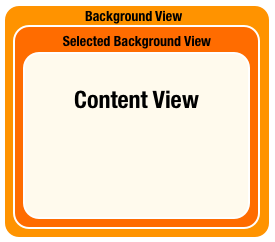
- Background View – background view of the cell
- Selected Background View – the background view when the cell is selected. When user selects the cell, this selected background view will be layered above the background view.
- Content View – obviously, it’s the cell content.
We have already used the content view to display the recipe photo. We’ll make use of the background view to show the picture frame. In the image pack you downloaded earlier, it includes a file named “pic_frame.png”, which is the picture frame. The size of the frame is 100 by 100 pixel. In order to frame the recipe photo, we’ll first resize the image view of cell and re-arrange its position.
Go to Storyboard and select the image view. Set X to 5 and Y to 8. The width and height should be changed to 90 and 72 pixels respectively.

Resize image view to fit into the photo frame
In the cellForItemAtIndexPath: method of RecipeCollectionViewController.m, add the following line of code:
|
1
|
cell.backgroundView = [[UIImageView alloc] initWithImage:[UIImage imageNamed:@"photo-frame.png"]];
|
We first load the photo frame image and set it as the cell background. Now compile and run the app again. Your app should look like this:

iphone Dev 开发实例9:Create Grid Layout Using UICollectionView in iOS 6的更多相关文章
- iphone Dev 开发实例10:How To Add a Slide-out Sidebar Menu in Your Apps
Creating the Xcode Project With a basic idea about what we’ll build, let’s move on. You can create t ...
- iphone Dev 开发实例8: Parsing an RSS Feed Using NSXMLParser
From : http://useyourloaf.com/blog/2010/10/16/parsing-an-rss-feed-using-nsxmlparser.html Structure o ...
- iphone dev 入门实例6:How To Use UIScrollView to Scroll and Zoom and Page
http://www.raywenderlich.com/10518/how-to-use-uiscrollview-to-scroll-and-zoom-content Getting Starte ...
- iphone dev 入门实例5:Get the User Location & Address in iPhone App
Create the Project and Design the Interface First, create a new Xcode project using the Single View ...
- iphone dev 入门实例4:CoreData入门
The iPhone Core Data Example Application The application developed in this chapter will take the for ...
- iphone dev 入门实例1:Use Storyboards to Build Table View
http://www.appcoda.com/use-storyboards-to-build-navigation-controller-and-table-view/ Creating Navig ...
- iphone dev 入门实例7:How to Add Splash Screen in Your iOS App
http://www.appcoda.com/how-to-add-splash-screen-in-your-ios-app/ What’s Splash Screen? For those who ...
- iphone dev 入门实例2:Pass Data Between View Controllers using segue
Assigning View Controller Class In the first tutorial, we simply create a view controller that serve ...
- iphone dev 入门实例3:Delete a Row from UITableView
How To Delete a Row from UITableView I hope you have a better understanding about Model-View-Control ...
随机推荐
- uestc1888 Birthday Party 组合数学,乘法原理
题目链接:http://acm.hust.edu.cn/vjudge/contest/view.action?cid=25539#problem/G 题目意思: 有n个人,每个人有一个礼物,每个人能拿 ...
- TFTP网络协议分析---15
TFTP网络协议分析 周学伟 文档说明:所有函数都依托与两个出口,发送和接收. 1:作为发送时,要完成基于TFTP协议下的文件传输,但前提是知道木的PC机的MAC地址,因为当发送TFTP请求包时必须提 ...
- Objective-c——UI基础开发第八天(QQ聊天界面)
一.知识点: QQ聊天界面 双模型的使用(dataModel和frameModel) UITextField的使用 通知的使用 拉伸图片的两种方法(slicing/image对象的resizeable ...
- FZU 1343 WERTYU --- 水题
FZU 1343 题目大意:手放在键盘上时,稍不注意就会往右错一位.这样Q就会输入成W,输入J就会变成K 给定一串大写敲错后输入,输出正确的输入(输入保证合法,如输入中不会出现Q,A,Z): 解题思路 ...
- URAL 1080 Map Coloring(染色)
Map Coloring Time limit: 1.0 secondMemory limit: 64 MB We consider a geographical map with N countri ...
- poj1094 拓扑序
题意:现在有多个大写字母(不一定连续),给出字母之间的大小关系,问到第几个关系时就能判断有唯一大小排序或出现矛盾,或是有多个合理排序,若有唯一排序,则输出它. 拓扑序,只不过坑爹的是如果关系处理到一半 ...
- 通过UserAgent判断智能手机(设备,Android,IOS)
转:http://free0007.iteye.com/blog/2017329 /// 根据 Agent 判断是否是智能手机 ///</summary> ///<returns&g ...
- Make和Makefile编写(详见GCC手册)
Makefile和Make Rules 多模块软件.依赖树和Make 默认规则 Make使用程序对简单变量的支持 内建变量 虚目标 特殊目标 一般性语法错误及其纠正措施 命令行的使用和调试 Makef ...
- web开发注意的问题
1.<input type="submit" value="提交"> 将表单提交<form action="login.jsp ...
- CUDA学习笔记(二)【转】
来源:http://luofl1992.is-programmer.com/posts/38847.html 编程语言的特点是要实践,实践多了才有经验.很多东西书本上讲得不慎清楚,不妨自己用代码实现一 ...