
Direct2D 旋转篇
微软文档:Transforms
本篇通过官方文档学习,整理出来的demo,初始样本请先创建一个普通的desktop app。
ID2D1SolidColorBrush* m_pOriginalShapeBrush, * m_pFillBrush,* m_pTransformedShapeBrush;

ID2D1StrokeStyle* m_pStrokeStyleDash;

...

LRESULT CALLBACK WndProc(HWND hWnd, UINT message, WPARAM wParam, LPARAM lParam)

{

    switch (message)

    {

    case WM_COMMAND:

        {

            int wmId = LOWORD(wParam);

            // Parse the menu selections:

            switch (wmId)

            {

            case IDM_ABOUT:

                DialogBox(hInst, MAKEINTRESOURCE(IDD_ABOUTBOX), hWnd, About);

                break;

            case IDM_EXIT:

                DestroyWindow(hWnd);

                break;

            default:

                return DefWindowProc(hWnd, message, wParam, lParam);

            }

        }

        break;

    case WM_PAINT:

        {

            Render();

            ValidateRect(hWnd, NULL);

        }

        break;

     ...

}

...

void Render()

{

    RECT rc;

    GetClientRect(hWnd, &rc);

    D2D1_SIZE_U size = D2D1::SizeU(

        rc.right - rc.left,

        rc.bottom - rc.top

    );

    HRESULT hr = l->CreateHwndRenderTarget(

        D2D1::RenderTargetProperties(),

        D2D1::HwndRenderTargetProperties(hWnd, size),

        &m_pRenderTarget

    );

    m_pRenderTarget->BeginDraw();

    m_pRenderTarget->Clear(D2D1::ColorF(D2D1::ColorF::White));

    transform();

    hr = m_pRenderTarget->EndDraw();

    if (FAILED(hr) || hr == D2DERR_RECREATE_TARGET)

    {

        DiscardGraphicsResources();

    }

}

void DiscardGraphicsResources()

{

    SafeRelease(&m_pOriginalShapeBrush);

    SafeRelease(&m_pFillBrush);

    SafeRelease(&m_pTransformedShapeBrush);

}

void transform()

{

    //旋转

    HRESULT hr = m_pRenderTarget->CreateSolidColorBrush(

        D2D1::ColorF(D2D1::ColorF::Black, 1.0F),

        &m_pOriginalShapeBrush);

    if (SUCCEEDED(hr))

    {

        hr = m_pRenderTarget->CreateSolidColorBrush(

            D2D1::ColorF(D2D1::ColorF(0x9ACD32, 1.0f)),

            &m_pFillBrush

        );

    }

    if (SUCCEEDED(hr))

    {

        hr = m_pRenderTarget->CreateSolidColorBrush(

            D2D1::ColorF(D2D1::ColorF::Blue, 1.0f),

            &m_pTransformedShapeBrush

        );

    }

    // Dash array for dashStyle D2D1_DASH_STYLE_CUSTOM

    float dashes[] = { 1.0f, 2.0f, 2.0f, 3.0f, 2.0f, 2.0f };

    // Stroke Style with Dash Style -- Custom

    if (SUCCEEDED(hr))

    {

        hr = l->CreateStrokeStyle(

            D2D1::StrokeStyleProperties(

                D2D1_CAP_STYLE_FLAT,

                D2D1_CAP_STYLE_FLAT,

                D2D1_CAP_STYLE_ROUND,

                D2D1_LINE_JOIN_MITER,

                10.0f,

                D2D1_DASH_STYLE_CUSTOM,

                0.0f),

            dashes,

            ARRAYSIZE(dashes),

            &m_pStrokeStyleDash

        );

    }

    // Create a rectangle.

    D2D1_RECT_F rectangle_1 = D2D1::Rect(438.0f, 301.5f, 498.0f, 361.5f);

    // Draw the rectangle.

    m_pRenderTarget->DrawRectangle(

        rectangle_1,

        m_pOriginalShapeBrush,

        1.0f,

        m_pStrokeStyleDash

    );

    // Apply the rotation transform to the render target.

    //m_pRenderTarget->SetTransform(

    //    D2D1::Matrix3x2F::Rotation(

    //        45.0f,

    //        D2D1::Point2F(468.0f, 331.5f))

    //);

    //// Fill the rectangle.

    //m_pRenderTarget->FillRectangle(rectangle_1, m_pFillBrush);

    //// Draw the transformed rectangle.

    //m_pRenderTarget->DrawRectangle(rectangle_1, m_pTransformedShapeBrush);

/*************************************************************************/

    //缩放

    // Create a rectangle.

    D2D1_RECT_F rectangle_2 = D2D1::Rect(438.0f, 80.5f, 498.0f, 140.5f);

    // Draw the outline of the rectangle.

    m_pRenderTarget->DrawRectangle(

        rectangle_2,

        m_pOriginalShapeBrush,

        1.0f,

        m_pStrokeStyleDash

    );

    //// Apply the scale transform to the render target.

    //m_pRenderTarget->SetTransform(

    //    D2D1::Matrix3x2F::Scale(

    //        D2D1::Size(1.3f, 1.3f),

    //        D2D1::Point2F(438.0f, 80.5f))

    //);

    //// Draw the outline of the rectangle.

    //m_pRenderTarget->DrawRectangle(rectangle_2, m_pTransformedShapeBrush);

/*****************************************************************************/

    //倾斜

     // Create a rectangle.

    D2D1_RECT_F rectangle_3 = D2D1::Rect(126.0f, 301.5f, 186.0f, 361.5f);

    // Draw the outline of the rectangle.

    m_pRenderTarget->DrawRectangle(

        rectangle_3,

        m_pOriginalShapeBrush,

        1.0f,

        m_pStrokeStyleDash

    );

    //// Apply the skew transform to the render target.

    //m_pRenderTarget->SetTransform(

    //    D2D1::Matrix3x2F::Skew(

    //        45.0f,

    //        10.0f,

    //        D2D1::Point2F(126.0f, 301.5f))

    //);

    //// Paint the interior of the rectangle.

    //m_pRenderTarget->FillRectangle(rectangle_3, m_pFillBrush);

    //// Draw the outline of the rectangle.

    //m_pRenderTarget->DrawRectangle(rectangle_3, m_pTransformedShapeBrush);

/***************************************************************************/

    //平移

     // Create a rectangle.

    D2D1_RECT_F rectangle_4 = D2D1::Rect(126.0f, 80.5f, 186.0f, 140.5f);

    // Draw the outline of the rectangle.

    m_pRenderTarget->DrawRectangle(

        rectangle_4,

        m_pOriginalShapeBrush,

        1.0f,

        m_pStrokeStyleDash

    );

    // Apply the translation transform to the render target.

    m_pRenderTarget->SetTransform(D2D1::Matrix3x2F::Translation(20, 10));

    // Paint the interior of the rectangle.

    m_pRenderTarget->FillRectangle(rectangle_4, m_pFillBrush);

    // Draw the outline of the rectangle.

    m_pRenderTarget->DrawRectangle(rectangle_4, m_pTransformedShapeBrush);

}
效果图:
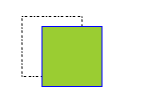
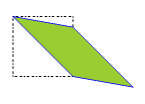
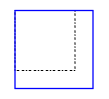

注意: 对一个对象执行多个变换意味着将多个变换组合为一个。即,将每个变换矩阵的输出用作下一个的输入,从而获得所有矩阵变换的累积效果。
假设将两个变换矩阵(旋转和平移)相乘。结果是一个新的矩阵,同时执行旋转和平移功能。因为矩阵乘法不是可交换的,所以乘以平移变换的旋转变换与乘以旋转变换的平移变换是不同的。
这也就是我每应用一个效果后,都会将其注释的原因。
有专门的文档来介绍了这部分:如何将多个变换应用于对象
Direct2D 旋转篇的更多相关文章
- python图像处理
Python常用处理图像的库是PIL,另外还有opencv.Matplotlib.NumPy.SciPy.skimage 详情请参考:https://www.cnblogs.com/qiaozhoul ...
- TGL站长关于常见问题的回复
问题地址: http://www.thegrouplet.com/thread-112923-1-1.html 问题: 网站配有太多的模板是否影响网站加载速度 月光答复: wp不需要删除其他的模板,不 ...
- Direct2D教程(外篇)环境配置
2014年世界杯首场淘汰赛马上开始了,闲着没事,整理以前的博客草稿打发时间,意外的发现这篇文章,本来是打算加入到Direct2D那个系列的,不知道为什么把它给遗漏了.环境配置,对于熟手来说,不是什么重 ...
- ArcGIS制图表达Representation实战篇2-河流渐变与符号旋转
ArcGIS制图表达Representation实战篇2-河流渐变与符号旋转 by 李远祥 上一章节主要是从实战中使用规则和几何效果,如何分解制图规则.本章主要还是通过一些特殊要求如河流线宽渐变和符号 ...
- Direct2D教程VIII——几何(Geometry)对象的运算,本系列的终结篇
目前博客园中成系列的Direct2D的教程有 1.万一的 Direct2D 系列,用的是Delphi 2009 2.zdd的 Direct2D 系列,用的是VS中的C++ 3.本文所在的 Direct ...
- WPF 精修篇 旋转 RotateTransForm
原文:WPF 精修篇 旋转 RotateTransForm 旋转 RotateTransform Angle 角度 CenterY ,CenterX 中心点位置 和缩小一样 左侧 和右侧 做了对比 ...
- Direct2D 第6篇 绘制多种风格的线条
原文:Direct2D 第6篇 绘制多种风格的线条 上图是使用Direct2D绘制的线条,Direct2D在效率上比GDI/GDI+要快几倍,GDI/GDI+绘图是出了名的"慢", ...
- Direct2D 第5篇 绘制图像
原文:Direct2D 第5篇 绘制图像 我加载的图像是一张透明底PNG图像,背景使用渐变的绿色画刷 #include <windows.h> #include <d2d1.h> ...
- Direct2D 第4篇 渐变画刷
原文:Direct2D 第4篇 渐变画刷 #include <windows.h> #include <d2d1.h> #include <d2d1helper.h> ...
- Direct2D 第3篇 绘制文字
原文:Direct2D 第3篇 绘制文字 #include <windows.h> #include <d2d1.h> #include <d2d1helper.h> ...
随机推荐
- [转帖]性能优化:Swap调优
目标:解决大量Log写入占用大量的File Cache,内容利用不充分导致swap 基本原则:尽量使用内存,减少swap,同时,尽早flush到外存,早点释放内存给写cache使用.---特别在持续的 ...
- Spring Boot Admin极简教程
一.简介 Spring Boot Admin是一个完整的应用程序,用于监控和管理Spring Boot应用.原理是通过调用Spring Boot Actuator提供的http接口来实现的监控和管理, ...
- React中css的module
处理css全局作用 现在有这样一个场景: A页面和B页面都有一个相同的类名 我们在A页面中有引入css. B页面没有css 在我们切换A和B页面的时候. A页面的css也作用在了B页面. 我们只希望A ...
- Redis启用认证
要在Redis中启用认证,您需要在Redis配置文件中设置requirepass指令.以下是步骤: 找到Redis配置文件.这通常是redis.conf,可能位于/etc/redis/或/etc/目录 ...
- 从零开始配置 vim(7)——自动命令
这篇我们来谈论vim一个相当重要的东西--自动命令. 从编程的角度来看,自动命令有点类似于事件响应,或者回调函数之类.当外部发生某些事件的时候,自动执行事先定义好的一组命令. 定义一个自动命令的格式如 ...
- go中bytes.Buffer使用小结
buffer 前言 例子 了解下bytes.buffer 如何创建bytes.buffer bytes.buffer的数据写入 写入string 写入[]byte 写入byte 写入rune 从文件写 ...
- 基于新浪微博海量用户行为数据、博文数据数据分析:包括综合指数、移动指数、PC指数三个指数
基于新浪微博海量用户行为数据.博文数据数据分析:包括综合指数.移动指数.PC指数三个指数 项目介绍 微指数是基于海量用户行为数据.博文数据,采用科学计算方法统计得出的反映不同事件领域发展状况的指数产品 ...
- MySQL【一】基本使用----超详细教学
相关文章: win10下MySQL安装教程(MySql-8.0.26超级详细)_丨汀.的博客-CSDN博客 1.RDBMS(Relational Databases Management System ...
- C/C++ 实现获取硬盘序列号
获取硬盘的序列号.型号和固件版本号,此类功能通常用于做硬盘绑定或硬件验证操作,通过使用Windows API的DeviceIoControl函数与物理硬盘驱动程序进行通信,发送ATA命令来获取硬盘的信 ...
- C/C++ 实现通过FTP上传下载
实现FTP文件下载: #include <stdio.h> #include <Windows.h> #include <WinInet.h> #pragma co ...