
《DSP using MATLAB》Problem 7.33

代码:
%% ++++++++++++++++++++++++++++++++++++++++++++++++++++++++++++++++++++++++++++++++

%%            Output Info about this m-file

fprintf('\n***********************************************************\n');

fprintf('        <DSP using MATLAB> Problem 7.33 \n\n');

banner();

%% ++++++++++++++++++++++++++++++++++++++++++++++++++++++++++++++++++++++++++++++++

ws1 = 0.44*pi; wp1 = 0.49*pi; wp2 = 0.51*pi; ws2=0.56*pi; As = 30; Rp = 1.0;

[delta1, delta2] = db2delta(Rp, As)

weights = [1  delta2/delta1  1]

deltaH = max([delta1,delta2]); deltaL = min([delta1,delta2]);

%Dw = min((wp1-ws1), (ws2-wp2));

%M = ceil((-20*log10((delta1*delta2)^(1/2)) - 13) / (2.285*Dw) + 1)

M = 51;

f = [ 0  ws1 wp1 wp2 ws2  pi]/pi;

m = [ 0   0  1   1   0  0];

h = firpm(M-1, f, m, weights);

[db, mag, pha, grd, w] = freqz_m(h, [1]);

delta_w = 2*pi/1000;

ws1i = floor(ws1/delta_w)+1; wp1i = floor(wp1/delta_w)+1;

wp2i = floor(wp2/delta_w)+1; ws2i = floor(ws2/delta_w)+1;

Asd = -max(db(1:ws1i))

%[Hr, ww, a, L] = Hr_Type1(h);

[Hr,omega,P,L] = ampl_res(h);

l = 0:M-1;

%% -------------------------------------------------

%%                    Plot

%% -------------------------------------------------

figure('NumberTitle', 'off', 'Name', 'Problem 7.33 Parks-McClellan Method')

set(gcf,'Color','white');

subplot(2,2,1); stem(l, h); axis([-1, M, -0.1, 0.1]); grid on;

xlabel('n'); ylabel('h(n)'); title('Actual Impulse Response, M=51');

set(gca,'XTickMode','manual','XTick',[0,M-1])

set(gca,'YTickMode','manual','YTick',[-0.3:0.1:0.4])

subplot(2,2,2); plot(w/pi, db); axis([0, 1, -80, 10]); grid on;

xlabel('frequency in \pi units'); ylabel('Decibels'); title('Magnitude Response in dB ');

set(gca,'XTickMode','manual','XTick',f)

set(gca,'YTickMode','manual','YTick',[-60,-30,0]);

set(gca,'YTickLabelMode','manual','YTickLabel',['60';'30';' 0']);

subplot(2,2,3); plot(omega/pi, Hr); axis([0, 1, -0.2, 1.2]); grid on;

xlabel('frequency in \pi nuits'); ylabel('Hr(w)'); title('Amplitude Response');

set(gca,'XTickMode','manual','XTick',f)

set(gca,'YTickMode','manual','YTick',[0,1]);

delta_w = 2*pi/1000;

subplot(2,2,4); axis([0, 1, -deltaH, deltaH]);

sb1w = omega(1:1:ws1i)/pi; sb1e = (Hr(1:1:ws1i)-m(1)); %sb1e = (Hr(1:1:ws1i)-m(1))*weights(1);

pbw = omega(wp1i:wp2i)/pi; pbe = (Hr(wp1i:wp2i)-m(3)); %pbe = (Hr(wp1i:wp2i)-m(3))*weights(2);

sb2w = omega(ws2i:501)/pi; sb2e = (Hr(ws2i:501)-m(5)); %sb2e = (Hr(ws2i:501)-m(5))*weights(3);

plot(sb1w,sb1e,pbw,pbe,sb2w,sb2e); grid on;

xlabel('frequency in \pi units'); ylabel('Hr(w)'); title('Error Response'); %title('Weighted Error');

set(gca,'XTickMode','manual','XTick',f);

%set(gca,'YTickMode','manual','YTick',[-deltaH,0,deltaH]);

figure('NumberTitle', 'off', 'Name', 'Problem 7.33 AmpRes of h(n), Parks-McClellan Method')

set(gcf,'Color','white');

plot(omega/pi, Hr); grid on; %axis([0 1 -100 10]);

xlabel('frequency in \pi units'); ylabel('Hr'); title('Amplitude Response');

set(gca,'YTickMode','manual','YTick',[-0.0334,0, 0.0334,1,1.057]);

%set(gca,'YTickLabelMode','manual','YTickLabel',['90';'40';' 0']);

set(gca,'XTickMode','manual','XTick',[0,0.44,0.49,0.51,0.56,1]);

%% -------------------------------------------------------

%%       Input is given, and we want the Output

%% -------------------------------------------------------

num = 200; mean_val=0; variance=1;

x2 = mean_val + sqrt(variance)*randn(num,1);

n_x2 = 0:num-1;

x_axis = min(x2):0.02:max(x2);

figure('NumberTitle', 'off', 'Name', 'Problem 7.33 hist');

set(gcf,'Color','white');

%hist(x1,x_axis);

hist(x2,100);

title('Gaussian Distributed Random Numbers (using hist)');

xlabel('n'); ylabel('x2(n)'); grid on;

figure('NumberTitle', 'off', 'Name', 'Problem 7.33 bar');

set(gcf,'Color','white');

%[counts,binlocal] = hist(x1, x_axis);

[counts,binlocal] = hist(x2, 100);

counts = counts/num;

bar(binlocal, counts, 1); title('Gaussian Distributed Random Numbers (using bar)');

xlabel('n'); ylabel('x2(n)'); grid on;

% Input

n_x3 = [0:1:num-1];

x3 = 2*cos(n_x3*pi/2);

[x,n_x] = sigadd (x2, n_x2, x3, n_x3);

y = filter(h, 1, x);

n_y = n_x;

figure('NumberTitle', 'off', 'Name', 'Problem 7.33 Input[x(n)] and Output[y(n)]');

set(gcf,'Color','white');

subplot(2,1,1); stem(n_x, x); axis([-1, 200, -5, 5]); grid on;

xlabel('n'); ylabel('x(n)'); title('Input Response, Length=200');

subplot(2,1,2); stem(n_y, y); axis([-1, 200, -3, 3]); grid on;

xlabel('n'); ylabel('y(n)'); title('Output Response');

% ---------------------------

%    DTFT of x and y

% ---------------------------

MM = 500;

[X, w1] = dtft1(x, n_x, MM);

[Y, w1] = dtft1(y, n_y, MM);

magX = abs(X); angX = angle(X); realX = real(X); imagX = imag(X);

magY = abs(Y); angY = angle(Y); realY = real(Y); imagY = imag(Y);

figure('NumberTitle', 'off', 'Name', 'Problem 7.33 DTFT of Input[x(n)]')

set(gcf,'Color','white');

subplot(2,2,1); plot(w1/pi,magX); grid on; %axis([0,2,0,15]);

title('Magnitude Part');

xlabel('frequency in \pi units'); ylabel('Magnitude  |X|');

subplot(2,2,3); plot(w1/pi, angX/pi); grid on; axis([0,2,-1,1]);

title('Angle Part');

xlabel('frequency in \pi units'); ylabel('Radians/\pi');

subplot(2,2,2); plot(w1/pi, realX); grid on;

title('Real Part');

xlabel('frequency in \pi units'); ylabel('Real');

subplot(2,2,4); plot(w1/pi, imagX); grid on;

title('Imaginary Part');

xlabel('frequency in \pi units'); ylabel('Imaginary');

figure('NumberTitle', 'off', 'Name', 'Problem 7.33 DTFT of Output[y(n)]')

set(gcf,'Color','white');

subplot(2,2,1); plot(w1/pi,magY); grid on; %axis([0,2,0,15]);

title('Magnitude Part');

xlabel('frequency in \pi units'); ylabel('Magnitude  |Y|');

subplot(2,2,3); plot(w1/pi, angY/pi); grid on; axis([0,2,-1,1]);

title('Angle Part');

xlabel('frequency in \pi units'); ylabel('Radians/\pi');

subplot(2,2,2); plot(w1/pi, realY); grid on;

title('Real Part');

xlabel('frequency in \pi units'); ylabel('Real');

subplot(2,2,4); plot(w1/pi, imagY); grid on;

title('Imaginary Part');

xlabel('frequency in \pi units'); ylabel('Imaginary');

figure('NumberTitle', 'off', 'Name', 'Problem 7.33 Magnitude Response')

set(gcf,'Color','white');

subplot(1,2,1); plot(w1/pi,magX); grid on; %axis([0,2,0,15]);

title('Magnitude Part of Input');

xlabel('frequency in \pi units'); ylabel('Magnitude  |X|');

subplot(1,2,2); plot(w1/pi,magY); grid on; %axis([0,2,0,15]);

title('Magnitude Part of Output');

xlabel('frequency in \pi units'); ylabel('Magnitude  |Y|');
运行结果:
设计一个50阶(即长度M=51)的线性相位FIR,通带宽度不超过0.02π,阻带衰减达到30dB,
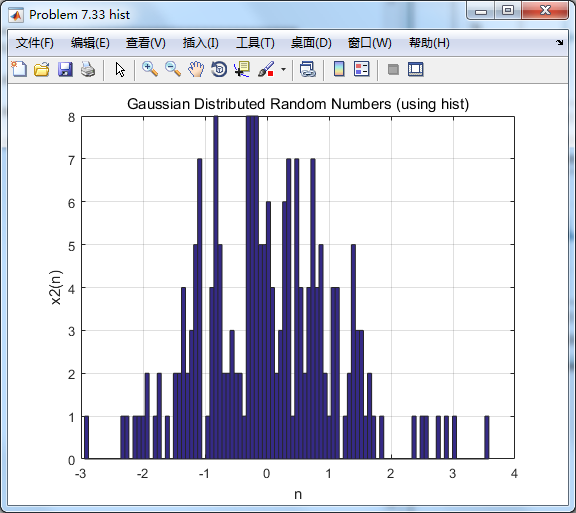
最后要把输入中的高斯噪声过滤掉。
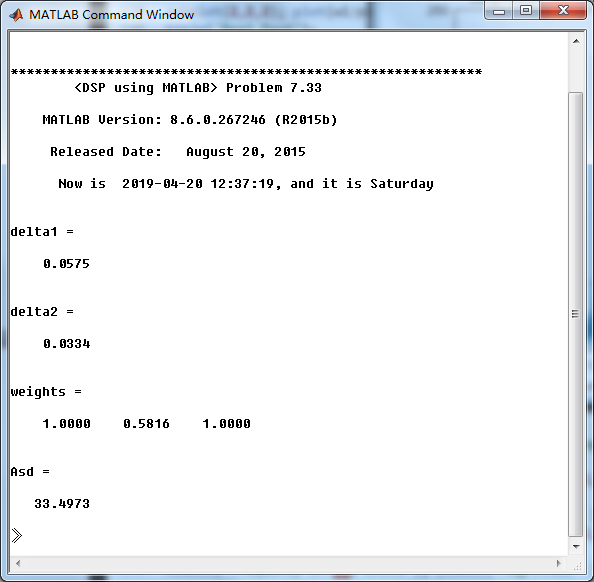
As=33dB,满足设计要求。
用P-M方法设计的脉冲响应幅度谱,

振幅谱

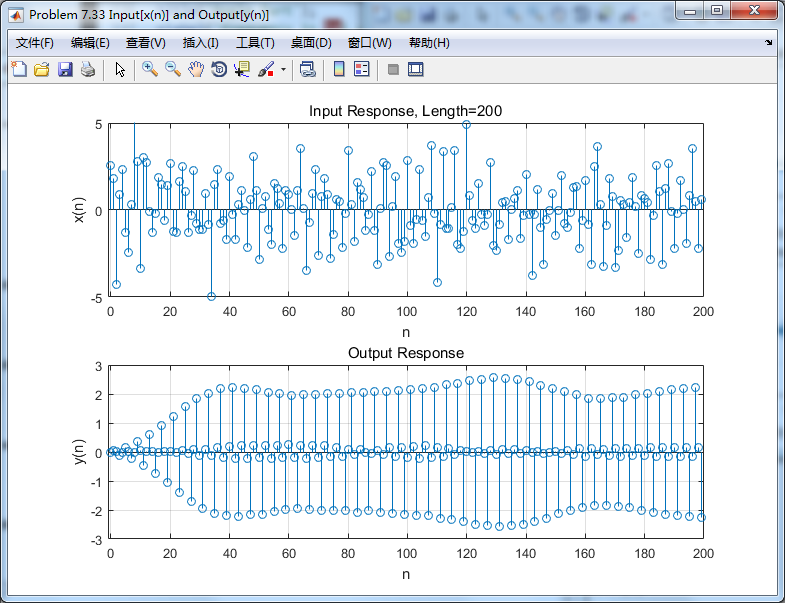
输入信号

滤波前后,输入数出对比
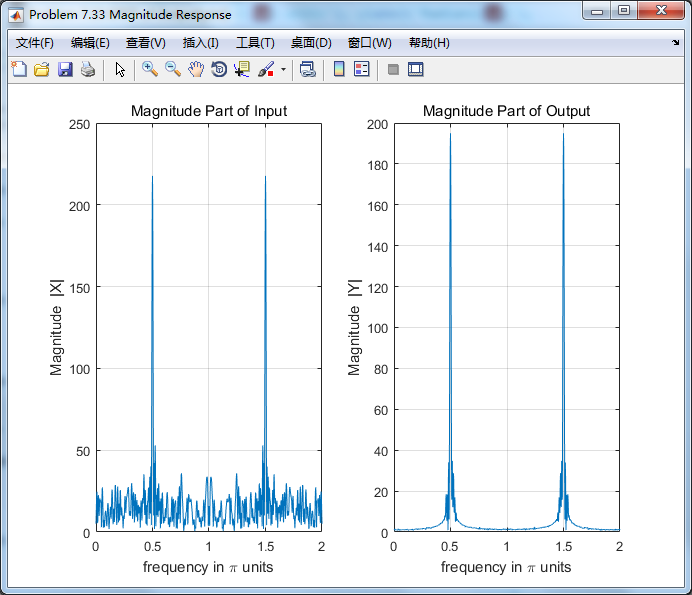
输入输出的谱:
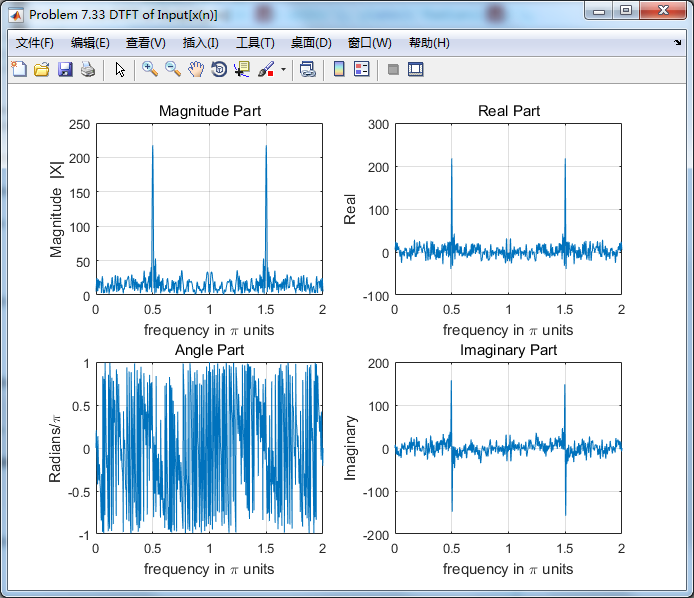
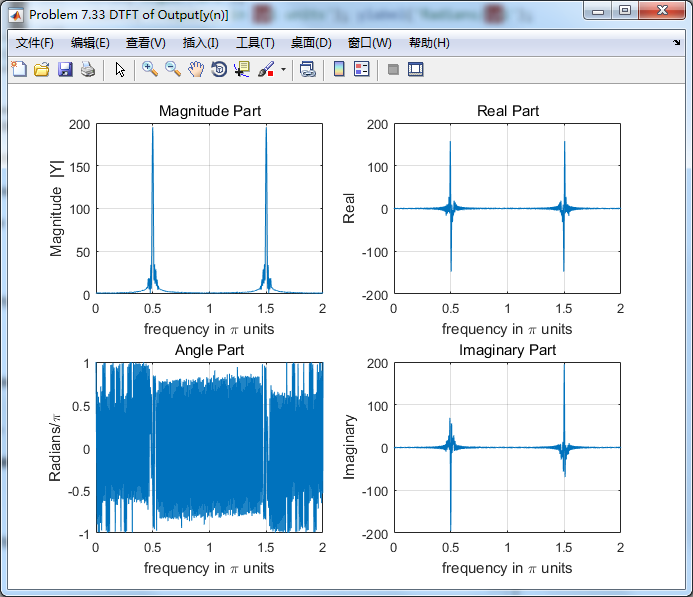
右下图可见,随即噪声分量已滤除,仅留0.5π频率分量,效果良好。
《DSP using MATLAB》Problem 7.33的更多相关文章
- 《DSP using MATLAB》Problem 8.33
代码: %% ------------------------------------------------------------------------ %% Output Info about ...
- 《DSP using MATLAB》Problem 7.36
代码: %% ++++++++++++++++++++++++++++++++++++++++++++++++++++++++++++++++++++++++++++++++ %% Output In ...
- 《DSP using MATLAB》Problem 7.29
代码: %% ++++++++++++++++++++++++++++++++++++++++++++++++++++++++++++++++++++++++++++++++ %% Output In ...
- 《DSP using MATLAB》Problem 7.27
代码: %% ++++++++++++++++++++++++++++++++++++++++++++++++++++++++++++++++++++++++++++++++ %% Output In ...
- 《DSP using MATLAB》Problem 7.26
注意:高通的线性相位FIR滤波器,不能是第2类,所以其长度必须为奇数.这里取M=31,过渡带里采样值抄书上的. 代码: %% +++++++++++++++++++++++++++++++++++++ ...
- 《DSP using MATLAB》Problem 7.25
代码: %% ++++++++++++++++++++++++++++++++++++++++++++++++++++++++++++++++++++++++++++++++ %% Output In ...
- 《DSP using MATLAB》Problem 7.24
又到清明时节,…… 注意:带阻滤波器不能用第2类线性相位滤波器实现,我们采用第1类,长度为基数,选M=61 代码: %% +++++++++++++++++++++++++++++++++++++++ ...
- 《DSP using MATLAB》Problem 7.23
%% ++++++++++++++++++++++++++++++++++++++++++++++++++++++++++++++++++++++++++++++++ %% Output Info a ...
- 《DSP using MATLAB》Problem 7.16
使用一种固定窗函数法设计带通滤波器. 代码: %% ++++++++++++++++++++++++++++++++++++++++++++++++++++++++++++++++++++++++++ ...
随机推荐
- VS2010-MFC(常用控件:标签控件Tab Control 上)
转自:http://www.jizhuomi.com/software/205.html 前面两节讲了树形控件Tree Control,本节开始讲解标签控件Tab Control,也可以称为选项卡控件 ...
- 同步+TASK异步请求
using System; using System.Collections.Generic; using System.ComponentModel; using System.Data; usin ...
- 适AT maven多个子项目、父项目之间的引用问题
适AT maven多个子项目.父项目之间的引用问题 在项目时用到maven管理项目,在一个就项目的基础上开发新的项目:关于子项目和父项目,子项目与子项目之间的调用问题,发现自己存在不足,以下是自己 ...
- 接着上回,导包正确之后,出现javabean.Friend cannot be cast to java.util.List,的错误。找了很久。以为是User user0作为参数,改成了String username还是错误,看了看listFriend.jsp没有错误,我想会不会是包多了,导致类型复杂。最后发现包少了一个:
import org.apache.commons.dbutils.handlers.BeanListHandler;这个包,BeanListHandler让我发现List<Friend> ...
- 16-3-es5解析顺序
<!DOCTYPE html> <html lang="en"> <head> <meta charset="UTF-8&quo ...
- (转)linux centos 编译luabind-0.9.1 动态库 静态库
编译时:virtual memory exhausted: Cannot allocate memory 一.问题 当安装虚拟机时系统时没有设置swap大小或设置内存太小,编译程序会出现virtual ...
- 【树剖】CF916E Jamie and Tree
好吧这其实应该不是树剖... 因为只要求子树就够了,dfs就好了 大概就是记录一个全局根root 多画几幅图会发现修改时x,y以root为根时的lca为以1为根时的lca(x,y),lca(root, ...
- JS 标签页切换(复杂)
<!DOCTYPE html PUBLIC "-//W3C//DTD XHTML 1.0 Strict//EN" "http://www.w3.org/TR/xht ...
- MySQL中\g和\G的作用
\g的作用和MySQL中的分号”;"是一样: \G的作用是讲查找到的内容结构旋转90度,变成纵向结构: 下面举例说明,查找数据库中的存在的存储过程状态: SHOW PROCEDURE STA ...
- 性能分析神器VisualVM【转】
性能分析神器VisualVM[转] Posted on 2015-04-17 09:37 WadeXu 阅读(5809) 评论(6) 编辑 收藏 VisualVM 是一款免费的,集成了多个 JDK 命 ...