
微服务SpringCloud之Spring Cloud Config配置中心Git
微服务以单个接口为颗粒度,一个接口可能就是一个项目,如果每个项目都包含一个配置文件,一个系统可能有几十或上百个小项目组成,那配置文件也会有好多,对后续修改维护也是比较麻烦,就和前面的服务注册一样,服务注册与发现是将服务从分散到中心化,而今天的配置中心是将配置文件从分散到中心化,这样便于后续维护。本篇主要以git为例学习使用Spring Cloud Config配置中心。
一、配置中心介绍
在我们了解spring cloud config之前,我可以想想一个配置中心提供的核心功能应该有什么
- 提供服务端和客户端支持
- 集中管理各环境的配置文件
- 配置文件修改之后,可以快速的生效
- 可以进行版本管理
- 支持大的并发查询
- 支持各种语言
Spring Cloud Config可以完美的支持以上所有的需求。
Spring Cloud Config项目是一个解决分布式系统的配置管理方案。它包含了Client和Server两个部分,server提供配置文件的存储、以接口的形式将配置文件的内容提供出去,client通过接口获取数据、并依据此数据初始化自己的应用。Spring cloud使用git或svn存放配置文件,默认情况下使用git,我们先以git为例做一套示例。
二、Server 端
1.准备配置文件
为了演示spring cloud config的使用,这里在github()上创建了config-repo(https://github.com/ywcui/config-repo)仓库.然后在该仓库下创建了3个配置文件neo-config-dev.properties、neo-config-pro.properties、neo-config-test.properties,每个配置文件都设置了属性neo.hello,value分别对应i am dev,i am pro,i am test。
2.创建Spring Cloud Config Server
创建Spring Boot项目并引入Spring Cloud Config Server,具体pom.xml如下:
<?xml version="1.0" encoding="UTF-8"?>

<project xmlns="http://maven.apache.org/POM/4.0.0" xmlns:xsi="http://www.w3.org/2001/XMLSchema-instance"

    xsi:schemaLocation="http://maven.apache.org/POM/4.0.0 http://maven.apache.org/xsd/maven-4.0.0.xsd">

    <modelVersion>4.0.0</modelVersion>

    <parent>

        <groupId>org.springframework.boot</groupId>

        <artifactId>spring-boot-starter-parent</artifactId>

        <version>2.1.6.RELEASE</version>

        <relativePath/> <!-- lookup parent from repository -->

    </parent>

    <groupId>com.example</groupId>

    <artifactId>SpringCloudConfigServer</artifactId>

    <version>0.0.1-SNAPSHOT</version>

    <packaging>war</packaging>

    <name>SpringCloudConfigServer</name>

    <description>Demo project for Spring Boot</description>

    <properties>

        <java.version>1.8</java.version>

        <spring-cloud.version>Greenwich.SR2</spring-cloud.version>

    </properties>

    <dependencies>

        <dependency>

            <groupId>org.springframework.boot</groupId>

            <artifactId>spring-boot-starter-web</artifactId>

        </dependency>

        <dependency>

            <groupId>org.springframework.cloud</groupId>

            <artifactId>spring-cloud-config-server</artifactId>

        </dependency>

        <dependency>

            <groupId>org.springframework.boot</groupId>

            <artifactId>spring-boot-starter-tomcat</artifactId>

            <scope>provided</scope>

        </dependency>

        <dependency>

            <groupId>org.springframework.boot</groupId>

            <artifactId>spring-boot-starter-test</artifactId>

            <scope>test</scope>

        </dependency>

    </dependencies>

    <dependencyManagement>

        <dependencies>

            <dependency>

                <groupId>org.springframework.cloud</groupId>

                <artifactId>spring-cloud-dependencies</artifactId>

                <version>${spring-cloud.version}</version>

                <type>pom</type>

                <scope>import</scope>

            </dependency>

        </dependencies>

    </dependencyManagement>

    <build>

        <plugins>

            <plugin>

                <groupId>org.springframework.boot</groupId>

                <artifactId>spring-boot-maven-plugin</artifactId>

            </plugin>

        </plugins>

    </build>

</project>
3.设置配置文件
在配置文件中做如下配置:
server.port=8001

spring.application.name=spring-cloud-config-server

spring.cloud.config.server.git.uri=https://github.com/ywcui/config-repo

spring.cloud.config.server.git.search-paths=

spring.cloud.config.server.git.username=用户名

spring.cloud.config.server.git.password=密码
Spring Cloud Config也提供本地存储配置的方式。我们只需要设置属性spring.profiles.active=native,Config Server会默认从应用的src/main/resource目录下检索配置文件。也可以通过spring.cloud.config.server.native.searchLocations=file:E:/properties/属性来指定配置文件的位置。虽然Spring Cloud Config提供了这样的功能,但是为了支持更好的管理内容和版本控制的功能,还是推荐使用git的方式。
4.启动类设置
只需在启动类中添加@EnableConfigServer即可。
5.测试
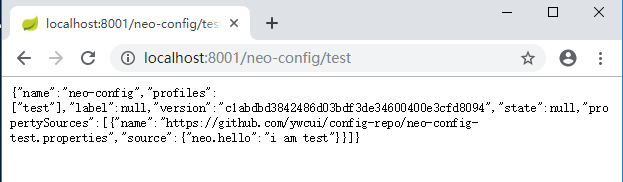
首先我们先要测试server端是否可以读取到github上面的配置信息,直接访问:http://localhost:8001/neo-config/test
返回信息如下:
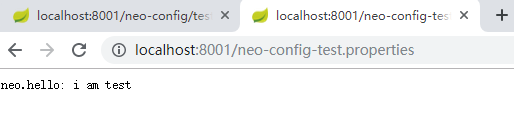
如果直接查看配置文件中的配置信息可访问:http://localhost:8001/neo-config-test.properties,返回:neo.hello: i am test
仓库中的配置文件会被转换成web接口,访问可以参照以下的规则:
- /{application}/{profile}[/{label}]
- /{application}-{profile}.yml
- /{label}/{application}-{profile}.yml
- /{application}-{profile}.properties
- /{label}/{application}-{profile}.properties
三、Client端
1.创建创建Spring Cloud Config Client
创建Spring Boot项目并引入Spring Cloud Config Client,具体pom.xml如下:
<?xml version="1.0" encoding="UTF-8"?>

<project xmlns="http://maven.apache.org/POM/4.0.0" xmlns:xsi="http://www.w3.org/2001/XMLSchema-instance"

    xsi:schemaLocation="http://maven.apache.org/POM/4.0.0 http://maven.apache.org/xsd/maven-4.0.0.xsd">

    <modelVersion>4.0.0</modelVersion>

    <parent>

        <groupId>org.springframework.boot</groupId>

        <artifactId>spring-boot-starter-parent</artifactId>

        <version>2.1.6.RELEASE</version>

        <relativePath/> <!-- lookup parent from repository -->

    </parent>

    <groupId>com.example</groupId>

    <artifactId>SpringCloudConfigClient</artifactId>

    <version>0.0.1-SNAPSHOT</version>

    <packaging>war</packaging>

    <name>SpringCloudConfigClient</name>

    <description>Demo project for Spring Boot</description>

    <properties>

        <java.version>1.8</java.version>

        <spring-cloud.version>Greenwich.SR2</spring-cloud.version>

    </properties>

    <dependencies>

        <dependency>

            <groupId>org.springframework.boot</groupId>

            <artifactId>spring-boot-starter-web</artifactId>

        </dependency>

        <dependency>

            <groupId>org.springframework.cloud</groupId>

            <artifactId>spring-cloud-starter-config</artifactId>

        </dependency>

        <dependency>

            <groupId>org.springframework.boot</groupId>

            <artifactId>spring-boot-starter-tomcat</artifactId>

            <scope>provided</scope>

        </dependency>

        <dependency>

            <groupId>org.springframework.boot</groupId>

            <artifactId>spring-boot-starter-test</artifactId>

            <scope>test</scope>

        </dependency>

    </dependencies>

    <dependencyManagement>

        <dependencies>

            <dependency>

                <groupId>org.springframework.cloud</groupId>

                <artifactId>spring-cloud-dependencies</artifactId>

                <version>${spring-cloud.version}</version>

                <type>pom</type>

                <scope>import</scope>

            </dependency>

        </dependencies>

    </dependencyManagement>

    <build>

        <plugins>

            <plugin>

                <groupId>org.springframework.boot</groupId>

                <artifactId>spring-boot-maven-plugin</artifactId>

            </plugin>

        </plugins>

    </build>

</project>
2.设置配置文件
准备application.properties、bootstrap.properties两个配置文件
application.properties:
spring.application.name=spring-cloud-config-client

server.port=8002
bootstrap.properties:
spring.cloud.config.name=neo-config

spring.cloud.config.profile=test

spring.cloud.config.uri=http://localhost:8001/

spring.cloud.config.label=master
spring.application.name:对应{application}部分
spring.cloud.config.profile:对应{profile}部分
spring.cloud.config.label:对应git的分支。如果配置中心使用的是本地存储,则该参数无用
spring.cloud.config.uri:配置中心的具体地址
spring.cloud.config.discovery.service-id:指定配置中心的service-id,便于扩展为高可用配置集群。
上面这些与spring-cloud相关的属性必须配置在bootstrap.properties中,config部分内容才能被正确加载。因为config的相关配置会先于application.properties,而bootstrap.properties的加载也是先于application.properties。
3.创建HelloController
在HelloController中使用@Value注入属性neo.hello。
package com.example.demo;

import org.springframework.beans.factory.annotation.Value;

import org.springframework.web.bind.annotation.RequestMapping;

import org.springframework.web.bind.annotation.RestController;

@RestController

public class HelloController {

    @Value("${neo.hello}")

    private String hello;

    @RequestMapping("/hello")

    public String from() {

        return this.hello;

    }

}
4.测试
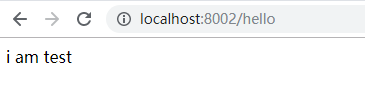
在浏览器中输入http://localhost:8002/hello,则显示下图所示。
参考:http://www.ityouknow.com/springcloud/2017/05/22/springcloud-config-git.html
微服务SpringCloud之Spring Cloud Config配置中心Git的更多相关文章
- 微服务SpringCloud之Spring Cloud Config配置中心服务化
在前面两篇Spring Cloud Config配置中心的博客中都是需要指定配置服务的地址url:spring.cloud.config.uri,客户端都是直接调用配置中心的server端来获取配置文 ...
- 微服务SpringCloud之Spring Cloud Config配置中心SVN
在回来的路上看到一个个的都抱着花,吃了一路的狗粮,原本想着去旁边的工业园里跑跑步呢,想想还是算了,人家过七夕,俺们过巴西.上一博客学习了Spring Cloud Config使用git作为配置中心,本 ...
- 跟我学SpringCloud | 第七篇:Spring Cloud Config 配置中心高可用和refresh
SpringCloud系列教程 | 第七篇:Spring Cloud Config 配置中心高可用和refresh Springboot: 2.1.6.RELEASE SpringCloud: Gre ...
- spring cloud --- config 配置中心 [本地、git获取配置文件]
spring boot 1.5.9.RELEASE spring cloud Dalston.SR1 1.前言 spring cloud config 配置中心是什么? 为了统一管理配 ...
- SpringCloud学习笔记(7):使用Spring Cloud Config配置中心
简介 Spring Cloud Config为分布式系统中的外部化配置提供了服务器端和客户端支持,服务器端统一管理所有配置文件,客户端在启动时从服务端获取配置信息.服务器端有多种配置方式,如将配置文件 ...
- Spring Cloud Config 配置中心实践过程中,你需要了解这些细节!
本文导读: Spring Cloud Config 基本概念 Spring Cloud Config 客户端加载流程 Spring Cloud Config 基于消息总线配置 Spring Cloud ...
- Spring Cloud Config 配置中心高可用
详细参见 <Spring Cloud 与 Docker微服务架构实战> p163-9.10 Spring Cloud Config 与 Eureka 配合使用 p163-9.12 Conf ...
- Spring Cloud Config 配置中心 自动加解密功能 jasypt方式
使用此种方式会存在一种问题:如果我配置了自动配置刷新,则刷新过后,加密过后的密文无法被解密.具体原因分析,看 SpringCloud 详解配置刷新的原理 使用 jasypt-spring-boot- ...
- Spring Cloud Config 配置中心
请将远程配置文件的格式写对: 比如使用 *.yml 或者 *.properties yml: testconfig: testvalue properties: testconfig=testvalu ...
随机推荐
- MyBatis从入门到精通(五):MyBatis 注解方式的基本用法
最近在读刘增辉老师所著的<MyBatis从入门到精通>一书,很有收获,于是将自己学习的过程以博客形式输出,如有错误,欢迎指正,如帮助到你,不胜荣幸! 1. @Select 注解 1.1 使 ...
- 数据结构与算法---查找算法(Search Algorithm)
查找算法介绍 在java中,我们常用的查找有四种: 顺序(线性)查找 二分查找/折半查找 插值查找 斐波那契查找 1)线性查找算法 示例: 有一个数列: {1,8, 10, 89, 1000, 123 ...
- 关于火狐浏览器设置cookie的一个问题
最近发现我一个项目的网页,里面的cookie无法添加了,急的我瞪着我的PHP代码沉思了好久,我默认用的火狐浏览器,然而我默默的打开另一个叫360的浏览器,发现它的cookie是正常添加的. ... 难 ...
- ES6_05_三点运算符和形参默认值
三点运算符的用途: # 1. rest(可变)参数 * 用来取代arguments 但比 arguments 灵活,只能是最后部分形参参数 function fun(...values) { cons ...
- 机器学习之使用Python完成逻辑回归
一.任务基础 我们将建立一个逻辑回归模型来预测一个学生是否被大学录取.假设你是一个大学系的管理员,你想根据两次考试的结果来决定每个申请人的录取机会.你有以前的申请人的历史数据,你可以用它作为逻辑回归的 ...
- CodeForces 696A:Lorenzo Von Matterhorn(map的用法)
http://codeforces.com/contest/697/problem/C C. Lorenzo Von Matterhorn time limit per test 1 second m ...
- GoLand Active Code
56ZS5PQ1RF-eyJsaWNlbnNlSWQiOiI1NlpTNVBRMVJGIiwibGljZW5zZWVOYW1lIjoi5q2j54mI5o6I5p2DIC4iLCJhc3NpZ25lZ ...
- cocopods新建或者更新远端库主要操作步骤
1.搭建远程仓库(私有或者公有项目): 2.使用sourceTree拉去远程仓库: 3.打开拉去的项目仓库Finder,构建pod lib项目:pod lib create AFNetworking( ...
- 双端队列 duque
一.双端队列(Deque) - 概念:deque(也称为双端队列)是与队列类似的项的有序集合.它有两个端部,首部和尾部,并且项在集合中保持不变. - 特性:deque 特殊之处在于添加和删除项是非限制 ...
- [记录]python的简单协程框架(回调+时间循环+select)
# -*- coding: utf-8 -*- # @Time : 2018/12/15 18:55 # @File : coroutine.py #一个简单的 Coroutine 框架 import ...