
[Python爬虫] 之十七:Selenium +phantomjs 利用 pyquery抓取梅花网数据
一、介绍
本例子用Selenium +phantomjs爬取梅花网(http://www.meihua.info/a/list/today)的资讯信息,输入给定关键字抓取资讯信息。
给定关键字:数字;融合;电视
抓取信息内如下:
1、资讯标题
2、资讯链接
3、资讯时间
4、资讯来源
二、网站信息


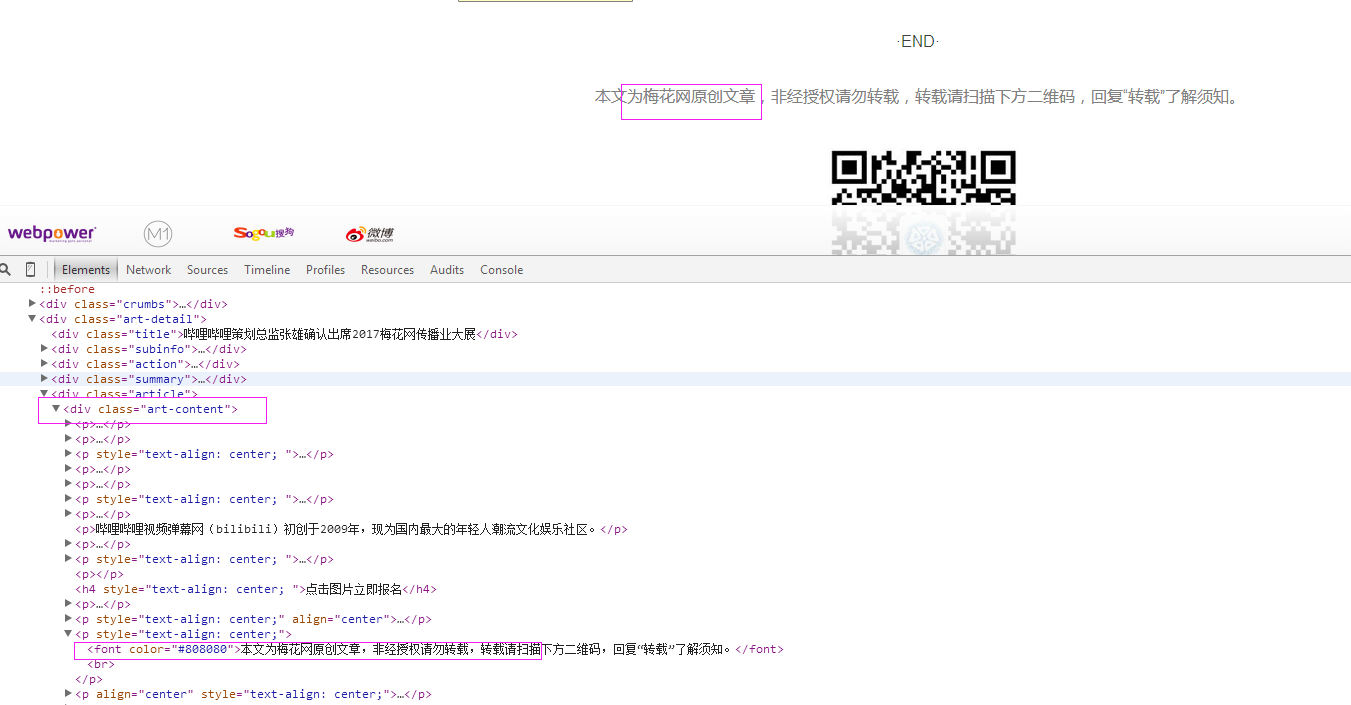

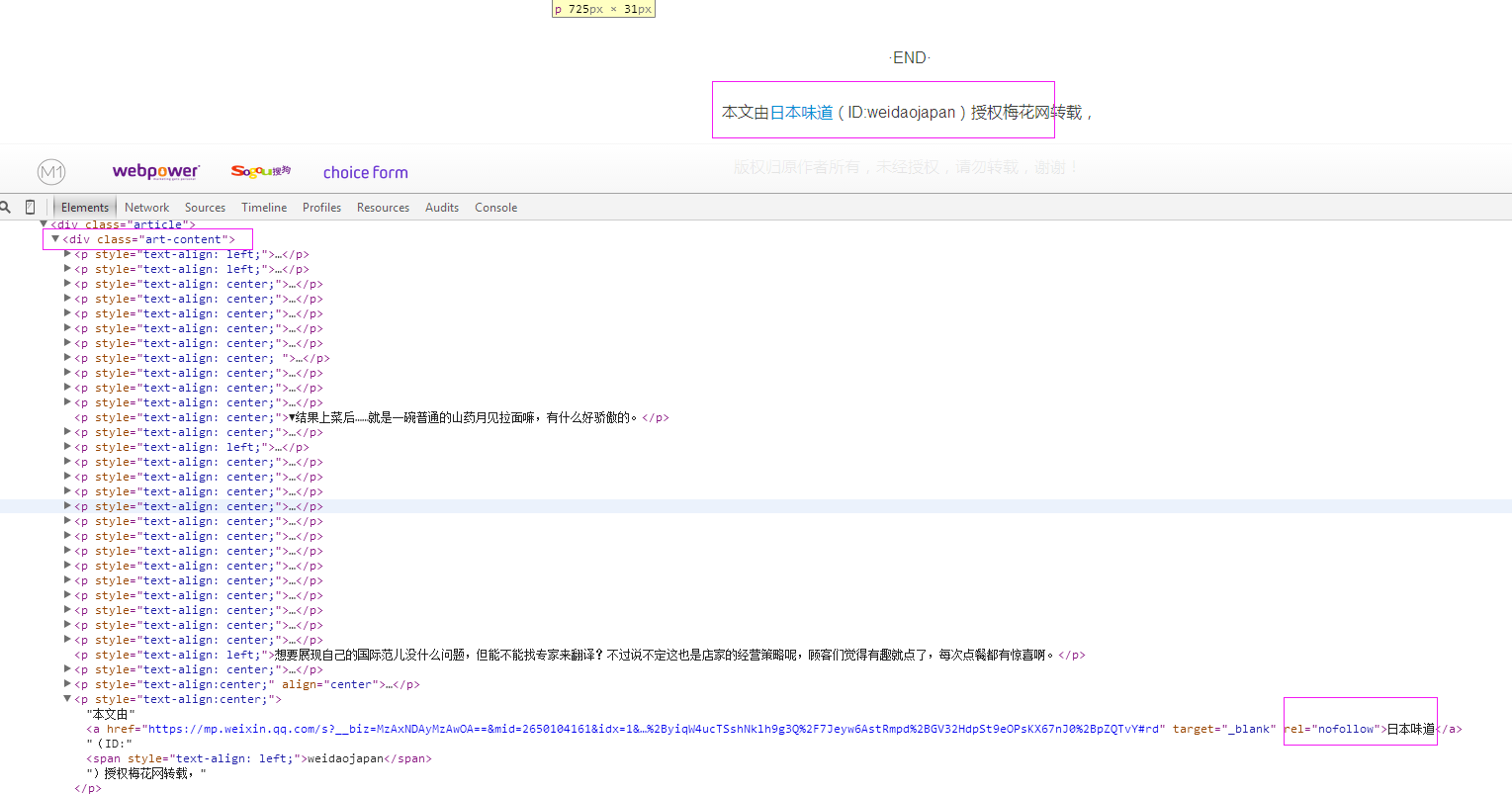

三、数据抓取
针对上面的网站信息,来进行抓取
1、首先抓取信息列表
抓取代码:Elements = doc('li[class="item"]')
2、抓取标题
抓取代码:title = element('a[class="list-title-color no-link"]').text().encode('utf8').strip()
3、抓取链接
抓取代码:url = 'http://www.meihua.info' + element('a[class="list-title-color no-link"]').attr('href')
4、抓取日期
抓取代码:date = element('span[class="desc-font date"]').text().encode('utf8').strip()
5、抓取来源
抓取代码:strSource = dochtml('div[class="art-content"]').eq(0).find('font').eq(0).text().encode('utf8').strip()
四、完整代码
# coding=utf-8

import os

import re

from selenium import webdriver

import selenium.webdriver.support.ui as ui

import time

from datetime import datetime

from selenium.webdriver.common.action_chains import ActionChains

import IniFile

from threading import Thread

from pyquery import PyQuery as pq

import LogFile

import mongoDB

class meihuaSpider(object):

    def __init__(self):

        logfile = os.path.join(os.path.dirname(os.getcwd()), time.strftime('%Y-%m-%d') + '.txt')

        self.log = LogFile.LogFile(logfile)

        configfile = os.path.join(os.path.dirname(os.getcwd()), 'setting.conf')

        cf = IniFile.ConfigFile(configfile)

        self.webSearchUrl_list = cf.GetValue("meihua", "webSearchUrl").split(';')

        self.keyword_list = cf.GetValue("section", "information_keywords").split(';')

        self.db = mongoDB.mongoDbBase()

        self.start_urls = []

        for url in self.webSearchUrl_list:

            self.start_urls.append(url)

        self.driver = webdriver.PhantomJS()

        self.wait = ui.WebDriverWait(self.driver, 2)

        self.driver.maximize_window()

    def Comapre_to_days(self,leftdate, rightdate):

        '''

        比较连个字符串日期,左边日期大于右边日期多少天

        :param leftdate: 格式:2017-04-15

        :param rightdate: 格式:2017-04-15

        :return: 天数

        '''

        l_time = time.mktime(time.strptime(leftdate, '%Y-%m-%d'))

        r_time = time.mktime(time.strptime(rightdate, '%Y-%m-%d'))

        result = int(l_time - r_time) / 86400

        return result

    def date_isValid(self, strDateText):

        '''

        判断日期时间字符串是否合法:如果给定时间大于当前时间是合法,或者说当前时间给定的范围内

        :param strDateText: 四种格式 '今天'; '前天' ; '昨天' ;'06月12日 '

        :return: True:合法;False:不合法

        '''

        currentDate = time.strftime('%Y-%m-%d')

        if strDateText.find('今天') > -1 :

            return True, currentDate

        return False, ''

    def log_print(self, msg):

        '''

        #         日志函数

        #         :param msg: 日志信息

        #         :return:

        #         '''

        print '%s: %s' % (time.strftime('%Y-%m-%d %H-%M-%S'), msg)

    def scrapy_date(self):

        strsplit = '------------------------------------------------------------------------------------'

        for link in self.start_urls:

            self.driver.get(link)

            selenium_html = self.driver.execute_script("return document.documentElement.outerHTML")

            doc = pq(selenium_html)

            infoList = []

            self.log.WriteLog(strsplit)

            self.log_print(strsplit)

            Elements = doc('li[class="item"]')  # class属性内容以item doc style-开始的元素

            for element in Elements.items():

                date = element('span[class="desc-font date"]').text().encode('utf8').strip()

                flag, strDate = self.date_isValid(date)

                if flag:

                    title = element('a[class="list-title-color no-link"]').text().encode('utf8').strip()

                    for keyword in self.keyword_list:

                        if title.find(keyword) > -1:

                            url = 'http://www.meihua.info' + element('a[class="list-title-color no-link"]').attr('href')

                            dictM = {'title': title, 'date': strDate,

                             'url': url, 'keyword': keyword, 'introduction': title, 'source': ''}

                            infoList.append(dictM)

                            break

            if len(infoList)>0:

                for item in infoList:

                    url =item['url']

                    self.driver.get(url)

                    htext = self.driver.execute_script("return document.documentElement.outerHTML")

                    dochtml = pq(htext)

                    slen =len('来源:')

                    strSource = dochtml('div[class="art-content"]').eq(0).find('font').eq(0).text().encode('utf8').strip()

                    if strSource.find('来源') > -1:

                        strSource = strSource[strSource.find('来源') + slen:]

                        if strSource.find('(') > -1:

                            strSource = strSource[0:strSource.find('('):]

                        item['source'] = strSource

                    elif strSource.find('梅花网原创')>-1:

                        item['source'] = " 梅花网"

                    else:

                        strSource = dochtml('div[class="art-content"]').text().encode('utf8').strip()

                        if strSource.find('梅花网原创')>-1 or strSource.find('消息源:梅花网')>-1:

                            item['source'] = '梅花网'

                        else:

                            strSource = dochtml('a[rel="nofollow"]').text().encode('utf8').strip()

                            item['source'] = strSource

                    self.log_print('title:%s' % item['title'])

                    self.log_print('url:%s' % item['url'])

                    self.log_print('date:%s' % item['date'])

                    self.log_print('source:%s' % item['source'])

                    self.log_print('kword:%s' % item['keyword'])

                    self.log_print(strsplit)

                self.db.SaveInformations(infoList)

        self.driver.close()

        self.driver.quit()

obj = meihuaSpider()

obj.scrapy_date()
[Python爬虫] 之十七:Selenium +phantomjs 利用 pyquery抓取梅花网数据的更多相关文章
- [Python爬虫] 之十六:Selenium +phantomjs 利用 pyquery抓取一点咨询数据
本篇主要是利用 pyquery来定位抓取数据,而不用xpath,通过和xpath比较,pyquery效率要高. 主要代码: # coding=utf-8 import os import re fro ...
- [Python爬虫] 之二十二:Selenium +phantomjs 利用 pyquery抓取界面网站数据
一.介绍 本例子用Selenium +phantomjs爬取界面(https://a.jiemian.com/index.php?m=search&a=index&type=news& ...
- [Python爬虫] 之二十三:Selenium +phantomjs 利用 pyquery抓取智能电视网数据
一.介绍 本例子用Selenium +phantomjs爬取智能电视网(http://news.znds.com/article/news/)的资讯信息,输入给定关键字抓取资讯信息. 给定关键字:数字 ...
- [Python爬虫] 之二十八:Selenium +phantomjs 利用 pyquery抓取网站排名信息
一.介绍 本例子用Selenium +phantomjs爬取中文网站总排名(http://top.chinaz.com/all/index.html,http://top.chinaz.com/han ...
- [Python爬虫] 之二十七:Selenium +phantomjs 利用 pyquery抓取今日头条视频
一.介绍 本例子用Selenium +phantomjs爬取今天头条视频(http://www.tvhome.com/news/)的信息,输入给定关键字抓取图片信息. 给定关键字:视频:融合:电视 二 ...
- [Python爬虫] 之三十一:Selenium +phantomjs 利用 pyquery抓取消费主张信息
一.介绍 本例子用Selenium +phantomjs爬取央视栏目(http://search.cctv.com/search.php?qtext=消费主张&type=video)的信息(标 ...
- [Python爬虫] 之二十五:Selenium +phantomjs 利用 pyquery抓取今日头条网数据
一.介绍 本例子用Selenium +phantomjs爬取今日头条(http://www.toutiao.com/search/?keyword=电视)的资讯信息,输入给定关键字抓取资讯信息. 给定 ...
- [Python爬虫] 之二十一:Selenium +phantomjs 利用 pyquery抓取36氪网站数据
一.介绍 本例子用Selenium +phantomjs爬取36氪网站(http://36kr.com/search/articles/电视?page=1)的资讯信息,输入给定关键字抓取资讯信息. 给 ...
- [Python爬虫] 之三十:Selenium +phantomjs 利用 pyquery抓取栏目
一.介绍 本例子用Selenium +phantomjs爬取栏目(http://tv.cctv.com/lm/)的信息 二.网站信息 三.数据抓取 首先抓取所有要抓取网页链接,共39页,保存到数据库里 ...
随机推荐
- linux下新硬盘的自动检测及格式化--支持硬盘的热插拔处理
说明 可能存在bug,所以慎用!!! 且只在mbr分区格式下测试过. parted.sh 可以用在系统起来的时候,比如rc.local脚本里面. parted.c 需要parted.sh脚本配合使用, ...
- echarts 图表建立步骤
需要引用的文件 <script src="web/mobile/js/jquery-1.8.3.min.js"></script> <script s ...
- 生产环境安装centos时的磁盘规划
一般来说,分区要按照公司领导的要求来执行.但是如果没有要求,一般按照下面的方法进行磁盘规划. /boot分区200M: swap分区分内存的2倍.如果内存大于等于8G,那么swap分8G即可: /分区 ...
- jQuery 入门笔记1
jQuery是一个兼容多浏览器的javascript框架,核心理念是write less,do more(写得更少,做得更多). 1:jQuery使用 <script type="te ...
- 使用bottle进行web开发(9):文件上传;json传递
1.文件上传 如果要完成文件上传,则需要对上文的form做一点改动,具体如下: <form action="/upload" method="post" ...
- 使用bottle进行web开发(6):Response 对象
Response的元数据(比如http的status code,headers,cookies等,都被i封装到一个叫Response的对象中,并传给浏览器. status code:status co ...
- rest_frameword学前准备
CBV CBV(class base views) 就是在视图里使用类处理请求. Python是一个面向对象的编程语言,如果只用函数来开发,有很多面向对象的优点就错失了(继承.封装.多态).所以Dja ...
- hdu 5179(数位DP||打表)
beautiful number Time Limit: 2000/1000 MS (Java/Others) Memory Limit: 32768/32768 K (Java/Others) ...
- AC日记——[HNOI2008]越狱 bzoj 1008
1008 思路: 越狱情况=总情况-不越狱情况: 代码: #include <cstdio> #include <cstring> #include <iostream& ...
- sublime text3下使用TAG快捷键ctrl+alt+f失效的解决方法
系统环境:WIN7 版本: sublime text3 问题:为了方便格式化html,下的TAG插件.在package control中在线安装能够安装成功,功能正常使用,就是ctrl+alt+f(A ...