
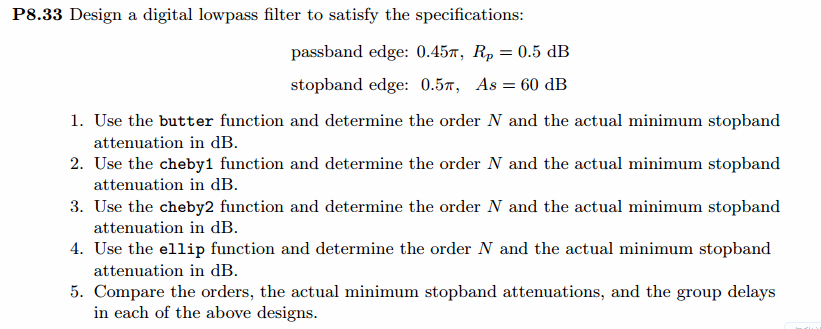
《DSP using MATLAB》Problem 8.36


上代码:
function [wpLP, wsLP, alpha] = lp2lpfre(wplp, wslp)

% Band-edge frequency conversion from lowpass to lowpass digital filter

% -------------------------------------------------------------------------

% [wpLP, wsLP, alpha] = lp2lpfre(wplp, wslp)

%   wpLP = passband edge for the lowpass digital prototype

%   wsLP = stopband edge for the lowpass digital prototype

%  alpha = lowpass to lowpass transformation parameter

%   wplp = passband edge frequency for the given lowpass

%   wslp = stopband edge frequency for the given lowpass

%

%

if wplp <= 0

	error('Passband edge must be larger than 0.')

end

if wslp <= wplp

	error('Stopband edge must be larger then Passband edge')

end

% Determine the digital lowpass cutoff frequencies:

wpLP = 0.2*pi;

alpha = sin((wpLP - wplp)/2)/sin((wpLP + wplp)/2);

wsLP = -angle((exp(-j*wslp)-alpha)/(1-alpha*exp(-j*wslp)));
function [b, a] = dlpfd_bl(type, wp, ws, Rp, As)

% IIR Lowpass Filter Design using bilinear transformation

% -----------------------------------------------------------------------

% [b, a] = dlpfd_bl(type, wp, ws, Rp, As);

%   type = 'butter' or 'cheby1' or 'cheby2' or 'ellip'

%      b = numerator polynomial coefficients of lowpass filter , Direct form

%      a = denominator polynomial coefficients of lowpass filter, Direct form

%     wp = Passband edge frequency in radians;

%     ws = Stopband edge frequency in radians (wp < ws);

%     Rp = Passband ripple in +dB; Rp > 0

%     As = Stopband attenuation in +dB; As > 0

%

%

%prompt = 'Please input the type of digital lp filter:  butter or cheby1 or cheby2 or ellip [butter] ';

%type = input(prompt , 's');

if isempty(type)

    str = 'butter';

end

switch type

    case 'butter'

    	[b , a] = buttlpf(wp, ws, Rp, As);

    case 'cheby1'

    	[b , a] = cheb1lpf(wp, ws, Rp, As);

    case 'cheby2'

    	[b , a] = cheb2lpf(wp, ws, Rp, As);

    case 'ellip'

    	[b , a] = eliplpf(wp, ws, Rp, As);

    otherwise

        disp('Oh, input may be error!');

end
第1小题
%% ------------------------------------------------------------------------

%%            Output Info about this m-file

fprintf('\n***********************************************************\n');

fprintf('        <DSP using MATLAB> Problem 8.36.1 \n\n');

banner();

%% ------------------------------------------------------------------------

% Digital lowpass Filter Specifications:

wplp = 0.45*pi;                 % digital passband freq in rad

wslp = 0.50*pi;                 % digital stopband freq in rad

Rp = 0.5;                       % passband ripple in dB

As = 60;                        % stopband attenuation in dB

Ripple = 10 ^ (-Rp/20)           % passband ripple in absolute

Attn = 10 ^ (-As/20)             % stopband attenuation in absolute

fprintf('\n*******Digital lowpass, Coefficients of DIRECT-form***********\n');

[blp, alp] = buttlpf(wplp, wslp, Rp, As)

%[blp, alp] = cheb1lpf(wphp, wshp, Rp, As)

%[blp, alp] = cheb2lpf(wphp, wshp, Rp, As)

%[blp, alp] = eliplpf(wphp, wshp, Rp, As)

[C, B, A] = dir2cas(blp, alp)

% Calculation of Frequency Response:

[dblp, maglp, phalp, grdlp, wwlp] = freqz_m(blp, alp);

%[dbhp, maghp, phahp, grdhp, wwhp] = freqz_m(bhp, ahp);

% ---------------------------------------------------------------

%    find Actual Passband Ripple and Min Stopband attenuation

% ---------------------------------------------------------------

delta_w = 2*pi/1000;

Rp_lp = -(min(dblp(1:1:ceil(wplp/delta_w)+1)));                           % Actual Passband Ripple

fprintf('\nActual Passband Ripple is %.4f dB.\n', Rp_lp);

As_lp = -round(max(dblp(ceil(wslp/delta_w)+1:1:501)));                    % Min Stopband attenuation

fprintf('\nMin Stopband attenuation is %.4f dB.\n\n', As_lp);

%% -----------------------------------------------------------------

%%                             Plot

%% -----------------------------------------------------------------

figure('NumberTitle', 'off', 'Name', 'Problem 8.36.1 Butterworth lowpass by buttlpf function')

set(gcf,'Color','white');

M = 2;                          % Omega max

subplot(2,2,1); plot(wwlp/pi, maglp); axis([0, M, 0, 1.2]); grid on;

xlabel('Digital frequency in \pi units'); ylabel('|H|'); title('Lowpass Filter Magnitude Response');

set(gca, 'XTickMode', 'manual', 'XTick', [0, 0.45, 0.5, M]);

set(gca, 'YTickMode', 'manual', 'YTick', [0, 0.9441, 1]);

subplot(2,2,2); plot(wwlp/pi, dblp); axis([0, M, -150, 1]); grid on;

xlabel('Digital frequency in \pi units'); ylabel('Decibels'); title('Lowpass Filter Magnitude in dB');

set(gca, 'XTickMode', 'manual', 'XTick', [0, 0.45, 0.5, M]);

set(gca, 'YTickMode', 'manual', 'YTick', [ -111, -85, -1, 0]);

%set(gca,'YTickLabelMode','manual','YTickLabel',['111'; '85'; '1 ';' 0']);

subplot(2,2,3); plot(wwlp/pi, phalp/pi); axis([0, M, -1.1, 1.1]); grid on;

xlabel('Digital frequency in \pi nuits'); ylabel('radians in \pi units'); title('Lowpass Filter Phase Response');

set(gca, 'XTickMode', 'manual', 'XTick', [0, 0.45, 0.5, M]);

set(gca, 'YTickMode', 'manual', 'YTick', [-1:1:1]);

subplot(2,2,4); plot(wwlp/pi, grdlp); axis([0, M, 0, 20]); grid on;

xlabel('Digital frequency in \pi units'); ylabel('Samples'); title('Lowpass Filter Group Delay');

set(gca, 'XTickMode', 'manual', 'XTick', [0, 0.45, 0.5, M]);

set(gca, 'YTickMode', 'manual', 'YTick', [0:10:20]);

% -----------------------------------------------------

%              method 2

% -----------------------------------------------------

% Digital lowpass Filter Specifications:

[wpLP, wsLP, alpha] = lp2lpfre(wplp, wslp);

prompt = '\nPlease input the type of digital lp filter: \n\n  butter or cheby1 or cheby2 or ellip [butter]: ';

type = input(prompt , 's');

[blp, alp] = dlpfd_bl(type, wplp, wslp, Rp, As);

[C, B, A] = dir2cas(blp, alp);

% -----------------------------------------------------

%              method 3  butter function

% -----------------------------------------------------

% Calculation of Butterworth lp filter parameters:

[N, wn] = buttord(wplp/pi, wslp/pi, Rp, As)

% Digital Butterworth lowpass Filter Design:

[blp, alp] = butter(N, wn, 'low')

[C, B, A] = dir2cas(blp, alp)

% Calculation of Frequency Response:

[dblp, maglp, phalp, grdlp, wwlp] = freqz_m(blp, alp);

%[dbhp, maghp, phahp, grdhp, wwhp] = freqz_m(bhp, ahp);

% ---------------------------------------------------------------

%    find Actual Passband Ripple and Min Stopband attenuation

% ---------------------------------------------------------------

delta_w = 2*pi/1000;

Rp_lp = -(min(dblp(ceil(1:1:wplp/delta_w+1))));                       % Actual Passband Ripple

fprintf('\nActual Passband Ripple is %.4f dB.\n', Rp_lp);

As_lp = -round(max(dblp(ceil(wslp/delta_w)+1 :1 : 501)));                    % Min Stopband attenuation

fprintf('\nMin Stopband attenuation is %.4f dB.\n\n', As_lp);

%% -----------------------------------------------------------------

%%                             Plot

%% -----------------------------------------------------------------

figure('NumberTitle', 'off', 'Name', 'Problem 8.36.1 Butterworth lowpass by butter function')

set(gcf,'Color','white');

M = 1;                          % Omega max

subplot(2,2,1); plot(wwlp/pi, maglp); axis([0, M, 0, 1.2]); grid on;

xlabel('Digital frequency in \pi units'); ylabel('|H|'); title('Lowpass Filter Magnitude Response');

set(gca, 'XTickMode', 'manual', 'XTick', [0, 0.45, 0.5, M]);

set(gca, 'YTickMode', 'manual', 'YTick', [0, 0.9441, 1]);

subplot(2,2,2); plot(wwlp/pi, dblp); axis([0, M, -100, 2]); grid on;

xlabel('Digital frequency in \pi units'); ylabel('Decibels'); title('Lowpass Filter Magnitude in dB');

set(gca, 'XTickMode', 'manual', 'XTick', [0, 0.45, 0.5, M]);

set(gca, 'YTickMode', 'manual', 'YTick', [-70, -60, -1, 0]);

set(gca,'YTickLabelMode','manual','YTickLabel',['70'; '60';'1 ';' 0']);

subplot(2,2,3); plot(wwlp/pi, phalp/pi); axis([0, M, -1.1, 1.1]); grid on;

xlabel('Digital frequency in \pi nuits'); ylabel('radians in \pi units'); title('Lowpass Filter Phase Response');

set(gca, 'XTickMode', 'manual', 'XTick', [0, 0.45, 0.5, M]);

set(gca, 'YTickMode', 'manual', 'YTick', [-1:1:1]);

subplot(2,2,4); plot(wwlp/pi, grdlp); axis([0, M, 0, 90]); grid on;

xlabel('Digital frequency in \pi units'); ylabel('Samples'); title('Lowpass Filter Group Delay');

set(gca, 'XTickMode', 'manual', 'XTick', [0, 0.45, 0.5, M]);

set(gca, 'YTickMode', 'manual', 'YTick', [0:10:90]);
运行结果:
绝对指标
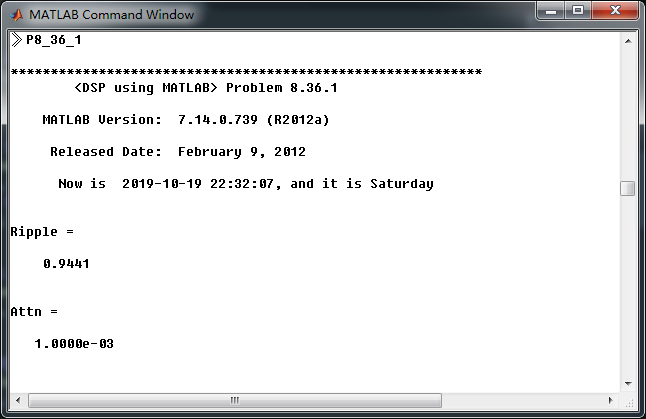
数字低通,频带边界截止频率

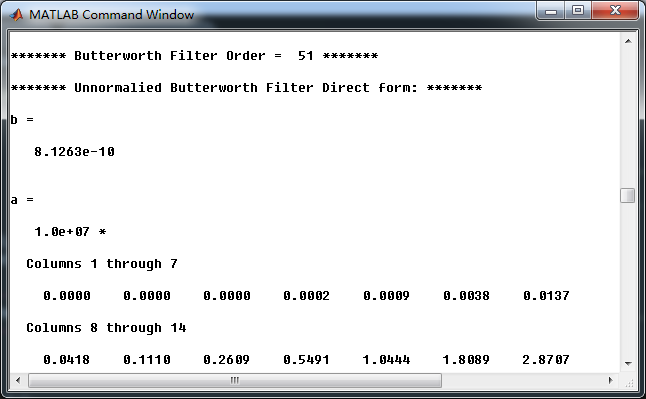
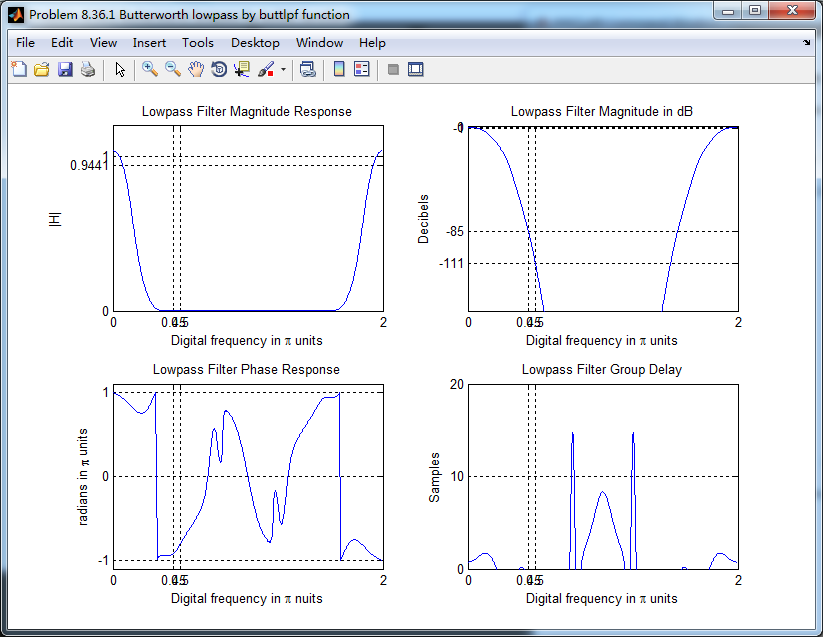
采用buttlpf函数,数字低通butterworth滤波器阶数51,系统函数直接形式系数
转换成串联形式,系数

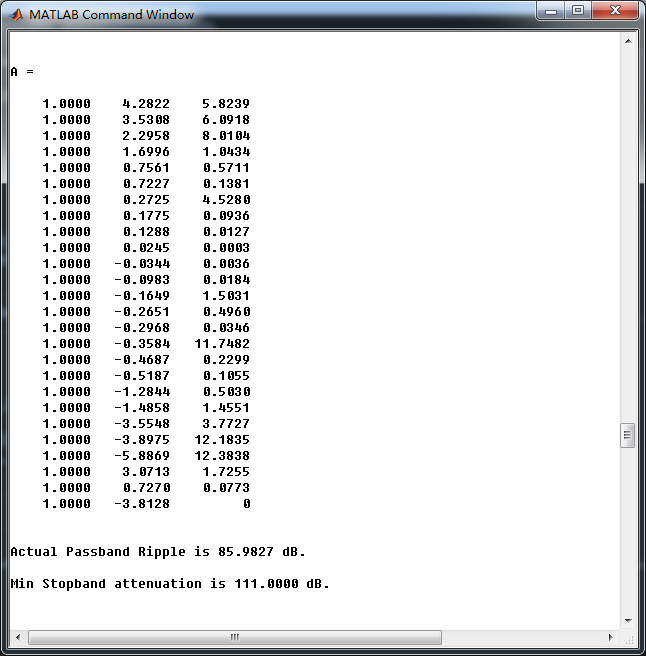

采用butter(MATLAB自带函数),计算数字低通滤波器,阶数51
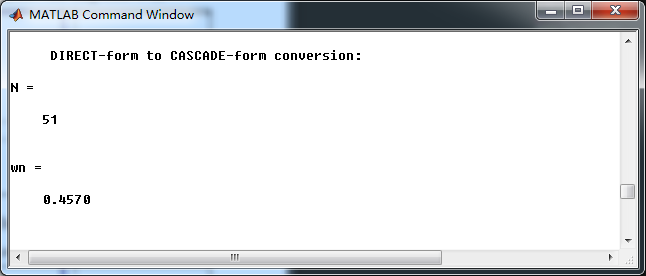
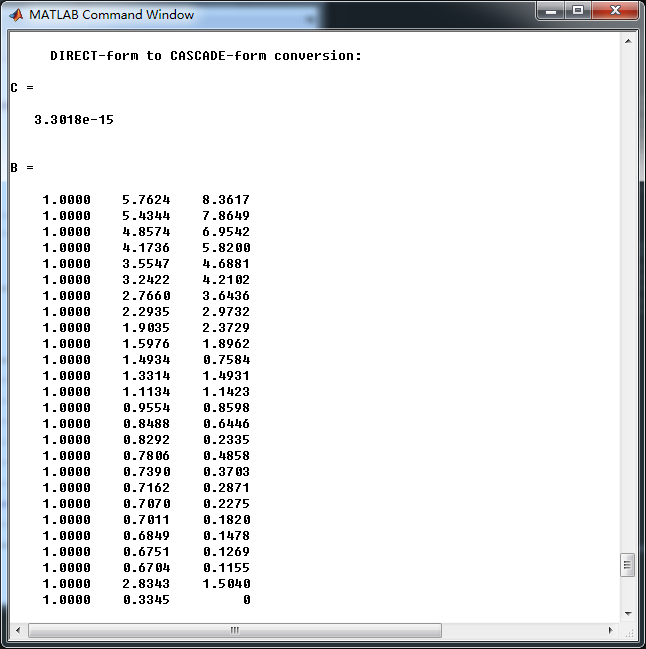

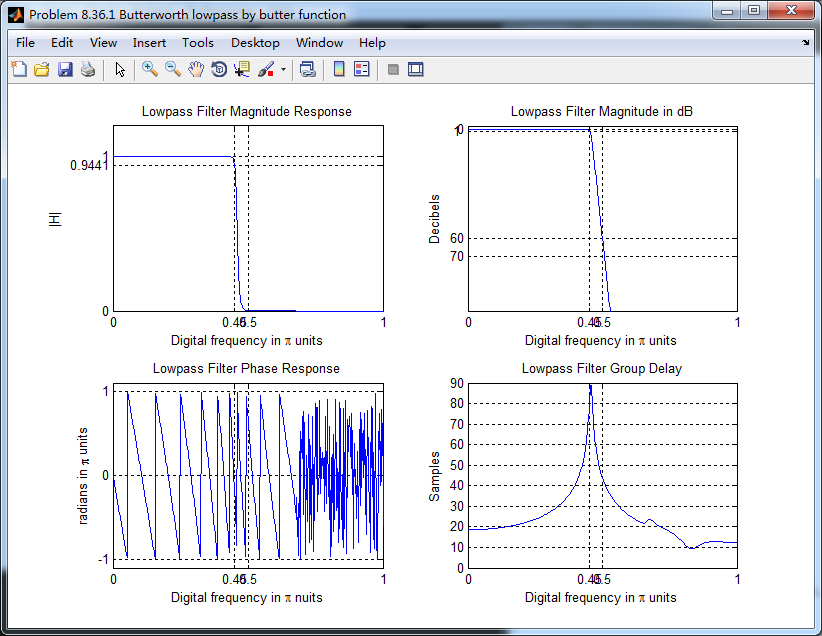
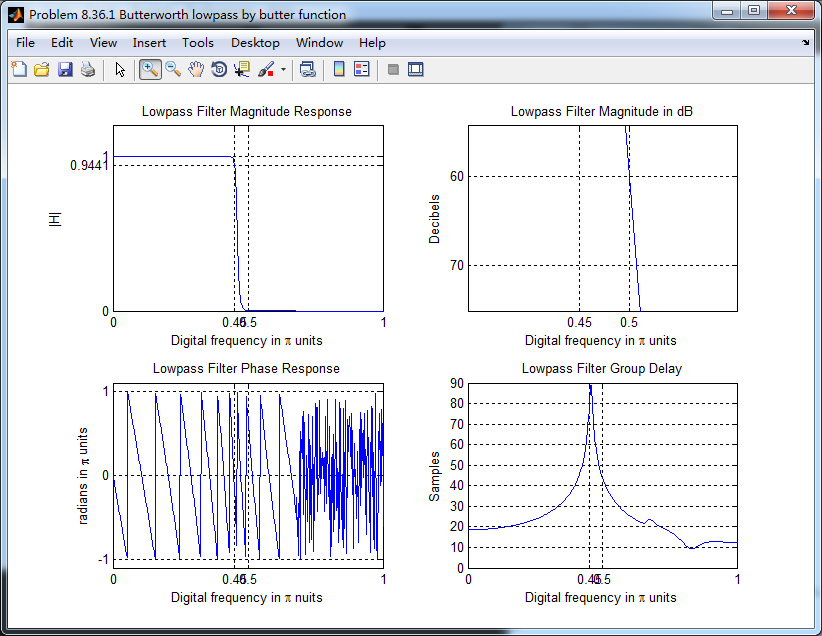
可见自带函数比个人所写的效果强!
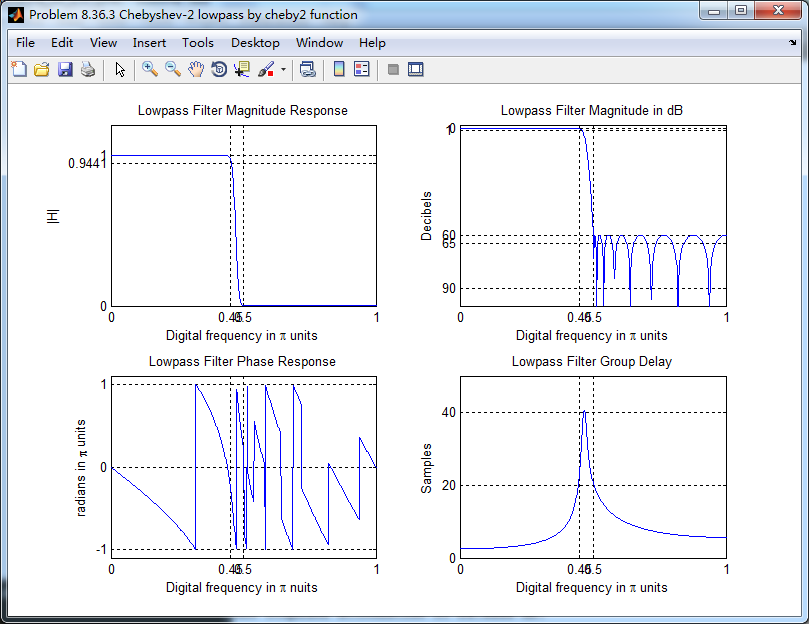
第3小题,Chebyshev-2型
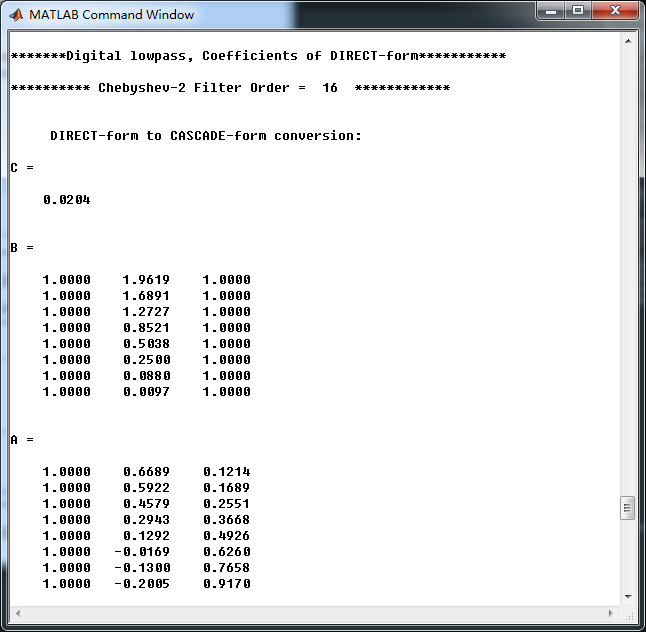
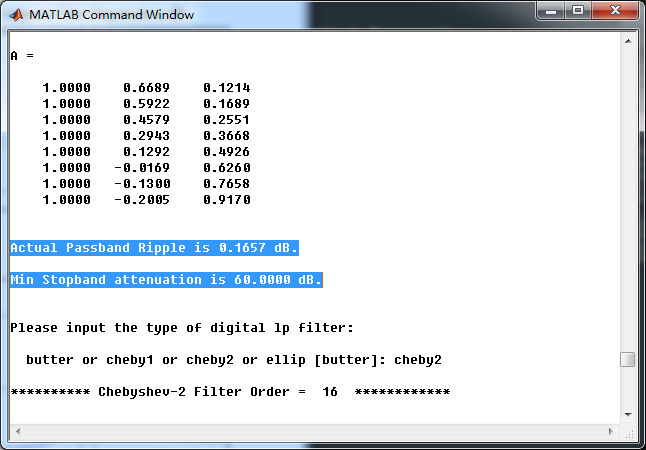
采用cheb2lpf函数,得到的Chebyshev-2型数字低通滤波器,幅度谱、相位谱和群延迟响应
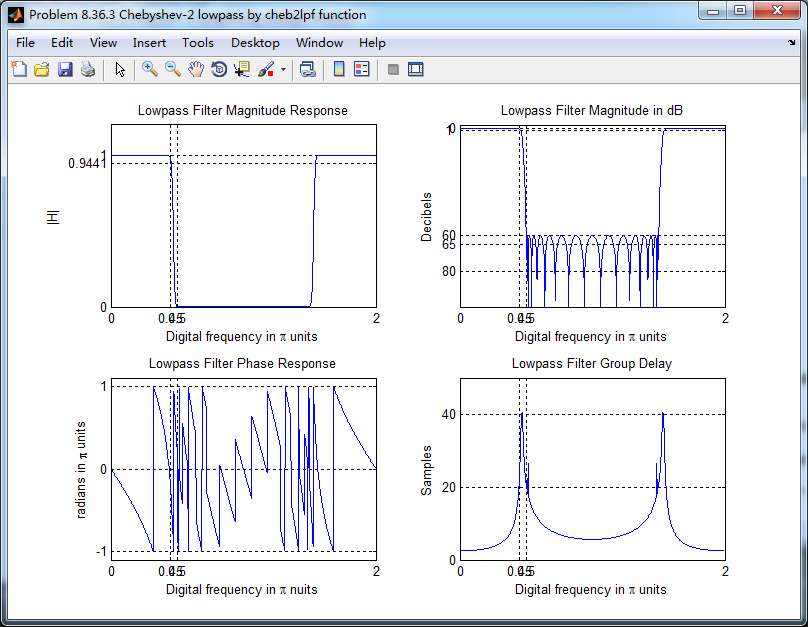
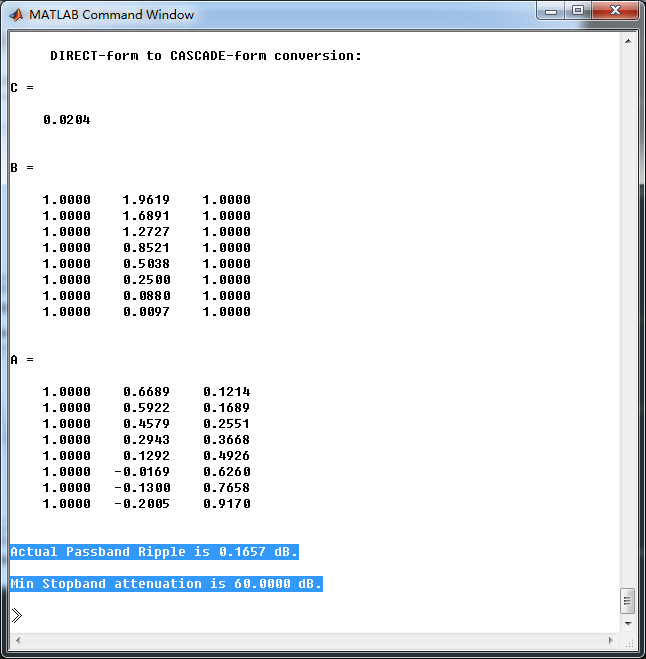
采用cheby2(MATLAB自带函数),计算得到数字低通滤波器,系统函数串联形式系数
Chebyshev-1型和Elliptic型数字低通,这里不放图了。
《DSP using MATLAB》Problem 8.36的更多相关文章
- 《DSP using MATLAB》Problem 5.36
第1小题 代码: %% ++++++++++++++++++++++++++++++++++++++++++++++++++++++++++++++++++++++++++++++++++++++++ ...
- 《DSP using MATLAB》Problem 7.36
代码: %% ++++++++++++++++++++++++++++++++++++++++++++++++++++++++++++++++++++++++++++++++ %% Output In ...
- 《DSP using MATLAB》Problem 4.15
只会做前两个, 代码: %% ---------------------------------------------------------------------------- %% Outpu ...
- 《DSP using MATLAB》Problem 7.27
代码: %% ++++++++++++++++++++++++++++++++++++++++++++++++++++++++++++++++++++++++++++++++ %% Output In ...
- 《DSP using MATLAB》Problem 7.26
注意:高通的线性相位FIR滤波器,不能是第2类,所以其长度必须为奇数.这里取M=31,过渡带里采样值抄书上的. 代码: %% +++++++++++++++++++++++++++++++++++++ ...
- 《DSP using MATLAB》Problem 7.25
代码: %% ++++++++++++++++++++++++++++++++++++++++++++++++++++++++++++++++++++++++++++++++ %% Output In ...
- 《DSP using MATLAB》Problem 7.24
又到清明时节,…… 注意:带阻滤波器不能用第2类线性相位滤波器实现,我们采用第1类,长度为基数,选M=61 代码: %% +++++++++++++++++++++++++++++++++++++++ ...
- 《DSP using MATLAB》Problem 7.23
%% ++++++++++++++++++++++++++++++++++++++++++++++++++++++++++++++++++++++++++++++++ %% Output Info a ...
- 《DSP using MATLAB》Problem 7.16
使用一种固定窗函数法设计带通滤波器. 代码: %% ++++++++++++++++++++++++++++++++++++++++++++++++++++++++++++++++++++++++++ ...
随机推荐
- MaxCompute表设计最佳实践
MaxCompute表设计最佳实践 产生大量小文件的操作 MaxCompute表的小文件会影响存储和计算性能,因此我们先介绍下什么样的操作会产生大量小文件,从 而在做表设计的时候考虑避开此类操作. 使 ...
- Oracle分页:工作记录
Oracle分页:传入值为List<String> . Mybatis XXXMapper.xml SELECT * FROM ( SELECT ROWNUM rn, t1.cardnum ...
- 【历年真题】斐波那契数列logn做法
描述 [题解] 用矩阵乘法加速递推 [0 1] [1 1] [f[n-1]] [f[n-2]] = [f[n-1]] [f[n]] 求A矩阵的n-2次幂然后再乘B矩阵. 结果矩阵中的第二行第一列就是f ...
- 57 CUDA 编程入门
0 引言 由于毕设用到了Marvin,采用的是CUDA框架作为加速器,正好借此学习一下CUDA编程的一些基本知识. 各个版本的cuda的下载链接如下. https://developer.nvidia ...
- Python对象继承set类型
Python对象继承set类型 class Feature(set): def __init__(self): set.__init__(self) # 这里演示将Feature类的加号重载成set. ...
- RouterOS视频教程下载
下载信息 名称:RouterOS视频教程下载 格式:MP4 版本:V1.0 https://pan.baidu.com/s/1skU6oW1 下载密码:nb97
- 20140425 malloc和new不同 dynamic何时返回0
1.malloc/free和new/delete区别 http://blog.csdn.net/hackbuteer1/article/details/6789164 相同点:都可用于申请动态内存和释 ...
- 刚装完Linux就CPU占用率高
top命令发现如下三个进程占据了前三的CPU使用率 wpa_supplicant NetworkManager rsyslogd google发现前两个进程与无线网络有关,我的电脑是笔记本,插的有线, ...
- IntelliJ IDEA无法创建springboot项目解决办法
最佳解决办法:IntelliJ IDEA---右键---以管理员身份运行. 方法二: 1.打开控制面板--系统和安全--windows防火墙 2.找到自己的默认浏览器,打勾,这里是谷歌浏览器 3.打开 ...
- 2.2_springboot2.x消息RabbitMQ整合&amqpAdmin管理组件的使用
5.1.1.基本测试 1.引 spring-boot-starter-amqp** <dependencies> <dependency> <groupId>org ...