
[js高手之路] html5 canvas系列教程 - 开始路径beginPath与关闭路径closePath详解
路径在canvas绘图中,经常被用到,是一个非常重要的概念.
比如:我们要在canvas画出3条直线,要求用不同的颜色加以区分.
 <style>

 body {

     background: #000;

 }

 #canvas{

     background:white;

 }

 </style>

 <script>

 window.onload = function(){

     var oCanvas = document.querySelector( "#canvas" ),

         oGc = oCanvas.getContext( '2d' );

         oGc.strokeStyle = 'red';

         oGc.moveTo( 50, 50 );

         oGc.lineTo( 500, 50 );

         oGc.stroke();

         oGc.strokeStyle = 'orange';

         oGc.moveTo( 50, 150 );

         oGc.lineTo( 500, 150 );

         oGc.stroke();

         oGc.strokeStyle = 'yellow';

         oGc.moveTo( 50, 250 );

         oGc.lineTo( 500, 250 );

         oGc.stroke();

 }

 </script>

 </head>

 <body>

 <canvas id="canvas" width="600" height="300"></canvas>

 </body>
在画每一条线之前,我都用storeStyle设置了线的颜色,但是,出来的结果却是3条黄色的线,并不是红、橙、黄三条颜色不同的线。为什么呢?
首先我们要搞清楚canvas渲染图形,它是基于状态的,所谓状态就是每一次用( stroke/fill )之类的API渲染图形的时候,canvas会检查整个程序定义的( strokeStyle, fillStyle, lineWidth等 )当一个状态值没有被改变时,canvas就一直用这个状态。如果被改变,这里就要注意了:
1,如果使用beginPath()开始一个新的路径,则不同路径使用当前路径的值
2,如果没有使用beginPath()开始一个新的路径,后面的会覆盖前面的.
而我们这个程序就是属于第2种情况,尽管strokeStyle被改变了,但是没有用beginPath()开启新路径,所以前面两个strokeStyle会被最后一个strokeStyle='yellow'覆盖。所以3条线都是黄色.
看完这段解释,你应该知道怎样修改了吧?
只需要把每条线设置在不同的路径中,就可以区分了
 <style>

 body {

     background: #000;

 }

 #canvas{

     background:white;

 }

 </style>

 <script>

 window.onload = function(){

     var oCanvas = document.querySelector( "#canvas" ),

         oGc = oCanvas.getContext( '2d' );

         oGc.beginPath();

         oGc.strokeStyle = 'red';

         oGc.moveTo( 50, 50 );

         oGc.lineTo( 500, 50 );

         oGc.stroke();

         oGc.beginPath();

         oGc.strokeStyle = 'orange';

         oGc.moveTo( 50, 150 );

         oGc.lineTo( 500, 150 );

         oGc.stroke();

         oGc.beginPath();

         oGc.strokeStyle = 'yellow';

         oGc.moveTo( 50, 250 );

         oGc.lineTo( 500, 250 );

         oGc.stroke();

 }

 </script>

 </head>

 <body>

 <canvas id="canvas" width="600" height="300"></canvas>

 </body>
closePath:关闭路径
所谓关闭路径就是:指的是将同一个路径中的起点与终点相连接.
比如,我们画个三角形,不使用路径的时候,我们这样做:
 <style>

 body {

     background: #000;

 }

 #canvas{

     background:white;

 }

 </style>

 <script>

 window.onload = function(){

     var oCanvas = document.querySelector( "#canvas" ),

         oGc = oCanvas.getContext( '2d' );

     oGc.moveTo( 50, 50 );

     oGc.lineTo( 250, 50 );

     oGc.lineTo( 250, 150 );

     oGc.lineTo( 50, 50 );

     oGc.stroke();

 }

 </script>

 </head>

 <body>

 <canvas id="canvas" width="600" height="300"></canvas>

 </body>
最后一次用lineTo( 50, 50 )连接到起点,如果我们使用closePath,就不需要这一步操作了.
 <style>

 body {

     background: #000;

 }

 #canvas{

     background:white;

 }

 </style>

 <script>

 window.onload = function(){

     var oCanvas = document.querySelector( "#canvas" ),

         oGc = oCanvas.getContext( '2d' );

     oGc.moveTo( 50, 50 );

     oGc.lineTo( 250, 50 );

     oGc.lineTo( 250, 150 );

     oGc.closePath();

     oGc.stroke();

 }

 </script>

 </head>

 <body>

 <canvas id="canvas" width="600" height="300"></canvas>

 </body>
在stroke之前,用closePath关闭路径,他就会把( 250, 150)这个点和起始点( 50, 50 )连接起来.
画2个三角形:
     var oCanvas = document.querySelector( "#canvas" ),

         oGc = oCanvas.getContext( '2d' );

     oGc.moveTo( 50, 50 );

     oGc.lineTo( 250, 50 );

     oGc.lineTo( 250, 150 );

     oGc.closePath();

     oGc.stroke();

     oGc.moveTo( 50, 150 );

     oGc.lineTo( 250, 150 );

     oGc.lineTo( 250, 250 );

     oGc.closePath();

     oGc.stroke();
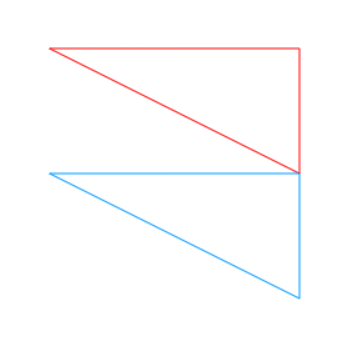
使用路径,绘制两个不同颜色的三角形:
 <style>

 body {

     background: #000;

 }

 #canvas{

     background:white;

 }

 </style>

 <script>

 window.onload = function(){

     var oCanvas = document.querySelector( "#canvas" ),

         oGc = oCanvas.getContext( '2d' );

     //这段oGc.beginPath可有可无,不会影响结果,但是建议加上,代码可读性比较好一点

     oGc.beginPath();

     oGc.strokeStyle = 'red';

     oGc.moveTo( 50, 50 );

     oGc.lineTo( 250, 50 );

     oGc.lineTo( 250, 150 );

     oGc.closePath();

     oGc.stroke();

     oGc.beginPath();

     oGc.strokeStyle = '#09f';

     oGc.moveTo( 50, 150 );

     oGc.lineTo( 250, 150 );

     oGc.lineTo( 250, 250 );

     oGc.closePath();

     oGc.stroke();

 }

 </script>

 </head>

 <body>

 <canvas id="canvas" width="600" height="300"></canvas>

 </body>
[js高手之路] html5 canvas系列教程 - 开始路径beginPath与关闭路径closePath详解的更多相关文章
- [js高手之路] html5 canvas系列教程 - 掌握画直线图形的常用API
我们接着上文[js高手之路] html5 canvase系列教程 - 认识canvas以及基本使用方法继续. 一.直线的绘制 cxt.moveTo( x1, y1 ): 将画笔移动到x1, y1这个点 ...
- [js高手之路] html5 canvas系列教程 - arcTo(弧度与二次,三次贝塞尔曲线以及在线工具)
之前,我写了一个arc函数的用法:[js高手之路] html5 canvas系列教程 - arc绘制曲线图形(曲线,弧线,圆形). arcTo: cxt.arcTo( cx, cy, x2, y2, ...
- [js高手之路] html5 canvas系列教程 - arc绘制曲线图形(曲线,弧线,圆形)
绘制曲线,经常会用到路径的知识,如果你对路径有疑问,可以参考我的这篇文章[js高手之路] html5 canvas系列教程 - 开始路径beginPath与关闭路径closePath详解. arc:画 ...
- [js高手之路] html5 canvas系列教程 - 图片操作(drawImage,clip,createPattern)
接着上文[js高手之路] html5 canvas系列教程 - 文本样式(strokeText,fillText,measureText,textAlign,textBaseline)继续,本文介绍的 ...
- [js高手之路] html5 canvas系列教程 - 文本样式(strokeText,fillText,measureText,textAlign,textBaseline)
接着上文线条样式[js高手之路] html5 canvas系列教程 - 线条样式(lineWidth,lineCap,lineJoin,setLineDash)继续. canvas提供两种输出文本的方 ...
- [js高手之路] html5 canvas系列教程 - 线条样式(lineWidth,lineCap,lineJoin,setLineDash)
上文,写完弧度与贝塞尔曲线[js高手之路] html5 canvas系列教程 - arcTo(弧度与二次,三次贝塞尔曲线以及在线工具),本文主要是关于线条的样式设置 lineWidth: 设置线条的宽 ...
- [js高手之路] html5 canvas系列教程 - 像素操作(反色,黑白,亮度,复古,蒙版,透明)
接着上文[js高手之路] html5 canvas系列教程 - 状态详解(save与restore),相信大家都应该玩过美颜功能,而我们今天要讲的就是canvas强大的像素处理能力,通过像素处理,实现 ...
- [js高手之路] html5 canvas系列教程 - 状态详解(save与restore)
本文内容与路径([js高手之路] html5 canvas系列教程 - 开始路径beginPath与关闭路径closePath详解)是canvas中比较重要的概念.掌握理解他们是做出复杂canvas动 ...
- [js高手之路] html5 canvas系列教程 - 线形渐变,径向渐变与阴影设置
接着上文[js高手之路] html5 canvas系列教程 - 像素操作(反色,黑白,亮度,复古,蒙版,透明)继续. 一.线形渐变 线形渐变指的是一条直线上发生的渐变. 用法: var linear ...
随机推荐
- weblogic 启动问题
通过startWebLogic.cmd 手动启动weblogic可以成功启动 myeclipse配置后,runserver 就会报 Error occurred during initializati ...
- Servlet中Response对象应用2(输出随机验证码图片)
预期结果如图: 可用于登陆界面的验证 需要使用random类和绘画相关的几个类.以及imageio的内容. import java.awt.*; import java.awt.image.Buffe ...
- Openfire分析之二:主干程序分析
引言 宇宙大爆炸,于是开始了万物生衍,从一个连人渣都还没有的时代,一步步进化到如今的花花世界. 然而沧海桑田,一百多亿年过去了-. 好复杂,但程序就简单多了,main()函数运行,敲个回车,一行Hel ...
- Django 创建admin账户
Django版本 1.11.4 安装参考:http://blog.csdn.net/a_little_snail/article/details/76933868 问题:创建admin账户密码 解决: ...
- Html5笔记之第八天
HTML字符实体 显示结果 描述 实体名称 实体编号 空格 < 小于号 < < > 大于号 > > & 和号 & & " ...
- Groovy读取文件信息
1. eachLine -- 打开和读取文件的每一行 new File("foo.txt").eachLine { println it.toUpperCase(); } 2. r ...
- 进程管理之system
system定义 #include<stdlib.h> int system(const char *command); 首先要知道,system函数是c库中的函数,而不是系统调用.其实s ...
- Maven项目下update maven后Eclipse报错:java.lang.ClassNotFoundException: ContextLoaderL
Maven项目下update maven后Eclipse报错:java.lang.ClassNotFoundException: ContextLoaderL 严重: Error config ...
- BZOJ 3379: [Usaco2004 Open]Turning in Homework 交作业
Description 贝茜有C(1≤C≤1000)门科目的作业要上交,之后她要去坐巴士和奶牛同学回家. 每门科目的老师所在的教室排列在一条长为H(1≤H≤1000)的走廊上,他们只在课后接收 ...
- Myeclipse 自定义java代码快捷键
1.首先在MyEclipse菜单栏找到"windows"下拉菜单中找到首选项(英文Prefenerces),弹出首选项界面. 2.打开java -->editor---& ...