
abp(net core)+easyui+efcore实现仓储管理系统——供应商管理升级之下(六十四)
abp(net core)+easyui+efcore实现仓储管理系统目录
9.在Visual Studio 2022中按F5运行应用程序。在浏览器将呈现登录页面,然后输入管理员用户名进行登录。浏览器跳转到首页面。
10.在主界面的菜单中,选择“Business->供应商管理”菜单项,浏览器中呈现一个供应商信息列表页面,css起作用了,样式好看了。如下图。 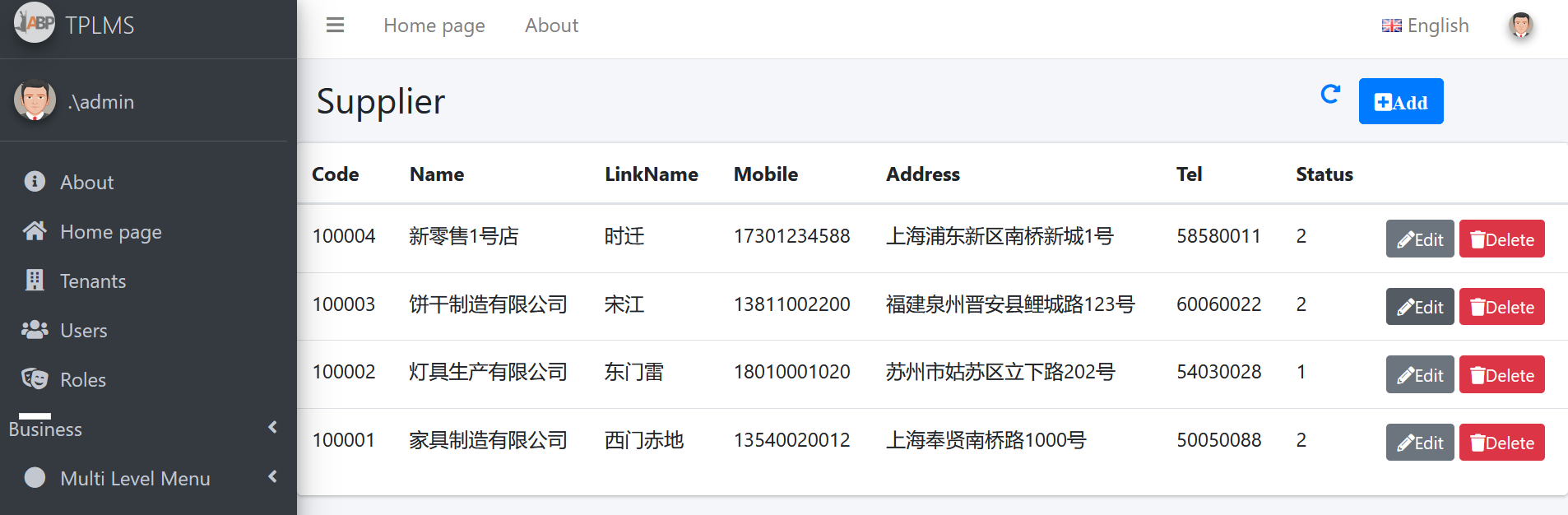
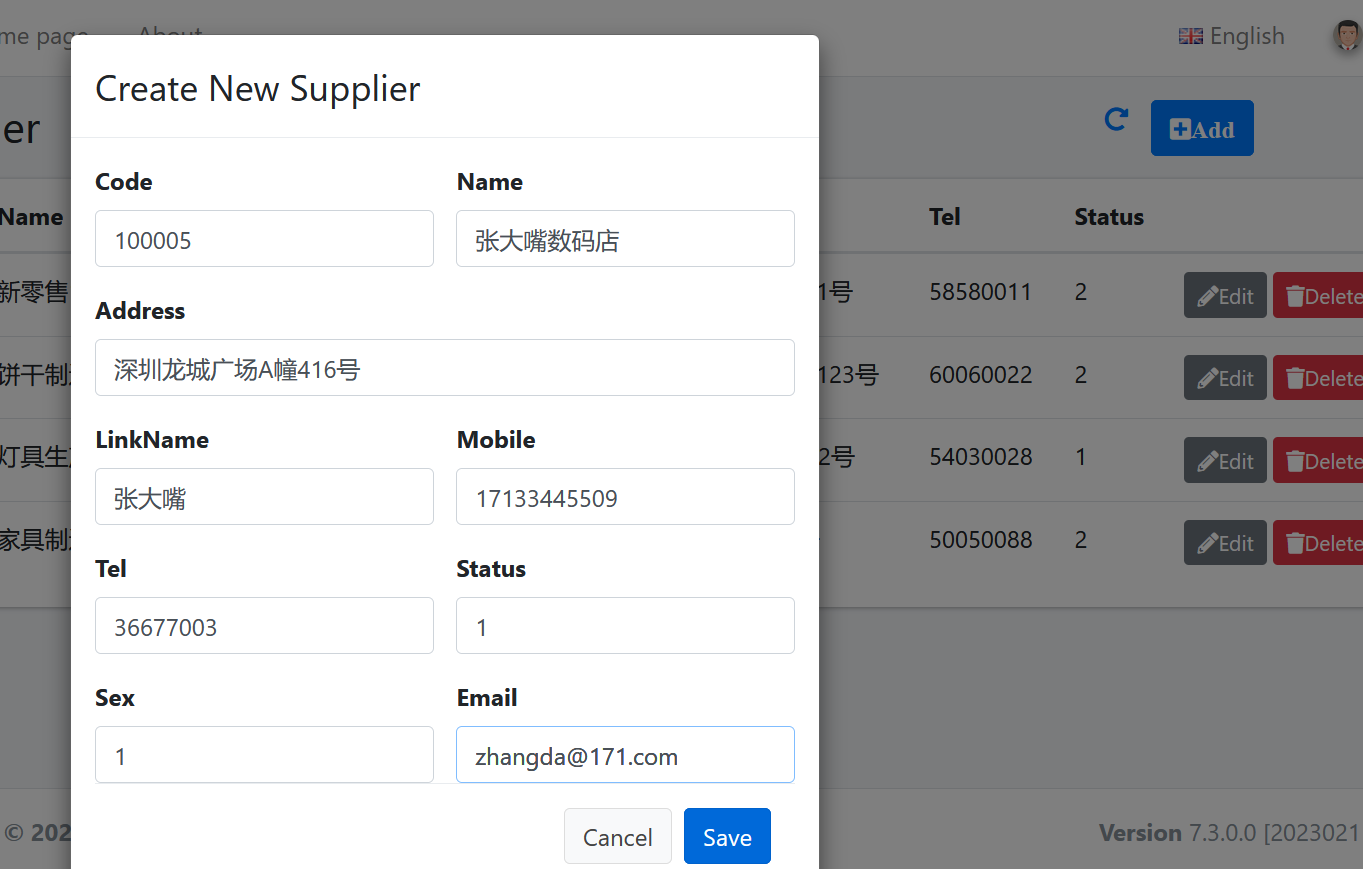
11然后点击供应商列表页面中的新增(Add)按钮,填写内容,然后点击“保存”按钮。如下图。
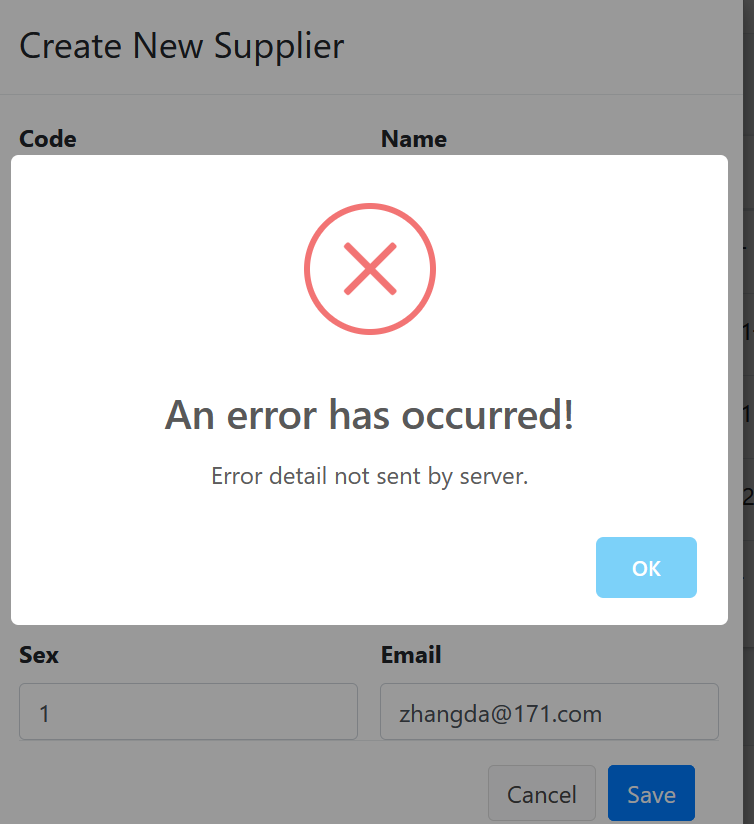
12. 在“Create New Supplier”页面中我们输入完信息之后,点击“Save”按钮。应用程序报了一个错误。如下图。
13.Supplier的增删改查,我们是调用的WebApi来实现保存到数据库与查询数据的操作,那么问题就可能出在WebAPI这一个项目中。在Visual Studio 2022的解决方案资源管理器中,选中“ABP.TPLMS.Web.Host”项目,然后单击鼠标右键,在弹出菜单中选中“设为启动项目”。按F5运行应用程序,程序报错。
14. 在Visual Studio 2022的解决方案资源管理器中,“ABP.TPLMS.Web.Host”项目的App_Data\Log目录下找到log.txt文件,这是一个日志文件。在文件中我找到如下,错误信息。
AspNetCore.Server.IIS.Core.IISHttpServer - Connection ID "18230571335350747201",
Request ID "40000042-000a-fd00-b63f-84710c7967bb": An unhandled exception was thrown by the application.

Microsoft.AspNetCore.Routing.Matching.AmbiguousMatchException: The request matched multiple endpoints. Matches:

 ABP.TPLMS.Suppliers.SupplierAppService.CreateAsync (ABP.TPLMS.Application)

ABP.TPLMS.Suppliers.SupplierAppService.Create (ABP.TPLMS.Application)

   at Microsoft.AspNetCore.Routing.Matching.DefaultEndpointSelector.ReportAmbiguity(CandidateState[] candidateState)

   at Microsoft.AspNetCore.Routing.Matching.DefaultEndpointSelector.ProcessFinalCandidates
(HttpContext httpContext, CandidateState[] candidateState)

   at Microsoft.AspNetCore.Routing.Matching.DefaultEndpointSelector.Select(HttpContext httpContext,
 CandidateState[] candidateState)

   at Microsoft.AspNetCore.Routing.Matching.DfaMatcher.MatchAsync(HttpContext httpContext)

   at Microsoft.AspNetCore.Routing.EndpointRoutingMiddleware.Invoke(HttpContext httpContext)

   at Microsoft.AspNetCore.StaticFiles.StaticFileMiddleware.Invoke(HttpContext context)
using Abp.Application.Services;

using Abp.Domain.Repositories;

using ABP.TPLMS.Entitys;

using ABP.TPLMS.Suppliers.Dto;

using System;

using System.Collections.Generic;

using System.Text;

using System.Threading.Tasks;

namespace ABP.TPLMS.Suppliers

{

   public class SupplierAppService :AsyncCrudAppService<Supplier, SupplierDto, int,
 PagedSupplierResultRequestDto, CreateUpdateSupplierDto, CreateUpdateSupplierDto>,
ISupplierAppService

    {

        public SupplierAppService(IRepository<Supplier, int> repository)

            : base(repository)

    {

    }

        public Task<SupplierDto> Create(CreateUpdateSupplierDto input)

        {

            return CreateAsync(input);

        }

        public override Task<SupplierDto> CreateAsync(CreateUpdateSupplierDto input)

        {

            var sin = input;

            return base.CreateAsync(input);

        }

    }

}
16. 在Visual Studio 2022的解决方案资源管理器中,使用鼠标双击打开 SupplierAppService.cs文件。将Create方法注释。按F5运行应用程序。登录之后,点击“Supplier”目录,我们可以看到供应商列表页面。然后点击供应商列表页面中的Add按钮。
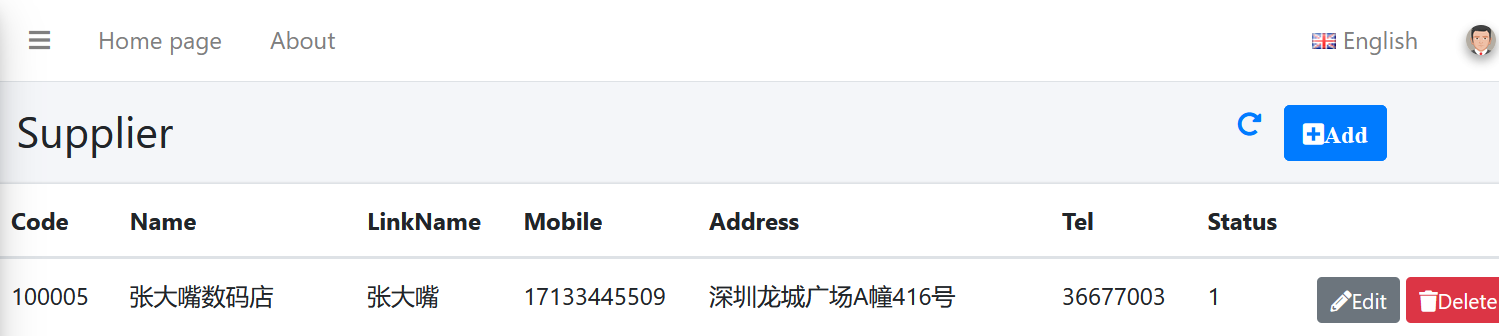
17. 在“Create New Supplier”页面中我们输入完信息之后,点击“Save”按钮。数据保存到数据库,应用会刷新供应商列表页面。如下图。
abp(net core)+easyui+efcore实现仓储管理系统——供应商管理升级之下(六十四)的更多相关文章
- abp(net core)+easyui+efcore实现仓储管理系统——使用 WEBAPI实现CURD (十四)
abp(net core)+easyui+efcore实现仓储管理系统目录 abp(net core)+easyui+efcore实现仓储管理系统——ABP总体介绍(一) abp(net core)+ ...
- abp(net core)+easyui+efcore实现仓储管理系统——出库管理之五(五十四)
abp(net core)+easyui+efcore实现仓储管理系统目录 abp(net core)+easyui+efcore实现仓储管理系统--ABP总体介绍(一) abp(net core)+ ...
- abp(net core)+easyui+efcore实现仓储管理系统——使用 WEBAPI实现CURD (十五)
core)+easyui+efcore实现仓储管理系统目录 abp(net core)+easyui+efcore实现仓储管理系统——ABP总体介绍(一) abp(net core)+easyui+e ...
- abp(net core)+easyui+efcore实现仓储管理系统——出库管理之六(五十五)
abp(net core)+easyui+efcore实现仓储管理系统目录 abp(net core)+easyui+efcore实现仓储管理系统--ABP总体介绍(一) abp(net core)+ ...
- Abp(net core)+easyui+efcore实现仓储管理系统——出库管理之七(五十六)
abp(net core)+easyui+efcore实现仓储管理系统目录 abp(net core)+easyui+efcore实现仓储管理系统--ABP总体介绍(一) abp(net core)+ ...
- abp(net core)+easyui+efcore实现仓储管理系统——使用 WEBAPI实现CURD (十二)
abp(net core)+easyui+efcore实现仓储管理系统目录 abp(net core)+easyui+efcore实现仓储管理系统——ABP总体介绍(一) abp(net core)+ ...
- abp(net core)+easyui+efcore实现仓储管理系统——出库管理之三(五十二)
abp(net core)+easyui+efcore实现仓储管理系统目录 abp(net core)+easyui+efcore实现仓储管理系统--ABP总体介绍(一) abp(net core)+ ...
- abp(net core)+easyui+efcore实现仓储管理系统——菜单 (十六)
系统目录 abp(net core)+easyui+efcore实现仓储管理系统——ABP总体介绍(一) abp(net core)+easyui+efcore实现仓储管理系统——解决方案介绍(二) ...
- abp(net core)+easyui+efcore实现仓储管理系统——EasyUI之货物管理一 (十九)
abp(net core)+easyui+efcore实现仓储管理系统目录 abp(net core)+easyui+efcore实现仓储管理系统——ABP总体介绍(一) abp(net core)+ ...
- abp(net core)+easyui+efcore实现仓储管理系统——EasyUI之货物管理二 (二十)
abp(net core)+easyui+efcore实现仓储管理系统目录 abp(net core)+easyui+efcore实现仓储管理系统——ABP总体介绍(一) abp(net core)+ ...
随机推荐
- springBoot的全局异常处理
GlobalException.java package com.bank.util; import com.bank.exception.ContentEmpyException; import c ...
- ASM1117脚位图
- 基本的dns命令
打开cmd的方式 win+r 键 输入cmd 管理员方式运行 打开桌面 命令提示符 盘符切换 直接输入要切换的盘 查看当前目录下所有文件 dir 切换目录 cd /d 跨盘 ...
- 【Beat】Scrum Meeting 4
时间:2021年6月29日 1.各个成员今日完成的任务以及贡献小时数 姓名 今日完成任务 贡献小时数 鑫 继续进行bug的修改 4 荣娟 继续进行bug的修改 4 亚楠 继续进行bug的修改 4 桂婷 ...
- vite不能用@做为路径的解决方法
vite创建vue3后,发现原来用@做为路径的不能用了,报错信息是 Internal server error: Failed to resolve import "@ 在网上查了一下资料, ...
- Harmonic Number 调和级数(欧拉常数)或者分块暴力
给你个n让你求 Memory limit 32768 kB 输出误差不超过1e-8 思路:做之前不知都调和级数不知道欧拉常数没问题,肯定能先想到暴力打标,打完发现数组内存太大,那么问题就是怎么能让内存 ...
- java多线程--6 死锁问题 锁Lock
java多线程--6 死锁问题 锁Lock 死锁问题 多个线程互相抱着对方需要的资源,然后形成僵持 死锁状态 package com.ssl.demo05; public class DeadLock ...
- VUE基本写法
VUE基本结构 <!DOCTYPE html> <html lang="en"> <head> <meta charset="U ...
- 集合-TreeMap源码分析
一.简介 TreeMap最早出现在JDK 1.2中,是 Java 集合框架中比较重要一个的实现.TreeMap 底层基于红黑树实现,可保证在log(n)时间复杂度内完成 containsKey.get ...
- ggplot2图形可视化应用集锦
数据可视化就是将我们从数据中探索的信息与图形要素对应起来的过程.数据可视化,先要理解数据,再去掌握可视化的方法,这样才能实现高效的数据可视化.数据可视化技术的基本思想,是将数据库中每一个数据项作为单个 ...