
吴裕雄--天生自然 PYTHON数据分析:医疗数据分析

import numpy as np # linear algebra

import pandas as pd # data processing, CSV file I/O (e.g. pd.read_csv)

# plotly

import chart_studio.plotly as py

from plotly.offline import init_notebook_mode, iplot

init_notebook_mode(connected=True)

import plotly.graph_objs as go

import seaborn as sns

# word cloud library

from wordcloud import WordCloud

# matplotlib

import matplotlib.pyplot as plt

# Input data files are available in the "../input/" directory.

# For example, running this (by clicking run or pressing Shift+Enter) will list the files in the input directory
dataframe = pd.read_csv("F:\\kaggleDataSet\\healthcare-data\\test_2v.csv")
import chart_studio.plotly as py

from plotly.graph_objs import *

df_heart_disease = dataframe[dataframe.heart_disease== 1]

labels = df_heart_disease.gender

pie1_list=df_heart_disease.heart_disease

df_hypertension= dataframe[dataframe.hypertension == 1]

labels1 = df_hypertension.gender

pie1_list1=df_hypertension.hypertension

labels2 = dataframe.Residence_type

pie1_list2 = dataframe.heart_disease

labels3 = dataframe.work_type

pie1_list3 = dataframe.heart_disease

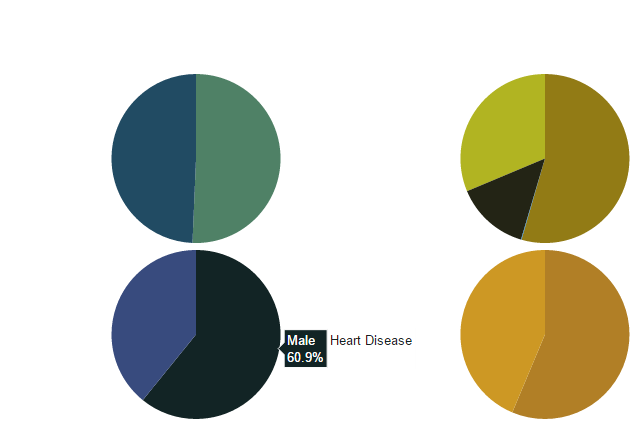
fig = {

    'data': [

        {

            'labels': labels,

            'values': pie1_list,

            'type': 'pie',

            'name': 'Heart Disease',

            'marker': {'colors': ['rgb(56, 75, 126)',

                                  'rgb(18, 36, 37)',

                                  'rgb(34, 53, 101)',

                                  'rgb(36, 55, 57)',

                                  'rgb(6, 4, 4)']},

            'domain': {'x': [0, .48],

                       'y': [0, .49]},

            'hoverinfo':'label+percent+name',

            'textinfo':'none'

        },

        {

            'labels': labels1,

            'values': pie1_list1,

            'marker': {'colors': ['rgb(177, 127, 38)',

                                  'rgb(205, 152, 36)',

                                  'rgb(99, 79, 37)',

                                  'rgb(129, 180, 179)',

                                  'rgb(124, 103, 37)']},

            'type': 'pie',

            'name': 'Hypertension',

            'domain': {'x': [.52, 1],

                       'y': [0, .49]},

            'hoverinfo':'label+percent+name',

            'textinfo':'none'

        },

        {

            'labels': labels2,

            'values': pie1_list2,

            'marker': {'colors': ['rgb(33, 75, 99)',

                                  'rgb(79, 129, 102)',

                                  'rgb(151, 179, 100)',

                                  'rgb(175, 49, 35)',

                                  'rgb(36, 73, 147)']},

            'type': 'pie',

            'name': 'Residence Type',

            'domain': {'x': [0, .48],

                       'y': [.51, 1]},

            'hoverinfo':'label+percent+name',

            'textinfo':'none'

        },

        {

            'labels': labels3,

            'values': pie1_list3,

            'marker': {'colors': ['rgb(146, 123, 21)',

                                  'rgb(177, 180, 34)',

                                  'rgb(206, 206, 40)',

                                  'rgb(175, 51, 21)',

                                  'rgb(35, 36, 21)']},

            'type': 'pie',

            'name':'Work Type',

            'domain': {'x': [.52, 1],

                       'y': [.51, 1]},

            'hoverinfo':'label+percent+name',

            'textinfo':'none'

        }

    ],

    'layout': {'title': '',

               'showlegend': False}

}

iplot(fig)
import chart_studio.plotly as py

import plotly.graph_objs as go

# Create random data with numpy

import numpy as np

df_250 = dataframe.iloc[:250,:]

random_x = df_250.index

random_y0 =  df_250.avg_glucose_level

random_y1 =  df_250.bmi

random_y2 =  df_250.age

# Create traces

trace0 = go.Scatter(

    x = random_x,

    y = random_y0,

    mode = 'markers',

    name = 'Avg. Glucose Level'

)

trace1 = go.Scatter(

    x = random_x,

    y = random_y1,

    mode = 'lines+markers',

    name = 'BMI'

)

trace2 = go.Scatter(

    x = random_x,

    y = random_y2,

    mode = 'lines',

    name = 'Age'

)

data = [trace0, trace1, trace2]

iplot(data, filename='scatter-mode')

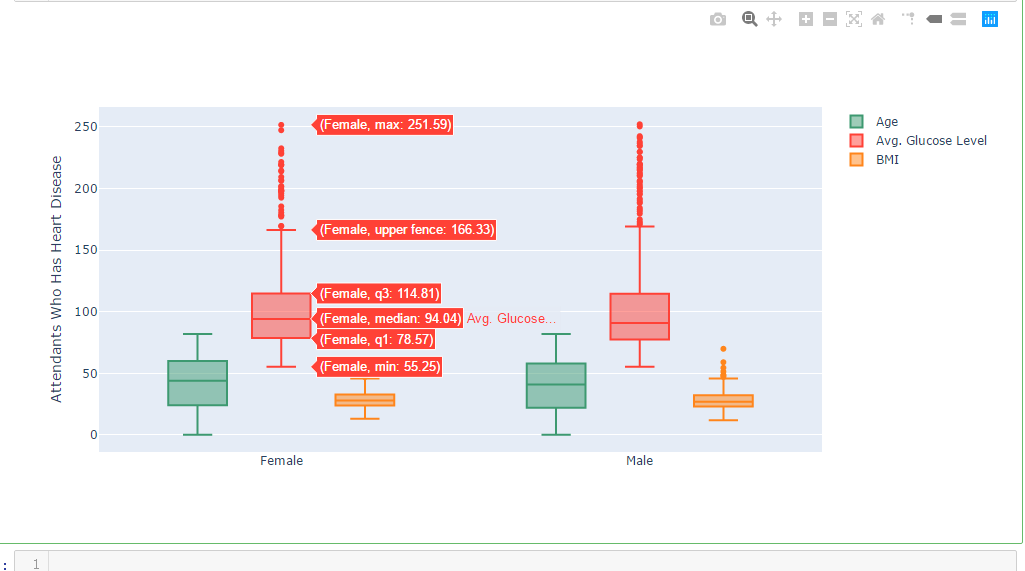
import chart_studio.plotly as py

import plotly.graph_objs as go

df_heart_disease = dataframe[dataframe.heart_disease==1]

labels = df_heart_disease.gender

x = labels

trace0 = go.Box(

    y=dataframe.age,

    x=x,

    name='Age',

    marker=dict(

        color='#3D9970'

    )

)

trace1 = go.Box(

    y=dataframe.avg_glucose_level,

    x=x,

    name='Avg. Glucose Level',

    marker=dict(

        color='#FF4136'

    )

)

trace2 = go.Box(

    y=dataframe.bmi,

    x=x,

    name='BMI',

    marker=dict(

        color='#FF851B'

    )

)

data = [trace0, trace1, trace2]

layout = go.Layout(

    yaxis=dict(

        title='Attendants Who Has Heart Disease',

        zeroline=False

    ),

    boxmode='group'

)

fig = go.Figure(data=data, layout=layout)

iplot(fig)
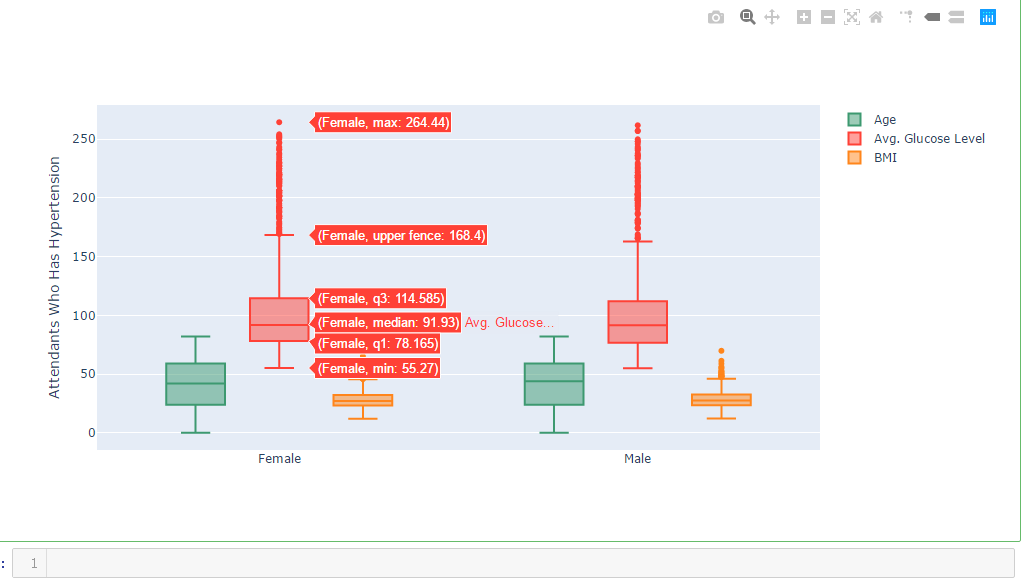
import chart_studio.plotly as py

import plotly.graph_objs as go

df_hypertension= dataframe[dataframe.hypertension == 1]

labels1 = df_hypertension.gender

x = labels1

trace0 = go.Box(

    y=dataframe.age,

    x=x,

    name='Age',

    marker=dict(

        color='#3D9970'

    )

)

trace1 = go.Box(

    y=dataframe.avg_glucose_level,

    x=x,

    name='Avg. Glucose Level',

    marker=dict(

        color='#FF4136'

    )

)

trace2 = go.Box(

    y=dataframe.bmi,

    x=x,

    name='BMI',

    marker=dict(

        color='#FF851B'

    )

)

data = [trace0, trace1, trace2]

layout = go.Layout(

    yaxis=dict(

        title='Attendants Who Has Hypertension',

        zeroline=False

    ),

    boxmode='group'

)

fig = go.Figure(data=data, layout=layout)

iplot(fig)
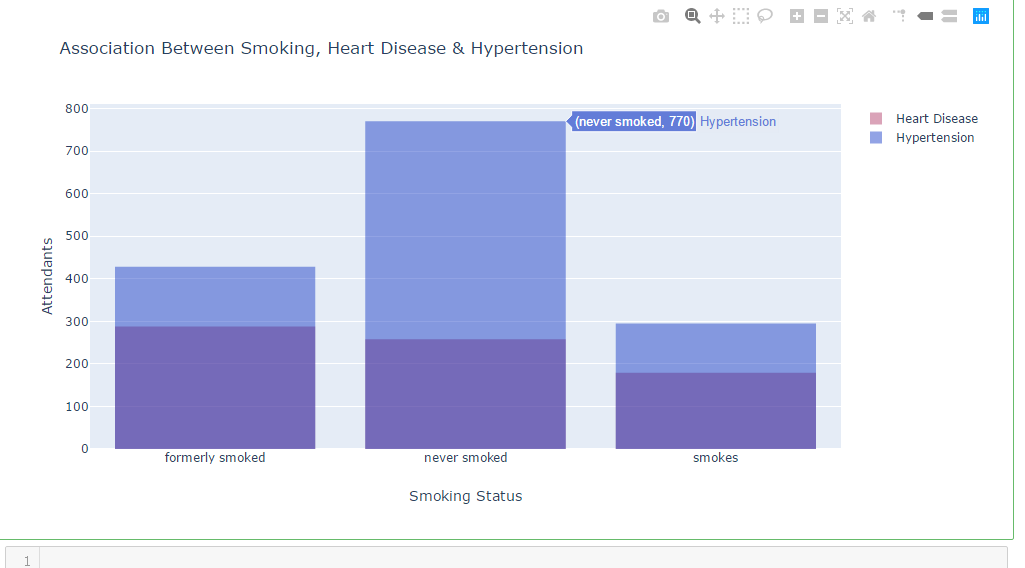
df_heart_disease_1 = dataframe.smoking_status [dataframe.heart_disease == 1  ]

df_hypertension_1  = dataframe.smoking_status [dataframe.hypertension  == 1   ]

trace1 = go.Histogram(

    x=df_heart_disease_1,

    opacity=0.75,

    name = "Heart Disease",

    marker=dict(color='rgba(171, 50, 96, 0.6)'))

trace2 = go.Histogram(

    x=df_hypertension_1,

    opacity=0.75,

    name = "Hypertension",

    marker=dict(color='rgba(12, 50, 196, 0.6)'))

data = [trace1, trace2]

layout = go.Layout(barmode='overlay',

                   title=' Association Between Smoking, Heart Disease & Hypertension',

                   xaxis=dict(title='Smoking Status'),

                   yaxis=dict( title='Attendants'),

)

fig = go.Figure(data=data, layout=layout)

iplot(fig)
df_heart_disease_1 = dataframe.work_type [dataframe.heart_disease    == 1  ]

df_hypertension_1 = dataframe.work_type [dataframe.hypertension    == 1   ]

trace1 = go.Histogram(

    x=df_heart_disease_1,

    opacity=0.75,

    name = "Heart Disease",

    marker=dict(color='rgba(171, 50, 96, 0.6)'))

trace2 = go.Histogram(

    x=df_hypertension_1,

    opacity=0.75,

    name = "Hypertension",

    marker=dict(color='rgba(12, 50, 196, 0.6)'))

data = [trace1, trace2]

layout = go.Layout(barmode='overlay',

                   title=' Association Between Work Type, Heart Disease & Hypertension',

                   xaxis=dict(title=''),

                   yaxis=dict( title='Attendants'),

)

fig = go.Figure(data=data, layout=layout)

iplot(fig)

吴裕雄--天生自然 PYTHON数据分析:医疗数据分析的更多相关文章
- 吴裕雄--天生自然 PYTHON数据分析:糖尿病视网膜病变数据分析(完整版)
# This Python 3 environment comes with many helpful analytics libraries installed # It is defined by ...
- 吴裕雄--天生自然 PYTHON数据分析:所有美国股票和etf的历史日价格和成交量分析
# This Python 3 environment comes with many helpful analytics libraries installed # It is defined by ...
- 吴裕雄--天生自然 python数据分析:健康指标聚集分析(健康分析)
# This Python 3 environment comes with many helpful analytics libraries installed # It is defined by ...
- 吴裕雄--天生自然 python数据分析:葡萄酒分析
# import pandas import pandas as pd # creating a DataFrame pd.DataFrame({'Yes': [50, 31], 'No': [101 ...
- 吴裕雄--天生自然 PYTHON数据分析:人类发展报告——HDI, GDI,健康,全球人口数据数据分析
import pandas as pd # Data analysis import numpy as np #Data analysis import seaborn as sns # Data v ...
- 吴裕雄--天生自然 python数据分析:医疗费数据分析
import numpy as np import pandas as pd import os import matplotlib.pyplot as pl import seaborn as sn ...
- 吴裕雄--天生自然 PYTHON语言数据分析:ESA的火星快车操作数据集分析
import os import numpy as np import pandas as pd from datetime import datetime import matplotlib imp ...
- 吴裕雄--天生自然 python语言数据分析:开普勒系外行星搜索结果分析
import pandas as pd pd.DataFrame({'Yes': [50, 21], 'No': [131, 2]}) pd.DataFrame({'Bob': ['I liked i ...
- 吴裕雄--天生自然 PYTHON数据分析:基于Keras的CNN分析太空深处寻找系外行星数据
#We import libraries for linear algebra, graphs, and evaluation of results import numpy as np import ...
随机推荐
- python all()函数
1.描述all() 函数——用于判断给定的可迭代参数 iterable 中的所有元素是否都为TRUE,如果是返回 True,否则返回 False.元素除了是 0.空.FALSE 外都算 TRUE.2. ...
- int a;和 int &a;的区别
int a的意思是定义一个变量a int &a意思是定义一个引用 //引用相当于指针再取值 他和被引用的变量都是表示同一块内存 引用就是给变量取别名 int b ;int &a=b; ...
- mysql按月分表, 组合查询
每个月月底最后一天建好下个月的空表 或每年底建1到12月的空表 , table_201901,table_201902,table_201903 增加记录不需要修改,insert到当月对应表就好了. ...
- 迅为iTOP-开发板-驱动-can和rfid配置
在迅为开发板中,在 4412,4418 以及 6818 中,有的开发板默认配置 RFID,有的默认配 置 CAN 驱动(IMX6 默认都配置). 本文档介绍如何配置 CAN 和 RFID 的驱动. 截 ...
- tensorflow用法记录
使用 embedding 变量 import tensorflow as tf import numpy as np sess = tf.InteractiveSession() M = list(' ...
- 关于前端html5的总结
简介 HTML5 是HTML语言的第5次重大修改产生的新的HTML语言版本 HTML5 是W3C组织和众多主要浏览器厂商以及众多开发者共同努力的结果,得之不易 HTML5 主要改进包括:增加新的HTM ...
- MySQL允许某个IP网段从远程访问的方法
grant select,insert,update,create on test.* to test@'192.168.8.%' identified by '123456'; 允许增删改查 ...
- Perl: 单引号里面的直接给当做标量了,而直接输出($`)的话就是变量值,即相符段落的前置字符会存到这里。输出‘$`’ 就变成标量值了
print '$`'."\n";print '$&'."\n";print $'."\n"; 输出: $`$& 而直接输出( ...
- 关于css中hover下拉框的一个bug
写hover下拉框的时候会遇到一个奇怪的bug,就是下拉框下来的时候会被所在位置的div遮挡,哪怕下拉框使用的absolute,也会被遮挡. 如图: 这个语言选择的下拉框会被下面的div挡住(截图是已 ...
- Linux_列出文件和文件属性
ls +文件名:列出该文件 ls +目录名:列出该目录下的文件 ls 什么也不加:列出当前工作目录下的文件 ls -a 列出包括隐藏文件,即所有文件名 ls -l 列出文件名+详细信息 ls -al ...