
React Native商城项目实战09 - 个人中心自定义cell
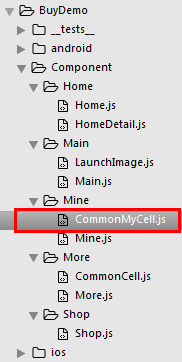
1.新建组件CommonMyCell.js
/**

 * 个人中心自定义cell

 */

import React, { Component } from 'react';

import {

    AppRegistry,

    StyleSheet,

    Text,

    View,

    Image,

    TouchableOpacity,

    Platform,

} from 'react-native';

// ES5

var MyCell = React.createClass({

    getDefaultProps(){

        return{

            leftIconName:'',    // cell左侧图标

            leftTitle:'',   // cell左侧标题

            rightIconName:'',   //  cell右侧图标

            rightTitle:'',  // cell右侧标题

        }

    },

    render() {

        return (

            <TouchableOpacity onPress={()=>{alert('点击了')}}>

                <View style={styles.container}>

                    <View style={styles.leftViewStyle}>

                        <Image source={{uri:this.props.leftIconName}} style={styles.leftImgStyle} />

                        <Text style={styles.leftTitleStyle}>{this.props.leftTitle}</Text>

                    </View>

                    <View style={styles.rightViewStyle}>

                        {this.rightSubView()}

                    </View>

                </View>

            </TouchableOpacity>

        );

    },

    // cell右侧子视图

    rightSubView(){

        return(

            <View style={{flexDirection:'row',alignItems:'center'}}>

                {this.renderRightContent()}

                <Image source={{uri:'icon_cell_rightArrow'}} style={{width:8, height:13, marginRight:8, marginLeft:5}} />

            </View>

        )

    },

    // cell右侧具体内容

    renderRightContent(){

        if(this.props.rightIconName.length == 0){   // 不返回图片

            return(

                <Text style={{color:'gray'}}>{this.props.rightTitle}</Text>

            )

        }else{

            <Image source={{uri:this.props.rightIconName}} style={{width:24, height:13}} />

        }

    },

});

const styles = StyleSheet.create({

    container: {

        // 主轴的方向

        flexDirection:'row',

        // 主轴的对齐方式

        justifyContent:'space-between',

        // 背景颜色

        backgroundColor:'white',

        // 垂直居中

        alignItems:'center',

        // 高度

        height:Platform.OS == 'ios' ? 40 : 36,

        // 下边框

        borderBottomColor:'#e8e8e8',

        borderBottomWidth:0.5

    },

    leftViewStyle:{

        // 主轴的方向

        flexDirection:'row',

        // 侧轴居中

        alignItems:'center',

        // 左外边距

        marginLeft:8

    },

    rightViewStyle:{

    },

    leftImgStyle:{ // 左边的图片

        width:24,

        height:24,

        marginRight:6,

        // 圆角

        borderRadius:12

    },

    leftTitleStyle:{

        fontSize:16

    }

});

// 输出

module.exports = MyCell;
2.Mine.js里如何使用?
/**

 * 我的

 */

import React, { Component } from 'react';

import {

    AppRegistry,

    StyleSheet,

    Text,

    View,

    ScrollView

} from 'react-native';

/*======导入外部组件类======*/

var MyCell = require('./CommonMyCell');

// ES5

var Mine = React.createClass({

    render() {

        return (

            <ScrollView>

                <View style={{marginTop:20}}>

                    <MyCell

                        leftIconName="draft"

                        leftTitle="钱包"

                        rightTitle="账户余额:¥100.88"

                    />

                </View>

            </ScrollView>

        );

    }

});

const styles = StyleSheet.create({

});

// 输出

module.exports = Mine;
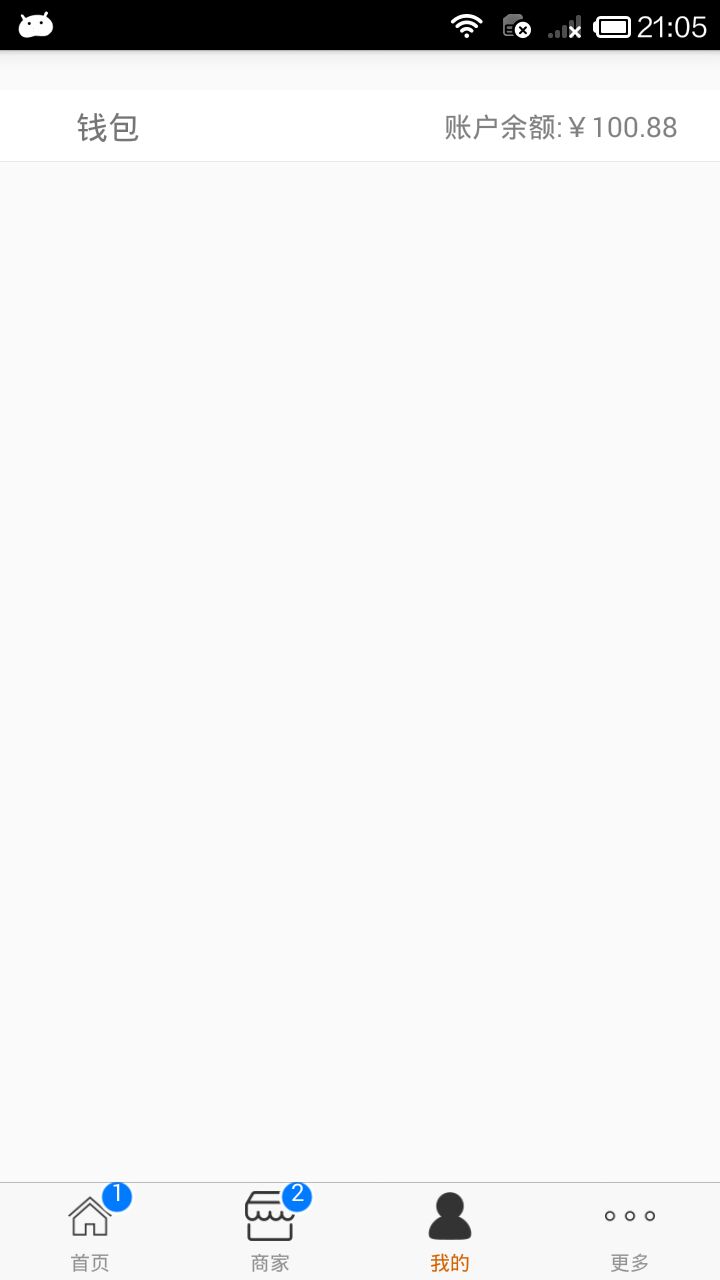
3.效果图
React Native商城项目实战09 - 个人中心自定义cell的更多相关文章
- React Native商城项目实战11 - 个人中心头部内容
1.创建MineHeaderView.js /** * 个人中心头部内容 */ import React, { Component } from 'react'; import { AppRegist ...
- React Native商城项目实战10 - 个人中心中间内容设置
1.新建一个MineMiddleView.js,专门用于构建中间的内容 /** * 个人中心中间内容设置 */ import React, { Component } from 'react'; im ...
- React Native商城项目实战08 - 设置“More”界面cell
1.自定义可复用的cell More/CommonCell.js: /** * 自定义可复用的cell */ import React, { Component } from 'react'; imp ...
- React Native商城项目实战04 - 封装TabNavigator.Item的创建
1.Main.js /** * 主页面 */ import React, { Component } from 'react'; import { StyleSheet, Text, View, Im ...
- React Native商城项目实战02 - 主要框架部分(tabBar)
1.安装插件,cd到项目根目录下执行: $ npm i react-native-tab-navigator --save 2.主框架文件Main.js /** * 主页面 */ import Rea ...
- React Native商城项目实战01 - 初始化设置
1.创建项目 $ react-native init BuyDemo 2.导入图片资源 安卓:把文件夹放到/android/app/src/main/res/目录下,如图: iOS: Xcode打开工 ...
- React Native商城项目实战07 - 设置“More”界面导航条
1.More/More.js /** * 更多 */ import React, { Component } from 'react'; import { AppRegistry, StyleShee ...
- React Native商城项目实战05 - 设置首页的导航条
1.Home.js /** * 首页 */ import React, { Component } from 'react'; import { AppRegistry, StyleSheet, Te ...
- React Native商城项目实战06 - 设置安卓中的启动页
1.Main 目录下新建LaunchImage.js: /** * 启动页 */ import React, { Component } from 'react'; import { AppRegis ...
随机推荐
- ^A '\001' 分隔符
^A 分隔符符号\001,使用组合按键“ctrl+V+A”获得
- BeautifulSoup库的基本元素
BeautifulSoup库 <html> <body> <p class='title'></p> </body> </html&g ...
- [Codeforces 1239D]Catowise City(2-SAT)
[Codeforces 1239D]Catowise City(2-SAT) 题面 有n个主人,每个主人都有一只猫.每个主人认识一些猫(包括自己的猫).现在要选出一些人和一些猫,个数均大于0且总共为n ...
- Zookeeper — 应用场景
大致来说,zookeeper 的使用场景如下,我就举几个简单的,大家能说几个就好了: 分布式协调 分布式锁 元数据/配置信息管理 HA高可用性 分布式协调 这个其实是 zookeeper 很经典的一个 ...
- WindowsForms使用Telerik Reporting
新建一个WindowsForms窗体项目 然后拖动ReportViewer这个控件到WindowsForms的窗体中 如上图所示,用来呈现报表的控件,这个控件可以打印报表,转换报表这类的功能 接下来我 ...
- 以当前时间作为GUID的方法
在C#中,系统提供了GUID类,用户可以通过该类来获得128位的唯一标识,但是该标识不具有可读性,很难把该GUID显示在界面上,以当前时间精确到毫秒来作为GUID是一个比较不错的做法,但是DateTi ...
- Linux系统性能测试工具(五)——磁盘io性能工具之fio
本文介绍关于Linux系统(适用于centos/ubuntu等)的磁盘io性能测试工具-fio.磁盘io性能测试工具包括: fio: dd
- JS中对象的定义及相关操作
<!DOCTYPE html> <html xmlns="http://www.w3.org/1999/xhtml"> <head> <m ...
- 14.Linux-CentOS系统proc文件系统丢失
问题: 在强制卸载根目录下的磁盘,导致/proc文件系统丢失. 解决: 重启服务器重新生成.
- Linux--用户与用户组--03
用户管理: 1.useradd 创建用户 -c 指定用户描述 -d 指定家目录 -g 指定主组 -G 指定附加组 附加组可以有多个 -s 指定shell程序 特殊的/sbin/nologin--> ...