
Android物联网应用程序开发(智慧城市)—— 火焰监控界面开发
效果:
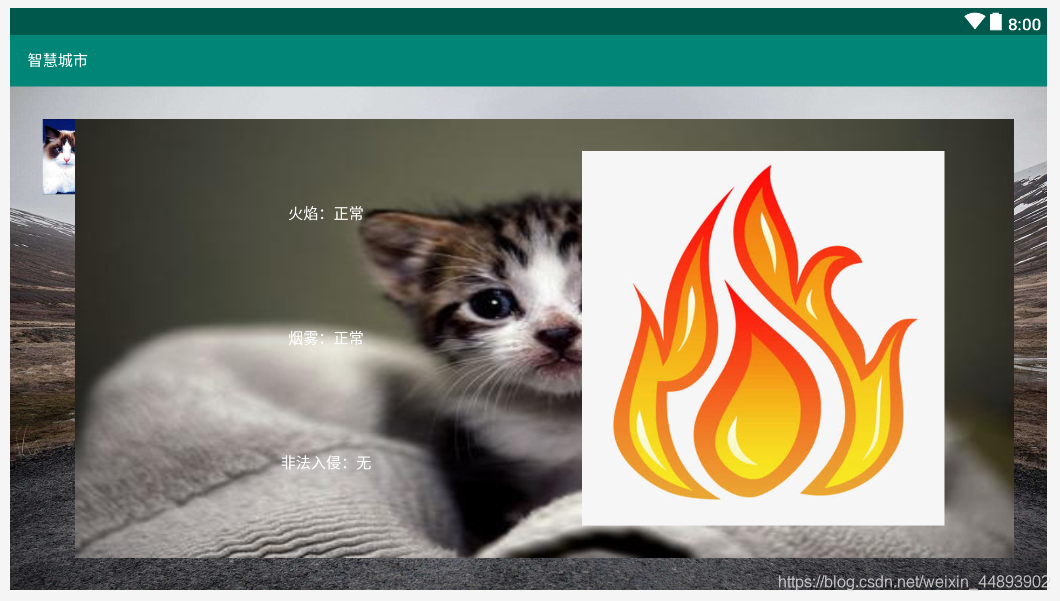
布局代码:
<?xml version="1.0" encoding="utf-8"?>

<RelativeLayout xmlns:android="http://schemas.android.com/apk/res/android"

    xmlns:app="http://schemas.android.com/apk/res-auto"

    xmlns:tools="http://schemas.android.com/tools"

    android:layout_width="fill_parent"

    android:layout_height="fill_parent"

    android:background="@drawable/bg_environment"

    tools:context=".VolcanoMonitoring">

    <ImageView

        android:id="@+id/imageView1"

        android:layout_width="30dp"

        android:layout_height="70dp"

        android:layout_marginLeft="30dp"

        android:layout_marginTop="30dp"

        android:src="@drawable/tab_cat"

        android:scaleType="centerCrop"/>

    <LinearLayout

        android:layout_width="match_parent"

        android:layout_height="match_parent"

        android:background="@drawable/bg_frame_dascend_setting"

        android:orientation="horizontal"

        android:padding="30dp"

        android:layout_marginTop="30dp"

        android:layout_marginRight="30dp"

        android:layout_marginBottom="30dp"

        android:layout_toRightOf="@+id/imageView1">

        <LinearLayout

            android:layout_width="0.0dp"

            android:layout_height="fill_parent"

            android:layout_weight="1"

            android:gravity="center"

            android:orientation="vertical">

            <TextView

                android:id="@+id/textView1"

                android:layout_width="wrap_content"

                android:layout_height="0.0dp"

                android:layout_weight="1"

                android:gravity="center"

                android:textColor="@color/white"

                android:text="火焰:正常"/>

            <TextView

                android:id="@+id/textView2"

                android:layout_width="wrap_content"

                android:layout_height="0.0dp"

                android:layout_weight="1"

                android:gravity="center"

                android:textColor="@color/white"

                android:text="烟雾:正常"/>

            <TextView

                android:id="@+id/textView3"

                android:layout_width="wrap_content"

                android:layout_height="0.0dp"

                android:layout_weight="1"

                android:gravity="center"

                android:textColor="@color/white"

                android:text="非法入侵:无"/>

        </LinearLayout>

        <LinearLayout

            android:layout_width="0.0dp"

            android:layout_height="fill_parent"

            android:layout_weight="1"

            android:gravity="center">

            <ImageView

                android:id="@+id/imageView2"

                android:layout_width="wrap_content"

                android:layout_height="wrap_content"

                android:src="@drawable/fire"/>

        </LinearLayout>

    </LinearLayout>

</RelativeLayout>
Android物联网应用程序开发(智慧城市)—— 火焰监控界面开发的更多相关文章
- Android物联网应用程序开发(智慧城市)—— 用户注册界面开发
效果: 布局代码: <?xml version="1.0" encoding="utf-8"?> <RelativeLayout xmlns: ...
- 【可视化大屏教程】用Python开发智慧城市数据分析大屏!
目录 一.开发背景 二.讲解代码 2.1 大标题+背景图 2.2 各区县交通事故统计图-系列柱形图 2.3 图书馆建设率-水球图 2.4 当年城市空气质量aqi指数-面积图 2.5 近7年人均生产总值 ...
- Android物联网应用程序开发(智慧城市)—— 查询购物信息界面开发
效果: 布局代码: <RelativeLayout xmlns:android="http://schemas.android.com/apk/res/android" xm ...
- Android物联网应用程序开发(智慧城市)—— 摄像头监控界面开发
效果: 布局代码: <?xml version="1.0" encoding="utf-8"?> <RelativeLayout xmlns: ...
- Android物联网应用程序开发(智慧城市)—— 购物信息的存储界面开发
效果: 布局代码: <?xml version="1.0" encoding="utf-8"?> <LinearLayout xmlns:an ...
- Android物联网应用程序开发(智慧城市)—— 环境状态值范围设置界面开发
效果图: 代码: 布局: <?xml version="1.0" encoding="utf-8"?> <LinearLayout xmlns ...
- Android物联网应用程序开发(智慧园区)—— 图片预览界面
效果图: 实现步骤: 1.首先在 build.gradle 文件中引入 RecycleView implementation 'com.android.support:recyclerview-v7: ...
- Android物联网应用程序开发(智慧园区)—— 设置传感器阈值对话框界面
效果图: 自定义对话框布局: <?xml version="1.0" encoding="utf-8"?> <LinearLayout xml ...
- Android物联网应用程序开发(智慧园区)—— 园区监控系统界面
效果图: 布局代码: <?xml version="1.0" encoding="utf-8"?> <LinearLayout xmlns:a ...
随机推荐
- python 从ubantu环境迁移到windows环境
下载安装Anaconda3 Anaconda3-2021.05-Windows-x86_64.exe 默认安装目录 C:\ProgramData\Anaconda3 可以启动Anaconda查看不同的 ...
- mybatis缓存+aop出现的问题
在对某些特殊数据进行转换时,getOne方法后执行fieleInfoHandle进行转换,如果直接使用fixedTableData进行操作,没有后续的二次调用这样是没问题的,但是在后面当执行完upda ...
- jquery总结和注意事项
1.关于页面元素的引用通过jquery的$()引用元素包括通过id.class.元素名以及元素的层级关系及dom或者xpath条件等方法,且返回的对象为jquery对象(集合对象),不能直接调用dom ...
- 如何在linux 上配置NTP 时间同步?
故障现象: 有些应用场景,对时间同步的要求严格,需要用到NTP同步,如何在linux上配置NTP时间同步? 解决方案: 在linux 上配置NTP 时间同步,具休操作步骤,整理如下: 1.安装软件包( ...
- Moment.js使用笔记
零.前情提要 上个月开发了数据平台,用的框架是vue + Ant Design of Vue,其中用了组件[range-picker]日期选择框,涉及到时间方法就去看了momentJS,以此记录~ 如 ...
- Reids安全加固
目录 一.简介 二.加固方案 一.简介 Redis 因配置不当存在未授权访问漏洞,可以被攻击者恶意利用. 在特定条件下,如果Redis以root身份运行,黑客可以给root账号写入SSH公钥文件,直接 ...
- Linux命令执行过程
目录 一.命令分类 二.命令执行顺序 三.命令分类及查找基本命令 四.命令执行过程 一.命令分类 Linux命令分为两类,具体为内部命令和外部命令 内部命令: 指shell内部集成的命令,此类命令无需 ...
- 【划重点】Python pandas简介
一.pandas获取Excel表单的两种方式 import pandas as pd df1 = pd.DataFrame(pd.read_excel(r'C:\Users\ASUS\Desktop\ ...
- 2020KCTF秋季赛签到题
比赛平台:https://ctf.pediy.com/game-season_fight-158.htm 开场 签到题 例行检查,64位程序,无壳 试运行一下,看看大概的情况 64位ida载入,根据运 ...
- Razor语法2
语法名称 Razor 语法 Web Forms 等效语法 代码块 @{ int x = 123; string y = "because."; } <% int x = 12 ...