
Android物联网应用程序开发(智慧城市)—— 购物信息的存储界面开发
效果:
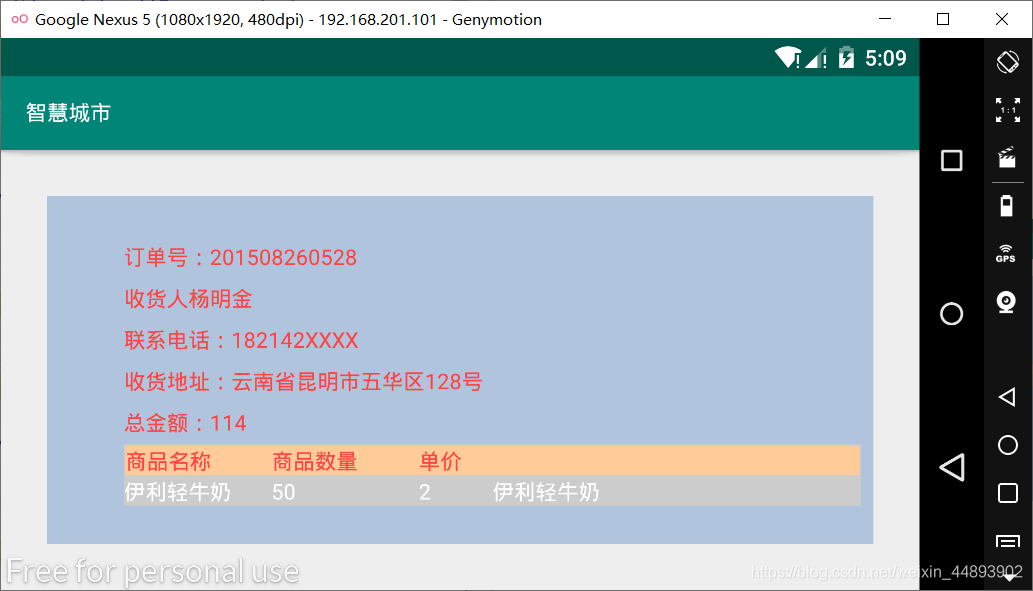
布局代码:
<?xml version="1.0" encoding="utf-8"?>

<LinearLayout xmlns:android="http://schemas.android.com/apk/res/android"

    xmlns:app="http://schemas.android.com/apk/res-auto"

    xmlns:tools="http://schemas.android.com/tools"

    android:layout_width="match_parent"

    android:layout_height="match_parent"

    android:orientation="vertical"

    tools:context=".GoodsInfo">

    <RelativeLayout

        android:layout_width="fill_parent"

        android:layout_height="fill_parent"

        android:layout_margin="30dp"

        android:background="	#B0C4DE">

        <TextView

            android:id="@+id/text1"

            android:layout_width="wrap_content"

            android:layout_height="wrap_content"

            android:layout_alignParentLeft="true"

            android:layout_alignParentRight="true"

            android:layout_marginLeft="50dp"

            android:layout_marginTop="30dp"

            android:text="订单号:201508260528"

            android:textColor="@android:color/holo_red_light"/>

        <TextView

            android:id="@+id/text2"

            android:layout_width="wrap_content"

            android:layout_height="wrap_content"

            android:layout_alignLeft="@id/text1"

            android:layout_below="@id/text1"

            android:layout_marginTop="8dip"

            android:text="收货人:杨明金"

            android:textColor="@android:color/holo_red_light"/>

        <TextView

            android:id="@+id/text3"

            android:layout_width="wrap_content"

            android:layout_height="wrap_content"

            android:layout_alignLeft="@id/text1"

            android:layout_below="@id/text2"

            android:layout_marginTop="8dip"

            android:textColor="@android:color/holo_red_light"

            android:text="联系电话:182142XXXX"/>

        <TextView

            android:id="@+id/text4"

            android:layout_width="wrap_content"

            android:layout_height="wrap_content"

            android:layout_alignLeft="@id/text1"

            android:layout_below="@id/text3"

            android:layout_marginTop="8dip"

            android:textColor="@android:color/holo_red_light"

            android:text="收货地址:云南省昆明市五华区128号"/>

        <TextView

            android:id="@+id/text5"

            android:layout_width="wrap_content"

            android:layout_height="wrap_content"

            android:layout_alignLeft="@id/text1"

            android:layout_below="@id/text4"

            android:layout_marginTop="8dip"

            android:textColor="@android:color/holo_red_light"

            android:text="总金额:114"/>

        <TableLayout

            android:id="@+id/tableLayout1"

            android:layout_width="fill_parent"

            android:layout_height="wrap_content"

            android:layout_alignLeft="@id/text1"

            android:layout_below="@id/text5"

            android:layout_centerVertical="true"

            android:layout_marginTop="5dp"

            android:layout_marginRight="8dip"

            android:background="#ffcccccc">

            <TableRow

                android:id="@+id/tableRow1"

                android:layout_width="wrap_content"

                android:layout_height="wrap_content"

                android:background="#ffffcc99"

                android:layout_margin="1dip">

                <TextView

                    android:layout_width="0.0dp"

                    android:layout_height="wrap_content"

                    android:layout_weight="2"

                    android:text="商品名称"

                    android:textColor="@android:color/holo_red_light" />

                <TextView

                    android:layout_width="0.0dp"

                    android:layout_height="wrap_content"

                    android:layout_weight="2"

                    android:text="商品数量"

                    android:textColor="@android:color/holo_red_light" />

                <TextView

                    android:layout_width="0.0dp"

                    android:layout_height="wrap_content"

                    android:layout_weight="1"

                    android:text="单价"

                    android:textColor="@android:color/holo_red_light" />

                <TextView

                    android:layout_width="0.0dp"

                    android:layout_height="wrap_content"

                    android:layout_weight="5"

                    android:text=""

                    android:textColor="@android:color/holo_red_light" />

            </TableRow>

            <TableRow

                android:id="@+id/tableRow2"

                android:layout_width="wrap_content"

                android:layout_height="wrap_content">

                <TextView

                    android:layout_width="0.0dp"

                    android:layout_height="wrap_content"

                    android:layout_weight="2"

                    android:text="伊利轻牛奶"

                    android:textColor="@android:color/white"/>

                <TextView

                    android:layout_width="0.0dp"

                    android:layout_height="wrap_content"

                    android:layout_weight="2"

                    android:text="50"

                    android:textColor="@android:color/white"/>

                <TextView

                    android:layout_width="0.0dp"

                    android:layout_height="wrap_content"

                    android:layout_weight="1"

                    android:text="2"

                    android:textColor="@android:color/white"/>

                <TextView

                    android:layout_width="0.0dp"

                    android:layout_height="wrap_content"

                    android:layout_weight="5"

                    android:text="伊利轻牛奶"

                    android:textColor="@android:color/white"/>

            </TableRow>

        </TableLayout>

    </RelativeLayout>

    <Spinner

        android:id="@+id/spinner"

        android:layout_width="wrap_content"

        android:layout_height="wrap_content"

        android:layout_below="@id/tableLayout1"

        android:layout_marginTop="10dp"

        android:layout_alignRight="@id/tableLayout1"/>

    <Button

        android:layout_width="30dp"

        android:layout_height="30dp"

        android:layout_alignRight="@id/tableLayout1"

        android:layout_below="@id/spinner"

        android:layout_marginTop="10dp"/>

</LinearLayout>
Android物联网应用程序开发(智慧城市)—— 购物信息的存储界面开发的更多相关文章
- 【可视化大屏教程】用Python开发智慧城市数据分析大屏!
目录 一.开发背景 二.讲解代码 2.1 大标题+背景图 2.2 各区县交通事故统计图-系列柱形图 2.3 图书馆建设率-水球图 2.4 当年城市空气质量aqi指数-面积图 2.5 近7年人均生产总值 ...
- Android物联网应用程序开发(智慧城市)—— 查询购物信息界面开发
效果: 布局代码: <RelativeLayout xmlns:android="http://schemas.android.com/apk/res/android" xm ...
- Android物联网应用程序开发(智慧城市)—— 用户注册界面开发
效果: 布局代码: <?xml version="1.0" encoding="utf-8"?> <RelativeLayout xmlns: ...
- Android物联网应用程序开发(智慧城市)—— 摄像头监控界面开发
效果: 布局代码: <?xml version="1.0" encoding="utf-8"?> <RelativeLayout xmlns: ...
- Android物联网应用程序开发(智慧城市)—— 火焰监控界面开发
效果: 布局代码: <?xml version="1.0" encoding="utf-8"?> <RelativeLayout xmlns: ...
- Android物联网应用程序开发(智慧城市)—— 环境状态值范围设置界面开发
效果图: 代码: 布局: <?xml version="1.0" encoding="utf-8"?> <LinearLayout xmlns ...
- Android物联网应用程序开发(智慧园区)—— 图片预览界面
效果图: 实现步骤: 1.首先在 build.gradle 文件中引入 RecycleView implementation 'com.android.support:recyclerview-v7: ...
- Android物联网应用程序开发(智慧园区)—— 设置传感器阈值对话框界面
效果图: 自定义对话框布局: <?xml version="1.0" encoding="utf-8"?> <LinearLayout xml ...
- Android物联网应用程序开发(智慧园区)—— 园区监控系统界面
效果图: 布局代码: <?xml version="1.0" encoding="utf-8"?> <LinearLayout xmlns:a ...
随机推荐
- 石墨文档Websocket百万长连接技术实践
引言 在石墨文档的部分业务中,例如文档分享.评论.幻灯片演示和文档表格跟随等场景,涉及到多客户端数据同步和服务端批量数据推送的需求,一般的 HTTP 协议无法满足服务端主动 Push 数据的场景,因此 ...
- zabbix之监控 io
#:编写监控脚本 root@ubuntu:/etc/zabbix/zabbix_agentd.conf.d# vim iotop_total.sh #!/bin/bash #Date: 2016/11 ...
- 【编程思想】【设计模式】【结构模式Structural】front_controller
Python版 https://github.com/faif/python-patterns/blob/master/structural/front_controller.py #!/usr/bi ...
- 【Linux】【Basis】文件系统
FHS:Filesystem Hierarchy Standard Web site: https://wiki.linuxfoundation.org/lsb/fhs http://www.path ...
- Js和Thymeleaf如何获取model中的值
一.Jquery获取Model中的数据 1.将model中的值赋给hidden,然后Js获取隐藏域的值. 后台的实现: @RequestMapping("/QEditorMod1" ...
- 关于requests.exceptions.ConnectionError: HTTPSConnectionPool的问题
错误如下: raise ConnectionError(e, request=request)requests.exceptions.ConnectionError: HTTPSConnectionP ...
- 一文详解面试常考的TopK问题
首发公众号:bigsai ,转载请附上本文链接 前言 hello,大家好,我是bigsai哥哥,好久不见,甚是想念哇! 今天给大家分享一个TOPK问题,不过我这里不考虑特别大分布式的解决方案,普通的一 ...
- MySQL 的日志:binlog
前言:binlog 用于记录数据库执行写入性操作的日志信息,以二进制的形式保留在磁盘中.它是由 Server 层进行记录的,使用任何存储引擎都会产生 binlog. 实验准备 我们通过 Docker ...
- JAVA将Object对象转byte数组
/** * 将Object对象转byte数组 * @param obj byte数组的object对象 * @return */ public static byte[] toByteArray(Ob ...
- java类型转换拓展
数据类型拓展 在Java中二进制用0b开头,八进制用0开头,十六进制用0x表示 整数拓展 int i=10; int i2=010;//八进制 int i3=0x10;//十六进制0x,0-9,A- ...