
Android物联网应用程序开发(智慧城市)—— 火焰监控界面开发
效果:
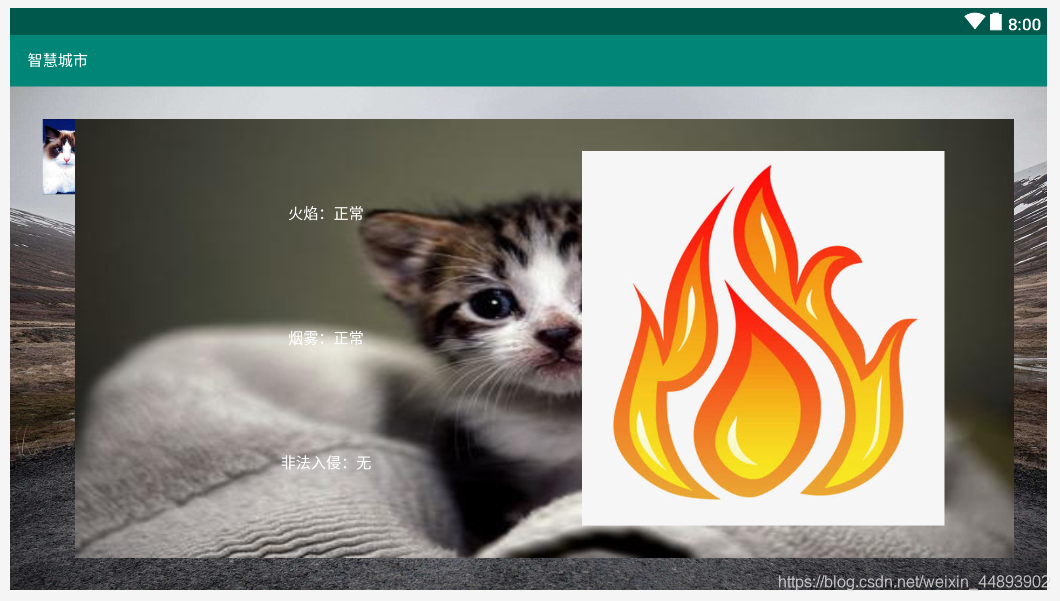
布局代码:
<?xml version="1.0" encoding="utf-8"?>

<RelativeLayout xmlns:android="http://schemas.android.com/apk/res/android"

    xmlns:app="http://schemas.android.com/apk/res-auto"

    xmlns:tools="http://schemas.android.com/tools"

    android:layout_width="fill_parent"

    android:layout_height="fill_parent"

    android:background="@drawable/bg_environment"

    tools:context=".VolcanoMonitoring">

    <ImageView

        android:id="@+id/imageView1"

        android:layout_width="30dp"

        android:layout_height="70dp"

        android:layout_marginLeft="30dp"

        android:layout_marginTop="30dp"

        android:src="@drawable/tab_cat"

        android:scaleType="centerCrop"/>

    <LinearLayout

        android:layout_width="match_parent"

        android:layout_height="match_parent"

        android:background="@drawable/bg_frame_dascend_setting"

        android:orientation="horizontal"

        android:padding="30dp"

        android:layout_marginTop="30dp"

        android:layout_marginRight="30dp"

        android:layout_marginBottom="30dp"

        android:layout_toRightOf="@+id/imageView1">

        <LinearLayout

            android:layout_width="0.0dp"

            android:layout_height="fill_parent"

            android:layout_weight="1"

            android:gravity="center"

            android:orientation="vertical">

            <TextView

                android:id="@+id/textView1"

                android:layout_width="wrap_content"

                android:layout_height="0.0dp"

                android:layout_weight="1"

                android:gravity="center"

                android:textColor="@color/white"

                android:text="火焰:正常"/>

            <TextView

                android:id="@+id/textView2"

                android:layout_width="wrap_content"

                android:layout_height="0.0dp"

                android:layout_weight="1"

                android:gravity="center"

                android:textColor="@color/white"

                android:text="烟雾:正常"/>

            <TextView

                android:id="@+id/textView3"

                android:layout_width="wrap_content"

                android:layout_height="0.0dp"

                android:layout_weight="1"

                android:gravity="center"

                android:textColor="@color/white"

                android:text="非法入侵:无"/>

        </LinearLayout>

        <LinearLayout

            android:layout_width="0.0dp"

            android:layout_height="fill_parent"

            android:layout_weight="1"

            android:gravity="center">

            <ImageView

                android:id="@+id/imageView2"

                android:layout_width="wrap_content"

                android:layout_height="wrap_content"

                android:src="@drawable/fire"/>

        </LinearLayout>

    </LinearLayout>

</RelativeLayout>
Android物联网应用程序开发(智慧城市)—— 火焰监控界面开发的更多相关文章
- Android物联网应用程序开发(智慧城市)—— 用户注册界面开发
效果: 布局代码: <?xml version="1.0" encoding="utf-8"?> <RelativeLayout xmlns: ...
- 【可视化大屏教程】用Python开发智慧城市数据分析大屏!
目录 一.开发背景 二.讲解代码 2.1 大标题+背景图 2.2 各区县交通事故统计图-系列柱形图 2.3 图书馆建设率-水球图 2.4 当年城市空气质量aqi指数-面积图 2.5 近7年人均生产总值 ...
- Android物联网应用程序开发(智慧城市)—— 查询购物信息界面开发
效果: 布局代码: <RelativeLayout xmlns:android="http://schemas.android.com/apk/res/android" xm ...
- Android物联网应用程序开发(智慧城市)—— 摄像头监控界面开发
效果: 布局代码: <?xml version="1.0" encoding="utf-8"?> <RelativeLayout xmlns: ...
- Android物联网应用程序开发(智慧城市)—— 购物信息的存储界面开发
效果: 布局代码: <?xml version="1.0" encoding="utf-8"?> <LinearLayout xmlns:an ...
- Android物联网应用程序开发(智慧城市)—— 环境状态值范围设置界面开发
效果图: 代码: 布局: <?xml version="1.0" encoding="utf-8"?> <LinearLayout xmlns ...
- Android物联网应用程序开发(智慧园区)—— 图片预览界面
效果图: 实现步骤: 1.首先在 build.gradle 文件中引入 RecycleView implementation 'com.android.support:recyclerview-v7: ...
- Android物联网应用程序开发(智慧园区)—— 设置传感器阈值对话框界面
效果图: 自定义对话框布局: <?xml version="1.0" encoding="utf-8"?> <LinearLayout xml ...
- Android物联网应用程序开发(智慧园区)—— 园区监控系统界面
效果图: 布局代码: <?xml version="1.0" encoding="utf-8"?> <LinearLayout xmlns:a ...
随机推荐
- C++一元多项式求导
这个题难度不大但是坑有点多,要考虑的点有几个: 1.测试用例为x 0 这个直接输出 0 0即可. 2.注意空格的输出 3.测试点3我好几次都没过,最后参考了别的答案加以修改才通过. 测试点3没过的代码 ...
- android studio 使用 aidl(三)权限验证
这篇文章是基于android studio 使用 aidl (一) 和 android studio 使用 aidl(二) 异步回调 下面的代码都是简化的,如果看不懂请先移步上2篇文章 网上的东西太坑 ...
- fastjson过滤多余字段
/** * Description:过滤实体中的字段 * @param src 需要过滤的对象,如 list,entity * @param clazz 实体的class ...
- Linux学习 - 帮助命令
一.获取帮助信息man(manual) 1 功能 获得命令或配置文件的帮助信息 2 语法 man [1.5] [命令或配置文件] 1 命令的帮助 (可用 whatis 代替) 5 配置文件的帮助 ...
- canal整合springboot实现mysql数据实时同步到redis
业务场景: 项目里需要频繁的查询mysql导致mysql的压力太大,此时考虑从内存型数据库redis里查询,但是管理平台里会较为频繁的修改增加mysql里的数据 问题来了: 如何才能保证mysql的数 ...
- Spring(3):AOP面向切面编程
一,AOP介绍 AOP为Aspect Oriented Programming的缩写,意为:面向切面编程,通过预编译方式和运行期动态代理实现程序功能的统一维护的一种技术.AOP是OOP的延续,是软件开 ...
- shell脚本下载网页图片
和大家分享一个shell脚本写的图片抓取器.使用方法:img_downloader.sh.使用时在shell下输入:./img_downloader.sh www.baidu.com -d image ...
- String直接赋值与使用new String的区别
在研究String直接赋值与new String的区别之前我们需要先了解java中的字符串常量池的概念 字符串常量池 String类是我们平常项目中使用频率非常高的一种对象类型,jvm为了提升性能和减 ...
- redis的总结笔记
# Redis 1. 概念: redis是一款高性能的NOSQL系列的非关系型数据库 1.1.什么是NOSQL NoSQL(NoSQL = Not Only ...
- Spring中Bean的装配方式
一.基于xml的装配 Student.java package com.yh; public class Student implements People { public void breath( ...