
《DSP using MATLAB》Problem 8.27
7月底,又一个夏天,又一个火热的夏天,来到火炉城武汉,天天高温橙色预警,到今天已有二十多天。
先看看住的地方

下雨的时候是这样的

接着做题

代码:
%% ------------------------------------------------------------------------

%%            Output Info about this m-file

fprintf('\n***********************************************************\n');

fprintf('        <DSP using MATLAB> Problem 8.27 \n\n');

banner();

%% ------------------------------------------------------------------------

Fp =  100;                    % analog passband freq in Hz

Fs =  150;                    % analog stopband freq in Hz

fs = 1000;                    % sampling rate in Hz

% -------------------------------

%       ω = ΩT = 2πF/fs

% Digital Filter Specifications:

% -------------------------------

wp = 2*pi*Fp/fs;                 % digital passband freq in rad/sec

%wp = Fp;

ws = 2*pi*Fs/fs;                 % digital stopband freq in rad/sec

%ws = Fs;

Rp = 1.0;                        % passband ripple in dB

As = 30;                         % stopband attenuation in dB

Ripple = 10 ^ (-Rp/20)           % passband ripple in absolute

Attn = 10 ^ (-As/20)             % stopband attenuation in absolute

% Analog prototype specifications: Inverse Mapping for frequencies

T = 1/fs;                       % set T = 1

OmegaP = wp/T;               % prototype passband freq

OmegaS = ws/T;               % prototype stopband freq

% Analog Butterworth Prototype Filter Calculation:

[cs, ds] = afd_butt(OmegaP, OmegaS, Rp, As);

% Calculation of second-order sections:

fprintf('\n***** Cascade-form in s-plane: START *****\n');

[CS, BS, AS] = sdir2cas(cs, ds)

fprintf('\n***** Cascade-form in s-plane: END *****\n');

% Calculation of Frequency Response:

[db_s, mag_s, pha_s, ww_s] = freqs_m(cs, ds, 2*pi/T);

% Calculation of Impulse Response:

[ha, x, t] = impulse(cs, ds);

% Match-z Transformation:

%[b, a] = imp_invr(cs, ds, T)        % digital Num and Deno coefficients of H(z)

[b, a] = mzt(cs, ds, T)            % digital Num and Deno coefficients of H(z)

[C, B, A] = dir2par(b, a)

% Calculation of Frequency Response:

[db, mag, pha, grd, ww] = freqz_m(b, a);

%% -----------------------------------------------------------------

%%                             Plot

%% -----------------------------------------------------------------

figure('NumberTitle', 'off', 'Name', 'Problem 8.27 Analog Butterworth lowpass')

set(gcf,'Color','white');

M = 1.2;                          % Omega max

subplot(2,2,1); plot(ww_s/pi*T, mag_s);  grid on; axis([-1.5, 1.5, 0, 1.1]);

xlabel(' Analog frequency in k\pi units'); ylabel('|H|'); title('Magnitude in Absolute');

set(gca, 'XTickMode', 'manual', 'XTick', [-500, -300, 0, 200, 300, 1000]*T);

set(gca, 'YTickMode', 'manual', 'YTick', [0, 0.0316, 0.5, 0.8913, 1]);

subplot(2,2,2); plot(ww_s/pi*T, db_s);  grid on; %axis([0, M, -50, 10]);

xlabel('Analog frequency in k\pi units'); ylabel('Decibels'); title('Magnitude in dB ');

%set(gca, 'XTickMode', 'manual', 'XTick', [-0.3, -0.2, 0, 0.2, 0.3, 1.0]);

set(gca, 'YTickMode', 'manual', 'YTick', [-65, -30, -1, 0]);

set(gca,'YTickLabelMode','manual','YTickLabel',['65';'30';' 1';' 0']);

subplot(2,2,3); plot(ww_s/pi*T, pha_s/pi);  grid on; axis([-1.010, 1.010, -1.2, 1.2]);

xlabel('Analog frequency in k\pi nuits'); ylabel('radians'); title('Phase Response');

set(gca, 'XTickMode', 'manual', 'XTick', [-0.3, -0.2, 0, 0.2, 0.3, 1.0]);

set(gca, 'YTickMode', 'manual', 'YTick', [-1:0.5:1]);

subplot(2,2,4); plot(t, ha); grid on; %axis([0, 30, -0.05, 0.25]);

xlabel('time in seconds'); ylabel('ha(t)'); title('Impulse Response');

figure('NumberTitle', 'off', 'Name', 'Problem 8.27 Digital Butterworth lowpass')

set(gcf,'Color','white');

M = 2;                          % Omega max

%%  Note  %%

%%  Magnitude of H(z) * T

%%  Note  %%

subplot(2,2,1); plot(ww/pi, mag/fs); axis([0, M, 0, 1.1]); grid on;

xlabel(' frequency in \pi units'); ylabel('|H|'); title('Magnitude Response');

set(gca, 'XTickMode', 'manual', 'XTick', [0, 0.2, 0.3, 1.0, M]);

set(gca, 'YTickMode', 'manual', 'YTick', [0, 0.0316, 0.5, 0.8913, 1]);

subplot(2,2,2); plot(ww/pi, pha/pi); axis([0, M, -1.1, 1.1]); grid on;

xlabel('frequency in \pi nuits'); ylabel('radians in \pi units'); title('Phase Response');

set(gca, 'XTickMode', 'manual', 'XTick', [0, 0.2, 0.3, 1.0, M]);

set(gca, 'YTickMode', 'manual', 'YTick', [-1:1:1]);

subplot(2,2,3); plot(ww/pi, db); axis([0, M, -120, 10]); grid on;

xlabel('frequency in \pi units'); ylabel('Decibels'); title('Magnitude in dB ');

set(gca, 'XTickMode', 'manual', 'XTick', [0, 0.2, 0.3, 1.0, M]);

set(gca, 'YTickMode', 'manual', 'YTick', [-70, -30, -1, 0]);

set(gca,'YTickLabelMode','manual','YTickLabel',['70';'30';' 1';' 0']);

subplot(2,2,4); plot(ww/pi, grd); grid on; %axis([0, M, 0, 35]);

xlabel('frequency in \pi units'); ylabel('Samples'); title('Group Delay');

set(gca, 'XTickMode', 'manual', 'XTick', [0, 0.2, 0.3, 1.0, M]);

%set(gca, 'YTickMode', 'manual', 'YTick', [0:5:35]);

figure('NumberTitle', 'off', 'Name', 'Problem 8.27 Pole-Zero Plot')

set(gcf,'Color','white');

zplane(b,a);

title(sprintf('Pole-Zero Plot'));

%pzplotz(b,a);

% Calculation of Impulse Response:

%[hs, xs, ts] = impulse(c, d);

figure('NumberTitle', 'off', 'Name', 'Problem 8.27 Imp & Freq Response')

set(gcf,'Color','white');

t = [0:0.001:0.07]; subplot(2,1,1); impulse(cs,ds,t); grid on;   % Impulse response of the analog filter

axis([0, 0.07, -100, 250]);hold on

n = [0:1:0.07/T]; hn = filter(b,a,impseq(0,0,0.07/T));             % Impulse response of the digital filter

stem(n*T,hn); xlabel('time in sec'); title (sprintf('Impulse Responses, T=%.3f',T));

hold off

%n = [0:1:29];

%hz = impz(b, a, n);

% Calculation of Frequency Response:

[dbs, mags, phas, wws] = freqs_m(cs, ds, 2*pi/T);             % Analog frequency   s-domain

[dbz, magz, phaz, grdz, wwz] = freqz_m(b, a);                 % Digital  z-domain

%% -----------------------------------------------------------------

%%                             Plot

%% -----------------------------------------------------------------

M = 1/T;                          % Omega max

subplot(2,1,2); plot(wws/(2*pi),mags*fs,'b', wwz/(2*pi)*fs,magz,'r'); grid on;

xlabel('frequency in Hz'); title('Magnitude Responses'); ylabel('Magnitude');

text(1.4,.5,'Analog filter'); text(1.5,1.5,'Digital filter');
运行结果:
绝对指标

非归一化Butterworth模拟低通直接形式的系数
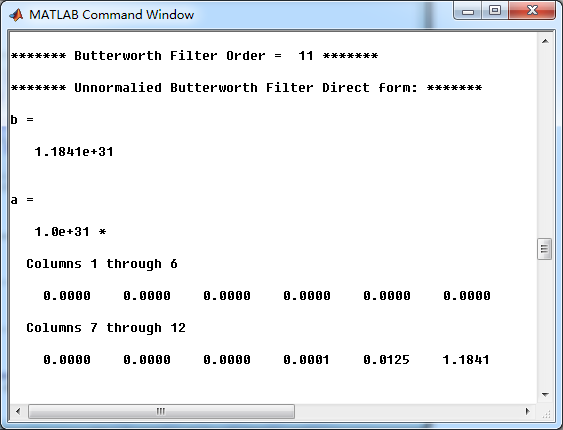
模拟低通串联形式的系数

开始Match-z方法,转变成数字低通
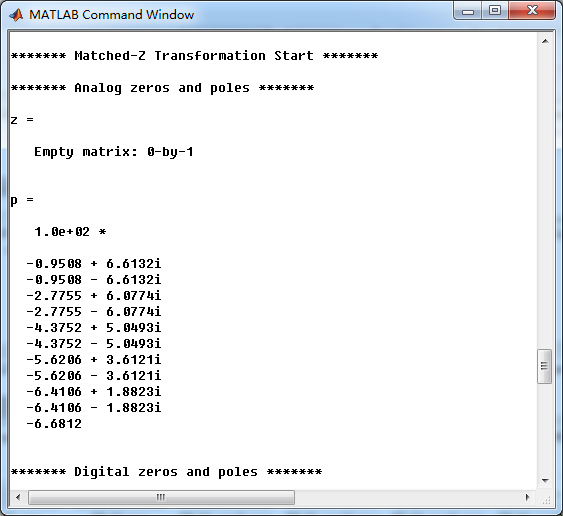

数字低通直接形式的系数

数字低通的并联形式的系数

模拟Butterworth低通的幅度谱、相位谱和脉冲响应

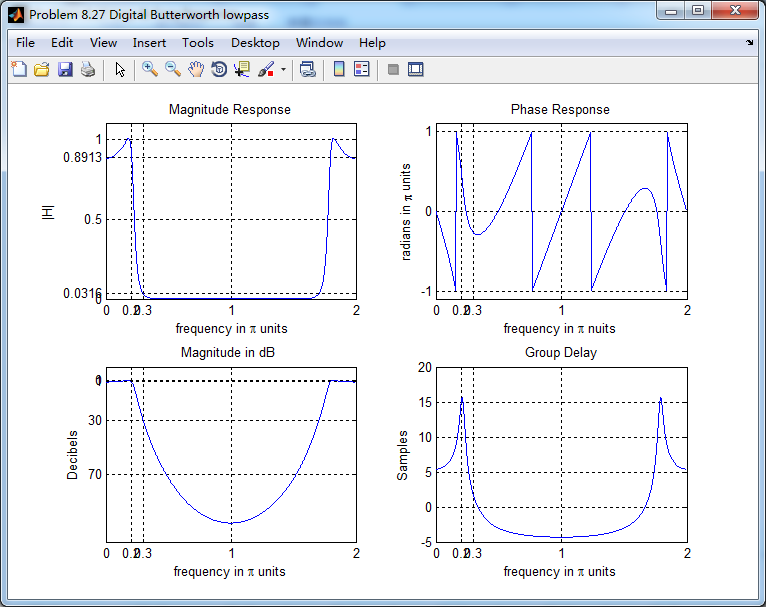
经过Match-z方法得到的数字Butterworth低通的幅度谱、相位谱和群延迟
数字Butterworth低通的零极点图

模拟Butterworth低通、Match-z方法得到的数字Butterworth低通,二者的脉冲响应、幅度响应如下
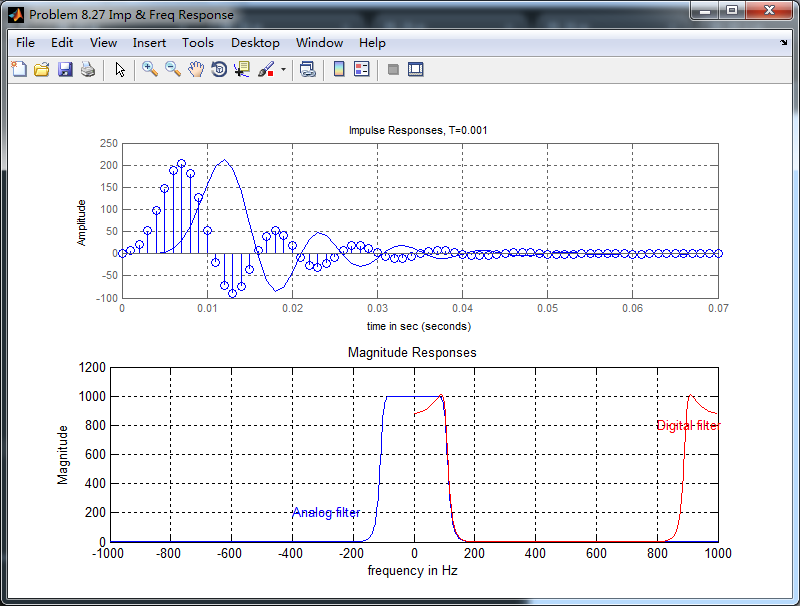
从上图可以看出,Match-z方法得到的数字低通,其脉冲响应与原模拟脉冲响应似乎有延迟的效果;其不像脉冲响应不变法那样,数字低通的
脉冲响应是相应模拟低通脉冲响应的采样序列,即保持了脉冲响应形式不变。
《DSP using MATLAB》Problem 8.27的更多相关文章
- 《DSP using MATLAB》Problem 7.27
代码: %% ++++++++++++++++++++++++++++++++++++++++++++++++++++++++++++++++++++++++++++++++ %% Output In ...
- 《DSP using MATLAB》Problem 5.27
代码: %% +++++++++++++++++++++++++++++++++++++++++++++++++++++++++++++++++++++++++++++++++++++ %% Outp ...
- 《DSP using MATLAB》Problem 7.23
%% ++++++++++++++++++++++++++++++++++++++++++++++++++++++++++++++++++++++++++++++++ %% Output Info a ...
- 《DSP using MATLAB》Problem 7.16
使用一种固定窗函数法设计带通滤波器. 代码: %% ++++++++++++++++++++++++++++++++++++++++++++++++++++++++++++++++++++++++++ ...
- 《DSP using MATLAB》Problem 7.38
代码: %% ++++++++++++++++++++++++++++++++++++++++++++++++++++++++++++++++++++++++++++++++ %% Output In ...
- 《DSP using MATLAB》Problem 7.36
代码: %% ++++++++++++++++++++++++++++++++++++++++++++++++++++++++++++++++++++++++++++++++ %% Output In ...
- 《DSP using MATLAB》Problem 7.32
代码: %% ++++++++++++++++++++++++++++++++++++++++++++++++++++++++++++++++++++++++++++++++ %% Output In ...
- 《DSP using MATLAB》Problem 7.31
参照Example7.27,因为0.1π=2πf1 f1=0.05,0.9π=2πf2 f2=0.45 所以0.1π≤ω≤0.9π,0.05≤|H|≤0.45 代码: %% +++++++++ ...
- 《DSP using MATLAB》Problem 7.26
注意:高通的线性相位FIR滤波器,不能是第2类,所以其长度必须为奇数.这里取M=31,过渡带里采样值抄书上的. 代码: %% +++++++++++++++++++++++++++++++++++++ ...
随机推荐
- Django 前后端数据传输、ajax、分页器
返回ORM目录 Django ORM 内容目录: 一.MTV与MVC模式 二.多对多表三种创建方式 三.前后端传输数据 四.Ajax 五.批量插入数据 六.自定义分页器 一.MTV与MVC模式 M ...
- drupal7 代码生成用户,并自动登录
直接上代码 1. 生成用户(注册) $edit = [ "name" => "name", "pass" => "pa ...
- 8.spark Core 进阶1
(e.g. standalone manager, Mesos, YARN) In "cluster" mode, the framework launches the ...
- MySQL基础知识 数据库 数据表
1.数据库结构 库 表 数据 2. sql(structured query language)结构化查询语言 管理数据库 管理表 管理数据 3.数据库 增删改查 增 create database ...
- 列表中的index,extend,count方法
列表中的index,extend,count方法 #_author:Administrator#date:2019/10/24#1.index方法l=['blue','red','white','bl ...
- JavaScript中纯JS写21点游戏
// 21点游戏 分为人机对战和人人对战 // 玩家每次抽一张牌 牌的点数为1-10点随机数 谁更接近21点谁就获胜 let readline = require("readline-syn ...
- 尚学linux课程---4、linux网络配置及linux文件
尚学linux课程---4.linux网络配置及linux文件 一.总结 一句话总结: linux下的etc目录是配置文件的目录,所以很多的文件配置操作都可以看到它的身影:比如 init系列命名,比如 ...
- System.Web.Mvc.IAuthorizationFilter.cs
ylbtech-System.Web.Mvc.IAuthorizationFilter.cs 1.程序集 System.Web.Mvc, Version=5.2.3.0, Culture=neutra ...
- 阿里云CentOs7上安装Mysql
前提:虽然yum源上有mysql,但是好像没有mysql-server,所以我们还是选择自己从官网上下载安装 一.新建文件夹,然后下载解压 cd /usr/ #新建mysql文件夹 mkdir mys ...
- shell脚本练习03--字符串
######################################################################### # File Name: -.sh # Author ...