
《DSP using MATLAB》Problem 8.39
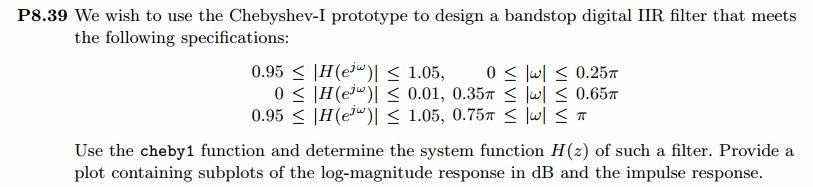
代码:
%% ------------------------------------------------------------------------

%%            Output Info about this m-file

fprintf('\n***********************************************************\n');

fprintf('        <DSP using MATLAB> Problem 8.39.2 \n\n');

banner();

%% ------------------------------------------------------------------------

% Digital Filter Specifications:   Chebyshev-1 bandstop

ws = [0.35*pi 0.65*pi];             % digital stopband freq in rad

wp = [0.25*pi 0.75*pi];             % digital passband freq in rad

delta1 = 0.05;                      % passband tolerance, absolute specs

delta2 = 0.01;                      % stopband tolerance, absolute specs

Rp = -20 * log10( (1-delta1)/(1+delta1))    % passband ripple in dB

As = -20 * log10( delta2 / (1+delta1))      % stopband attenuation in dB

Ripple = 10 ^ (-Rp/20)           % passband ripple in absolute

Attn = 10 ^ (-As/20)             % stopband attenuation in absolute

% Calculation of Chebyshev-1 filter parameters:

[N, wn] = cheb1ord(wp/pi, ws/pi, Rp, As);

fprintf('\n  ********* Chebyshev-1 Digital Bandstop Filter Order is = %3.0f \n', 2*N)

% Digital Chebyshev-1 bandstop Filter Design:

[bbs, abs] = cheby1(N, Rp, wn, 'stop');

[C, B, A] = dir2cas(bbs, abs)

% Calculation of Frequency Response:

[dbbs, magbs, phabs, grdbs, wwbs] = freqz_m(bbs, abs);

% ---------------------------------------------------------------

%    find Actual Passband Ripple and Min Stopband attenuation

% ---------------------------------------------------------------

delta_w = 2*pi/1000;

Rp_bs = -(min(dbbs(1:1:ceil(wp(1)/delta_w+1))));                           % Actual Passband Ripple

fprintf('\nActual Passband Ripple is %.4f dB.\n', Rp_bs);

As_bs = -round(max(dbbs(ceil(ws(1)/delta_w)+1:1:ceil(ws(2)/delta_w)+1)));   % Min Stopband attenuation

fprintf('\nMin Stopband attenuation is %.4f dB.\n\n', As_bs);

%% -----------------------------------------------------------------

%%                             Plot

%% -----------------------------------------------------------------

figure('NumberTitle', 'off', 'Name', 'Problem 8.39.2 Chebyshev-1 bs by cheby1 function')

set(gcf,'Color','white');

M = 1;                          % Omega max

subplot(2,2,1); plot(wwbs/pi, magbs); axis([0, M, 0, 1.2]); grid on;

xlabel('Digital frequency in \pi units'); ylabel('|H|'); title('Magnitude Response');

set(gca, 'XTickMode', 'manual', 'XTick', [0, 0.25, 0.35, 0.65, 0.75, M]);

set(gca, 'YTickMode', 'manual', 'YTick', [0, 0.01, 0.9048, 1]);

subplot(2,2,2); plot(wwbs/pi, dbbs); axis([0, M, -120, 2]); grid on;

xlabel('Digital frequency in \pi units'); ylabel('Decibels'); title('Magnitude in dB');

set(gca, 'XTickMode', 'manual', 'XTick', [0, 0.25, 0.35, 0.65, 0.75, M]);

set(gca, 'YTickMode', 'manual', 'YTick', [-80, -40, -1, 0]);

set(gca,'YTickLabelMode','manual','YTickLabel',['80'; '40';'1 ';' 0']);

subplot(2,2,3); plot(wwbs/pi, phabs/pi); axis([0, M, -1.1, 1.1]); grid on;

xlabel('Digital frequency in \pi nuits'); ylabel('radians in \pi units'); title('Phase Response');

set(gca, 'XTickMode', 'manual', 'XTick', [0, 0.25, 0.35, 0.65, 0.75, M]);

set(gca, 'YTickMode', 'manual', 'YTick', [-1:0.5:1]);

subplot(2,2,4); plot(wwbs/pi, grdbs); axis([0, M, 0, 50]); grid on;

xlabel('Digital frequency in \pi units'); ylabel('Samples'); title('Group Delay');

set(gca, 'XTickMode', 'manual', 'XTick', [0, 0.25, 0.35, 0.65, 0.75, M]);

set(gca, 'YTickMode', 'manual', 'YTick', [0:20:50]);
运行结果:
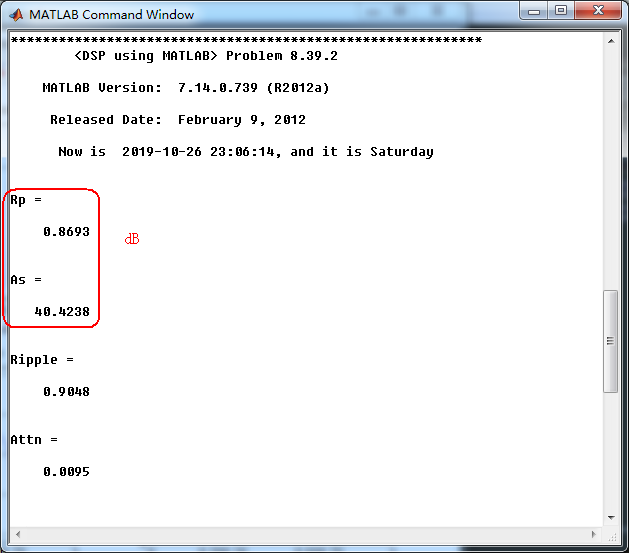
通带、阻带衰减指标,dB单位和绝对值单位,
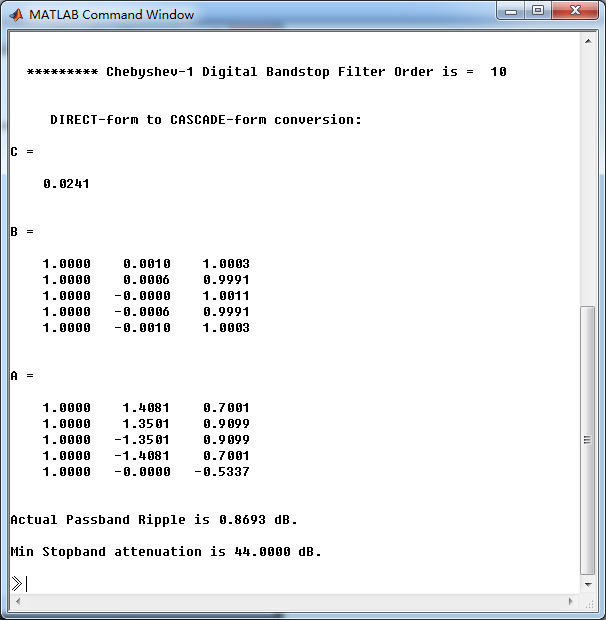
使用cheby1函数(MATLAB工具箱函数)得到Chebyshev-1型数字带阻滤波器,系统函数串联形式的系数
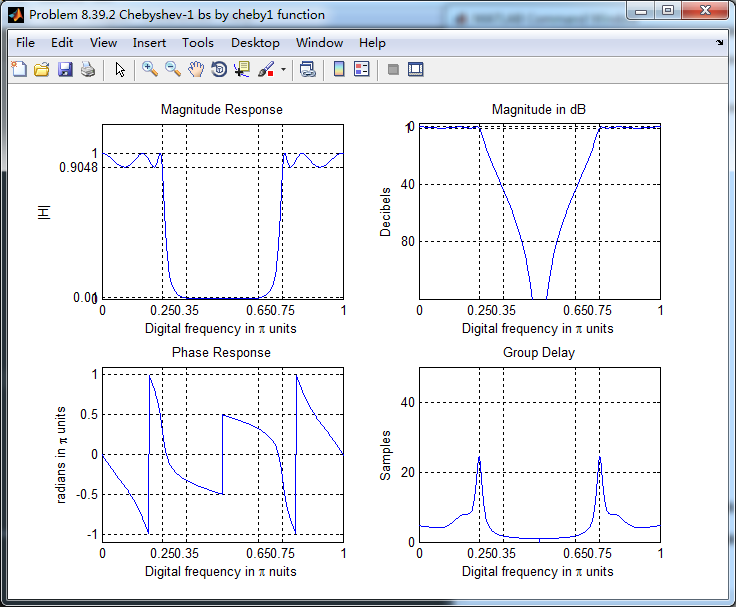
最小阻带衰减为44dB,满足40.4238dB的设计要求。滤波器的幅度谱、相位谱和群延迟响应如下
类似的,使用butter、cheby2和ellip函数(都是MATLAB工具箱函数)也可以设计带阻滤波器,这里不放图了。
《DSP using MATLAB》Problem 8.39的更多相关文章
- 《DSP using MATLAB》Problem 5.19
代码: function [X1k, X2k] = real2dft(x1, x2, N) %% --------------------------------------------------- ...
- 《DSP using MATLAB》Problem 8.40
代码: function [wpLP, wsLP, alpha] = bs2lpfre(wpbs, wsbs) % Band-edge frequency conversion from bandst ...
- 《DSP using MATLAB》Problem 7.36
代码: %% ++++++++++++++++++++++++++++++++++++++++++++++++++++++++++++++++++++++++++++++++ %% Output In ...
- 《DSP using MATLAB》Problem 7.28
又是一年五一节,朋友圈都是晒名山大川的,晒脑袋的,我这没钱的待在家里上网转转吧 频率采样法设计带通滤波器,过渡带中有一个样点 代码: %% ++++++++++++++++++++++++++++++ ...
- 《DSP using MATLAB》Problem 7.27
代码: %% ++++++++++++++++++++++++++++++++++++++++++++++++++++++++++++++++++++++++++++++++ %% Output In ...
- 《DSP using MATLAB》Problem 7.26
注意:高通的线性相位FIR滤波器,不能是第2类,所以其长度必须为奇数.这里取M=31,过渡带里采样值抄书上的. 代码: %% +++++++++++++++++++++++++++++++++++++ ...
- 《DSP using MATLAB》Problem 7.25
代码: %% ++++++++++++++++++++++++++++++++++++++++++++++++++++++++++++++++++++++++++++++++ %% Output In ...
- 《DSP using MATLAB》Problem 7.24
又到清明时节,…… 注意:带阻滤波器不能用第2类线性相位滤波器实现,我们采用第1类,长度为基数,选M=61 代码: %% +++++++++++++++++++++++++++++++++++++++ ...
- 《DSP using MATLAB》Problem 7.23
%% ++++++++++++++++++++++++++++++++++++++++++++++++++++++++++++++++++++++++++++++++ %% Output Info a ...
随机推荐
- 使用node搭建服务时,服务可以启动,但是无法访问
一开始搭建的是没有问题,能够正常启动和访问,然后吃了个饭回来就变成只能启动,浏览器访问不了了. 说真的,这是一个常识问题.使用node搭建服务访问本地文件,服务搭建的没有问题,能够正常启动.但是在浏览 ...
- PHP headers_list() 函数
定义和用法 headers_list() 函数返回已发送的(或待发送的)响应头部的一个列表. 该函数返回包含报头的数组. 语法 headers_list() 提示和注释 提示:如需确定是否已发送报头, ...
- [JZOJ 5813] 计算
题意:求满足题意的方案数. 思路: 显然的计数类\(dp\). 不难发现,令$f(x) = \prod_{i=1}^{2m}{x_i} \(. 在找一个\)x'\(使得\)f(x') = \prod_ ...
- 2018-2019-2-20175323 java实验五 网络编程与安全
20175323 java实验五 网络编程与安全 任务一 ①编写MyBC.java实现中缀表达式转后缀表达式的功能 ②编写MyDC.java实现从上面功能中获取的表达式中实现后缀表达式求值的功能 基本 ...
- docker 环境搭建步骤
配置CA: zhaoweipeng@bogon:~$ ls106 baseos.tar fabric-sdk fabric-sdk (1).tar fixture_106zhaoweipeng@bog ...
- CSS3:CSS3 文本效果
ylbtech-CSS3:CSS3 文本效果 1.返回顶部 1. CSS3 文本效果 CSS3 文本效果 CSS3中包含几个新的文本特征. 在本章中您将了解以下文本属性: text-shadow bo ...
- mysql查看数据库大小或者表大小
要想知道每个数据库的大小的话,步骤如下: 1.进入information_schema 数据库(存放了数据库的信息) use information_schema; 2.查询所有数据库的大小: sel ...
- tomcat部署项目报错NoSuchMethodException#addServlet,addFilter
java.lang.NoSuchMethodException: org.apache.catalina.deploy.WebXml addServlet java.lang.NoSuchMethod ...
- 剑指offer——19删除链表的节点
题目一: 在O(1)时间内删除链表节点.给定单向链表的头指针和一个节点指针,定义一个函数在O(1)时间内删除该节点. 书本讲得不明就里 class Solution { void DeleteNode ...
- 大神给你分析HTTPS和HTTP的区别
今天在做雅虎的时候,发现用第三方工具截取不到客户端与服务端的通讯,以前重来没碰到过这种情况,仔细看了看,它的url请求时基于https的,gg了下发现原来https协议和http有着很大的区别.总的来 ...