
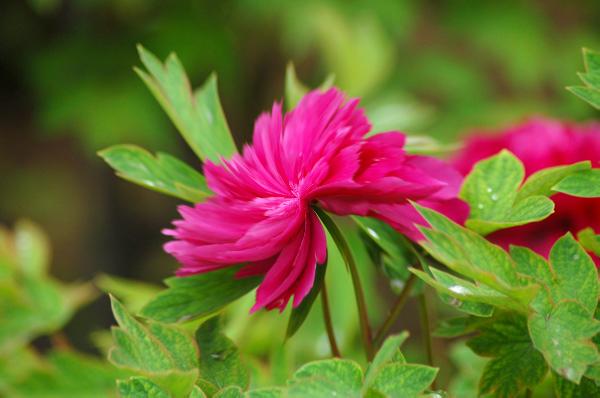
PS 滤镜— —挤压效果
    clc;

    clear all;

    close all;

    addpath('E:\PhotoShop Algortihm\Image Processing\PS Algorithm');

    I=imread('4.jpg');

    I=double(I);

    Image=I/255;

    angle = pi/4;

    centreX = 0.5;

    centreY = 0.5;

    radius=200;

    amount=0.75;

    [height, width, depth]=size(Image);

    Image_new=Image;

    icentreX = width * centreX;

    icentreY = height * centreY;

    if ( radius == 0 )

        radius=min(icentreX, icentreY);

    end

    radius2=radius*radius;

    for ii=1:height

        for jj=1:width

            dx = jj-icentreX;

            dy = ii-icentreY;

            distance = dx*dx + dy*dy;

            if (distance>radius2 || distance==0)

                x=jj;

                y=ii;

            else

                 d = sqrt( distance / radius2 );

                 t = sin( pi*0.5 * d ).^(-amount);

                dx =dx* t;

                dy =dy* t;

                e = 1 - d;

                a = angle * e * e;

                s = sin( a );

                c = cos( a );

                x = icentreX + c*dx - s*dy;

                y = icentreY + s*dx + c*dy;

            end

            if (x<=1)     x=1;  end

            if (x>=width)   x=width-1; end;

            if (y>=height)  y=height-1; end;

            if (y<1)  y=1;     end;

    % %         if (x<=1)     continue;  end

    % %         if (x>=width)   continue; end;

    % %         if (y>=height)  continue; end;

    % %         if (y<1)  continue;     end;

            x1=floor(x);

            y1=floor(y);

            p=x-x1;

            q=y-y1;

            Image_new(ii,jj,:)=(1-p)*(1-q)*Image(y1,x1,:)+p*(1-q)*Image(y1,x1+1,:)...

                +q*(1-p)*Image(y1+1,x1,:)+p*q*Image(y1+1,x1+1,:);

        end

    end

    imshow(Image_new)

imwrite(Image_new, 'out.jpg');参考来源:http://www.jhlabs.com/index.html
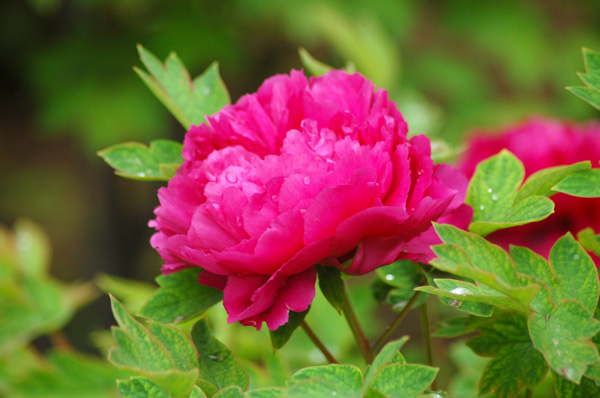
原图:
效果图:
PS 滤镜— —挤压效果的更多相关文章
- Python: PS 滤镜--万花筒效果
本文用 Python 实现 PS 的一种滤镜效果,称为万花筒.也是对图像做各种扭曲变换,最后图像呈现的效果就像从万花筒中看到的一样: 图像的效果可以参考之前的博客: http://blog.csdn. ...
- PS 滤镜— —Marble 效果
clc; clear all; close all; addpath('E:\PhotoShop Algortihm\Image Processing\PS Algorithm'); I=imread ...
- PS 滤镜— — 万花筒效果
clc; clear all; close all; addpath('E:\PhotoShop Algortihm\Image Processing\PS Algorithm'); I=imread ...
- PS 滤镜— —水波效果
clc; clear all; close all; addpath('E:\PhotoShop Algortihm\Image Processing\PS Algorithm'); I=imread ...
- PS 滤镜— — sparkle 效果
clc; clear all; close all; addpath('E:\PhotoShop Algortihm\Image Processing\PS Algorithm'); I=imread ...
- PS 滤镜— —球面化效果
clc; clear all; close all; addpath('E:\PhotoShop Algortihm\Image Processing\PS Algorithm'); I=imread ...
- PS滤镜— —波浪效果
clc; clear all; close all; addpath('E:\PhotoShop Algortihm\Image Processing\PS Algorithm'); I=imread ...
- OpenCV——PS滤镜 水波效果
// define head function #ifndef PS_ALGORITHM_H_INCLUDED #define PS_ALGORITHM_H_INCLUDED #include < ...
- Python: PS 滤镜--旋涡特效
本文用Python 实现 PS 滤镜的旋涡特效,具体的算法原理和效果可以参考之前的博客: http://blog.csdn.net/matrix_space/article/details/42215 ...
随机推荐
- Linux进程间通信(一) - 管道
管道(pipe) 普通的Linux shell都允许重定向,而重定向使用的就是管道. 例如:ps | grep vsftpd .管道是单向的.先进先出的.无结构的.固定大小的字节流,它把一个进程的标准 ...
- Linux中的提示符
root的提示符:# 一般用户的提示符:$
- ULN2003A 使用,有坑
8脚接24V负极 9脚接24V正极 16接24V继电器,再接到24V正极 1-7无论给5V 正 或 负,10-16都不能达到24V,越靠近输入端的输出端电压越大,最大的才11V,最小的2.5V 最后发 ...
- Black And White(DFS+剪枝)
Black And White Time Limit: 2000/2000 MS (Java/Others) Memory Limit: 512000/512000 K (Java/Others ...
- An Ordinary Game(简单推导)
An Ordinary Game Time limit : 2sec / Memory limit : 256MB Score : 500 points Problem Statement There ...
- java List的相关工具类
1. <dependency> <groupId>com.google.guava</groupId> <artifactId>guava</ar ...
- x-www-form-urlencoded名字的由来
1 提交的是表单数据 所以用form. 2 提交的形式是以参数放在url后面的形式提交的 例如,以x1=y1&x2=y2&x3=y3的形式放在url后面的形式提交,所以是urlenco ...
- [转载]Java web应用中的常见字符编码问题的解决方法
以下是 Java web应用的常见编码问题 1. html页面的编码 在web应用中,通常浏览器会根据http header: Content-type的值来决定用什么encoding, 比如遇到Co ...
- iBatis 简单介绍及基础入门
iBATIS一词来源于“internet”和“abatis”的组合,是一个由Clinton Begin在2002年发起的开放源代码项目.于2010年6月16号被谷歌托管,改名为MyBatis.是一个基 ...
- python3 内置常用函数系列一
python3 内置了一系列的常用函数, python英文官方文档详细说明:点击查看, 为了方便查看,将内置常用的函数的记录一下来. Python3版本所有的内置函数: 1.abs() print(a ...