
吴裕雄 python深度学习与实践(7)
import cv2

import numpy as np

img = np.mat(np.zeros((,)))

cv2.imshow("test",img)

cv2.waitKey()
import cv2

import numpy as np

img = np.mat(np.zeros((,),dtype=np.uint8))

cv2.imshow("test",img)

cv2.waitKey()
import cv2

import numpy as np

image = np.mat(np.zeros((,)))

imageByteArray = bytearray(image)

print(imageByteArray)

imageBGR = np.array(imageByteArray).reshape(,)

cv2.imshow("cool",imageBGR)

cv2.waitKey()
import os

import cv2

import numpy as np

randomByteArray = bytearray(os.urandom())

flatNumpyArray = np.array(randomByteArray).reshape(,)

cv2.imshow("cool",flatNumpyArray)

cv2.waitKey()
import cv2

import numpy as np

img = np.zeros((,))

img[,] =

cv2.imshow("img",img)

cv2.waitKey()
import cv2

import numpy as np

img = np.zeros((300,300))

img[:,10] = 255

img[10,:] = 255

cv2.imshow("img",img)

cv2.waitKey(0)
import cv2

import numpy as np

from scipy import ndimage

kernel33 = np.array([[-1,-1,-1],

                     [-1,8,-1],

                     [-1,-1,-1]])

kernel33_D = np.array([[1,1,1],

                       [1,-8,1],

                       [1,1,1]])

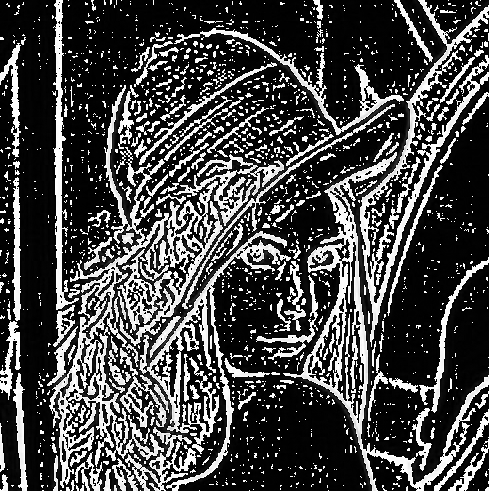
img = cv2.imread("G:\\MyLearning\\TensorFlow_deep_learn\\data\\lena.jpg",0)

linghtImg = ndimage.convolve(img,kernel33_D)

cv2.imshow("img",linghtImg)

cv2.waitKey()

import numpy as np

import cv2

from scipy import ndimage

img = cv2.imread("lena.jpg",0)

blurred = cv2.GaussianBlur(img,(11,11),0)

gaussImg = img - blurred

cv2.imshow("img",gaussImg)

cv2.waitKey()
import numpy as np

def convolve(dateMat,kernel):

    m,n = dateMat.shape

    km,kn = kernel.shape

    newMat = np.ones(((m - km + 1),(n - kn + 1)))

    tempMat = np.ones(((km),(kn)))

    for row in range(m - km + 1):

        for col in range(n - kn + 1):

            for m_k in range(km):

                for n_k in range(kn):

                    tempMat[m_k,n_k] = dateMat[(row + m_k),(col + n_k)] * kernel[m_k,n_k]

            newMat[row,col] = np.sum(tempMat)

    return newMat

dateMat = np.mat([

    [1,2,1,2,0,1,0,1,1],

    [0,3,1,1,0,0,1,0,1],

    [1,2,1,0,2,1,1,0,0],

    [2,2,0,1,1,1,1,1,0],

    [3,1,1,0,1,1,0,0,1],

    [1,0,1,1,1,0,0,1,1],

    [1,1,1,1,0,1,1,1,1],

    [1,0,1,1,0,1,0,1,0],

    [0,1,1,1,1,2,0,1,0]

])

kernel = np.mat([

    [1,0,1],

    [0,-4,0],

    [1,0,1]

])

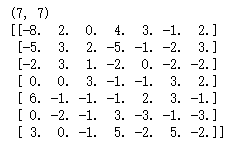
newMat = convolve(dateMat,kernel)

print(np.shape(newMat))

print(newMat)
吴裕雄 python深度学习与实践(7)的更多相关文章
- 吴裕雄 python深度学习与实践(18)
# coding: utf-8 import time import numpy as np import tensorflow as tf import _pickle as pickle impo ...
- 吴裕雄 python深度学习与实践(17)
import tensorflow as tf from tensorflow.examples.tutorials.mnist import input_data import time # 声明输 ...
- 吴裕雄 python深度学习与实践(16)
import struct import numpy as np import matplotlib.pyplot as plt dateMat = np.ones((7,7)) kernel = n ...
- 吴裕雄 python深度学习与实践(15)
import tensorflow as tf import tensorflow.examples.tutorials.mnist.input_data as input_data mnist = ...
- 吴裕雄 python深度学习与实践(14)
import numpy as np import tensorflow as tf import matplotlib.pyplot as plt threshold = 1.0e-2 x1_dat ...
- 吴裕雄 python深度学习与实践(13)
import numpy as np import matplotlib.pyplot as plt x_data = np.random.randn(10) print(x_data) y_data ...
- 吴裕雄 python深度学习与实践(12)
import tensorflow as tf q = tf.FIFOQueue(,"float32") counter = tf.Variable(0.0) add_op = t ...
- 吴裕雄 python深度学习与实践(11)
import numpy as np from matplotlib import pyplot as plt A = np.array([[5],[4]]) C = np.array([[4],[6 ...
- 吴裕雄 python深度学习与实践(10)
import tensorflow as tf input1 = tf.constant(1) print(input1) input2 = tf.Variable(2,tf.int32) print ...
- 吴裕雄 python深度学习与实践(9)
import numpy as np import tensorflow as tf inputX = np.random.rand(100) inputY = np.multiply(3,input ...
随机推荐
- 无法新建EXCLE
Regedit 进入注册表,找到HKEY_CLASSES_ROOT>.xls和.xlsx的ShellNew的值设置为:C:\Windows\ShellNew\EXCEL12.XLSX
- Shiro 整合SpringMVC 并实现权限管理,登录和注销
Shiro 整合SpringMVC 并且实现权限管理,登录和注销 Apache Shiro是Java的一个安全框架.目前,使用Apache Shiro的人越来越多,因为它相当简单,对比Spring S ...
- IC卡冷复位时序
冷复位(cold reset):当提供给IC卡的电源电压和其他信号从静止状态中复苏且收到复位信号后,IC卡产生的复位. 在触点激活后,终端将发出一个冷复位信号,并从IC卡获得一个复位应答信号,过程如下 ...
- Linux学习之路——文件查找:find
使用权限:所有角色 用法:find [ options ] [ expression ]( find path -expression [ -print ] [ -exec | -ok command ...
- JAVA第八次作业
JAVA第八次作业 (一)学习总结 1.用思维导图对本周的学习内容进行总结 参考资料: XMind. 2.通过实验内容中的具体实例说明在执行executeUpdate()方法和executeQuery ...
- _proto_ && prototype (原型 && 原型链)
原型一直都是JavaScript基础里面的痛点,因为在JavaScript里面没有类的概念,都是通过原型对象来实现继承,下面的这个图很好的说明几者之间的关系! a.__proto__ = A.prot ...
- springMvc---跨服务器文件上传(实测总结)
序言: 该案例是采用springMvc实现跨服务器图片上传功能,其中用到的主要类和工具有:CommonsMultipartResolver.jquery.form.js.如果要实现多个文件上传,只需要 ...
- python------面向对象进阶 Socket网络编程
一.Socket网络编程 1.七层模型,亦称OSI(Open System Interconnection)参考模型,是参考模型是国际标准化组织(ISO)制定的一个用于计算机或通信系统间互联的标准体系 ...
- HttpWebRequest post 请求超时问题
在使用curl做POST的时候, 当要POST的数据大于1024字节的时候, curl并不会直接就发起POST请求, 而是会分为俩步, 发送一个请求, 包含一个Expect:100-continue, ...
- winform中devexpress bindcommand无效的解决方法
正常绑定,编译运行无报错,但无法执行command fluentAPI.BindCommand(commandButton, (x, p) => x.DoSomething(p), x => ...