
Android物联网应用程序开发(智慧城市)—— 购物信息的存储界面开发
效果:
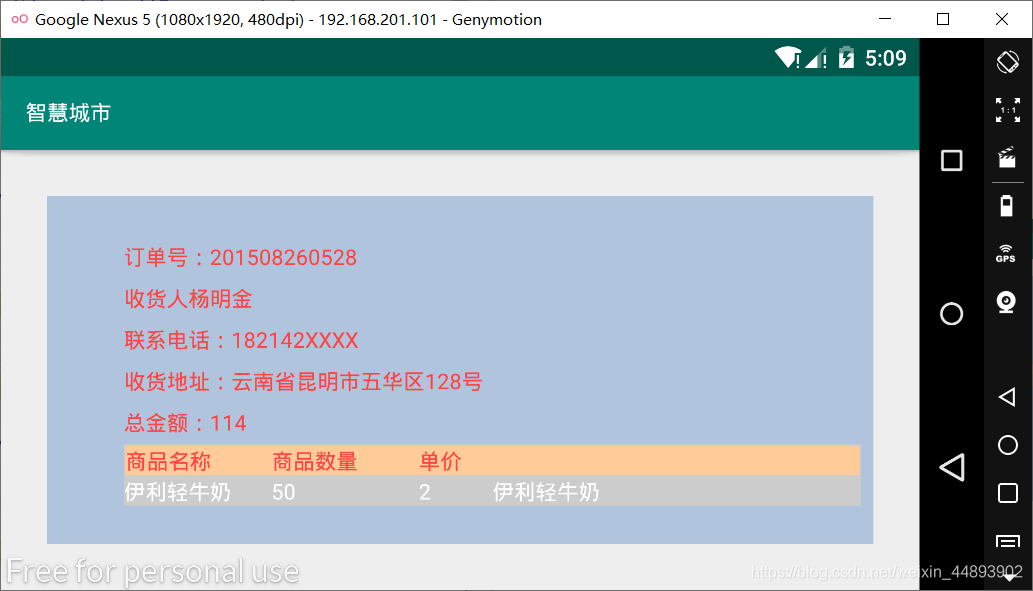
布局代码:
<?xml version="1.0" encoding="utf-8"?>

<LinearLayout xmlns:android="http://schemas.android.com/apk/res/android"

    xmlns:app="http://schemas.android.com/apk/res-auto"

    xmlns:tools="http://schemas.android.com/tools"

    android:layout_width="match_parent"

    android:layout_height="match_parent"

    android:orientation="vertical"

    tools:context=".GoodsInfo">

    <RelativeLayout

        android:layout_width="fill_parent"

        android:layout_height="fill_parent"

        android:layout_margin="30dp"

        android:background="	#B0C4DE">

        <TextView

            android:id="@+id/text1"

            android:layout_width="wrap_content"

            android:layout_height="wrap_content"

            android:layout_alignParentLeft="true"

            android:layout_alignParentRight="true"

            android:layout_marginLeft="50dp"

            android:layout_marginTop="30dp"

            android:text="订单号:201508260528"

            android:textColor="@android:color/holo_red_light"/>

        <TextView

            android:id="@+id/text2"

            android:layout_width="wrap_content"

            android:layout_height="wrap_content"

            android:layout_alignLeft="@id/text1"

            android:layout_below="@id/text1"

            android:layout_marginTop="8dip"

            android:text="收货人:杨明金"

            android:textColor="@android:color/holo_red_light"/>

        <TextView

            android:id="@+id/text3"

            android:layout_width="wrap_content"

            android:layout_height="wrap_content"

            android:layout_alignLeft="@id/text1"

            android:layout_below="@id/text2"

            android:layout_marginTop="8dip"

            android:textColor="@android:color/holo_red_light"

            android:text="联系电话:182142XXXX"/>

        <TextView

            android:id="@+id/text4"

            android:layout_width="wrap_content"

            android:layout_height="wrap_content"

            android:layout_alignLeft="@id/text1"

            android:layout_below="@id/text3"

            android:layout_marginTop="8dip"

            android:textColor="@android:color/holo_red_light"

            android:text="收货地址:云南省昆明市五华区128号"/>

        <TextView

            android:id="@+id/text5"

            android:layout_width="wrap_content"

            android:layout_height="wrap_content"

            android:layout_alignLeft="@id/text1"

            android:layout_below="@id/text4"

            android:layout_marginTop="8dip"

            android:textColor="@android:color/holo_red_light"

            android:text="总金额:114"/>

        <TableLayout

            android:id="@+id/tableLayout1"

            android:layout_width="fill_parent"

            android:layout_height="wrap_content"

            android:layout_alignLeft="@id/text1"

            android:layout_below="@id/text5"

            android:layout_centerVertical="true"

            android:layout_marginTop="5dp"

            android:layout_marginRight="8dip"

            android:background="#ffcccccc">

            <TableRow

                android:id="@+id/tableRow1"

                android:layout_width="wrap_content"

                android:layout_height="wrap_content"

                android:background="#ffffcc99"

                android:layout_margin="1dip">

                <TextView

                    android:layout_width="0.0dp"

                    android:layout_height="wrap_content"

                    android:layout_weight="2"

                    android:text="商品名称"

                    android:textColor="@android:color/holo_red_light" />

                <TextView

                    android:layout_width="0.0dp"

                    android:layout_height="wrap_content"

                    android:layout_weight="2"

                    android:text="商品数量"

                    android:textColor="@android:color/holo_red_light" />

                <TextView

                    android:layout_width="0.0dp"

                    android:layout_height="wrap_content"

                    android:layout_weight="1"

                    android:text="单价"

                    android:textColor="@android:color/holo_red_light" />

                <TextView

                    android:layout_width="0.0dp"

                    android:layout_height="wrap_content"

                    android:layout_weight="5"

                    android:text=""

                    android:textColor="@android:color/holo_red_light" />

            </TableRow>

            <TableRow

                android:id="@+id/tableRow2"

                android:layout_width="wrap_content"

                android:layout_height="wrap_content">

                <TextView

                    android:layout_width="0.0dp"

                    android:layout_height="wrap_content"

                    android:layout_weight="2"

                    android:text="伊利轻牛奶"

                    android:textColor="@android:color/white"/>

                <TextView

                    android:layout_width="0.0dp"

                    android:layout_height="wrap_content"

                    android:layout_weight="2"

                    android:text="50"

                    android:textColor="@android:color/white"/>

                <TextView

                    android:layout_width="0.0dp"

                    android:layout_height="wrap_content"

                    android:layout_weight="1"

                    android:text="2"

                    android:textColor="@android:color/white"/>

                <TextView

                    android:layout_width="0.0dp"

                    android:layout_height="wrap_content"

                    android:layout_weight="5"

                    android:text="伊利轻牛奶"

                    android:textColor="@android:color/white"/>

            </TableRow>

        </TableLayout>

    </RelativeLayout>

    <Spinner

        android:id="@+id/spinner"

        android:layout_width="wrap_content"

        android:layout_height="wrap_content"

        android:layout_below="@id/tableLayout1"

        android:layout_marginTop="10dp"

        android:layout_alignRight="@id/tableLayout1"/>

    <Button

        android:layout_width="30dp"

        android:layout_height="30dp"

        android:layout_alignRight="@id/tableLayout1"

        android:layout_below="@id/spinner"

        android:layout_marginTop="10dp"/>

</LinearLayout>
Android物联网应用程序开发(智慧城市)—— 购物信息的存储界面开发的更多相关文章
- 【可视化大屏教程】用Python开发智慧城市数据分析大屏!
目录 一.开发背景 二.讲解代码 2.1 大标题+背景图 2.2 各区县交通事故统计图-系列柱形图 2.3 图书馆建设率-水球图 2.4 当年城市空气质量aqi指数-面积图 2.5 近7年人均生产总值 ...
- Android物联网应用程序开发(智慧城市)—— 查询购物信息界面开发
效果: 布局代码: <RelativeLayout xmlns:android="http://schemas.android.com/apk/res/android" xm ...
- Android物联网应用程序开发(智慧城市)—— 用户注册界面开发
效果: 布局代码: <?xml version="1.0" encoding="utf-8"?> <RelativeLayout xmlns: ...
- Android物联网应用程序开发(智慧城市)—— 摄像头监控界面开发
效果: 布局代码: <?xml version="1.0" encoding="utf-8"?> <RelativeLayout xmlns: ...
- Android物联网应用程序开发(智慧城市)—— 火焰监控界面开发
效果: 布局代码: <?xml version="1.0" encoding="utf-8"?> <RelativeLayout xmlns: ...
- Android物联网应用程序开发(智慧城市)—— 环境状态值范围设置界面开发
效果图: 代码: 布局: <?xml version="1.0" encoding="utf-8"?> <LinearLayout xmlns ...
- Android物联网应用程序开发(智慧园区)—— 图片预览界面
效果图: 实现步骤: 1.首先在 build.gradle 文件中引入 RecycleView implementation 'com.android.support:recyclerview-v7: ...
- Android物联网应用程序开发(智慧园区)—— 设置传感器阈值对话框界面
效果图: 自定义对话框布局: <?xml version="1.0" encoding="utf-8"?> <LinearLayout xml ...
- Android物联网应用程序开发(智慧园区)—— 园区监控系统界面
效果图: 布局代码: <?xml version="1.0" encoding="utf-8"?> <LinearLayout xmlns:a ...
随机推荐
- Linux基础命令---mysqlshow显示数据库
mysqlshow mysqlshow是一个客户端的程序,它可以显示数据库的信息.表信息.字段信息. 此命令的适用范围:RedHat.RHEL.Ubuntu.CentOS.Fedora. 1.语法 ...
- JAVA序列化浅析
java.io.Serializable浅析 Java API中java.io.Serializable接口源码: 1 public interface Serializable { 2 } 类通过实 ...
- Linux基础命令---put上传ftp文件
put 使用lftp登录ftp服务器之后,可以使用put指令将文件上传到服务器. 1.语法 put [-E] [-a] [-c] [-O base] lfile [-o rfi ...
- java内存管理的小技巧
1,尽量使用直接量. 采用String str="hello"; 而不是 String str = new String("hello"): 2,使用S ...
- Function Overloading in C++
In C++, following function declarations cannot be overloaded. (1)Function declarations that differ o ...
- 商城项目的购物车模块的实现------通过session实现
1.新建购物车的实体类Cart public class Cart implements java.io.Serializable{ private Shangpin shangpin;//存放商品实 ...
- 【C/C++】01背包问题/动态规划
按小蓝书上写的大数据情况下没过,按解答区一个大佬的修改了过了 #include <bits/stdc++.h> using namespace std; class Solution { ...
- IM即时通讯设计 高并发聊天服务:服务器 + qt客户端(附源码)
来源:微信公众号「编程学习基地」 目录 IM即时通信程序设计 IM即时通讯 设计一款高并发聊天服务需要注意什么 如何设计可靠的消息处理服务 什么是粘包 什么是半包 解决粘包和半包 IM通信协议 应用层 ...
- Niushop开源商店渗透测试
靶机 提取码:le8l 首先连上靶机 先扫一下靶场ip,看看开启了哪些端口 开启了80端口,扫描一下目录 一个shop的界面, 一个admin后台管理界面 其他的目录翻看了一下, 看样子是网站的配置文 ...
- others_babystack
一道泄露canary+rop常规的题. 这道题让我学习到了,原来canary的最后一位是\x00,又因为是小端存储,所以在内存中我位置是在开头的. 来,下载文件检查一下保护. 开启了canary和nx ...