
吴裕雄 python深度学习与实践(18)
# coding: utf-8

import time

import numpy as np

import tensorflow as tf

import _pickle as pickle

import matplotlib.pyplot as plt

def unpickle(filename):

    import pickle

    with open(filename, 'rb') as fo:

        data = pickle.load(fo, encoding='latin1')

        return data

def onehot(labels):

    n_sample = len(labels)

    n_class = max(labels) + 1

    onehot_labels = np.zeros((n_sample, n_class))

    onehot_labels[np.arange(n_sample), labels] = 1

    return onehot_labels

# 训练数据集

data1 = unpickle('F:\\TensorFlow_deep_learn\\cifar-10-batches-py\\data_batch_1')

data2 = unpickle('F:\\TensorFlow_deep_learn\\cifar-10-batches-py\\data_batch_2')

data3 = unpickle('F:\\TensorFlow_deep_learn\\cifar-10-batches-py\\data_batch_3')

data4 = unpickle('F:\\TensorFlow_deep_learn\\cifar-10-batches-py\\data_batch_4')

data5 = unpickle('F:\\TensorFlow_deep_learn\\cifar-10-batches-py\\data_batch_5')

X_train = np.concatenate((data1['data'], data2['data'], data3['data'], data4['data'], data5['data']), axis=0)

y_train = np.concatenate((data1['labels'], data2['labels'], data3['labels'], data4['labels'], data5['labels']), axis=0)

y_train = onehot(y_train)

# 测试数据集

test = unpickle('F:\\TensorFlow_deep_learn\\cifar-10-batches-py\\test_batch')

X_test = test['data'][:5000, :]

y_test = onehot(test['labels'])[:5000, :]

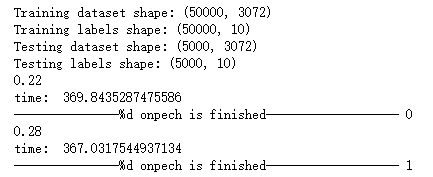
print('Training dataset shape:', X_train.shape)

print('Training labels shape:', y_train.shape)

print('Testing dataset shape:', X_test.shape)

print('Testing labels shape:', y_test.shape)

with tf.device('/cpu:0'):

    # 模型参数

    learning_rate = 1e-3

    training_iters = 200

    batch_size = 50

    display_step = 5

    n_features = 3072  # 32*32*3

    n_classes = 10

    n_fc1 = 384

    n_fc2 = 192

    # 构建模型

    x = tf.placeholder(tf.float32, [None, n_features])

    y = tf.placeholder(tf.float32, [None, n_classes])

    W_conv = {

        'conv1': tf.Variable(tf.truncated_normal([5, 5, 3, 32], stddev=0.0001)),

        'conv2': tf.Variable(tf.truncated_normal([5, 5, 32, 64],stddev=0.01)),

        'fc1': tf.Variable(tf.truncated_normal([8*8*64, n_fc1], stddev=0.1)),

        'fc2': tf.Variable(tf.truncated_normal([n_fc1, n_fc2], stddev=0.1)),

        'fc3': tf.Variable(tf.truncated_normal([n_fc2, n_classes], stddev=0.1))

    }

    b_conv = {

        'conv1': tf.Variable(tf.constant(0.0, dtype=tf.float32, shape=[32])),

        'conv2': tf.Variable(tf.constant(0.1, dtype=tf.float32, shape=[64])),

        'fc1': tf.Variable(tf.constant(0.1, dtype=tf.float32, shape=[n_fc1])),

        'fc2': tf.Variable(tf.constant(0.1, dtype=tf.float32, shape=[n_fc2])),

        'fc3': tf.Variable(tf.constant(0.0, dtype=tf.float32, shape=[n_classes]))

    }

    x_image = tf.reshape(x, [-1, 32, 32, 3])

    # 卷积层 1

    conv1 = tf.nn.conv2d(x_image, W_conv['conv1'], strides=[1, 1, 1, 1], padding='SAME')

    conv1 = tf.nn.bias_add(conv1, b_conv['conv1'])

    conv1 = tf.nn.relu(conv1)

    # 池化层 1

    pool1 = tf.nn.avg_pool(conv1, ksize=[1, 3, 3, 1], strides=[1, 2, 2, 1], padding='SAME')

    # LRN层,Local Response Normalization

    norm1 = tf.nn.lrn(pool1, 4, bias=1.0, alpha=0.001/9.0, beta=0.75)

    # 卷积层 2

    conv2 = tf.nn.conv2d(norm1, W_conv['conv2'], strides=[1, 1, 1, 1], padding='SAME')

    conv2 = tf.nn.bias_add(conv2, b_conv['conv2'])

    conv2 = tf.nn.relu(conv2)

    # LRN层,Local Response Normalization

    norm2 = tf.nn.lrn(conv2, 4, bias=1.0, alpha=0.001/9.0, beta=0.75)

    # 池化层 2

    pool2 = tf.nn.avg_pool(norm2, ksize=[1, 3, 3, 1], strides=[1, 2, 2, 1], padding='SAME')

    reshape = tf.reshape(pool2, [-1, 8*8*64])

    fc1 = tf.add(tf.matmul(reshape, W_conv['fc1']), b_conv['fc1'])

    fc1 = tf.nn.relu(fc1)

    # 全连接层 2

    fc2 = tf.add(tf.matmul(fc1, W_conv['fc2']), b_conv['fc2'])

    fc2 = tf.nn.relu(fc2)

    # 全连接层 3, 即分类层

    fc3 = tf.nn.softmax(tf.add(tf.matmul(fc2, W_conv['fc3']), b_conv['fc3']))

    # 定义损失

    loss = tf.reduce_mean(tf.nn.softmax_cross_entropy_with_logits(logits=fc3, labels=y))

    optimizer = tf.train.GradientDescentOptimizer(learning_rate=learning_rate).minimize(loss)

    # 评估模型

    correct_pred = tf.equal(tf.argmax(fc3, 1), tf.argmax(y, 1))

    accuracy = tf.reduce_mean(tf.cast(correct_pred, tf.float32))

    init = tf.global_variables_initializer()

with tf.Session() as sess:

    sess.run(init)

    c = []

    total_batch = int(X_train.shape[0] / batch_size)

#    for i in range(training_iters):

    start_time = time.time()

    for i in range(200):

        for batch in range(total_batch):

            batch_x = X_train[batch*batch_size : (batch+1)*batch_size, :]

            batch_y = y_train[batch*batch_size : (batch+1)*batch_size, :]

            sess.run(optimizer, feed_dict={x: batch_x, y: batch_y})

        acc = sess.run(accuracy, feed_dict={x: batch_x, y: batch_y})

        print(acc)

        c.append(acc)

        end_time = time.time()

        print('time: ', (end_time - start_time))

        start_time = end_time

        print("---------------%d onpech is finished-------------------",i)

    print("Optimization Finished!")

    # Test

    test_acc = sess.run(accuracy, feed_dict={x: X_test, y: y_test})

    print("Testing Accuracy:", test_acc)

    plt.plot(c)

    plt.xlabel('Iter')

    plt.ylabel('Cost')

    plt.title('lr=%f, ti=%d, bs=%d, acc=%f' % (learning_rate, training_iters, batch_size, test_acc))

    plt.tight_layout()

    plt.savefig('F:\\cnn-tf-cifar10-%s.png' % test_acc, dpi=200)
吴裕雄 python深度学习与实践(18)的更多相关文章
- 吴裕雄 python深度学习与实践(17)
import tensorflow as tf from tensorflow.examples.tutorials.mnist import input_data import time # 声明输 ...
- 吴裕雄 python深度学习与实践(16)
import struct import numpy as np import matplotlib.pyplot as plt dateMat = np.ones((7,7)) kernel = n ...
- 吴裕雄 python深度学习与实践(15)
import tensorflow as tf import tensorflow.examples.tutorials.mnist.input_data as input_data mnist = ...
- 吴裕雄 python深度学习与实践(14)
import numpy as np import tensorflow as tf import matplotlib.pyplot as plt threshold = 1.0e-2 x1_dat ...
- 吴裕雄 python深度学习与实践(13)
import numpy as np import matplotlib.pyplot as plt x_data = np.random.randn(10) print(x_data) y_data ...
- 吴裕雄 python深度学习与实践(12)
import tensorflow as tf q = tf.FIFOQueue(,"float32") counter = tf.Variable(0.0) add_op = t ...
- 吴裕雄 python深度学习与实践(11)
import numpy as np from matplotlib import pyplot as plt A = np.array([[5],[4]]) C = np.array([[4],[6 ...
- 吴裕雄 python深度学习与实践(10)
import tensorflow as tf input1 = tf.constant(1) print(input1) input2 = tf.Variable(2,tf.int32) print ...
- 吴裕雄 python深度学习与实践(9)
import numpy as np import tensorflow as tf inputX = np.random.rand(100) inputY = np.multiply(3,input ...
随机推荐
- C语言之一维数组与指针
一维数组: 假如有一维数组如下: ]; 该数组有3个元素,数据类型为char型,地址空间如下. 如果想访问数据,直接使用a[0].a[1].a[2]取出相应地址空间的值即可 一级指针: 指针即地址,c ...
- css3动画的简单学习
transform常用的属性(2D变化): translate(x,y) 定义 2D 转换. scale(x,y) 定义 2D 缩放转换 rotate(angle) 定义 2D 旋转,在参数中规定角度 ...
- 黄聪:C#获取网页HTML内容的三种方式
C#通常有三种方法获取网页内容,使用WebClient.WebBrowser或者HttpWebRequest/HttpWebResponse. 方法一:使用WebClient static void ...
- Bacnet协议IP采集开发 总结
一.开发准备 a.模拟器 VTS和BACnetDeviceSimulator b.主站 BACnetScan c.参考文档 http://wenku.baidu.com/view/3052 ...
- python之路——17
王二学习python的笔记以及记录,如有雷同,那也没事,欢迎交流,wx:wyb199594 复习 1.迭代器2.生成器3.内置函数 1.学习55个 2.带key的,max min filter map ...
- [UE4]虚幻引擎的C++环境安装
一.一般使用VS2017开发 二.需要勾选“使用C++的游戏开发”
- 关于破解visualsvn 我这里是版本是5.2.1
1.首先备份当前安装visualSVN文件的bin目录,万一出错还能反个水.一般默认安装路径是C:\Program Files (x86)\VisualSVN\bin 2.然后运行ildasm,Win ...
- 关于Jupyter Notebook快捷操作
Jupyter Notebook 的快捷键 Jupyter Notebook 有两种键盘输入模式.编辑模式,允许你往单元中键入代码或文本:这时的单元框线是绿色的.命令模式,键盘输入运行程序命令:这时的 ...
- 合并hive/hdfs小文件
磁盘: heads/sectors/cylinders,分别就是磁头/扇区/柱面,每个扇区512byte(现在新的硬盘每个扇区有4K) 文件系统: 文件系统不是一个扇区一个扇区的来读数据,太慢了,所以 ...
- IE8图片上传预览
$("#smallImg").attr('style', "filter:progid:DXImageTransform.Microsoft.AlphaImageLoad ...