
Android物联网应用程序开发(智慧城市)—— 用户注册界面开发
效果:
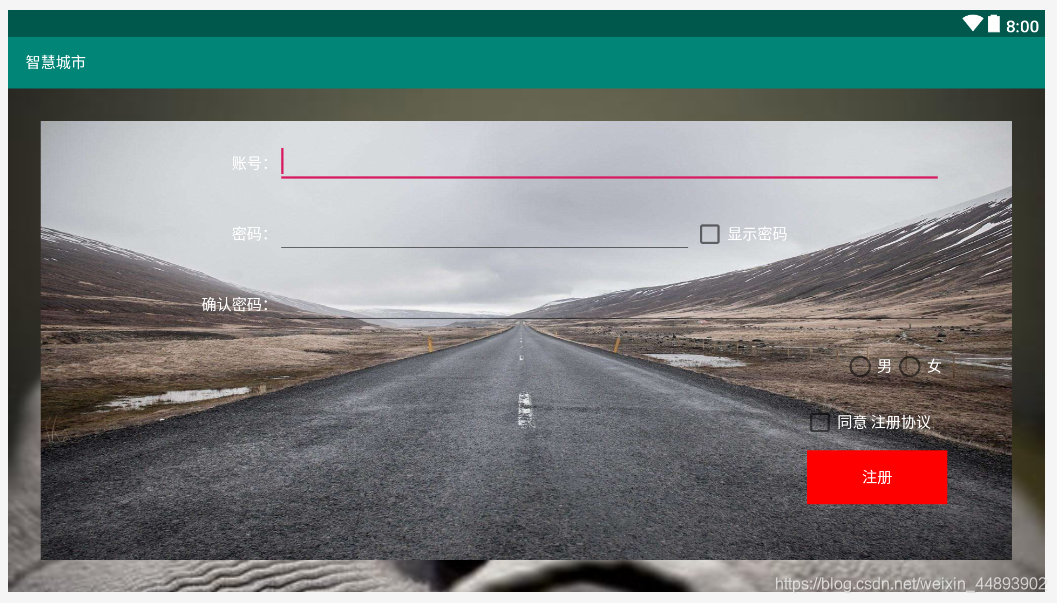
布局代码:
<?xml version="1.0" encoding="utf-8"?>

<RelativeLayout xmlns:android="http://schemas.android.com/apk/res/android"

    xmlns:app="http://schemas.android.com/apk/res-auto"

    xmlns:tools="http://schemas.android.com/tools"

    android:layout_width="fill_parent"

    android:layout_height="fill_parent"

    tools:context=".UserRegistration">

    <LinearLayout

        android:layout_width="match_parent"

        android:layout_height="match_parent"

        android:layout_margin="30dp"

        android:background="@drawable/bg_environment"

        android:gravity="center_horizontal"

        android:orientation="vertical"

        android:padding="15dp">

        <!--账号-->

        <LinearLayout

            android:layout_width="match_parent"

            android:layout_height="wrap_content"

            android:layout_marginLeft="50dp"

            android:layout_marginRight="50dp">

            <TextView

                android:layout_width="0.0dp"

                android:layout_height="wrap_content"

                android:layout_weight="2"

                android:gravity="right"

                android:text="账号:"

                android:textColor="@color/white"/>

            <EditText

                android:layout_width="0.0dp"

                android:layout_height="wrap_content"

                android:layout_weight="8"

                android:ems="10">

                <requestFocus />

            </EditText>

        </LinearLayout>

        <!--密码-->

        <LinearLayout

            android:layout_width="match_parent"

            android:layout_height="wrap_content"

            android:layout_marginLeft="50dp"

            android:layout_marginRight="50dp"

            android:layout_marginTop="20dp">

            <TextView

                android:layout_width="0.0dp"

                android:layout_height="wrap_content"

                android:layout_weight="2"

                android:gravity="right"

                android:text="密码:"

                android:textColor="@color/white"/>

            <EditText

                android:layout_width="0.0dp"

                android:layout_height="wrap_content"

                android:layout_weight="5"

                android:ems="10">

            </EditText>

            <CheckBox

                android:layout_width="0.0dp"

                android:layout_height="wrap_content"

                android:layout_weight="3"

                android:text="显示密码"

                android:textColor="@color/white"/>

        </LinearLayout>

        <!--确认密码-->

        <LinearLayout

            android:layout_width="match_parent"

            android:layout_height="wrap_content"

            android:layout_marginLeft="50dp"

            android:layout_marginRight="50dp"

            android:layout_marginTop="20dp">

            <TextView

                android:layout_width="0.0dp"

                android:layout_height="wrap_content"

                android:layout_weight="2"

                android:gravity="right"

                android:text="确认密码:"

                android:textColor="@color/white"/>

            <EditText

                android:layout_width="0.0dp"

                android:layout_height="wrap_content"

                android:layout_weight="8"

                android:ems="10">

            </EditText>

        </LinearLayout>

        <!--男女-->

        <LinearLayout

            android:layout_width="match_parent"

            android:layout_height="wrap_content"

            android:layout_marginLeft="50dp"

            android:layout_marginRight="50dp"

            android:layout_marginTop="20dp">

            <RadioGroup

                android:layout_width="match_parent"

                android:layout_height="wrap_content"

                android:orientation="horizontal"

                android:gravity="right">

                <RadioButton

                    android:layout_width="wrap_content"

                    android:layout_height="wrap_content"

                    android:textColor="@color/white"

                    android:text="男"

                    android:layout_marginRight="0dp"/>

                <RadioButton

                    android:layout_width="wrap_content"

                    android:layout_height="wrap_content"

                    android:textColor="@color/white"

                    android:text="女"/>

            </RadioGroup>

        </LinearLayout>

        <CheckBox

            android:layout_width="wrap_content"

            android:layout_height="wrap_content"

            android:text="同意 注册协议"

            android:textColor="@color/white"

            android:layout_gravity="right"

            android:gravity="center_vertical"

            android:layout_marginRight="60dp"

            android:layout_marginTop="20dp"/>

        <Button

            android:layout_width="130dp"

            android:layout_height="50dp"

            android:textColor="@color/white"

            android:text="注册"

            android:layout_gravity="right"

            android:layout_marginRight="45dp"

            android:layout_marginTop="10dp"

            android:background="@color/red"/>

    </LinearLayout>

</RelativeLayout>
Android物联网应用程序开发(智慧城市)—— 用户注册界面开发的更多相关文章
- 【可视化大屏教程】用Python开发智慧城市数据分析大屏!
目录 一.开发背景 二.讲解代码 2.1 大标题+背景图 2.2 各区县交通事故统计图-系列柱形图 2.3 图书馆建设率-水球图 2.4 当年城市空气质量aqi指数-面积图 2.5 近7年人均生产总值 ...
- Android物联网应用程序开发(智慧城市)—— 查询购物信息界面开发
效果: 布局代码: <RelativeLayout xmlns:android="http://schemas.android.com/apk/res/android" xm ...
- Android物联网应用程序开发(智慧城市)—— 摄像头监控界面开发
效果: 布局代码: <?xml version="1.0" encoding="utf-8"?> <RelativeLayout xmlns: ...
- Android物联网应用程序开发(智慧城市)—— 火焰监控界面开发
效果: 布局代码: <?xml version="1.0" encoding="utf-8"?> <RelativeLayout xmlns: ...
- Android物联网应用程序开发(智慧城市)—— 购物信息的存储界面开发
效果: 布局代码: <?xml version="1.0" encoding="utf-8"?> <LinearLayout xmlns:an ...
- Android物联网应用程序开发(智慧城市)—— 环境状态值范围设置界面开发
效果图: 代码: 布局: <?xml version="1.0" encoding="utf-8"?> <LinearLayout xmlns ...
- Android物联网应用程序开发(智慧园区)—— 图片预览界面
效果图: 实现步骤: 1.首先在 build.gradle 文件中引入 RecycleView implementation 'com.android.support:recyclerview-v7: ...
- Android物联网应用程序开发(智慧园区)—— 设置传感器阈值对话框界面
效果图: 自定义对话框布局: <?xml version="1.0" encoding="utf-8"?> <LinearLayout xml ...
- Android物联网应用程序开发(智慧园区)—— 园区监控系统界面
效果图: 布局代码: <?xml version="1.0" encoding="utf-8"?> <LinearLayout xmlns:a ...
随机推荐
- Output of C++ Program | Set 10
Predict the output of following C++ programs. Question 1 1 #include<iostream> 2 #include<st ...
- 命令行方式运行hadoop程序
1,写一个java代码.*.java.(这里从example 拷贝一个过来作为测试) cp src/examples/org/apache/hadoop/examples/WordCount.java ...
- vue 键盘事件keyup/keydoen
使用: <!DOCTYPE html> <html> <head> <title></title> <meta charset=&qu ...
- js实现点击不同按钮切换内容
<!DOCTYPE html> <html lang="en"> <head> <meta charset="UTF-8&quo ...
- 走进Spring Boot源码学习之路和浅谈入门
Spring Boot浅聊入门 **本人博客网站 **IT小神 www.itxiaoshen.com Spring Boot官网地址:https://spring.io/projects/spring ...
- 接下来一段时间会对大家进行网络通信的魔鬼训练-理解socket
引子 下一篇标题是<深入理解MQ生产端的底层通信过程>,建议文章读完之前.或者读完之后,再读一遍我之前写的<RabbitMQ设计原理解析>,结合理解一下. 我大学时流行过一个韩 ...
- [BUUCTF]PWN4——pwn1_sctf_2016
[BUUCTF]PWN4--pwn1_sctf_2016 题目网址:https://buuoj.cn/challenges#pwn1_sctf_2016 步骤: 例行检查,32位,开启nx(堆栈不可执 ...
- Table.ReverseRows反转…Reverse…(Power Query 之 M 语言)
数据源: 任意五行两列 目标: 将原排列顺序颠倒 操作过程: [转换]>[反转行] M公式: = Table.ReverseRows( 表 ) 扩展: 反转列表:= List.Reverse( ...
- CF1492B Card Deck 题解
Content 有 \(n\) 张纸牌组成的一个牌堆,每张纸牌都有一个价值 \(p_1,p_2,\dots,p_n\).每次选出最顶上的几个牌放到另外一个一开始为空的牌堆里面.定义一个牌堆的总值为 \ ...
- Django modules模块
http://www.cnblogs.com/wupeiqi/articles/5246483.html