
吴裕雄--天生自然 PYTHON数据分析:威斯康星乳腺癌(诊断)数据分析(续一)
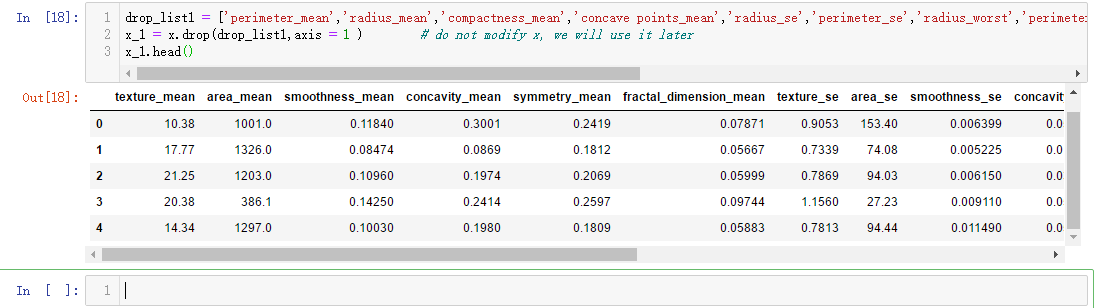
drop_list1 = ['perimeter_mean','radius_mean','compactness_mean','concave points_mean','radius_se','perimeter_se','radius_worst','perimeter_worst','compactness_worst','concave points_worst','compactness_se','concave points_se','texture_worst','area_worst']

x_1 = x.drop(drop_list1,axis = 1 )        # do not modify x, we will use it later

x_1.head()
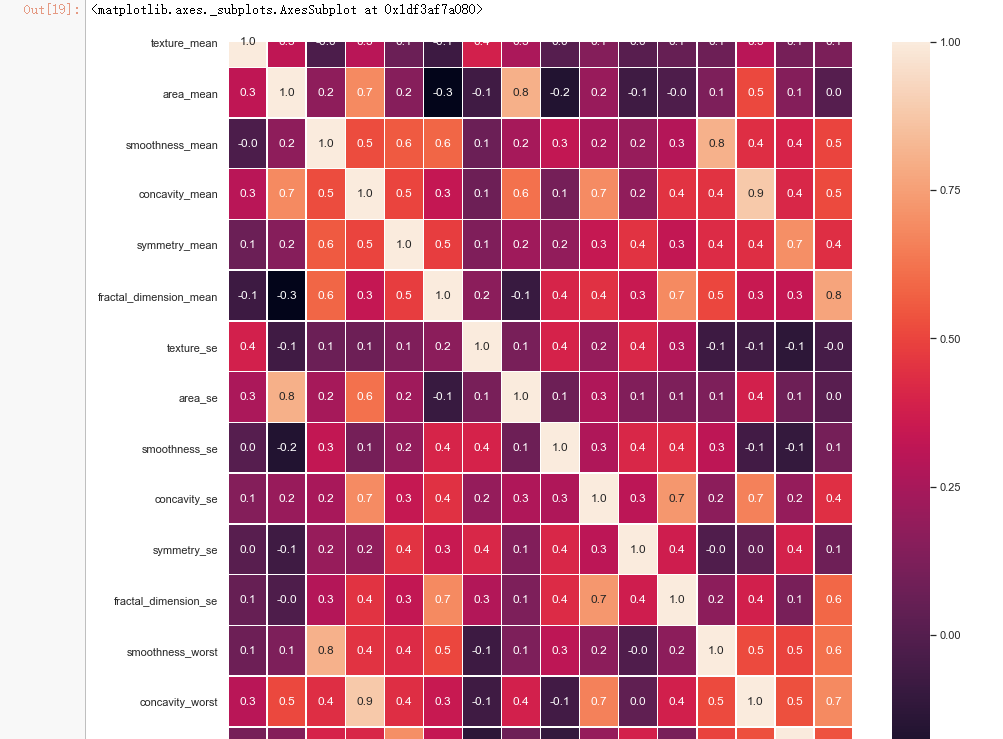
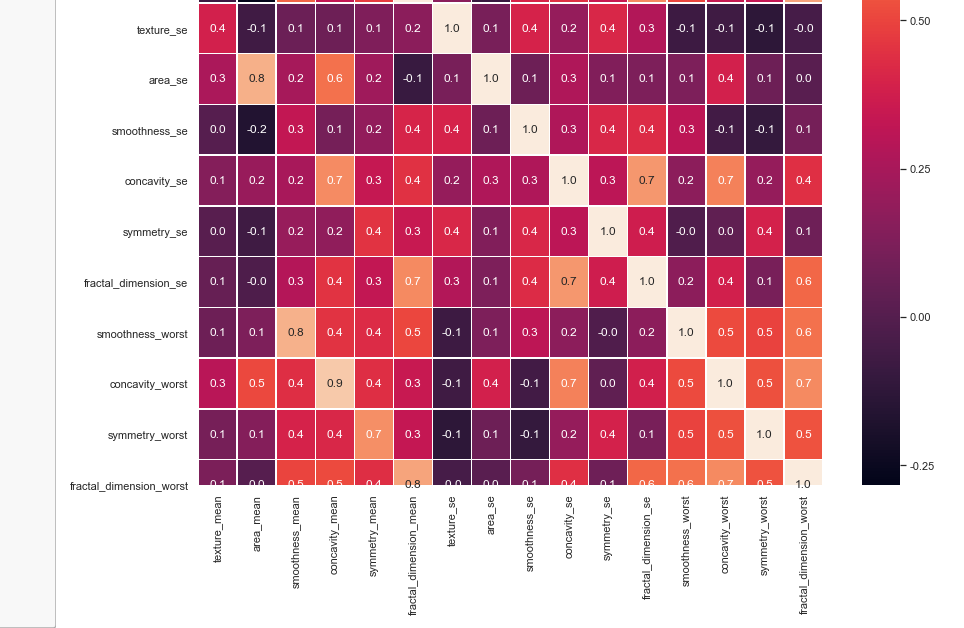
#correlation map

f,ax = plt.subplots(figsize=(14, 14))

sns.heatmap(x_1.corr(), annot=True, linewidths=.5, fmt= '.1f',ax=ax)
from sklearn.model_selection import train_test_split

from sklearn.ensemble import RandomForestClassifier

from sklearn.metrics import f1_score,confusion_matrix

from sklearn.metrics import accuracy_score

# split data train 70 % and test 30 %

x_train, x_test, y_train, y_test = train_test_split(x_1, y, test_size=0.3, random_state=42)

#random forest classifier with n_estimators=10 (default)

clf_rf = RandomForestClassifier(random_state=43)

clr_rf = clf_rf.fit(x_train,y_train)

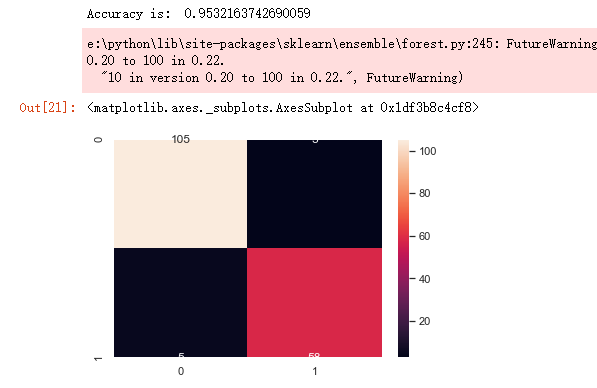
ac = accuracy_score(y_test,clf_rf.predict(x_test))

print('Accuracy is: ',ac)

cm = confusion_matrix(y_test,clf_rf.predict(x_test))

sns.heatmap(cm,annot=True,fmt="d")
from sklearn.feature_selection import SelectKBest

from sklearn.feature_selection import chi2

# find best scored 5 features

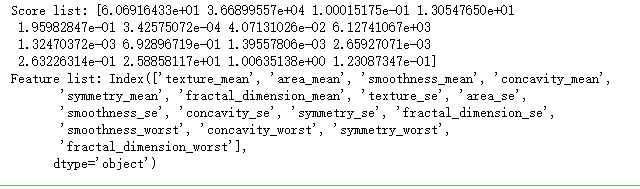
select_feature = SelectKBest(chi2, k=5).fit(x_train, y_train)
print('Score list:', select_feature.scores_)

print('Feature list:', x_train.columns)
x_train_2 = select_feature.transform(x_train)

x_test_2 = select_feature.transform(x_test)

#random forest classifier with n_estimators=10 (default)

clf_rf_2 = RandomForestClassifier()

clr_rf_2 = clf_rf_2.fit(x_train_2,y_train)

ac_2 = accuracy_score(y_test,clf_rf_2.predict(x_test_2))

print('Accuracy is: ',ac_2)

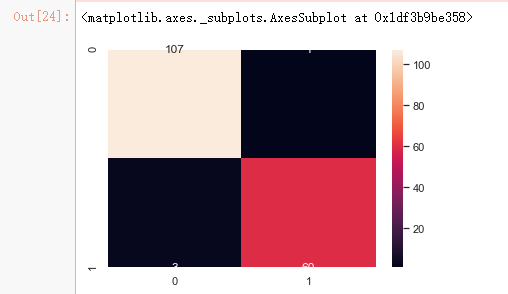
cm_2 = confusion_matrix(y_test,clf_rf_2.predict(x_test_2))

sns.heatmap(cm_2,annot=True,fmt="d")
from sklearn.feature_selection import RFE

# Create the RFE object and rank each pixel

clf_rf_3 = RandomForestClassifier()

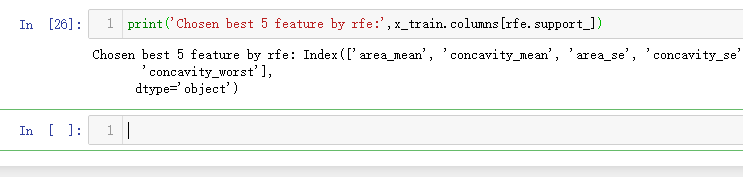
rfe = RFE(estimator=clf_rf_3, n_features_to_select=5, step=1)

rfe = rfe.fit(x_train, y_train)
print('Chosen best 5 feature by rfe:',x_train.columns[rfe.support_])
from sklearn.feature_selection import RFECV

# The "accuracy" scoring is proportional to the number of correct classifications

clf_rf_4 = RandomForestClassifier()

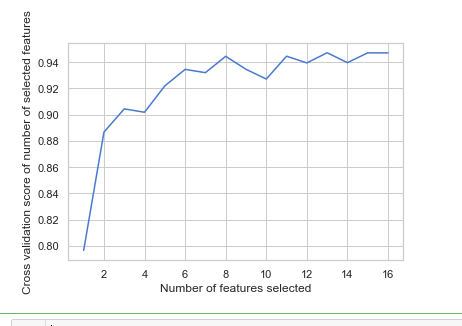
rfecv = RFECV(estimator=clf_rf_4, step=1, cv=5,scoring='accuracy')   #5-fold cross-validation

rfecv = rfecv.fit(x_train, y_train)

print('Optimal number of features :', rfecv.n_features_)

print('Best features :', x_train.columns[rfecv.support_])
# Plot number of features VS. cross-validation scores

import matplotlib.pyplot as plt

plt.figure()

plt.xlabel("Number of features selected")

plt.ylabel("Cross validation score of number of selected features")

plt.plot(range(1, len(rfecv.grid_scores_) + 1), rfecv.grid_scores_)

plt.show()
clf_rf_5 = RandomForestClassifier()

clr_rf_5 = clf_rf_5.fit(x_train,y_train)

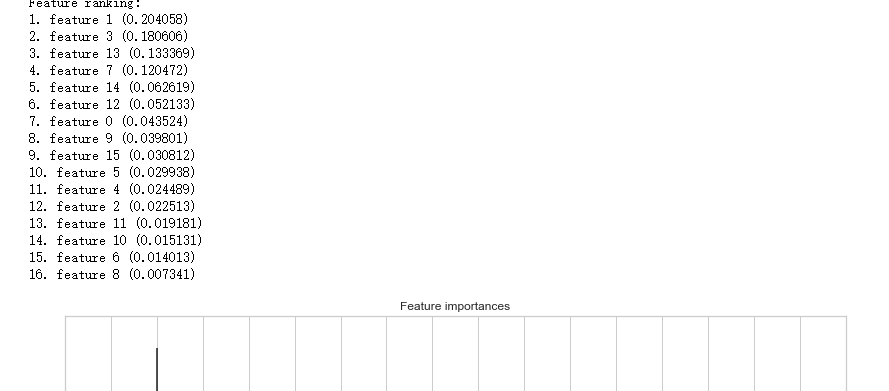
importances = clr_rf_5.feature_importances_

std = np.std([tree.feature_importances_ for tree in clf_rf.estimators_],

             axis=0)

indices = np.argsort(importances)[::-1]

# Print the feature ranking

print("Feature ranking:")

for f in range(x_train.shape[1]):

    print("%d. feature %d (%f)" % (f + 1, indices[f], importances[indices[f]]))

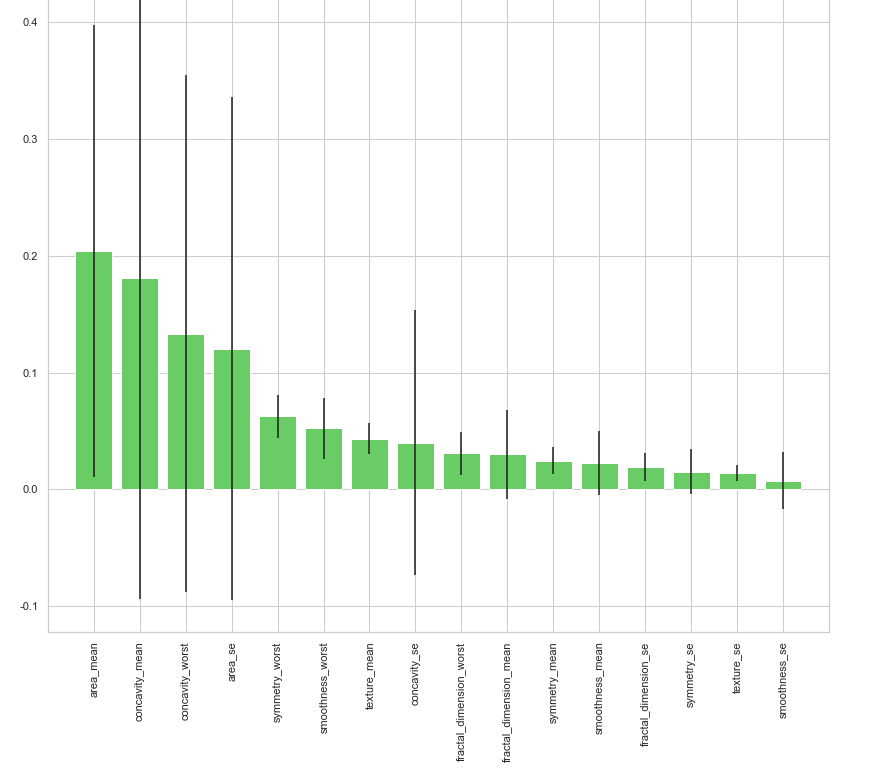
# Plot the feature importances of the forest

plt.figure(1, figsize=(14, 13))

plt.title("Feature importances")

plt.bar(range(x_train.shape[1]), importances[indices],

       color="g", yerr=std[indices], align="center")

plt.xticks(range(x_train.shape[1]), x_train.columns[indices],rotation=90)

plt.xlim([-1, x_train.shape[1]])

plt.show()
# split data train 70 % and test 30 %

x_train, x_test, y_train, y_test = train_test_split(x, y, test_size=0.3, random_state=42)

#normalization

x_train_N = (x_train-x_train.mean())/(x_train.max()-x_train.min())

x_test_N = (x_test-x_test.mean())/(x_test.max()-x_test.min())

from sklearn.decomposition import PCA

pca = PCA()

pca.fit(x_train_N)

plt.figure(1, figsize=(14, 13))

plt.clf()

plt.axes([.2, .2, .7, .7])

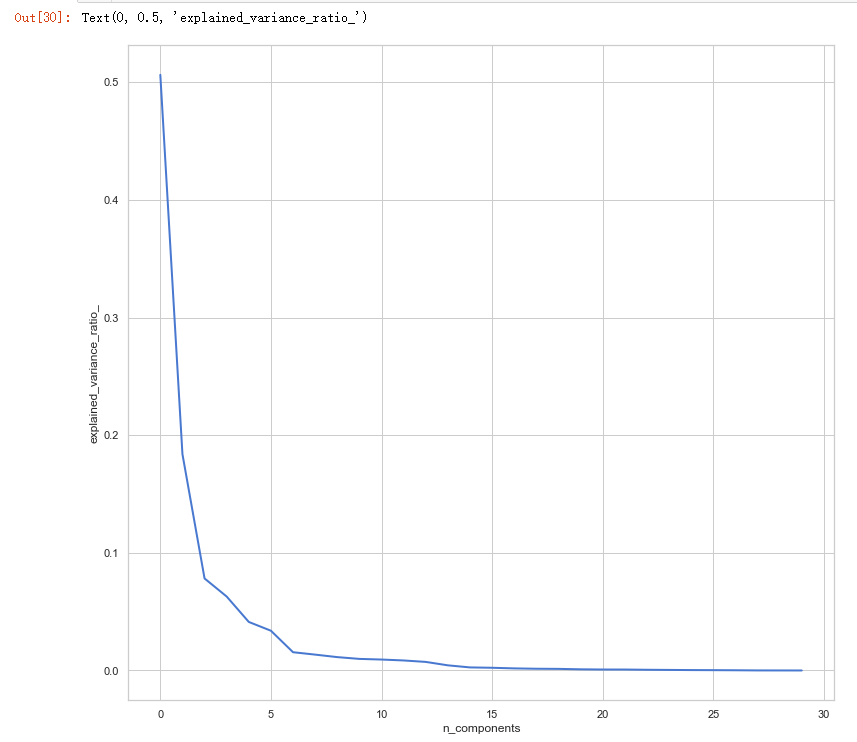
plt.plot(pca.explained_variance_ratio_, linewidth=2)

plt.axis('tight')

plt.xlabel('n_components')

plt.ylabel('explained_variance_ratio_')
吴裕雄--天生自然 PYTHON数据分析:威斯康星乳腺癌(诊断)数据分析(续一)的更多相关文章
- 吴裕雄--天生自然 PYTHON数据分析:糖尿病视网膜病变数据分析(完整版)
# This Python 3 environment comes with many helpful analytics libraries installed # It is defined by ...
- 吴裕雄--天生自然 PYTHON数据分析:所有美国股票和etf的历史日价格和成交量分析
# This Python 3 environment comes with many helpful analytics libraries installed # It is defined by ...
- 吴裕雄--天生自然 python数据分析:健康指标聚集分析(健康分析)
# This Python 3 environment comes with many helpful analytics libraries installed # It is defined by ...
- 吴裕雄--天生自然 python数据分析:葡萄酒分析
# import pandas import pandas as pd # creating a DataFrame pd.DataFrame({'Yes': [50, 31], 'No': [101 ...
- 吴裕雄--天生自然 PYTHON数据分析:人类发展报告——HDI, GDI,健康,全球人口数据数据分析
import pandas as pd # Data analysis import numpy as np #Data analysis import seaborn as sns # Data v ...
- 吴裕雄--天生自然 python数据分析:医疗费数据分析
import numpy as np import pandas as pd import os import matplotlib.pyplot as pl import seaborn as sn ...
- 吴裕雄--天生自然 PYTHON语言数据分析:ESA的火星快车操作数据集分析
import os import numpy as np import pandas as pd from datetime import datetime import matplotlib imp ...
- 吴裕雄--天生自然 python语言数据分析:开普勒系外行星搜索结果分析
import pandas as pd pd.DataFrame({'Yes': [50, 21], 'No': [131, 2]}) pd.DataFrame({'Bob': ['I liked i ...
- 吴裕雄--天生自然 PYTHON数据分析:基于Keras的CNN分析太空深处寻找系外行星数据
#We import libraries for linear algebra, graphs, and evaluation of results import numpy as np import ...
随机推荐
- numpy(一)
ndarray np的一个核心类,它描述了相同类型的“项目”集合.可以使用例如N个整数来索引项目.每个项目占用相同大小的内存块, 并且所有块都以完全相同的方式解释. 如何解释数组中的每个项目由单独的数 ...
- MySql索引基本
1.什么是索引 索引用于快速找出在某个列中有一特定值的行.如果不使用索引,需要遍历整张表,表越大查询耗时越大: MySQL中的索引的存储类型有两种:BTREE.HASH.具体实现机制参照另一篇博客: ...
- BTree
hash.平衡二叉树.BTree.B+tree的区别 https://blog.csdn.net/qq_40673786/article/details/90082444 联合索引在B+树上的结构介绍 ...
- 吴裕雄--天生自然 PYTHON3开发学习:SMTP发送邮件
import smtplib smtpObj = smtplib.SMTP( [host [, port [, local_hostname]]] ) SMTP.sendmail(from_addr, ...
- ZZJ_淘淘商城项目:day04(淘淘商城03 - 前台系统搭建、实现、内容管理系统实现)
1. 今日大纲 1. 实现商品的编辑 2. 实现商品的规格参数功能 3. 搭建前台系统 4. 实现首页商品类目的显示 2.2.4. 未实现TODO 编辑时图片回显: 思路: 1. 查 ...
- Windows Server 2008 R2 安全加固
0x00 简介 安全加固是企业安全中及其重要的一环,其主要内容包括账号安全.认证授权.协议安全.审计安全四项,这篇博客简单整理一下Windows Server 2008 R2的安全加固方案. 0x01 ...
- xianduanshu
https://www.cnblogs.com/xenny/p/9739600.html ***************https://blog.csdn.net/shiqi_614/article/ ...
- [LC] 270. Closest Binary Search Tree Value
Given a non-empty binary search tree and a target value, find the value in the BST that is closest t ...
- Uncaught TypeError: Cannot read property 'querySelector' of null
报错. 解决办法:把报错部分的js放到body后面
- VS2010 保护视力 背景色设置
vs2010——工具——选项---环境——字体和颜色——纯文本——项背景色——自定义 色调:88 饱和度:92 亮度:209