
[Python爬虫] 之二十七:Selenium +phantomjs 利用 pyquery抓取今日头条视频
一、介绍
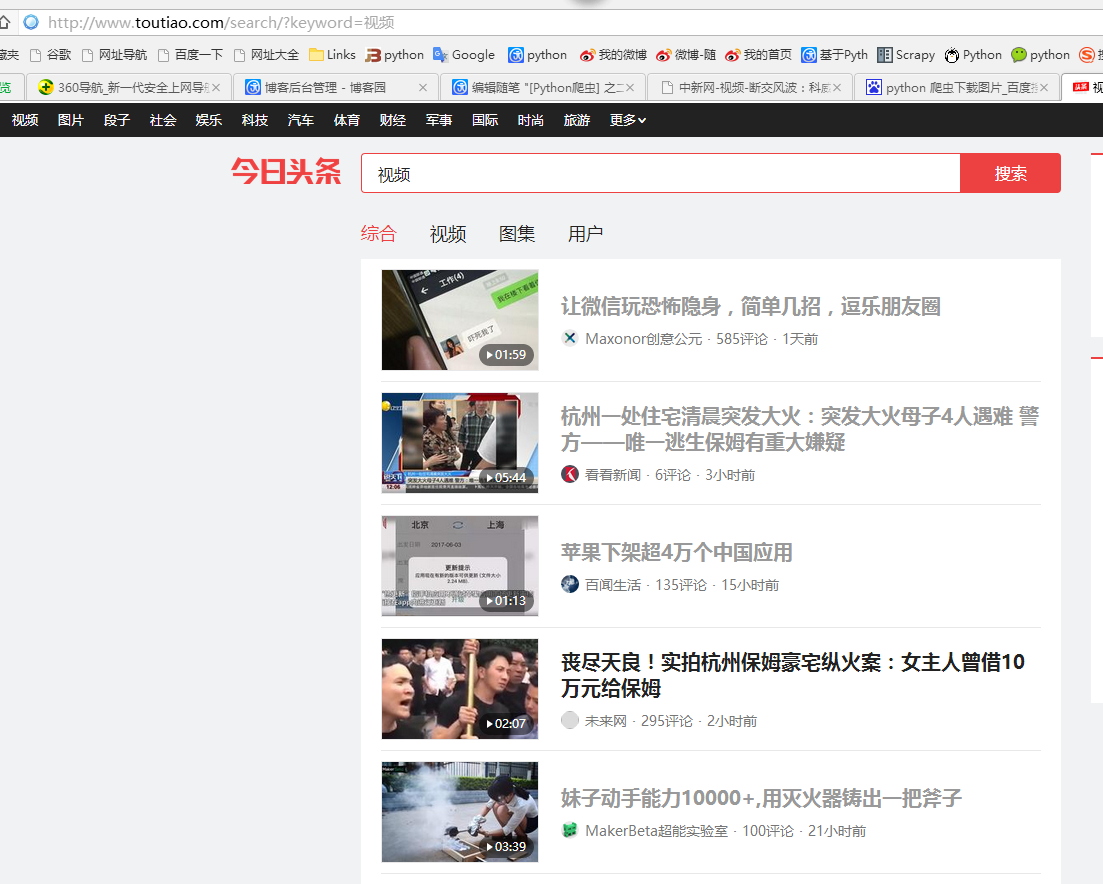
本例子用Selenium +phantomjs爬取今天头条视频(http://www.tvhome.com/news/)的信息,输入给定关键字抓取图片信息。
给定关键字:视频;融合;电视
二、网站信息
三、数据抓取
针对上面的网站信息,来进行抓取
1、首先抓取视频信息列表
抓取代码:Elements = doc('div[class="articleCard"]')
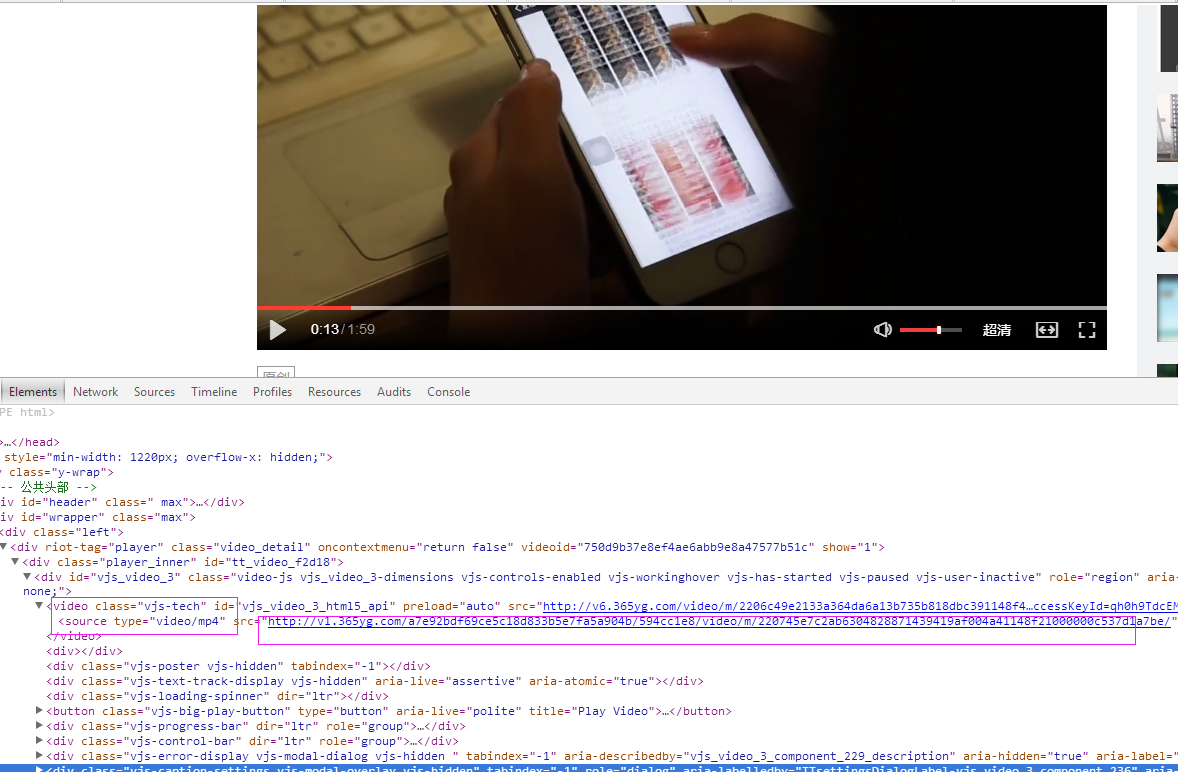
2、抓取图片
视频url:url = 'http://www.toutiao.com' + element.find('a[class="link title"]').attr('href')
videourl = dochtml('video[class="vjs-tech"]').find('source').attr('src')
四、完整代码
# coding=utf-8

import os

import re

from selenium import webdriver

import selenium.webdriver.support.ui as ui

import time

from datetime import datetime

import IniFile

# from threading import Thread

from pyquery import PyQuery as pq

import LogFile

import mongoDB

import urllib

class toutiaoSpider(object):

    def __init__(self):

        logfile = os.path.join(os.path.dirname(os.getcwd()), time.strftime('%Y-%m-%d') + '.txt')

        self.log = LogFile.LogFile(logfile)

        configfile = os.path.join(os.path.dirname(os.getcwd()), 'setting.conf')

        cf = IniFile.ConfigFile(configfile)

        webSearchUrl = cf.GetValue("toutiao", "webSearchUrl")

        self.keyword_list = cf.GetValue("section", "information_keywords").split(';')

        self.db = mongoDB.mongoDbBase()

        self.start_urls = []

        for word in self.keyword_list:

            self.start_urls.append(webSearchUrl + urllib.quote(word))

        self.driver = webdriver.PhantomJS()

        self.wait = ui.WebDriverWait(self.driver, 2)

        self.driver.maximize_window()

    def down_video(self, videourl):

        """

                                       下载视频到本地

                                       :param videourl: 视频url

                                       """

        # http://img.tvhomeimg.com/uploads/2017/06/23/144910c41de4781ccfe9435e736ef72b.jpg

        if len(videourl) > 0:

            fileName = ''

            if videourl.rfind('/') > 0:

                fileName = time.strftime('%Y%m%d%H%M%S') + '.mp4'

                u = urllib.urlopen(videourl)

                data = u.read()

                strpath = os.path.join(os.path.dirname(os.getcwd()), 'video')

                with open(os.path.join(strpath, fileName), 'wb') as f:

                    f.write(data)

    def scrapy_date(self):

        strsplit = '------------------------------------------------------------------------------------'

        index = 0

        for link in self.start_urls:

            self.driver.get(link)

            keyword = self.keyword_list[index]

            index = index + 1

            time.sleep(1) #数据比较多,延迟下,否则会出现查不到数据的情况

            selenium_html = self.driver.execute_script("return document.documentElement.outerHTML")

            doc = pq(selenium_html)

            infoList = []

            self.log.WriteLog(strsplit)

            self.log_print(strsplit)

            Elements = doc('div[class="articleCard"]')

            for element in Elements.items():

                url = 'http://www.toutiao.com' + element.find('a[class="link title"]').attr('href')

                infoList.append(url)

            if len(infoList)>0:

                for url in infoList:

                    self.driver.get(url)

                    htext = self.driver.execute_script("return document.documentElement.outerHTML")

                    dochtml = pq(htext)

                    videourl = dochtml('video[class="vjs-tech"]').find('source').attr('src')

                    if videourl:

                        self.down_video(videourl)

        self.driver.close()

        self.driver.quit()

obj = toutiaoSpider()

obj.scrapy_date()
[Python爬虫] 之二十七:Selenium +phantomjs 利用 pyquery抓取今日头条视频的更多相关文章
- [Python爬虫] 之二十五:Selenium +phantomjs 利用 pyquery抓取今日头条网数据
一.介绍 本例子用Selenium +phantomjs爬取今日头条(http://www.toutiao.com/search/?keyword=电视)的资讯信息,输入给定关键字抓取资讯信息. 给定 ...
- [Python爬虫] 之三十一:Selenium +phantomjs 利用 pyquery抓取消费主张信息
一.介绍 本例子用Selenium +phantomjs爬取央视栏目(http://search.cctv.com/search.php?qtext=消费主张&type=video)的信息(标 ...
- [Python爬虫] 之三十:Selenium +phantomjs 利用 pyquery抓取栏目
一.介绍 本例子用Selenium +phantomjs爬取栏目(http://tv.cctv.com/lm/)的信息 二.网站信息 三.数据抓取 首先抓取所有要抓取网页链接,共39页,保存到数据库里 ...
- [Python爬虫] 之二十二:Selenium +phantomjs 利用 pyquery抓取界面网站数据
一.介绍 本例子用Selenium +phantomjs爬取界面(https://a.jiemian.com/index.php?m=search&a=index&type=news& ...
- [Python爬虫] 之二十一:Selenium +phantomjs 利用 pyquery抓取36氪网站数据
一.介绍 本例子用Selenium +phantomjs爬取36氪网站(http://36kr.com/search/articles/电视?page=1)的资讯信息,输入给定关键字抓取资讯信息. 给 ...
- [Python爬虫] 之二十九:Selenium +phantomjs 利用 pyquery抓取节目信息信息
一.介绍 本例子用Selenium +phantomjs爬取节目(http://tv.cctv.com/epg/index.shtml?date=2018-03-25)的信息 二.网站信息 三.数据抓 ...
- [Python爬虫] 之二十八:Selenium +phantomjs 利用 pyquery抓取网站排名信息
一.介绍 本例子用Selenium +phantomjs爬取中文网站总排名(http://top.chinaz.com/all/index.html,http://top.chinaz.com/han ...
- [Python爬虫] 之十七:Selenium +phantomjs 利用 pyquery抓取梅花网数据
一.介绍 本例子用Selenium +phantomjs爬取梅花网(http://www.meihua.info/a/list/today)的资讯信息,输入给定关键字抓取资讯信息. 给定关键字:数字: ...
- [Python爬虫] 之二十六:Selenium +phantomjs 利用 pyquery抓取智能电视网站图片信息
一.介绍 本例子用Selenium +phantomjs爬取智能电视网站(http://www.tvhome.com/news/)的资讯信息,输入给定关键字抓取图片信息. 给定关键字:数字:融合:电视 ...
随机推荐
- HDU1385 (Floyd记录路径)
Minimum Transport Cost Time Limit: 2000/1000 MS (Java/Others) Memory Limit: 65536/32768 K (Java/O ...
- BAT 前端开发面经 —— 吐血总结
更好阅读,请移步这里 聊之前 最近暑期实习招聘已经开始,个人目前参加了阿里的内推及腾讯和百度的实习生招聘,在此总结一下 一是备忘.总结提升,二是希望给大家一些参考 其他面试及基础相关可以参考其他博文: ...
- 《Java编程思想》笔记 第二章 一切都是对象
1.对象存储位置 对象的引用存在栈中,对象存在堆中.new 出来的对象都在堆中存储.栈的存取速度较快. 所有局部变量都放在栈内存里,不管是基本类型变量还是引用类型变量,都存储在各自的方法栈中: 但是引 ...
- Redis安装-CentOs7
官方地址 确保gcc已经安装 $ yum list installed | grep gcc $ yum install gcc 下载.提取和编辑Redis: $ wget http://downlo ...
- css项目列表如何水平放置
列表项目默认分行排列,那么将列表项设置浮动就可以实现水平放置 1 li{float:left;} 示例如下: 创建Html元素 1 2 3 4 5 6 <ul> <li> ...
- linux上redis的安装与配置
1.redis安装 wget http://download.redis.io/releases/redis-4.0.8.tar.gz tar xzf redis-4.0.8.tar.gz ln -s ...
- scrapy xpath 从response中获取li,然后再获取li中img的src
lis = response.xpath("//ul/li") for li in lis: src = li.xpath("img/@src") # 如果xp ...
- codeforces Round #440 C Maximum splitting【数学/素数与合数/思维/贪心】
C. Maximum splitting time limit per test 2 seconds memory limit per test 256 megabytes input standar ...
- hdu2825(AC 自动机)
hdu2825 题意 给出一些字符串,要求构造一个长度为 \(n\) 的字符串至少包括其中的 \(k\) 个,问有多少种字符串满足条件. 分析 AC自动机 构造状态转移,然后 状态压缩DP 即可. \ ...
- Codeforces Round #209 (Div. 2) D. Pair of Numbers (模拟)
D. Pair of Numbers time limit per test 2 seconds memory limit per test 256 megabytes input standard ...