
《DSP using MATLAB》Problem 7.9
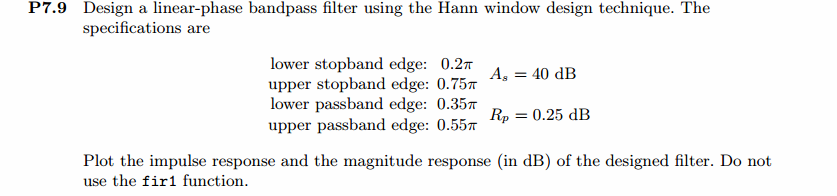
代码:
%% ++++++++++++++++++++++++++++++++++++++++++++++++++++++++++++++++++++++++++++++++

%%            Output Info about this m-file

fprintf('\n***********************************************************\n');

fprintf('        <DSP using MATLAB> Problem 7.9 \n\n');

banner();

%% ++++++++++++++++++++++++++++++++++++++++++++++++++++++++++++++++++++++++++++++++

ws1 = 0.2*pi; wp1 = 0.35*pi; wp2 = 0.55*pi; ws2 = 0.75*pi; As = 40;

tr_width = min((wp1-ws1), (ws2-wp2));

M = ceil(6.2*pi/tr_width) + 1;                 % Hann Window

fprintf('\nFilter Length is %d.\n', M);

n = [0:1:M-1]; wc1 = (ws1+wp1)/2; wc2 = (wp2+ws2)/2;

%wc = (ws + wp)/2,                    % ideal LPF cutoff frequency

hd = ideal_lp(wc2, M) - ideal_lp(wc1, M);

w_han = (hann(M))';  h = hd .* w_han;

[db, mag, pha, grd, w] = freqz_m(h, [1]);  delta_w = 2*pi/1000;

[Hr,ww,P,L] = ampl_res(h);

Rp = -(min(db(wp1/delta_w+1 : 1 : wp2/delta_w)));     % Actual Passband Ripple

fprintf('\nActual Passband Ripple is %.4f dB.\n', Rp);

As = -round(max(db(ws2/delta_w+1 : 1 : 501)));        % Min Stopband attenuation

fprintf('\nMin Stopband attenuation is %.4f dB.\n', As);

[delta1, delta2] = db2delta(Rp, As)

%Plot

figure('NumberTitle', 'off', 'Name', 'Problem 7.9 ideal_lp Method')

set(gcf,'Color','white');

subplot(2,2,1); stem(n, hd); axis([0 M-1 -0.4 0.5]); grid on;

xlabel('n'); ylabel('hd(n)'); title('Ideal Impulse Response');

subplot(2,2,2); stem(n, w_han); axis([0 M-1 0 1.1]); grid on;

xlabel('n'); ylabel('w(n)'); title('Hanning Window');

subplot(2,2,3); stem(n, h); axis([0 M-1 -0.4 0.5]); grid on;

xlabel('n'); ylabel('h(n)'); title('Actual Impulse Response');

subplot(2,2,4); plot(w/pi, db); axis([0 1 -150 10]); grid on;

set(gca,'YTickMode','manual','YTick',[-90,-45,0]);

set(gca,'YTickLabelMode','manual','YTickLabel',['90';'45';' 0']);

set(gca,'XTickMode','manual','XTick',[0,0.2,0.35,0.55,0.75,1]);

xlabel('frequency in \pi units'); ylabel('Decibels'); title('Magnitude Response in dB');

figure('NumberTitle', 'off', 'Name', 'Problem 7.9 h(n) ideal_lp Method')

set(gcf,'Color','white');

subplot(2,2,1); plot(w/pi, db); grid on; %axis([0 1 -100 10]);

xlabel('frequency in \pi units'); ylabel('Decibels'); title('Magnitude Response in dB');

set(gca,'YTickMode','manual','YTick',[-90,-45,0])

set(gca,'YTickLabelMode','manual','YTickLabel',['90';'45';' 0']);

set(gca,'XTickMode','manual','XTick',[0,0.2,0.35,0.55,0.75,1,1.2,1.55,2]);

subplot(2,2,3); plot(w/pi, mag); grid on; %axis([0 1 -100 10]);

xlabel('frequency in \pi units'); ylabel('Absolute'); title('Magnitude Response in absolute');

set(gca,'XTickMode','manual','XTick',[0,0.2,0.35,0.55,0.75,1,1.2,1.55,2]);

set(gca,'YTickMode','manual','YTick',[0.0,0.5,1.0])

subplot(2,2,2); plot(w/pi, pha); grid on; %axis([0 1 -100 10]);

xlabel('frequency in \pi units'); ylabel('Rad'); title('Phase Response in Radians');

subplot(2,2,4); plot(w/pi, grd*pi/180);  grid on; %axis([0 1 -100 10]);

xlabel('frequency in \pi units'); ylabel('Rad'); title('Group Delay');

figure('NumberTitle', 'off', 'Name', 'Problem 7.9 h(n)')

set(gcf,'Color','white');

plot(ww/pi, Hr); grid on; %axis([0 1 -100 10]);

xlabel('frequency in \pi units'); ylabel('Hr'); title('Amplitude Response');

set(gca,'YTickMode','manual','YTick',[-delta2,0,delta2,1 - delta1,1, 1 + delta1])

%set(gca,'YTickLabelMode','manual','YTickLabel',['90';'45';' 0']);

%set(gca,'XTickMode','manual','XTick',[0,0.2,0.35,0.55,0.75,1,1.2,1.55,2]);

h_check = fir1(M-1, [wc1 wc2]/pi, 'bandpass', window(@hann,M));

[db, mag, pha, grd, w] = freqz_m(h_check, [1]);

[Hr,ww,P,L] = ampl_res(h_check);

figure('NumberTitle', 'off', 'Name', 'Problem 7.9 fir1 Method')

set(gcf,'Color','white');

subplot(2,2,1); stem(n, hd); axis([0 M-1 -0.4 0.5]); grid on;

xlabel('n'); ylabel('hd(n)'); title('Ideal Impulse Response');

subplot(2,2,2); stem(n, w_han); axis([0 M-1 0 1.1]); grid on;

xlabel('n'); ylabel('w(n)'); title('Hanning Window');

subplot(2,2,3); stem(n, h_check); axis([0 M-1 -0.4 0.5]); grid on;

xlabel('n'); ylabel('h\_check(n)'); title('Actual Impulse Response');

subplot(2,2,4); plot(w/pi, db); axis([0 1 -150 10]); grid on;

set(gca,'YTickMode','manual','YTick',[-90,-45,0])

set(gca,'YTickLabelMode','manual','YTickLabel',['90';'45';' 0']);

set(gca,'XTickMode','manual','XTick',[0,0.2,0.35,0.55,0.75,1]);

xlabel('frequency in \pi units'); ylabel('Decibels'); title('Magnitude Response in dB');

figure('NumberTitle', 'off', 'Name', 'Problem 7.9 h(n) fir1 Method')

set(gcf,'Color','white');

subplot(2,2,1); plot(w/pi, db); grid on; %axis([0 1 -100 10]);

xlabel('frequency in \pi units'); ylabel('Decibels'); title('Magnitude Response in dB');

set(gca,'YTickMode','manual','YTick',[-90,-45,0])

set(gca,'YTickLabelMode','manual','YTickLabel',['90';'45';' 0']);

set(gca,'XTickMode','manual','XTick',[0,0.2,0.35,0.55,0.75,1,1.2,1.55,2]);

subplot(2,2,3); plot(w/pi, mag); grid on; %axis([0 1 -100 10]);

xlabel('frequency in \pi units'); ylabel('Absolute'); title('Magnitude Response in absolute');

set(gca,'XTickMode','manual','XTick',[0,0.2,0.35,0.55,0.75,1,1.2,1.55,2]);

set(gca,'YTickMode','manual','YTick',[0.0,0.5,1.0])

subplot(2,2,2); plot(w/pi, pha); grid on; %axis([0 1 -100 10]);

xlabel('frequency in \pi units'); ylabel('Rad'); title('Phase Response in Radians');

subplot(2,2,4); plot(w/pi, grd*pi/180);  grid on; %axis([0 1 -100 10]);

xlabel('frequency in \pi units'); ylabel('Rad'); title('Group Delay');
运行结果:
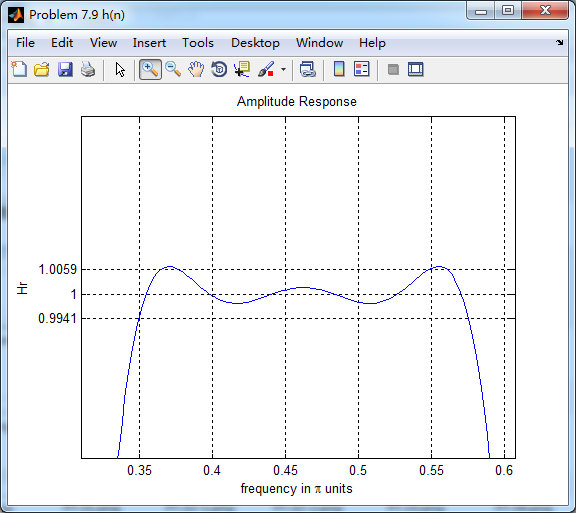
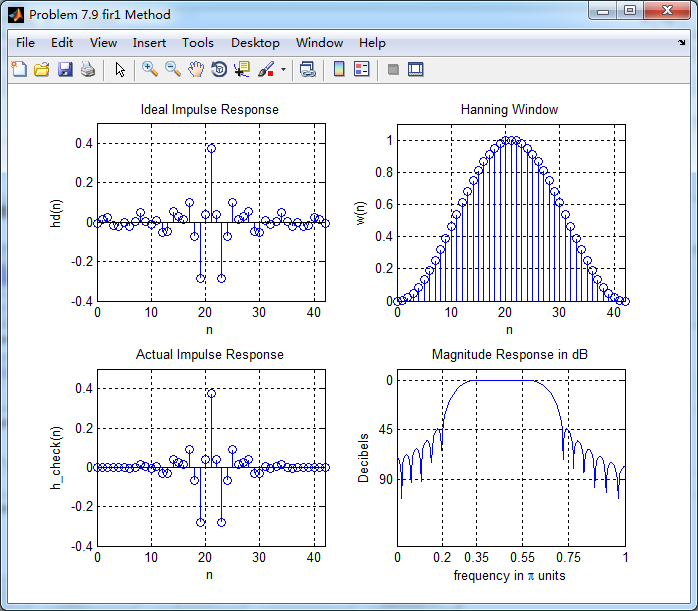
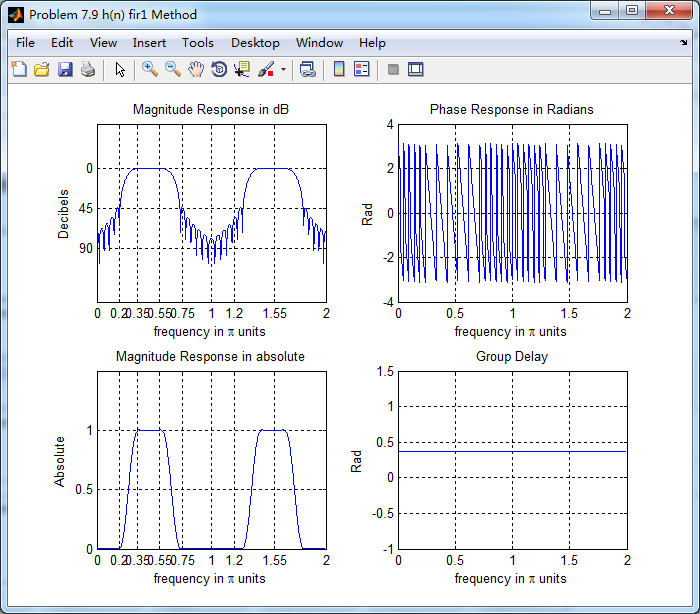
45dB满足设计要求。
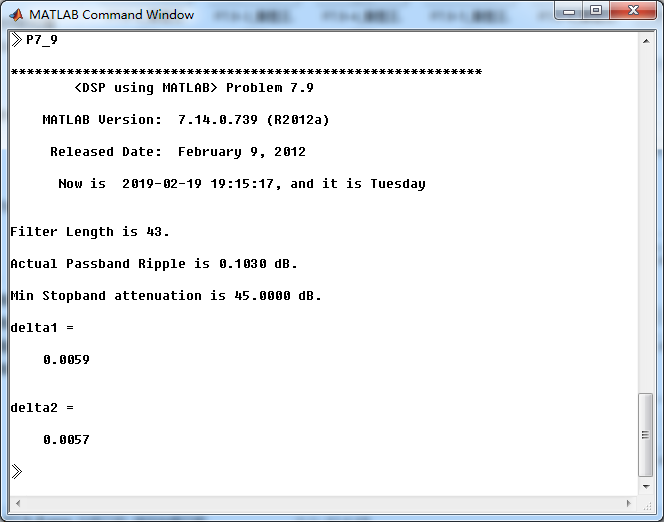
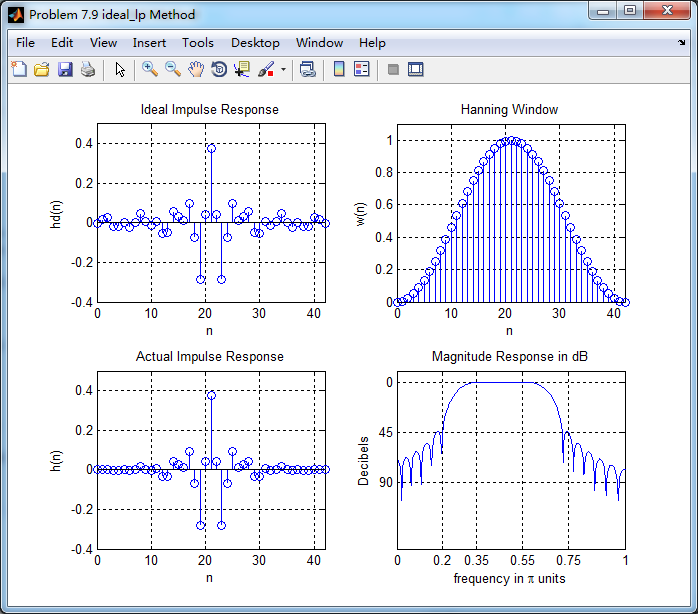
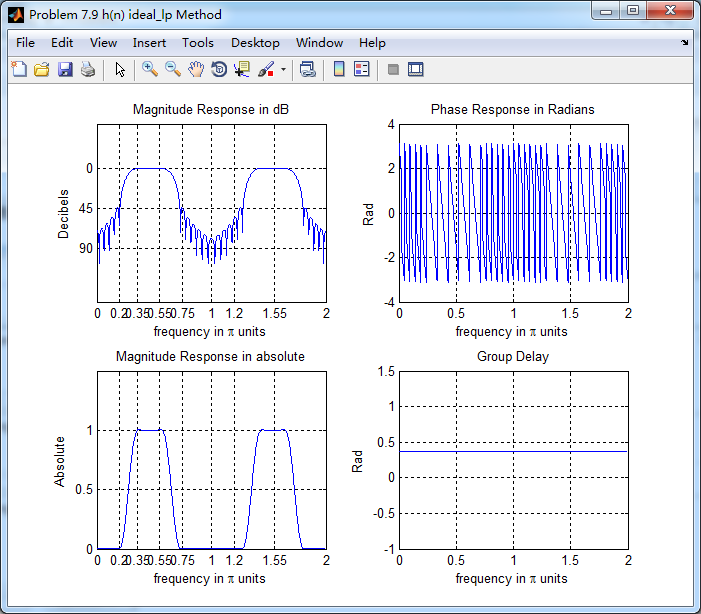
理想低通方法加窗截断,获得脉冲响应。其幅度响应(dB和Absolute单位)、相位响应、群延迟
振幅响应,通带部分(放大图)
振幅响应,阻带部分(放大图)

使用fir1函数获得脉冲响应,其幅度响应(dB和Absolute单位)、相位响应、群延迟响应
《DSP using MATLAB》Problem 7.9的更多相关文章
- 《DSP using MATLAB》Problem 7.27
代码: %% ++++++++++++++++++++++++++++++++++++++++++++++++++++++++++++++++++++++++++++++++ %% Output In ...
- 《DSP using MATLAB》Problem 7.26
注意:高通的线性相位FIR滤波器,不能是第2类,所以其长度必须为奇数.这里取M=31,过渡带里采样值抄书上的. 代码: %% +++++++++++++++++++++++++++++++++++++ ...
- 《DSP using MATLAB》Problem 7.25
代码: %% ++++++++++++++++++++++++++++++++++++++++++++++++++++++++++++++++++++++++++++++++ %% Output In ...
- 《DSP using MATLAB》Problem 7.24
又到清明时节,…… 注意:带阻滤波器不能用第2类线性相位滤波器实现,我们采用第1类,长度为基数,选M=61 代码: %% +++++++++++++++++++++++++++++++++++++++ ...
- 《DSP using MATLAB》Problem 7.23
%% ++++++++++++++++++++++++++++++++++++++++++++++++++++++++++++++++++++++++++++++++ %% Output Info a ...
- 《DSP using MATLAB》Problem 7.16
使用一种固定窗函数法设计带通滤波器. 代码: %% ++++++++++++++++++++++++++++++++++++++++++++++++++++++++++++++++++++++++++ ...
- 《DSP using MATLAB》Problem 7.15
用Kaiser窗方法设计一个台阶状滤波器. 代码: %% +++++++++++++++++++++++++++++++++++++++++++++++++++++++++++++++++++++++ ...
- 《DSP using MATLAB》Problem 7.14
代码: %% ++++++++++++++++++++++++++++++++++++++++++++++++++++++++++++++++++++++++++++++++ %% Output In ...
- 《DSP using MATLAB》Problem 7.13
代码: %% ++++++++++++++++++++++++++++++++++++++++++++++++++++++++++++++++++++++++++++++++ %% Output In ...
- 《DSP using MATLAB》Problem 7.12
阻带衰减50dB,我们选Hamming窗 代码: %% ++++++++++++++++++++++++++++++++++++++++++++++++++++++++++++++++++++++++ ...
随机推荐
- 论文笔记:Visual Semantic Navigation Using Scene Priors
Visual Semantic Navigation Using Scene Priors 2018-10-21 19:39:26 Paper: https://arxiv.org/pdf/1810 ...
- mui框架下监听返回按钮
用于监听mui框架下的Android手机的返回按键(物理键) mui.back = function() { if(b == true) {//一个标识符,在某个状态下不允许双击返回关闭程序 aler ...
- vue脚手架的目录结构
. |-- build // 项目构建(webpack)相关代码 | |-- build.js // 生产环境构建代码 | |-- check-version.js // 检查node.npm等版本 ...
- python使用os.listdir和os.walk获得文件的路径
python使用os.listdir和os.walk获得文件的路径 目录 情况1:在一个目录下面只有文件,没有文件夹,这个时候可以使用os.listdir 情况2:递归的情况,一个目录下面既有目录 ...
- VC.重定向标准输出到文件(父进程方式)
1.libxml2 使用过程中,有时 libxml2里面会报一些错误信息,在 控制台的程序中 这些信息看起来比较乱,不易观察,我想将这些信息重定向到 文件中 1.1.本进程内:试着 将标准输出,标准错 ...
- Kali linux 2016.2(Rolling)里安装OpenVAS
不多说,直接上干货! 本博文,是在Kali 2.0 linux里,安装OpenVAS. 前言 OpenVAS是一款开放式的漏洞评估工具,主要用来检测目标网络或主机的安全性.与安全焦点的X-Scan工具 ...
- 浅谈jQuery的promise
jquery中的Promise,也就是我们所知道的Deferred对象. 举例1: var data=""; function runAsync(){ var def = $.De ...
- 201621123075 week5 继承、多态、抽象类和接口
1. 本周学习总结 1.1 写出你认为本周学习中比较重要的知识点关键词 接口.abstract.implements.comparable 1.2 尝试使用思维导图将这些关键词组织起来.注:思维导图一 ...
- react+classnames
之前做项目的时候一直不知道有不知道有classnames这个东西,一直用的都是字符串拼接,感觉用的很别扭. classnames用法和angular1.x及vue差不多,所以用起来会比较顺手 1)安装 ...
- (淘宝无限适配)手机端rem布局详解
从网易与淘宝的font-size思考前端设计稿与工作流 本文结合自己对网易与淘宝移动端首页html元素上的font-size这个属性的思考与学习,讨论html5设计稿尺寸以及前端与设计之间协作流程的问 ...