
吴裕雄 python神经网络 水果图片识别(3)
import os
import keras
import time
import numpy as np
import tensorflow as tf
from random import shuffle
from keras.utils import np_utils
from skimage import color, data, transform, io
trainDataDirList = os.listdir("F:\\MachineLearn\\ML-xiaoxueqi\\fruits\\trainGrayImage")
trainDataList = []
for i in range(len(trainDataDirList)):
image = io.imread("F:\\MachineLearn\\ML-xiaoxueqi\\fruits\\trainGrayImage\\"+trainDataDirList[i])
trainDataList.append(image)
trainLabelNum = np.load("F:\\MachineLearn\\ML-xiaoxueqi\\fruits\\trainLabelNum.npy")
testDataDirList = os.listdir("F:\\MachineLearn\\ML-xiaoxueqi\\fruits\\testGrayImage")
testDataList = []
for i in range(len(testDataDirList)):
image = io.imread("F:\\MachineLearn\\ML-xiaoxueqi\\fruits\\testGrayImage\\"+testDataDirList[i])
testDataList.append(image)
testLabelNum = np.load("F:\\MachineLearn\\ML-xiaoxueqi\\fruits\\testLabelNum.npy")
#乱序
train_images = []
train_labels = []
index = [i for i in range(len(trainDataList))]
shuffle(index)
for i in range(len(index)):
train_images.append(trainDataList[index[i]])
train_labels.append(trainLabelNum[index[i]])
#将标签转码
train_labels=keras.utils.to_categorical(train_labels,77)
#保存处理后的数据
np.save("E:\\tmp\\train_images",train_images)
np.save("E:\\tmp\\train_labels",train_labels)
#加载上面保存的数据
train77_images = np.load("E:\\train_images.npy")
train77_labeles = np.load("E:\\train_labels.npy")
#变成四维训练数据,两维标签
dataset = train77_images.reshape((-1, 64, 64, 1)).astype(np.float32)
labels = train77_labeles
## 配置神经网络的参数
n_classes = 77
batch_size = 64
kernel_h = kernel_w = 5
#dropout = 0.8
depth_in = 1
depth_out1 = 64
depth_out2 = 128
image_size = 64 ##图片尺寸
n_sample = len(dataset) ##样本个数
#每张图片的像素大小为64*64,训练样本
x = tf.placeholder(tf.float32, [None, 64, 64, 1])
#训练样本对应的真实label
y=tf.placeholder(tf.float32,[None,n_classes])
# y_ = tf.placeholder(tf.float32, [None, n_classes])
#设置dropout的placeholder
dropout = tf.placeholder(tf.float32)
# 扁平化
fla = int((image_size * image_size / 16) * depth_out2)
#卷积函数
def inference(x, dropout):
#第一层卷积
with tf.name_scope('convLayer1'):
Weights = tf.Variable(tf.random_normal([kernel_h, kernel_w, depth_in, depth_out1]))
bias = tf.Variable(tf.random_normal([depth_out1]))
x = tf.nn.conv2d(x, Weights, strides=[1, 1, 1, 1], padding="SAME")
x = tf.nn.bias_add(x, bias)
conv1 = tf.nn.relu(x)
#可视化权值
tf.summary.histogram('convLayer1/weights1', Weights)
#可视化偏置
tf.summary.histogram('convLayer1/bias1', bias)
#可视化卷积结果
tf.summary.histogram('convLayer1/conv1', conv1)
#对卷积的结果进行池化
pool1 = tf.nn.max_pool(conv1, ksize=[1, 2, 2, 1], strides=[1, 2, 2, 1], padding="SAME")
#可视化池化结果
tf.summary.histogram('ConvLayer1/pool1', pool1)
#第二层卷积
with tf.name_scope('convLayer2'):
Weights = tf.Variable(tf.random_normal([kernel_h, kernel_w, depth_out1, depth_out2]))
bias = tf.Variable(tf.random_normal([depth_out2]))
x = tf.nn.conv2d(pool1, Weights, strides=[1, 1, 1, 1], padding="SAME")
x = tf.nn.bias_add(x, bias)
conv2 = tf.nn.relu(x)
#可视化权值
tf.summary.histogram('convLayer2/weights2', Weights)
#可视化偏置
tf.summary.histogram('convLayer2/bias2', bias)
#可视化卷积结果
tf.summary.histogram('convLayer2/conv2', conv2)
#对卷积的结果进行池化
pool2 = tf.nn.max_pool(conv2, ksize=[1, 2, 2, 1], strides=[1, 2, 2, 1], padding="SAME")
#可视化池化结果
tf.summary.histogram('ConvLayer2/pool2', pool2)
#扁平化处理
flatten = tf.reshape(pool2, [-1, fla])
#第一层全连接
Weights = tf.Variable(tf.random_normal([int((image_size * image_size / 16) * depth_out2), 512]))
bias = tf.Variable(tf.random_normal([512]))
fc1 = tf.add(tf.matmul(flatten, Weights), bias)
#使用relu激活函数处理全连接层结果
fc1r = tf.nn.relu(fc1)
#第二层全连接
Weights = tf.Variable(tf.random_normal([512, 128]))
bias = tf.Variable(tf.random_normal([128]))
fc2 = tf.add(tf.matmul(fc1r, Weights), bias)
#使用relu激活函数处理全连接层结果
fc2 = tf.nn.relu(fc2)
#使用Dropout(Dropout层防止预测数据过拟合)
fc2 = tf.nn.dropout(fc2, dropout)
#输出预测的结果
Weights = tf.Variable(tf.random_normal([128, n_classes]))
bias = tf.Variable(tf.random_normal([n_classes]))
prediction = tf.add(tf.matmul(fc2, Weights), bias)
return prediction
#使用上面定义好的神经网络进行训练,得到预测的label
prediction = inference(x, dropout)
#定义损失函数,使用上面的预测label与真实的label作运算
cross_entropy = tf.reduce_mean(tf.nn.softmax_cross_entropy_with_logits(logits=prediction, labels=y))
#选定一个优化器和学习率(步长)
optimizer = tf.train.AdamOptimizer(1e-4).minimize(cross_entropy)
merged = tf.summary.merge_all()
#评估模型(准确率)
correct_pred = tf.equal(tf.argmax(prediction, 1), tf.argmax(y, 1))
accuracy = tf.reduce_mean(tf.cast(correct_pred, tf.float32))
#初始会话并开始训练过程
with tf.Session() as sess:
tf.global_variables_initializer().run()
for i in range(20):
for j in range(int(n_sample / batch_size) + 1):
start = (j * batch_size)
end = start + batch_size
x_ = dataset[start:end]
y_ = labels[start:end]
#准备验证数据
sess.run(optimizer, feed_dict={x: x_, y: y_, dropout: 0.5})
#计算当前块训练数据的损失和准确率
loss, acc = sess.run([cross_entropy, accuracy], feed_dict={x: x_, y: y_, dropout: 0.5})
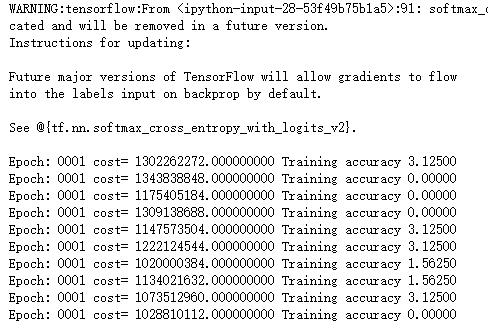
print("Epoch:", '%04d' % (i + 1), "cost=", "{:.9f}".format(loss), "Training accuracy", "{:.5f}".format(acc*100))
print('Optimization Completed')
吴裕雄 python神经网络 水果图片识别(3)的更多相关文章
- 吴裕雄 python神经网络 水果图片识别(5)
#-*- coding:utf-8 -*-### required libaraiedimport osimport matplotlib.image as imgimport matplotlib. ...
- 吴裕雄 python神经网络 水果图片识别(4)
# coding: utf-8 # In[1]:import osimport numpy as npfrom skimage import color, data, transform, io # ...
- 吴裕雄 python神经网络 水果图片识别(2)
import osimport numpy as npimport matplotlib.pyplot as pltfrom skimage import color,data,transform,i ...
- 吴裕雄 python神经网络 水果图片识别(1)
import osimport numpy as npimport matplotlib.pyplot as pltfrom skimage import color,data,transform,i ...
- 吴裕雄 python神经网络 花朵图片识别(10)
import osimport numpy as npimport matplotlib.pyplot as pltfrom PIL import Image, ImageChopsfrom skim ...
- 吴裕雄 python神经网络 花朵图片识别(9)
import osimport numpy as npimport matplotlib.pyplot as pltfrom PIL import Image, ImageChopsfrom skim ...
- 吴裕雄 python 神经网络——TensorFlow图片预处理调整图片
import numpy as np import tensorflow as tf import matplotlib.pyplot as plt def distort_color(image, ...
- 吴裕雄 python 神经网络——TensorFlow 花瓣识别2
import glob import os.path import numpy as np import tensorflow as tf from tensorflow.python.platfor ...
- 吴裕雄 python 神经网络——TensorFlow图片预处理
import numpy as np import tensorflow as tf import matplotlib.pyplot as plt # 使用'r'会出错,无法解码,只能以2进制形式读 ...
随机推荐
- python re模块和collections
re模块下的常用方法 import re ret = re.findall('a', 'eva egon yuan') # 返回所有满足匹配条件的结果,放在列表里 print(ret) #结果 : [ ...
- IP地址查询接口API
项目需要根据ip查询pos机设备所在的省份信息,经查询有以下几种免费接口: 1. 淘宝IP API http://ip.taobao.com/service/getIpInfo.php?ip=xxx ...
- lunix 集群,负载均衡,location
nginx location语法: location支持的语法优先级: 复制代码location匹配顺序 # www.s14hanju.com/1.location = / { 我是代码1} ...
- Shell 格式化输出数字、字符串(printf)
1.语法 printf打印格式字符串,解释'%'指令和'\'转义. 1.1.转义 printf使用时需要指定输出格式,输出后不换行. printf FORMAT [ARGUMENT] printf O ...
- Java实现图像对比类
package com.function; import java.awt.image.BufferedImage; import java.io.BufferedWriter; import jav ...
- springBoot基本配置
Spring Boot 基本配置 1.新建maven jar工程 使用依赖 <project xmlns="http://maven.apache.org/POM/4.0.0" ...
- ubuntu14.04 配置g++工具,并运行一个简单的c++文件
首先,对Ubuntu 14.04 LTS进行源更新,摘自下述链接: http://chenrongya.blog.163.com/blog/static/8747419620143185103297/ ...
- ROS进阶学习笔记(11)- Turtlebot Navigation and SLAM
(写在前面: 这里参考rbx书中第八章和ROS社区教程进行学习,先看社区教程) === Doing the Turtlebot Navigation === ref ros wiki: http ...
- uva-10132-排序
题意: 有很多文件,碎成了俩片,问,原来的文件是什么,如果有多个答案,任意一个答案就行,输入2N个字符串,拼接成N个文件. 直接排序,正确的答案一定是某个长度最短的和某个最长的连在一起. #inclu ...
- 17.纯 CSS 创作炫酷的同心矩形旋转动画
原文地址:https://segmentfault.com/a/1190000014807564 感想: 这个特效不难,但是这想法可能想不到,哈哈,怎么又废了. HTML代码: <div cla ...