
abp(net core)+easyui+efcore实现仓储管理系统——供应商管理升级之下(六十四)
abp(net core)+easyui+efcore实现仓储管理系统目录
9.在Visual Studio 2022中按F5运行应用程序。在浏览器将呈现登录页面,然后输入管理员用户名进行登录。浏览器跳转到首页面。
10.在主界面的菜单中,选择“Business->供应商管理”菜单项,浏览器中呈现一个供应商信息列表页面,css起作用了,样式好看了。如下图。 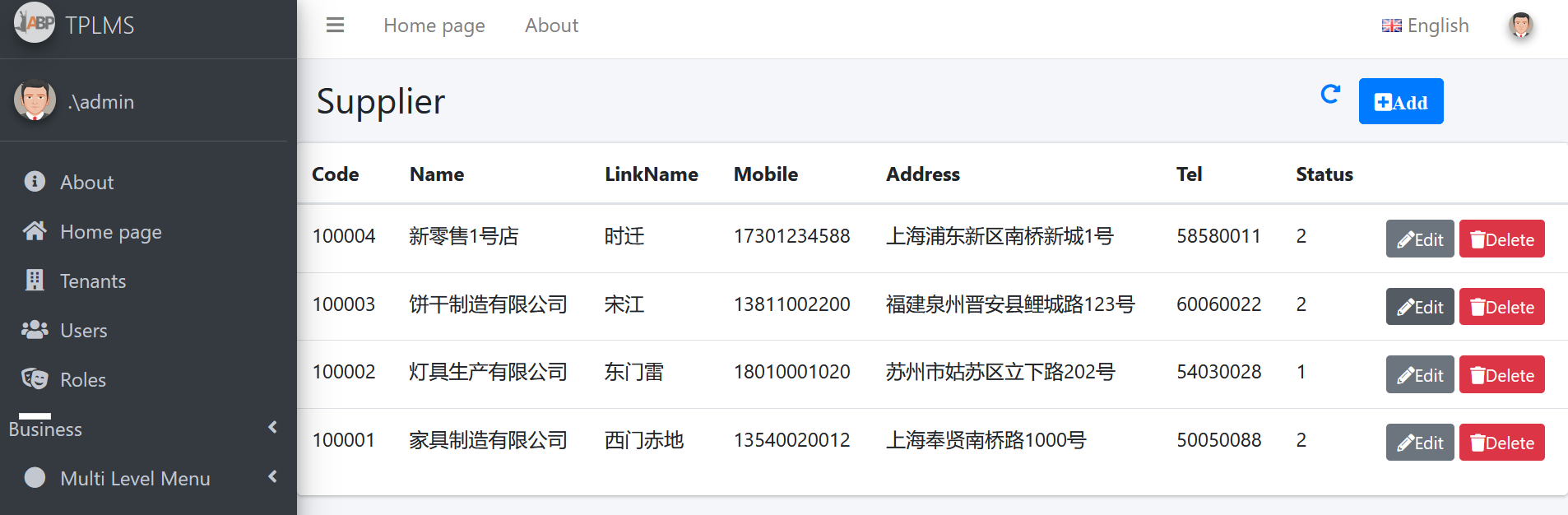
11然后点击供应商列表页面中的新增(Add)按钮,填写内容,然后点击“保存”按钮。如下图。
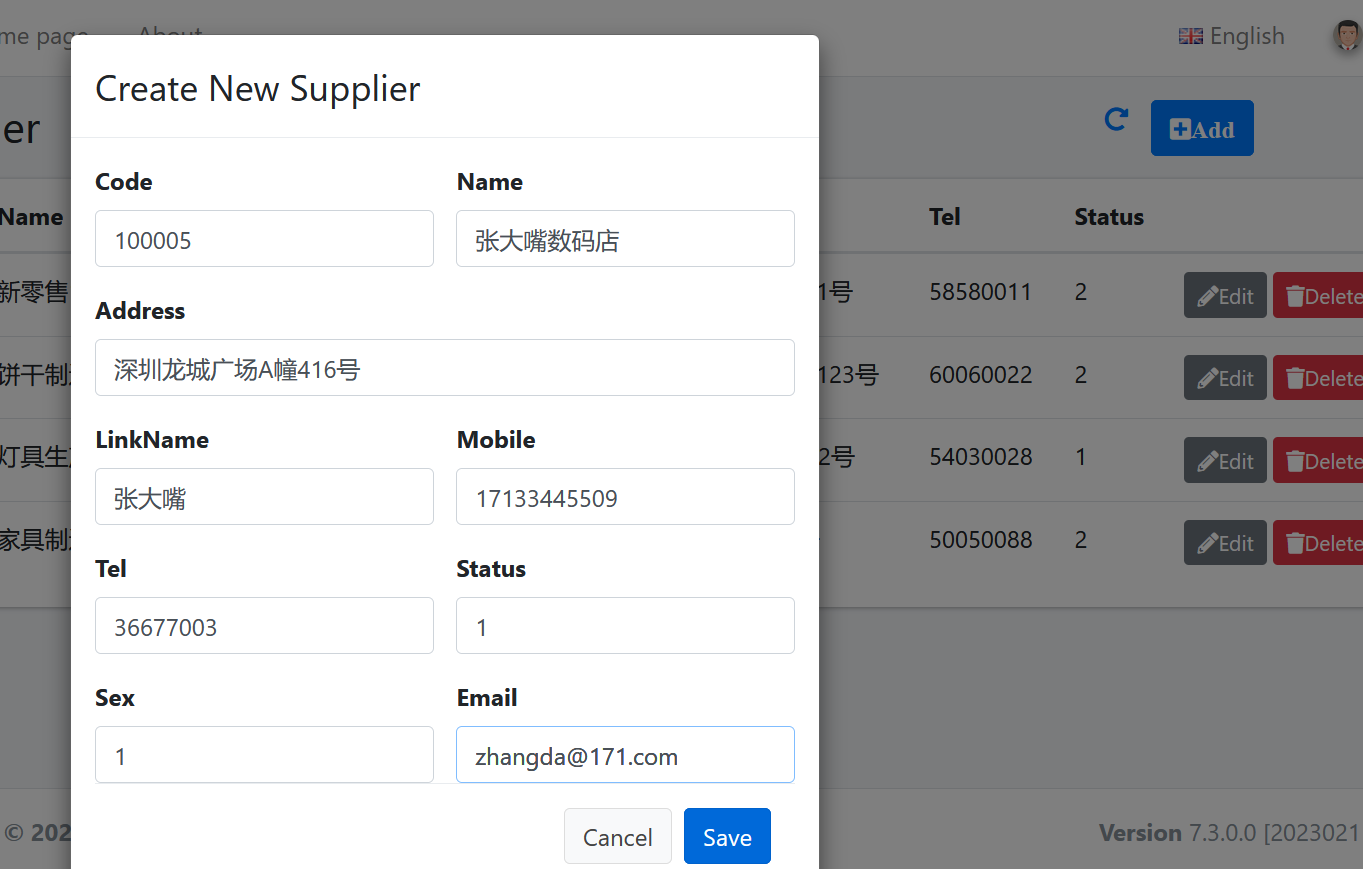
12. 在“Create New Supplier”页面中我们输入完信息之后,点击“Save”按钮。应用程序报了一个错误。如下图。
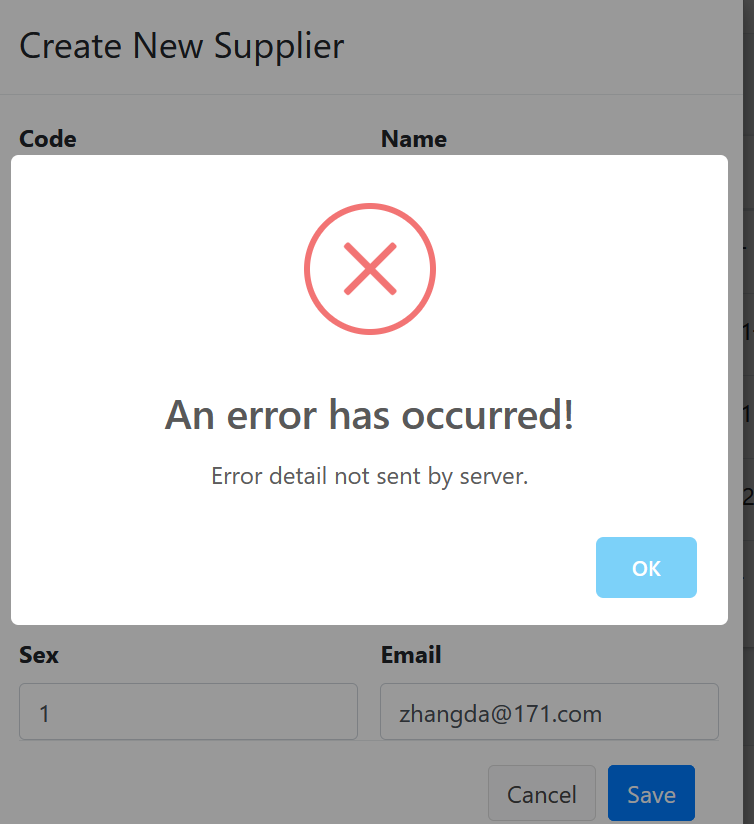
13.Supplier的增删改查,我们是调用的WebApi来实现保存到数据库与查询数据的操作,那么问题就可能出在WebAPI这一个项目中。在Visual Studio 2022的解决方案资源管理器中,选中“ABP.TPLMS.Web.Host”项目,然后单击鼠标右键,在弹出菜单中选中“设为启动项目”。按F5运行应用程序,程序报错。
14. 在Visual Studio 2022的解决方案资源管理器中,“ABP.TPLMS.Web.Host”项目的App_Data\Log目录下找到log.txt文件,这是一个日志文件。在文件中我找到如下,错误信息。
AspNetCore.Server.IIS.Core.IISHttpServer - Connection ID "18230571335350747201",
Request ID "40000042-000a-fd00-b63f-84710c7967bb": An unhandled exception was thrown by the application.

Microsoft.AspNetCore.Routing.Matching.AmbiguousMatchException: The request matched multiple endpoints. Matches:

 ABP.TPLMS.Suppliers.SupplierAppService.CreateAsync (ABP.TPLMS.Application)

ABP.TPLMS.Suppliers.SupplierAppService.Create (ABP.TPLMS.Application)

   at Microsoft.AspNetCore.Routing.Matching.DefaultEndpointSelector.ReportAmbiguity(CandidateState[] candidateState)

   at Microsoft.AspNetCore.Routing.Matching.DefaultEndpointSelector.ProcessFinalCandidates
(HttpContext httpContext, CandidateState[] candidateState)

   at Microsoft.AspNetCore.Routing.Matching.DefaultEndpointSelector.Select(HttpContext httpContext,
 CandidateState[] candidateState)

   at Microsoft.AspNetCore.Routing.Matching.DfaMatcher.MatchAsync(HttpContext httpContext)

   at Microsoft.AspNetCore.Routing.EndpointRoutingMiddleware.Invoke(HttpContext httpContext)

   at Microsoft.AspNetCore.StaticFiles.StaticFileMiddleware.Invoke(HttpContext context)
using Abp.Application.Services;

using Abp.Domain.Repositories;

using ABP.TPLMS.Entitys;

using ABP.TPLMS.Suppliers.Dto;

using System;

using System.Collections.Generic;

using System.Text;

using System.Threading.Tasks;

namespace ABP.TPLMS.Suppliers

{

   public class SupplierAppService :AsyncCrudAppService<Supplier, SupplierDto, int,
 PagedSupplierResultRequestDto, CreateUpdateSupplierDto, CreateUpdateSupplierDto>,
ISupplierAppService

    {

        public SupplierAppService(IRepository<Supplier, int> repository)

            : base(repository)

    {

    }

        public Task<SupplierDto> Create(CreateUpdateSupplierDto input)

        {

            return CreateAsync(input);

        }

        public override Task<SupplierDto> CreateAsync(CreateUpdateSupplierDto input)

        {

            var sin = input;

            return base.CreateAsync(input);

        }

    }

}
16. 在Visual Studio 2022的解决方案资源管理器中,使用鼠标双击打开 SupplierAppService.cs文件。将Create方法注释。按F5运行应用程序。登录之后,点击“Supplier”目录,我们可以看到供应商列表页面。然后点击供应商列表页面中的Add按钮。
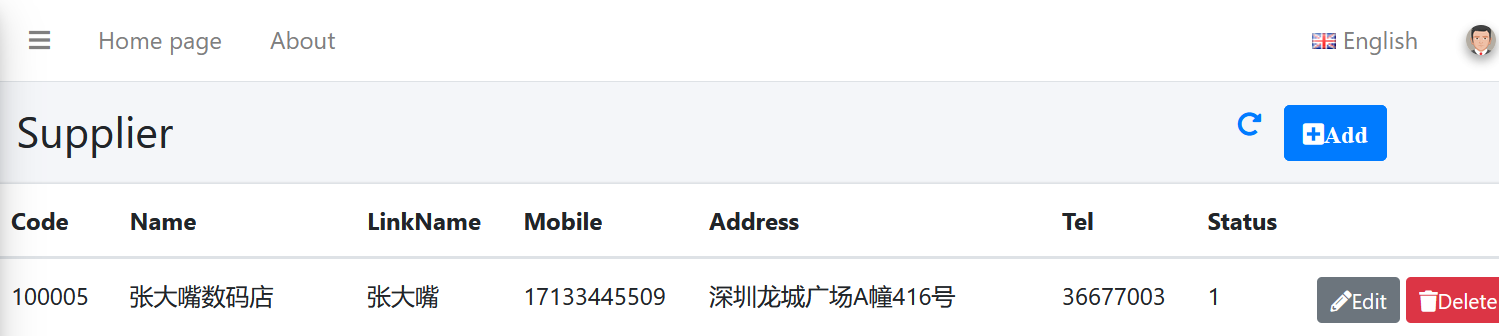
17. 在“Create New Supplier”页面中我们输入完信息之后,点击“Save”按钮。数据保存到数据库,应用会刷新供应商列表页面。如下图。
abp(net core)+easyui+efcore实现仓储管理系统——供应商管理升级之下(六十四)的更多相关文章
- abp(net core)+easyui+efcore实现仓储管理系统——使用 WEBAPI实现CURD (十四)
abp(net core)+easyui+efcore实现仓储管理系统目录 abp(net core)+easyui+efcore实现仓储管理系统——ABP总体介绍(一) abp(net core)+ ...
- abp(net core)+easyui+efcore实现仓储管理系统——出库管理之五(五十四)
abp(net core)+easyui+efcore实现仓储管理系统目录 abp(net core)+easyui+efcore实现仓储管理系统--ABP总体介绍(一) abp(net core)+ ...
- abp(net core)+easyui+efcore实现仓储管理系统——使用 WEBAPI实现CURD (十五)
core)+easyui+efcore实现仓储管理系统目录 abp(net core)+easyui+efcore实现仓储管理系统——ABP总体介绍(一) abp(net core)+easyui+e ...
- abp(net core)+easyui+efcore实现仓储管理系统——出库管理之六(五十五)
abp(net core)+easyui+efcore实现仓储管理系统目录 abp(net core)+easyui+efcore实现仓储管理系统--ABP总体介绍(一) abp(net core)+ ...
- Abp(net core)+easyui+efcore实现仓储管理系统——出库管理之七(五十六)
abp(net core)+easyui+efcore实现仓储管理系统目录 abp(net core)+easyui+efcore实现仓储管理系统--ABP总体介绍(一) abp(net core)+ ...
- abp(net core)+easyui+efcore实现仓储管理系统——使用 WEBAPI实现CURD (十二)
abp(net core)+easyui+efcore实现仓储管理系统目录 abp(net core)+easyui+efcore实现仓储管理系统——ABP总体介绍(一) abp(net core)+ ...
- abp(net core)+easyui+efcore实现仓储管理系统——出库管理之三(五十二)
abp(net core)+easyui+efcore实现仓储管理系统目录 abp(net core)+easyui+efcore实现仓储管理系统--ABP总体介绍(一) abp(net core)+ ...
- abp(net core)+easyui+efcore实现仓储管理系统——菜单 (十六)
系统目录 abp(net core)+easyui+efcore实现仓储管理系统——ABP总体介绍(一) abp(net core)+easyui+efcore实现仓储管理系统——解决方案介绍(二) ...
- abp(net core)+easyui+efcore实现仓储管理系统——EasyUI之货物管理一 (十九)
abp(net core)+easyui+efcore实现仓储管理系统目录 abp(net core)+easyui+efcore实现仓储管理系统——ABP总体介绍(一) abp(net core)+ ...
- abp(net core)+easyui+efcore实现仓储管理系统——EasyUI之货物管理二 (二十)
abp(net core)+easyui+efcore实现仓储管理系统目录 abp(net core)+easyui+efcore实现仓储管理系统——ABP总体介绍(一) abp(net core)+ ...
随机推荐
- C/C++ 顺序表的初始化、添加、插入、删除(删除顺序表中指定的所有元素)
#include <iostream> #include <stdlib.h> #define MAX_SIZE 100 using namespace std; typede ...
- 【前端样式】关于Element-plus 菜单 unique-opened不生效的问题
需要保证el-sub-menu 的唯一性,即index得写在el-sub-menu上,否则 unique-opened 属性不生效.
- CH573 CH582 CH579蓝牙从机(peripheral)例程讲解三(蓝牙服务修改)
修改服务需要对蓝牙比较熟悉的工程师去完成,否则在例程功能满足自己需求时,不建议修改,很容易改错,下面就简单介绍下如何在别的char添加一个nofify属性. step1: 给Simple Profil ...
- 使用scrollIntoView 使某元素滚动到指定位置
var el = document.getElementById('A'); el.scrollIntoView('true'); 知识: element.scrollIntoView(); // 使 ...
- Boost.Asio C++ 网络编程
在线电子书:https://mmoaay.gitbooks.io/boost-asio-cpp-network-programming-chinese/content/Chapter1.html
- mysql 死锁解决
查看锁记录等待时间: SHOW VARIABLES LIKE 'innodb_lock_wait_timeout'; 把超时等待时间修改为5秒: SET innodb_lock_wait_timeou ...
- Keil Jlink没法找到STM32H750
https://www.amobbs.com/thread-5713382-1-1.html MDK使用的是5.32,jlink使用的是9.2jlink驱动使用的是6.44b 删除工程下的JLinkS ...
- 音质效果不错的Pcie声卡之CM8828听歌声卡
CM8828芯片是cmedia骅讯公司生产的,采用这个芯片的声卡价格不一,便宜的100多,贵一点的500多.价位在100多买到这款声卡还是比较实惠的,再高一点的声卡都是堆料的.CM8828声卡是原生的 ...
- 选择KV数据库最重要的是什么
本文分享自华为云社区<选择KV数据库最重要的是什么?>,作者:GaussDB 数据库 . 经常有客户提到KV数据库,但却偏偏"不要Redis".比如有个做安全威胁分析平 ...
- 怎么用ChatGPT写代码,ChatGPT怎么改代码修BUG
ChatGPT 是一个自然语言处理模型,可以模拟人类语言生成文本,可以用于写代码和修复bug.在本文中,我们将介绍如何使用 ChatGPT 写代码和修bug. 怎么用ChatGPT写代码? 虽然 Ch ...